Search  for anything...

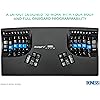
KINESIS Advantage2 Quiet LF Ergonomic USB Keyboard (KB600LFQ)

  • Based on 248 reviews
Condition: New
Checking for the best price...
$349.00 Why this price?
Holiday Deal · 5% off was $369.00

Buy Now, Pay Later


As low as / mo
  • – Up to 36-month term if approved
  • – No impact on credit
  • – Instant approval decision
  • – Secure and straightforward checkout

Ready to go? Add this product to your cart and select a plan during checkout.

Payment plans are offered through our trusted finance partners Klarna, Affirm, Afterpay, Apple Pay, and PayTomorrow. No-credit-needed leasing options through Acima may also be available at checkout.

Learn more about financing & leasing here.

Selected Option

Free shipping on this product

Eligible for Return, Refund or Replacement within 30 days of receipt

To qualify for a full refund, items must be returned in their original, unused condition. If an item is returned in a used, damaged, or materially different state, you may be granted a partial refund.

To initiate a return, please visit our Returns Center.

View our full returns policy here.


Availability: In Stock.
Fulfilled by Amazon

Arrives Sunday, Dec 21
Order within 17 hours and 31 minutes
Available payment plans shown during checkout

Protection Plan Protect Your Purchase
Checking for protection plans...

Color: Black


Features

  • Contoured ergonomic shape proven to increase comfort and productivity: patented design features split key wells with concave shape, thumb keys, orthogonal layout, 20 degrees of tenting, and integrated Palm Supports with cushioned palm pads.
  • Genuine Cherry mechanical switches for premium typing feel and performance with less noise: Cherry MX "Silent" Red mechanical switches feature a low activation force, linear feel and are rated for 50M key presses for unmatched durability. Function row features new Cherry ML mechanical switches.
  • Full onboard programmability with the Driverless Smart Set engine: custom layouts in QWERTY or Dvorak, on-the-fly macro recording, one-touch key remapping, Windows, Mac, and PC modes, settings saved to keyboards 4MB flash memory, and the Smart Set app GUI for Windows.
  • Plug-and-play with all major operating systems: Windows 7-10, Mac OS X, Linux, Chrome.
  • 3 year manufacturer's : buy with confidence knowing that KINESIS engineers all our products in the USA to the highest standards and stands behind them 100 percent since 1992.

Brand: KINESIS


Compatible Devices: Plug-and-Play compatible with all USB operating systems (no special drivers required) Windows 7, 8 & 10 Mac OS X 10.4+ Linux Android Chrome See more


Connectivity Technology: USB


Keyboard Description: Ergonomic


Recommended Uses For Product: Office


Special Feature: Ergonomic, Split Keyset Design, Wrist Rest


Color: Black


Number of Keys: 68


Keyboard backlighting color support: RGB


Style: Ergonomic and Quiet


Brand: ‎KINESIS


Series: ‎KB600LFQ


Item model number: ‎KB600LFQ


Operating System: ‎Linux, Windows 7, mac os x


Item Weight: ‎2.2 pounds


Product Dimensions: ‎16.5 x 8 x 3 inches


Item Dimensions LxWxH: ‎16.5 x 8 x 3 inches


Color: ‎Black


Power Source: ‎Corded Electric


Manufacturer: ‎KINESIS


Is Discontinued By Manufacturer: ‎No


Date First Available: ‎October 30, 2018


Frequently asked questions

If you place your order now, the estimated arrival date for this product is: Sunday, Dec 21

Yes, absolutely! You may return this product for a full refund within 30 days of receiving it.

To initiate a return, please visit our Returns Center.

View our full returns policy here.

  • Klarna Financing
  • Affirm Pay in 4
  • Affirm Financing
  • Afterpay Financing
  • PayTomorrow Financing
  • Financing through Apple Pay
Leasing options through Acima may also be available during checkout.

Learn more about financing & leasing here.

Top Amazon Reviews


  • The Keyboard Of The Gods
It's just the best. It's smooth. It's comfortable. It's flexible. It's a 10-star product. It does take some time to get used to, but it is SO worth it. The first day is absolutely painful. Take my advice and power through the cramp that this keyboard will put in your brain. A lot of mistakes will be made, but having the backspace, control, delete, and enter keys right by your thumbs will offset all of that. You'll be gaining speed before you know it. For me, the transition to this layout was relatively fast, but I've spent my life typing like a fish out of water. I have small hands, and every keyboard I've ever owned has been awkward, especially all those keys that rely on pinky-reaches. I spent more time backspacing than typing. Keyboards never fit, and I didn't realize how bad it was until I got used to this one and (eventually) experienced what it was like to type smoothly and without errors for the first time ever. Given that, it only took me about three days to adjust. I know of others didn't hit their groove for a month or so. It's still worth the learning curve, in my opinion, no matter how big that curve may be. Some observations: 1. The imbedded 10-key is not very usable IMO. I ended up attaching an old smartphone with a keypad app to the big space between the keyboard's recessed typing wells. It's easy to use and also provides a mouse touchpad in addition to being a keypad. (hey Kenesis, this would be a nice built-in feature for future models) 2. This keyboard case shows every fingerprint, every palm print, and every little touch. Something as simple as hand lotion from two hours ago can make this board look like its user is a total greaseball. 3. The interface to remap keys is not as user-friendly as it looks, at least at first. There are instructions and even a video available, but they do not seem geared toward all learning styles. That might be fine for most users, and even I (beginner-computer-geekery level) could eventually figure it out. 4. It has the strangest little phone plug sticking out of the back. My understanding is this is for users who wish to run a foot pedal through the keyboard (instead of directly to a computer). This would be an awesome option, but most foot pedals these days have USB plugs, not something Meemaw would use to plug a land line into the wall. On a related note, it would be nice if Kinesis brought their line of foot pedals into the USB world as well, because transcriptionists around the world are looking for alternatives to their currently limited foot pedal options. 5. I think the price is worth the sheer comfort of this keyboard, but I also think it might be nice for buyers to have the option to pay less for a scaled-back model. I don't need macro scripting, I can't use the embedded 10-key, the foot pedal plug is oddly archaic, and the sad reality is that this keyboard is going to ruin me for other keyboards and probably slow me down significantly when I need to work on other devices. The purchase price does seem a bit high for someone who does not need all of its features. Again, it's still very, very much worth the sheer comfort. If you're still reading along, this really is a gem of a keyboard, and I absolutely recommend it. I know when I was trying to decide if the price was worth the leap, I had some doubts. Hopefully these little bits will help you know what it's like to make that leap and settle in with this wonderful and well-thought little keyboard. ETA: After about a year or so of use, the alt key crapped out. Sadly, there is only one alt key. That was rough. The keys aren't quick swap (or something like that). A bit short of two years, the cords started to act up, connecting and disconnecting every time the keyboard was moved. I doubt this would be a problem for people who keep the keyboard on a stable work surface. I keep mine on a swivel tray, and I think all of the movement was a bit too much for the cords. As an aside, I've noticed that I bought my Advantage2 from a 3rd party seller here on Amazon. Looks like there are others as well. I have no idea if that might contribute to some of the issues I've had, but I bought my second Advantage2 directly from Kinesis. ... show more
Reviewed in the United States on March 10, 2022 by Jae

  • Just plain WOW!
BACKGROUND: I have used Macs since 1986 and, therefore, many of their keyboards. I have also tried several other brands over the years - but none can compare to the ease of typing on my Kinesis, which I have used for 15 years. I don't remember when I got the first one, but the original keyboard was the white model, and, over the years, it has gradually turned a dull yellow. The first one took a little time to get used to it, but it was/is fantastic once I did. I'm 6' 1" and broad-shouldered, so I had to squinch my arms together and bend my wrists. And I used to wear wrist braces for carpal tunnel issues. After using the Kinesis for a while, I stopped wearing the braces and have not had wrist issues for a loooonnnnggg time. :-) Also, I can touch type on the Kinesis keyboards. I say boards because this purchase was my 4th one: upgrading the office keyboard, home, and 2nd home. In December, after waiting for six weeks, I was excited to try one of the new 360 models - and frankly LOVED both the flexibility of adjusting each hand's key's angle and elevations together with the feel of the keys! But unfortunately, despite all of Tyler Sullivan's (in their tech support department) efforts, I could not conquer the programming skills needed to make it operate as a Mac keyboard. His efforts were much appreciated, but although I have used Macs for all these years, I have never done any coding. It was literally Greek to me! Since I liked the keys on the 360, I decided to try the Advantage 2 model to see how it feels. It arrived yesterday. The new model keys are so silent and touch-friendly. A tiny detail - the home keys are slightly more cupped, so one's fingertips tell you instantly that they are “home.” :-) Overall: WOW! Nice! Smooth! And Quiet. Worth updating! (Even without my carpal tunnel issue, I’d update just for the superior feel and quieter typing!) And consider that the A2 is one-half the cost of the 360 (which I had just returned), so there is that. And finally, FYI - I will likely upgrade the other two keyboards. Considering the extra cost of replacing two more keyboards tells you how much I like the A-2 model. Nonetheless, I will wait awhile with my fingers crossed - yep - it is challenging to type that way ;-) I am hoping that, once the original demand for the 360 has been caught up, Kinesis will consider making the 360 available ready to use as a Mac Keyboard! KINESIS, ARE YOU LISTENING? So, I strongly recommend you give their technology a try. I hope you find it as appealing as I do. ... show more
Reviewed in the United States on February 10, 2023 by JohnWDIII

  • Very innovative, ergonomic and cool! Learning curve requires patience.
I was so excited when this product arrived at my house! I'm obsessed with good design and ergonomics, and this product did not disappoint. I was looking for something that would have absolute minimum impact on my fingers because I had tendonitis and pre-osteoarthritis from overwork. With this product, it feels very good to type, and I love the quiet cherry red keys. I read some reviews that said cherry red felt "mushy: but to me they feel awesome!! I love low-impact on my body. It warps my mind and makes me realize everything I've been doing wrong with typing. It also makes a fun parlor toy to show off to friends when they come over. None of us have ever seen anything like it before--even the nerdy tech guys in my family! I find the thumb keys the most difficult to relearn, though I know there are options to reprogram the way you want it--I haven't done that yet. I normally type 100-120 WPM on a traditional keyboard, but I'm super slow with this one as I get used to the curved keys and new thumb position keys. It's a great product for anyone who is serious about ergonomics--knowing as well that ergo is highly personal and it's important to find the right products that feel great and work for YOUR body and workspace setup. ... show more
Reviewed in the United States on February 23, 2022 by Marielle Katherine West

Can't find a product?

Find it on Amazon first, then paste the link below.
Checking for best price...