




Heltec Bitcoin Miner - Upgraded Smart Crypto Ticker with 1060 KH/s Solo Miner, Multi-Currency K-Line, Weather Station & 1.54" Display, WiFi/BLE USB Plug & Play BTC Miner (NM-TV 154)
Condition: New




$9.99
Save $2.00
was $11.99
Buy Now, Pay Later
As low as
$2
/ mo
Learn more
- – 4-month term
- – No impact on credit to apply
- – Instant approval decision
- – Secure and straightforward checkout
Ready to go? Add this product to your cart and select a plan during checkout.
Payment plans are offered through our trusted finance partners Klarna, Affirm, Afterpay, Zip, Apple Pay, and Google Pay. No-credit-needed leasing options through Acima may also be available at checkout.
Learn more about financing & leasing here.
Selected Option
Free shipping on this product
30-day returns
Learn more
FREE 30-day refund/replacement
To qualify for a full refund, items must be returned in their original, unused condition. If an item is returned in a used, damaged, or materially different state, you may be granted a partial refund.
To initiate a return, please visit our Returns Center.
View our full returns policy here.
Availability:
In Stock.
Arrives
Thursday, Oct 29


At a glance
- Condition
- New
- Color
- Black
- Model
- NM-TV 154
- Operating System
- FreeRTOS
- CPU Manufacturer
- Espressif
- Warranty
- 1 Year Manufacturer Limited
- Works with
- Computers (PCs, laptops, tablets), smartphones, USB power banks
Features 6
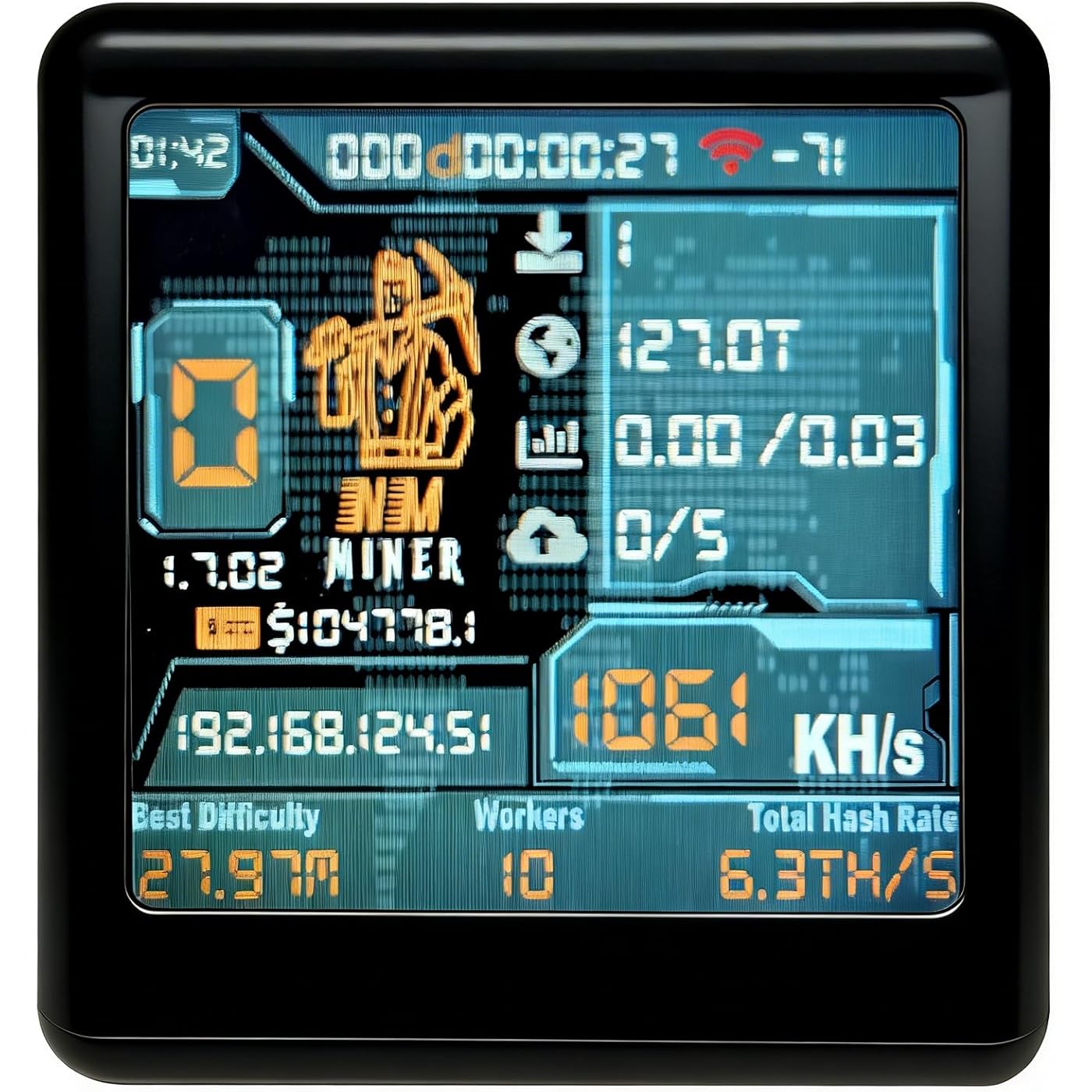
- Upgraded All-in-One Smart Monitor More than a Bitcoin Miner, More than a Clock!: The new NM-TV 154 transforms into a real-time smart monitor. By simply connecting to your computer via USB and entering the device's IP in your browser, the new NM Monitor (NM Monitor) allows you to view real-time device status and verify all functions are running perfectly. This major upgrade turns the device into a professional-grade monitoring tool, ensuring total transparency and reliability in your mining journey.
- 1060 KH/s Lottery Miner + 2000% Boost Dominated with Next-Gen Firmware: Harness the power of the ESP32-D0 chip for a blazing-fast 1060 KH/s hash rate20x faster than standard Nerdminers. The newly optimized firmware dramatically boosts your BTC lottery winning odds by 2000%. Just plug in, connect via WiFi/BLE, and it mines independently with no external PC required. For advanced users, the NMController software (Windows/Mac) allows seamless management of multiple miners across your LAN.
- Multi-Functional Desktop Genius: K-Line, Weather & Time: Step into the future with three new smart features: Track the crypto market at a glance with the multi-currency K-line feature; plan your day with the live weather and temperature display; and toggle effortlessly to the refined desktop clock mode. The 1.54-inch 240x240 stunning display and touch-button design make this compact gadget (45x35x40mm) a brilliant smart gift, perfect for offices or tech lovers who want more than just a BTC miner.
- USB Plug & Play with Web-Flash Tool Zero Hassle Setup: No complex configurations needed. Use the web-flash tool (flash.nmminer.com) for instant firmware updates or license recovery. Simply connect to WiFi, input your BTC address, and monitor your hash rate via the console. Supporting 802.11 b/g/n WiFi and BLE, the device runs efficiently on 5V ultra-low power. Its wide operating temperature range (-20C to 70C) ensures stable 24/7 operation, making it a durable and energy-saving choice for solo lottery mining.
- Cluster-Ready with NMController & Long-Term Support :Scale your decentralized lottery mining effortlessly! The NMController tool lets you manage multiple NMMiners from a single dashboard. Fine-tune settings, update firmware, and monitor hash rates across your entire crypto farm via Windows client or Python-based web controller. Backed by NMTech's long-term support (Telegram: t.me/NMMiner), this is the ultimate mining companion for those seeking ESP32 efficiency with professional-grade management.
- The instruction manual is available for download on the product page
Specs 8
| Brand | Heltec Automation |
|---|---|
| Model Name | NM-TV 154 |
| Connectivity Technology | Bluetooth, Wi-Fi |
| Operating System | FreeRTOS |
| CPU Manufacturer | Espressif |
| Processor Brand | Espressif |
| Processor Count | 1 |
| Total Usb Ports | 1 |
No specs match.
Frequently asked questions
If you place your order now, the estimated arrival date for this product is:
Thursday, Oct 29
Yes, absolutely! You may return this product for a full refund within 30 days of receiving it.
To initiate a return, please visit our Returns Center.
View our full returns policy here.
To initiate a return, please visit our Returns Center.
View our full returns policy here.
- Klarna Financing
- Affirm Pay in 4
- Affirm Financing
- Afterpay Financing
- Zip Pay in 4
- Financing through Apple Pay
- Financing through Google Pay
Learn more about financing & leasing here.




Top Amazon Reviews
Fun times
Color: Black
Like playing the lottery! fun to watch, but more for show. Set up sucked, took forever for it to connect.
Reviewed in the United States on November 22, 2025 by T
Doesn't Actually mine anything at all just for show. Doesn't Actually mine anything at all just for show.
Color: Pink


Got this for fun. Initially it didn’t even work. I was able to connect to the internet and add my BTC address but it wouldn’t finish the initial setup. Was driving me nuts. I was determined to make it work. Reset it probably about 3 or 4 times. Ended up changing the preset pool because the problem was the one that was preloaded into it didn’t work. I Love that this is pink and matches my desk setup excited to have this cool little miner on my desk that hopefully strikes gold & wins big. Have patience. It does work but because it comes without a manual you have to just kind of tinker with it and figure it out. You can reset it by pressing and holding the top button. Update- After verifying to see if it was actually mining it does not. It's just a toy for show an expensive miniature alarm clock. Definetly Returning. Total Scam. It's a lottery miner that doesn't actually mine anything at all.
...
show more
Reviewed in the United States on February 1, 2026 Reviewed in the United States on February 1, 2026 by Sharon
No instructions - but, I did figure it out.
Color: Yellow
No instructions. Comes preset with some unknown BTC wallet address - so, if you do not set that to yours you will never get the reward if it does happen. Had to use trial and error to eventually figure it out. Nice to see the crypto prices on the screen as a monitor. Here is the process to get it working: plug into a USB power port, press the button on the top, change mobile phone wifi to the network name of the miner. The config page loads, there you can set the miner to use your home wifi network with the password, BUT once that is connected, you need to load the real config page by entering the miner's IP address (like: 192.168.1.100) into your browser and then you can edit the BTC wallet address. It is also good to see that it is operating. CAUTION: if you press the button on top of the miner you can inadvertently clear the wifi settings and then you have to do it all over again. It seems to have a mind of it's own. It either changes screens or resets config. I have noticed that if you unplug it and plug it back in, it reboots with its wifi and wallet settings retained.
...
show more
Reviewed in the United States on January 26, 2026 by Jason M
Nice piece Nice piece
Color: Yellow

A little tweaking in the setup, and "BAM", we're off to the races!! I'm learning a good bit playing with these things. They're making me want to build an asic miner to make some real cash.
Reviewed in the United States on March 21, 2026 Reviewed in the United States on March 21, 2026 by James Fowler
Won't load or log in! Won't load or log in!
Color: Green


Can't give a zero review!! First, it was supposed to be next day...a week later.. then the case looked like someone opened it, it literally popped off as i was putting it in the port. I didn't care really, more ventilation. Went through the standard setup process and let it run. Next day, check up online, i see my other 3 miners and not this one. It stalled at 80% loading up. Tried again with a different mining site, same thing. Did this way to many times!! Let it sit overnight unplugged, same thing again. Tried all the reprogramming and update sets, nothing works. Sending back for a replacement, going to give it 1 more try. Not impressed at all!! Bought cheaper ones with better results!
...
show more
Reviewed in the United States on January 31, 2026 Reviewed in the United States on January 31, 2026 by me
Use the Taz pool
Color: Green
After millions of visits to reedit, chatgpt troubleshooting, shouting at the gateway login in screen for the device, and about 4 gallons of tears I finally figured out how to get this thing to actually work. 1.stratum+tcp://public-pool.io:21496 <----never works, you will get to about 80-86% connection progress and get stuck on pool connection and never connect in. 2. Your wifi info you put in did save even though when you go back to the info section of the gateway page for the device shows nothing. Rule of thumb is that if you make it to a pool connection stage that means it has accepted your wifi info and connected to the internet otherwise you would be able to attempt the pool connection 3.Use the NM ESP Flash tool, to get your computer to recognize the device hold down the little button WHILE you plug it into usb, you will know you did it right because the screen will just show black and a new COM device will show up when you go to update the firmware with the tool, for me it was COM3. 4. Use firmware version 1.1.01, i prefer this version because it wont just say "Pool Connect" for the status and will actually say "Pool Connect <pool name> 5. MOST IMPORTANT USE stratum+tcp://pool.tazmining.ch:33333 it connected instantly for me and is running 100% stable. 6.Dont really pay attention to the provided instructions they are really incorrect. And don't worry about that license nonsense you see either you don't need it just follow my instructions. 7.Don't leave the password field blank in the gateway for the pool use "x" without the quotes and no space before or after 8.Plug it in and let it work Update: So i have come to understand the operations of these devices a little better. I have found out how to get them functionally operating and have mine going with a uptime currently around 32 hours. If you want to view your stats connect to the same network the device, then punch into a web browser the device IP that your screen displays. I just downloaded a the "NM Controller" software that essentially does the same thing except in a program not a webpage. The wepage looks exactly like the one in the images they provided.My ip was like 192.168.1.27 or something like that, it will be a diffrent ip then the one you used at the wifi configuration page incase you cant read the screen. On a final note, you dont have to use the tazming pool either just search on google for a "Lotto Miner Pool" i switched my pool to stratum+tcp://ss.antminer.com:3343 or port 3333 I THINK just look it up and see what you like. Also ask chatgpt for recommended pools as it was a life saver because im well versed in python but C is a lanuage as ancient as sumarian culture thats annoying. Oh also, if you want to make your own antminer it's super duper easy just buy a esp32-s3 and you can essentially use the firmware tool website to dump on the info. Personally i had chatgpt write up a firmware thats custom with my own wificonfig page and coded to be pinned out for a esp32-s3 and had it put in some coding for a ssd1306 display to show the same kind of information on the device. Just tell it to be sure to add the "stratum protocols" for mining which is just basically the part on how in connects to the pool and such. After that check your new webserver and screen. Depending in your pool aswell you might be able to hop on their website and see all the miners currently in the same pool and your device name should popup or wallet or matching stats. Its kind of neat to verify its actually working that way. Cheers prospectors!
...
show more
Reviewed in the United States on February 16, 2025 by Justin K.
Would recommend Would recommend
Color: Yellow

Woooo this is tiny! Great to have on your desk. What’s interesting is that it seems to out perform my larger nerdminers! It was easy to set up. The price was great. Would recommend at least one
Reviewed in the United States on December 14, 2025 Reviewed in the United States on December 14, 2025 by raymond
I think it’s really a waste of money and time
Color: Yellow
Without any instructions, there’s no way to tell if the thing is working or not, and with the odds of actually winning being so astronomical, there’s no way for me to give it a good rating
Reviewed in the United States on January 22, 2026 by Barry