Prime Big Deals are live! View Deals
Search  for anything...

Genmitsu Laser Engraver Kortek 10W 10000mW, Wireless APP Support

  • Based on 54 reviews
Condition: New
Checking for the best price...
$229.99 Why this price?
Prime Big Deal · 10% off was $255.91

Buy Now, Pay Later


As low as $38.33 / mo
  • – 6-month term
  • – No impact on credit to apply
  • – Instant approval decision
  • – Secure and straightforward checkout

Ready to go? Add this product to your cart and select a plan during checkout.

Payment plans are offered through our trusted finance partners Klarna, Affirm, Afterpay, Zip, Apple Pay, and Google Pay. No-credit-needed leasing options through Acima may also be available at checkout.

Learn more about financing & leasing here.

Selected Option

Free shipping on this product

FREE 30-day refund/replacement

To qualify for a full refund, items must be returned in their original, unused condition. If an item is returned in a used, damaged, or materially different state, you may be granted a partial refund.

To initiate a return, please visit our Returns Center.

View our full returns policy here.


Availability: In Stock.
Fulfilled by Amazon

Arrives Friday, Oct 9
Order within 12 hours and 39 minutes
Available payment plans shown during checkout

Protection Plan Protect Your Purchase
Checking for protection plans...

Size: 10W


Features

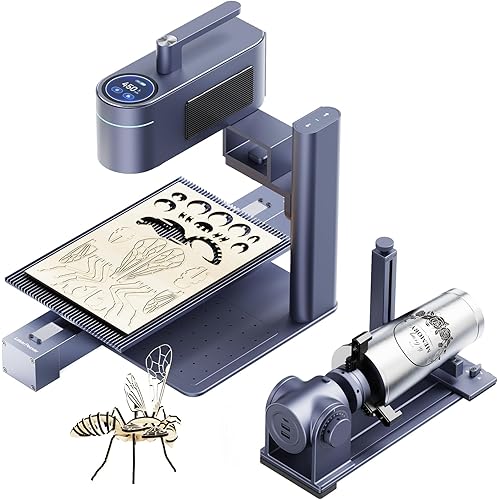
  • Driven by 35mm stepper motors with 0.01mm repeatability, the Kortek engraver, paired with a 10W(10000mW) laser module, delivers a deeper cutting performance. Capable of cutting through up to 10mm of wood and opaque acrylic, and engraving material like glass, ceramic, stainless steel, etc. Its a powerful solution for batch production, thicker materials, and more demanding projects.
  • Only 2.65 lbs (1.2 kg) and easy to carry with one hand, it offers a 200x150 mm working area. Ideal for makers, educators, and hobbyists who need powerful functionality in a compact space. It is also compatible with LightBurn and LaserGRBL.
  • Easily control it with the Genmitsu APP on your phone or laptop no complicated setup needed. Its ready to use right out of the box and pairs with a wide range of accessories to let you create on virtually any material.
  • Expand your capabilities with optional accessories, including the 1W infrared laser head for marking metal and plastic, a rotary roller for cylindrical objects, a honeycomb bed for improved airflow, and an air assist pump to enhance overall engraving quality.
  • Engineered for maximum safety, the Kortek features Class 1 laser certification, automatic tilt-stop protection, and an emergency safety switch, giving you total peace of mind while you work.

Description

Kortek 10W Kintix 10W Kiosk 10W Max. Speed 7000mm/min Max. Speed 90000mm/min Max. Speed 12000mm/min Working area 200x150mm Working area 200x100mm Working area 100x100mm Focusing Method Manual Focus Focusing Method One-Click Focus Focusing Method Manual Focus Motion System XY Gantry Motion System Motion System X Motor Driven+ Y Galvo Scan Motion System XY Gantry Motion System Usage Cases DIY enthusiasts & hobbyists Usage Cases Small business owners & pros Usage Cases DIY enthusiasts & hobbyists It is specially designed for metals (stainless steel, aluminum, brass), plastics, glass, leather, and acrylic, which allows you to create personalized gifts, custom signs, and intricate DIY projects. It provides a strong, adjustable airflow that blows away smoke and debris, thereby improving the cutting speed, depth, and precision of all your laser engraving and cutting projects. Trust in the durability of the panel, built from all-metal steel. Easily align your materials with precise measurement markers along the edges of the honeycomb panel. Compatible with Kortek Laser engraver Compatible With Bigger Genmitsu CNC Engraver SainSmart Genmitsu There are no limits to your imagination. You can easily fulfill your ideas with SainSmart Genmitsu machines. We believe your ideas have the power to change the world, whether you're sitting in a classroom, a makerspace, or a basement workshop. Let's create a better world together.

Product Dimensions: 14.57 x 12.99 x 7.48 inches


Item model number: 10W


Item Weight: 6.25 pounds


Manufacturer: Genmitsu


Date First Available: June 19, 2025


Frequently asked questions

If you place your order now, the estimated arrival date for this product is: Friday, Oct 9

Yes, absolutely! You may return this product for a full refund within 30 days of receiving it.

To initiate a return, please visit our Returns Center.

View our full returns policy here.

  • Klarna Financing
  • Affirm Pay in 4
  • Affirm Financing
  • Afterpay Financing
  • Zip Pay in 4
  • Financing through Apple Pay
  • Financing through Google Pay
Leasing options through Acima may also be available during checkout.

Learn more about financing & leasing here.

Top Amazon Reviews


  • Just want I wanted.
Size: 10W
Just want I wanted.
Reviewed in the United States on April 21, 2026 by Darell Cheek

  • Got a Replacement
Size: 10W
Experience from beginning to end with updates: This machine is advertised as being able to use any mobile device, tablet, etc, to run it. However, this isn't true. It must be plugged in directly to the laptop to connect as the IP address isn't recognized and no wireless devices can find or connect to the machine. I've contacted technical support through the manufacturer and Amazon with no responses. Update: It's been two weeks and customer support finally responded after several emails. They are requesting a video of me using the laser so they can see the issue. Ummm okay. But since then while using it hard wired to a laptop, it often just turns on the fan and won't actually move to it's starting point or engrave. It will also just stop mid preview and no longer communicate with the computer or shut off or start or return to it's origin or turn off the fan. Truly junk. If I could leave 0 stars I definitely would. Update: I wouldn't call customer support prompt initially, but once the communication got rolling they did promptly send a replacement, with no further action required on my end. I did receive the new machine, but haven't had the chance to unbox it yet. When I do, I will definitely come back to give another update. ... show more
Reviewed in the United States on October 5, 2025 by Victoria Jimenez

  • Beginner up and running in about an hour.
Size: 10W
I think this is a great choice for a first-time laser engraver. This was my first laser engraver and I was up an running within about an hour. Assembly was simply sliding the laser into the bracket, tightening the retainer, and plugging the laser into the machine. I opted for the 10W version because I want to be able to etch metal. I don't have a laser bed so I used a sheet of aluminum foil to protect my desk in the event of a laser overrun. I am leery of installing .exe drivers on my Windows PC so I opted to connect via Wi-Fi, similarly to how phones are used to connect to the engraver wirelessly. I downloaded the CutlabX software to a Windows Sandbox session to test the software and it ran fine inside the sandbox. Even connecting flawlessly to the engraver via IP address 192.168.0.1. I didn't notice any errant behavior by the CutlabX software, so I will probably end up installing CutlabX in my normal Windows environment. My first project was to print a photo onto one of the included 80mm X 80mm Kraft Paper cards. I imported a jpg into CutlabX and scaled it to smaller than 80mm for height and width. The trickiest part of the whole project was aligning the card inside the burning area. To accomplish this, I did the following: From within CutlabX, on the "Engrave" tab, I set "Go to zero" to home the laser. This corresponds to the lower-left corner of the CutlabX canvas (X=0, Y=0). I PUT ON SAFETY GLASSES, then pressed the "Ignition" button to turn the laser on 4% power so it locates the origin in the work area. I taped the card down about 10mm up and 10mm to the right of the zero origin. I move the laser over the Kraft Paper card using the controls on the "Move" tab. I set the height of the laser by loosening the retainer and lower the laser with the standoff lever dropped until it just touched the card, then tightened the retainer. In the software with the photo selected, I entered 10 and 10 for the X and Y position, which corresponds to the lower-left corner of the photo. These X and Y fields are in the upper-left corner of the CutlabX window. From there, WITH SAFETY GLASSES ON, I clicked "Preview" and laser traced the outer perimeter of where it would burn the photo image. I then alternated between adjusting the X and Y coordinates and pressing "Preview" until the laser trace was approximately centered on the card. I then set the laser Speed, Maximum power, and Interval, per the table in the owner's manual for my 10W laser. Finally, I pressed "Start" and it etched my photo on the card! Since this is not a toy, I had to remind myself to WEAR PROTECTIVE GLASSES WHEN USING THE LASER and HAVE PROPER VENTILATION FOR THE FUMES GIVEN OFF BY THE LASER. I also keep a fire extinguisher handy in the unlikely event that something catches fire. I am very pleased with the Kortek Laser Engraver and highly recommend it! ... show more
Reviewed in the United States on October 5, 2025 by arg

  • Decent for beginners
Size: 10W
Its pretty cool a bit of a struggle to start but I got it going like in an hour then the cut Interface is pretty simple, it took me a minute to understand that I need to put the surface I'm engraving close as possible to the laser buy it cuts nicely I only did a few trial cuts today on the piece on wood that comes with it. Decent for the price the build quality is not the greatest but it works for a bigger might not last very long but to start its good , also comes with its own safety goggles ... show more
Reviewed in the United States on April 2, 2026 by Dieguez

  • user manual is zero help.
Size: 10W
user manual is useless. I've been trying to make it work for 2 days now with no success. Couldn't be less help if it was in Greek.
Reviewed in the United States on November 11, 2025 by Teri Moffett

  • Nice little laser engraver with phone app
Size: 10W
I got this small laser as a beginner who liked the idea of having a phone app to use the machine, and overall it felt like a friendly entry point into laser engraving without being overwhelming. I got the 10W model and it seems pretty powerful for basic tasks like light wood engraving, cutting thin wood, and even some leather engraving that I have done, which honestly impressed me for a desktop sized unit. The machine feels solid and well built, the frame stays stable during operation, and the engraving results come out clean and consistent once settings are dialed in. I started with simple designs on scrap wood and quickly moved on to small signs, coasters, and leather tags, and the detail level was better than I expected for something marketed as beginner friendly. The compact footprint is also a big plus since it fits easily on my workbench without taking over the entire space. The wireless phone app setup was pretty straight forward and I used it from my phone for a while, but it is pretty limiting when you want more control over speed, power, and more complex designs. It worked fine for quick jobs and simple text or graphics, but I could tell I was only scratching the surface of what the machine could do. I eventually set it up from a PC and there are so many options and it works great, making the laser feel like a much more advanced tool with precise control and repeatable results. Once connected to the computer I was able to fine tune passes, adjust focus more accurately, and work with more detailed files, which really elevated the quality of my projects. Overall this feels like a laser that can grow with you, starting simple but offering plenty of depth once you are ready to explore more advanced engraving and cutting projects. ... show more
Reviewed in the United States on January 16, 2026 by Amazon Customer

  • Very nice laser engraver
Size: 10W
This laser engraver is well constructed and very easy to operate. The laser engraver arrives pre-assembled so when you receive the engraver the only thing you need to do to start engraving is to slide the laser head in the x-axis dovetail and adjust the lasers z position with your material to engrave. I'm using it with LaserGRBL and F-Engrave and with this software the laser engraver works perfectly. The engraver comes with all of the tools needed, a couple of sheet of thin plywood to start on, a small tool kit and safety glasses to protect your eyes. The laser engraver is very compact and does not require a lot of work bench space. The laser engraver is very repeatable in position which allows multiple passes to get deeper cuts. This is the same machine I all ready have but has a high power laser on it which allow some cutting and faster engraving. The laser engraver is a great machine for those that want to get into laser engraving but don't have the time, patience or know how to build a machine up from parts. The machine looks really good and is a nice cost effective way to get into laser engraving. ... show more
Reviewed in the United States on October 1, 2025 by Time

  • fair but can be problematic
Size: 10W
would not stay connected over usb, works ok on wifi but takes extra steps every time i wanna use it. laser is powerful and it etches nicely and is pretty quick compared to other cheaper ones. So far i have used it on metal PC cases and aluminum iphones and it does pretty well. Just have to use it over wifi otherwise the usb will not stay connected and messes it up - at least for me, tried two different pc's an keeps dropping offline but it does still work ok over wifi. just not as convenient. ... show more
Reviewed in the United States on December 30, 2025 by Dave

Can't find a product?

Find it on Amazon first, then paste the link below.
Checking for best price...