Search  for anything...

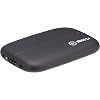
Elgato HD60 S+, External Capture Card, Stream and Record in 1080p60 HDR10 or 4K60 HDR10 with ultra-low latency on PS5, PS4/Pro, Xbox Series X/S, Xbox One X/S, in OBS and more, works with PC and Mac

  • Based on 11,579 reviews
Condition: New
Checking for the best price...
$289.99 Why this price?
Save $18.37 was $308.36

Buy Now, Pay Later


As low as $48.33 / mo
  • – 6-month term
  • – No impact on credit to apply
  • – Instant approval decision
  • – Secure and straightforward checkout

Ready to go? Add this product to your cart and select a plan during checkout.

Payment plans are offered through our trusted finance partners Klarna, Affirm, Afterpay, Apple Pay, and PayTomorrow. No-credit-needed leasing options through Acima may also be available at checkout.

Learn more about financing & leasing here.

Free shipping on this product

FREE 30-day refund/replacement

To qualify for a full refund, items must be returned in their original, unused condition. If an item is returned in a used, damaged, or materially different state, you may be granted a partial refund.

To initiate a return, please visit our Returns Center.

View our full returns policy here.


Availability: Only 1 left in stock, order soon!
Fulfilled by Amazon

Arrives Jul 26 – Jul 29
Order within 18 hours and 7 minutes
Available payment plans shown during checkout

Protection Plan Protect Your Purchase
Checking for protection plans...

Features

  • 1080p60 HDR10 Capture: share your gameplay in superb viewing quality.
  • 4K60 HDR10 Zero-Lag Passthrough: play your high-fidelity Xbox Series X/S, Xbox One X, PS5 and PS4 Pro games in original format.
  • Instant Gameview: power your workflow with ultra-low-latency technology.
  • Unlimited Capture: record hours of footage directly to your hard drive.
  • Flashback Recording: slide back in time to save epic moments retroactively.

Description

HD60 S+ lets you play your high-fidelity console games in stunning 4K60 HDR10, while capturing your gameplay in superb 1080p60 HDR10 quality. Compatibility with any streaming software gives you full creative control, and Instant Gameview powers your workflow with ultra-low-latency technology.

Specs & Other Info

Specification Details
Manufacturer Elgato
Connection Type USB Interface
Maximum Capture Resolution 1080p High Definition
Compatible Operating Systems Mac OS
Device Compatibility Universal (Not Specific to Any Platform)
Model Number 10GAR9901
Supported Hardware Platforms Xbox Consoles
Product Weight 3.84 ounces
Dimensions 0.75 x 4.41 x 2.95 inches (L x W x H)
Color Classic Black
Internal Memory Size 8 GB
Product Language English
Release Date September 27, 2019

Frequently asked questions

Yes, the Elgato HD60 S+ supports capturing video in 4K resolution at 60 frames per second with HDR10. However, when streaming, the device will generally stream 1080p footage with HDR10 to maintain a stable performance.

Absolutely, the Elgato HD60 S+ is compatible with a wide range of gaming consoles including the PS5, PS4, PS4 Pro, Xbox Series X/S, and Xbox One X/S. It allows for high-quality streaming and recording from these devices.

To use the Elgato HD60 S+ with a PC, you need a Windows 10 (64-bit) computer with a 6th generation Intel Core i5 CPU (or AMD equivalent), and an NVIDIA GeForce GTX 10xx (or better) graphics card. For Mac users, a macOS Sierra (10.12) or later is required. Additionally, a USB 3.0 port is necessary for connectivity.

The Elgato HD60 S+ is known for its ultra-low latency capabilities, which means there is almost no delay between the live video on your gaming console and the footage that appears on your stream or recording, enabling smooth, real-time gameplay broadcasting.

Top Amazon Reviews

🚀 Abunda's Overview

This is our summary and key points to consider based on customer reviews.


The Elgato HD60 S+ is a high-performing, external capture card suitable for both novice and professional content creators. It offers impressive versatility with its compatibility across multiple platforms, ease of setup, and support for different resolutions. Some users report some initial setup hassles and troubleshooting issues, but overall, the product receives highly positive feedback for its crisp image quality, low latency, and user-friendly interface.

Pros

  • 🎮 Supports multiple resolutions and frame rates, up to 4K60 and 1080p60 HDR10
  • 💻 Offers compatibility with various gaming platforms, including PC, Xbox, PlayStation, and Nintendo Switch
  • 🔌 Provides an ease of setup with its plug-and-play functionality
  • ⚡ Ensures low latency with its USB 3.0 connection
  • 🔧 Solid robust design and high build quality

Cons

  • ⚙ Some users report troubleshooting issues during initial setup
  • 🔊 One user mentions the recurring problem of a buzzing sound during recording or streaming
  • 🔄 Some users note the need to repeatedly unplug the device from the USB port to reset it

Should I Buy It?

Given the overall high-performance specs and the relatively few easily surmountable issues reported, the Elgato HD60 S+ is a worthy investment for anyone aspiring to deliver high-quality streaming content across various platforms. However, prospective buyers should be prepared for initial setup difficulties and may need to conduct some troubleshooting.


  • The Ultimate Capture Card - Flawless Performance and Unparalleled Versatility!
The Elgato HD60 S+ has completely transformed my streaming and recording experience, earning every single one of its five stars. This external capture card is an absolute powerhouse that delivers flawless performance and unparalleled versatility! First and foremost, the HD60 S+ offers an exceptional level of quality when it comes to capturing gameplay. Whether you're streaming or recording, this capture card ensures stunning visuals with its ability to handle resolutions up to 4K60 or 1080p60 HDR10. The resulting footage is incredibly crisp, vibrant, and true to life, ensuring that your audience or viewers get the best possible visual experience. It's a game-changer for content creators, streamers, and aspiring professionals who demand top-tier quality. The ease of use is another standout feature of the HD60 S+. Setting up this capture card is an absolute breeze, thanks to its plug-and-play functionality. Connecting it to your PC or console is as simple as connecting a few cables, and you're ready to go. The user-friendly software interface makes it incredibly intuitive to adjust settings, stream to your favorite platforms, and record your gameplay with ease. Elgato has truly made the process seamless and hassle-free. One of the most impressive aspects of this capture card is its low latency. The HD60 S+ uses a USB 3.0 connection, ensuring minimal delay between your gameplay and the footage being displayed on your streaming platform or recording software. This near-instantaneous response is crucial, especially for competitive gaming or live streaming, where split-second reactions can make all the difference. The HD60 S+ guarantees a smooth and lag-free experience, allowing you to perform at your best. The versatility of the HD60 S+ is unmatched. Not only does it support a wide range of resolutions and frame rates, but it is also compatible with multiple platforms. Whether you're gaming on a PC, Xbox, PlayStation, or even a Nintendo Switch, this capture card has got you covered. The ability to seamlessly switch between different devices and platforms without any hiccups is truly remarkable. It caters to the needs of a diverse user base, making it an ideal choice for both casual and professional gamers. Build quality is another area where Elgato excels. The HD60 S+ boasts a sleek and robust design that not only looks great but also ensures durability. The aluminum body provides excellent heat dissipation, allowing for extended recording or streaming sessions without any performance issues. The compact form factor makes it easy to carry and set up, whether you're gaming at home or on the go. In conclusion, the Elgato HD60 S+ is the ultimate capture card that delivers on every front. With its exceptional performance, versatile compatibility, user-friendly interface, and solid build quality, it's a must-have tool for content creators, streamers, and gamers alike. Whether you're looking to stream in stunning 1080p60 HDR10 or record your gameplay in pristine 4K60, this capture card will exceed your expectations. Without a doubt, the Elgato HD60 S+ deserves a perfect five-star rating! ... show more
Reviewed in the United States on June 21, 2023 by Sniperheartwolf

  • Incredible Hardware, Lacking Software
TL;DR: Great product for 1080p content, slightly above average software with problems easily fixed with using 3rd party programs instead. This is pretty much the description of "plug n play" as it's compatible with pretty much every device that supports HDMI output and given you have a PC or Mac with a USB A 3.0 port, or for newer Macs a hub/dongle with USB A 3.0. And as long as you have software that can detect the devices signal of course. It can record 4k at 30fps in certain situations, not every device can record that and not every software can detect that signal, but it *can* do it. The 1080p recording option that this device is aimed at records at a great quality for entry-intermediate level YouTubers and content creators (As established creators have most likely upgraded to 4k capable devices). With its ease of use all you need is either the Elgato 4k software or another program like OBS that can detect a capture card and a computer that has a USB 3.0 port. To record at higher frame rates like 60fps or to record at the 4k 30fps option (mainly for the 4k) you will need a computer that can handle the processing of a video resolution that high. Otherwise any decent computer or laptop can handle recording the lower resolutions. This capture card can also be used to stream of course but at that end it's more reliant on your computers processing power and internet speed/bandwidth put together. Now my biggest gripe with the product isn't directly related to the product itself but the software that Elgato provides for this product. I've had it crash or glitch out on me far more than something like OBS which has been zero times, and meanwhile the image quality is quite nice when using proper settings with a computer that can handle it, there's a chance that audio and video will get out of sync with the elgato software something I don't have to deal with other software. Easily fixed with a video editing program but not everyone edits their videos. The audio desync doesn't happen with streams thankfully unlike its older version the HD60s on longer streams. ... show more
Reviewed in the United States on May 10, 2021 by Miguel

  • Reliable and captures high quality video
One thing that everyone needs to be aware of: This device is dependent on your PC/laptop's specs. The higher, the better. I used it on my Aorus laptop running GTX3070Ti 32gb RAM 10th gen intel processor, must be used on USB 3.0 port or higher and ensure the cables are capable of high data transfer or else it won't work properly. I used it to capture gaming footage on my iPhone 12 and 14 (with an HDMI adapter), PS5, Xbox One S, xbox 360, nintendo, snes, and laptop. It captures both audio and video and stays in synch. No stuttering or loss of video quality. Use the software that the device recommends so you can live stream in FB live, twitch, youtube, or any social platform. Great device and a great addition for content creators. Highly recommend. ... show more
Reviewed in the United States on August 4, 2024 by Furiouss

  • To use with a Mac/MBP with only usb-c/thunderbolt- use OBS Studio not elgato's game capture software
MBP with M1 + apple dongle (hdmi/usb-usbc) + Elgato HD60 S+ + OBS studio = works no problem I hoped elgato would fix their issue where this capture card seems to not work on mac when you only have usb-c/thunderbolt- regardless of cable, dock, or dongle. They have not fixed the issue and none of the work arounds have worked for me so far. However, I finally realized that that issue is specific to their SOFTWARE, not the capture card. It gives you an error that you can only use USB 3 with the card and that you don't have such a port regardless of reality. However, the capture card works seamlessly with OBS studio (free software). So if you are having issues, try switching programs and save some headaches. OBS had no issues with this capture card capturing video and sound from a nintendo switch to a mbp through apple's dongle despite the elgato game capture software never working (usually 3.0 issue, sometimes waiting issue). I've used it only to record not stream so I cannot speak to that, but it seems to do what it should as long as you don't use the elgato game capture software. It also captured the audio fine without needing blackhole audio or an audio specific cable. I did have to open and close OBS studio to get the audio to work after adding the audio device. ... show more
Reviewed in the United States on January 23, 2022 by thelse

  • Compatible with OBS without a driver, perfect for OSSC
This product is the only one I've found that ticks the full set of features I wanted out of a capture card: -Compatible with the Open Source Scan Converter line 5x mode -Compatible with Windows 10 -Compatible with MacOS -Compatible with M1 Macs -HDMI passthrough for low latency support There are some caveats to this. The native software support is not equivalent between platforms -- on Windows you'll be required to use the 4K capture utility if you want to stick to El Gato's software, while on macOS only Game Capture HD is supported (and on M1 macs 1080p can only be captured at 30fps in that software). Additionally, neither of these pieces of software will support the OSSC at anything other than 2x mode. However, that's where OBS comes in. The capture card requires no drivers, just add it as a source and it'll auto-detect pretty much everything you could need and capture at whatever resolution you want -- including 1080p60 on M1 Macs. Through OBS, the capture card supports all line 5x modes on the SNES (Generic or either of the optimized presets) at 1600x1200. It does not work with 1920x1080 mode at all, but 1920x1200 does work fine with either of the optimized presets (the generic one will cause dropouts). The only caveat is that the device does not like to switch between these odd resolutions, so you may have to cycle the 'activate' button in OBS to get it to turn off and back on and catch the resolution you're sending it. On the whole, I'm happy. The quality is phenomenal and it's the only capture card I've found that works with the OSSC's line 5x mode with passthru. ... show more
Reviewed in the United States on August 6, 2021 by ElBaha

  • Excellent, but not out of the box
It doesn’t play nice with either my Sonnet Allegro USB 3.0 card or my Sonnet Allegro Pro USB 3.2 card. I was about to send it back but then I tried one of my motherboard ports, even though they are theoretically slower than my cards. Works beautifully. I’m not going to dock a star for that because it’s hard to say whose fault this compatibility issue is but it is something I never had happen before or since with this system. Performance is excellent. I don’t know about the 60Hz problem as I mostly use this to capture game consoles or watch my Apple or Shield TV in a Window as I work and use an HDMI splitter upstream. It has served me well for 9 months so far. Lag is so low you can play some types of games through it and no unwanted artifacts in the video. ... show more
Reviewed in the United States on October 17, 2021 by twitch.tv/mayhemreignstv

  • Lets me play my Nintendo Switch on my iMac
I bought this device because I wanted to display my Nintendo Switch on my iMac (21.5", 2020) and this was the easiest method I found after researching online. I haven't used it to stream per se, but I have connected it to my Nintendo dock so that the iMac screen acts as the display. The iMac is below the minimum spec listed (for Mac the minimum is listed as quad core, Core i5 but my iMac has a dual core i5) but I can stream 1920x1080/60p (about 18 mbps) without any problem. Set up is totally easy. Just connect the cables (for this I connected the Switch to AC power and HDMI to the Elgato and USB-C and HDMI from the Elgato to the iMac), open up Game Capture HD (downloaded from the Elgato website) and with minimal settings (changed from default of 720p/30 to 1080p/60) changes it was displaying the Switch's screen perfectly. Yes, it's expensive to get just for streaming to your iMac but it beats buying another monitor (even if the monitor costs less than this device) as it keeps the clutter down. I'm happy with the video quality on the iMac's 21.5" 1080p display so it's worth it to me. And if I want to stream at some point in the future I can use this device to do it. ... show more
Reviewed in the United States on April 15, 2021 by Impetigo

  • It works! It works!
I bought this strictly because I wanted to display/play on my nintendo switch on my 2021 M1 iMac because I found out that the M1 iMac doesn’t display HDMI and I didn’t really feel like spending more money on an actual PC + monitor set, and waste my perfectly fine Apple monitor. I plugged this in (I had to buy a separate usb C to usb C cable since it didn’t come with one which isn’t that big of a deal), went to the website, looked for the HD60 S+, downloaded the application for game capturing, and boom, my switch was being displayed and I was legit screaming for joy. The price is a on the pricier side, but if you have the money and want to display your switch or even your xbox/playstation on your iMac, I 100% recommend this product! ... show more
Reviewed in the United States on January 21, 2024 Reviewed in the United States on January 21, 2024 by Makenzie

Can't find a product?

Find it on Amazon first, then paste the link below.
Checking for best price...