Search  for anything...

ELEGOO UNO R3 Smart Robot Car Kit V4 for Arduino Robotics for Kids Ages 8-12 12-16 STEM Science Kits Coding Gifts for 8 9 10 11 12 13 14 15 16 Year Old Boys Girls Teens Cool Engineering Building Toys | FPV Video, Line Tracking, Ultrasonic Obstacle Avoidance, Build, Code & Control by App or IR Remote, Home, Class, Gift for 8+

  • Based on 4,456 reviews
Condition: New
Checking for the best price...

Buy Now, Pay Later


As low as $13.33 / mo
  • – 6-month term
  • – No impact on credit to apply
  • – Instant approval decision
  • – Secure and straightforward checkout

Ready to go? Add this product to your cart and select a plan during checkout.

Payment plans are offered through our trusted finance partners Klarna, Affirm, Afterpay, Zip, Apple Pay, and Google Pay. No-credit-needed leasing options through Acima may also be available at checkout.

Learn more about financing & leasing here.

Selected Option

Free shipping on this product

FREE 30-day refund/replacement

To qualify for a full refund, items must be returned in their original, unused condition. If an item is returned in a used, damaged, or materially different state, you may be granted a partial refund.

To initiate a return, please visit our Returns Center.

View our full returns policy here.


Availability: In Stock.
Fulfilled by Amazon

Arrives Friday, Aug 28
Order within 6 hours and 18 minutes
Available payment plans shown during checkout

Protection Plan Protect Your Purchase
Checking for protection plans...

Color: Robot Car V4


Features

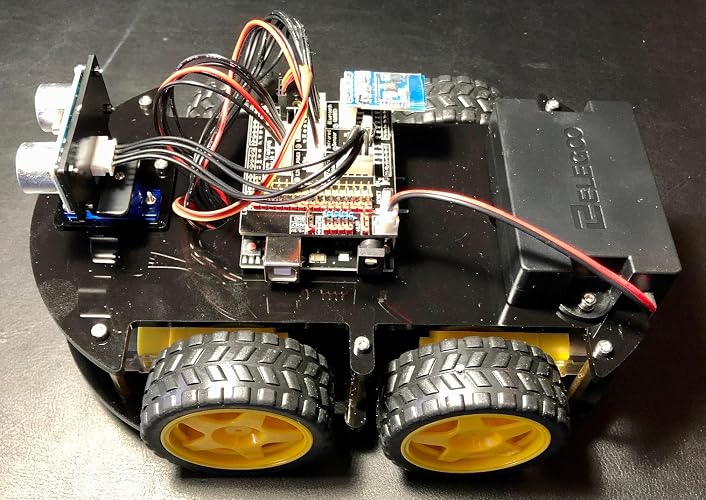
  • ELEGOO Smart Robot Car: An educational STEM kit beginners (kids) to get hands-on experience about programming, electronics assembling and robotics knowledge. It is an integration solution for robotics learning and made for education.
  • Complete Package: Contains 24 kinds of module parts including obstacle avoidance, line tracing module, infrared remote control and also you can control it via phone and tablets of Android and iOS system, etc.
  • Easy to Assemble: All the module interface has been modified with XH2. 54 ports as to make it much easier and convenient to assemble the car and reduce the chances for errors.
  • Refined Tutorial: HD rendering instructions on how to assemble the robot car from scratch and all the necessary programs and codes are included.
  • Upgraded Package Design: More minimalism design and make it a perfect kit for your kids and friends. Note:(Applicable Age : 8+)To use Elegoo starter kits requires basic electronic knowledge. If the user has no experience, it would be better to have someone lead and teach them while studying.

Description

At ELEGOO, we make STEM learning more approachable through hands-on electronics, coding, and robotics kits. Each kit includes the boards, sensors, wires, modules, and components learners need to build real projects and explore programming, circuits, IoT, and robotics with confidence. We are committed to making STEM education easier to start, more enjoyable to practice, and more accessible to the next generation of creators, engineers, and makers. Chris, the founder of ELEGOO, found out that most enterprises in the STEM industry focused on the hardware of open-source electronics and did not have tools to create a complete product by combining electronic hardware and structural shells. We have excellent R&D team, constantly upgrading and improving products, and after-sales service team for quick support. 100% compatible with Arduino, ELEGOO's kits are best-practice for beginners who have no appropriate technical tools to learn about electronics. ELEGOO Smart Robot Car V4.0 with camera is an educational and fun kit based on ELEGOO UNO R3 controller board (Arduino-Compatible) designed for both beginners and professionals to learn electronics, programming and robotics. With our easy-to-follow tutorial assembling this robot car kit would be very intuitive and simple regardless of whether you are an engineer or a novice. Building up your own robotic project has never been so easy and fun. Just follow our tutorial and step by step you will have your own running car kit within no time. This kit enables you to have a good quality time with your children and empower them to develop and inspire their imaginations. ELEGOO Smart Robot Cat Kit V4.0 has multiple modes such as auto-go, infrared control, obstacle avoidance and line tracking modes. In each mode, you will learn how to load programs and command the car to run as instructed. The great interactivity that you can have with this robot car could definitely motive your curiosity and interest to find out why and how it works this way. Learning electronics is not as complicated as you might think, especially with our smart robot car kit it will become more interesting than ever. If your kids, family or friends are attracted to the electronics and robotics world this kit would be a great choice and perfect kit for them to start their first step on the electronic journey. A smart robot car on your phone It wouldn’t be smart enough if you can’t control your robot car with your phone. Simply install the ElegooKit APP from APP Store and Google Play and team with the car through wifi, you can control your car freely. In our tutorial you will also learn how to programm and control it. Be your eyes FPV control experience and using Wi-Fi for Video transmission and control the robot car’s movement. Imagine that your are driving the car. Please be noted that the horizontal control range is 0-180°, you cannot control the camera vertically. Fear of damage no more. Under this mode the ELEGOO robot car will automatically detect obstacles ahead of it no matter which direction it is from with the ultrasonic sensors on the platform by sending waves and calculating the distance. Keep your car away from collision and enjoy the fun. Follow your runway The line tracking modules at the bottom of the car make sure it follows the runway you design with its infrared transmitter tube and an infrared receiver tube. Make sure your runway is clear enough and long enough then you can enjoy a wonderful car racing show.

Brand Name: ELEGOO


Age Range Description: Kid


Educational Objective: Robotics Knowledge, Programming Skills, Electronics Assembling, STEM Education


Sub Brand: Sonic the Hedgehog


Set Name: ELEGOO UNO R3 Smart Robot Car Kit V4


Manufacturer Maximum Age (MONTHS): 1200


Number of Items: 1


Unit Count: 1 Count


Manufacturer Minimum Age (MONTHS): 144


Item Type Name: STEM car


Model Number: US-EL-KIT-012


Manufacturer: ELEGOO


Manufacturer Part Number: US-EL-KIT-012


Manufacturer Warranty Description: Half year


Theme: Car, Electronics, Engineering, Robotics


Battery Description: Lithium-Ion


Material Type: Acrylic, Plastic


Size: 7 x 8 x 6 inches


Item Dimensions: 8 x 7 x 6 inches


Item Weight: 1.23 kg


Frequently asked questions

If you place your order now, the estimated arrival date for this product is: Friday, Aug 28

Yes, absolutely! You may return this product for a full refund within 30 days of receiving it.

To initiate a return, please visit our Returns Center.

View our full returns policy here.

  • Klarna Financing
  • Affirm Pay in 4
  • Affirm Financing
  • Afterpay Financing
  • Zip Pay in 4
  • Financing through Apple Pay
  • Financing through Google Pay
Leasing options through Acima may also be available during checkout.

Learn more about financing & leasing here.

Top Amazon Reviews


  • Wonderful product as a STEM kit!!!
This Smart Robot was my introduction to Elegoo products and the experience has made me a diehard fan of Elegoo. I bought this for my 9 year old son as a gift for the holidays. This was my attempt to give him gifts would peak his interest enough to get him away from all the games and electric devices and this did the trick. At first when I first opened it I wondered if it was to much for him to assemble but boy was I worng. He enjoyed every moment of it and has not stopped using it. Its so much fun that everyone in the house is enjoying it. It was designed and packaged so well and the instuctions were very easy to follow. Love the care they took and the packaging was neat and well organized. In its default state its packed with features but the intro to Arduino IDE increases its value immensely making it possible to add more components, features and functionality. This has already paid for itself times over and its value for money is undeniable!! ... show more
Reviewed in the United States on February 6, 2026 by DR CLINT

  • Worked first time...couple of small screws hard
I like this and it worked immediately. It was not quite like what was in the ad on amazon but it was functionally the same and nothing earth shattering. Battery pack and charging was a little different but easy to use. The instructions are mostly diagrams so you will benefit from looking at the videos about it. They are really helpful...it can save you from reworking. My only real complaint was that it was hard to thread a couple of the smallest screws but I have large hands. I only could get three of the four in but that is all that is really needed anyway. I could have cross threaded it myself. The software was already loaded and so I turned it on and it started right up. I tested the IR control (have to be in line of sight for sure and aim clicker right at it) and I tested it working with iphone and android apps...no problems. It found the bluetooth connection and worked perfectly. I tested the collision avoidance and it worked very nicely. It can't detect really small objects but that is to be expected I think. I wish they had put the sensor back a little further as when you run the car it goes pretty fast and it can bump into something and move the sensor and, I would imagine, could knock it off it hit too hard. Just something to watch for. I think they did a very thorough job with this, the instructions are reading (i.e. not in "chinese" english), the parts fit right and were of good quality. Nice job for this price. I'm happy. PS might be a little much for kids under about 12 to build it but I'm on the other end of the age spectrum. Enjoy! ... show more
Reviewed in the United States on August 31, 2020 by Dee

  • This is an excellent kit for an introduction to robotics and Arduino
I bought this kit to build and learn with my 10 year old daughter. She was working on a "Robotics" science fair project for her elementary school. We spent several evenings building & programming the robot car together and had a great time, we learned a ton! In addition to her project research she used the robot car as an example of what a robot is and what the components of a robot are. This kit is very well made with all components neatly and safely packaged. The included PDF files for assembly, construction and programming are very well written and illustrated. There are multiple provided Arduino programs to highlight the use of one or any of the included sensors provided with the kit. the construction was simple and fun with no required soldering. The kit includes a custom UNO shield which is used to aggregate all of the wiring for the sensors and motor control signals, very slick and easy to follow. In our own rush to get the project together on time, we choose to utilize one of the ready-made programs which makes the car drive along and track a black line of electrical tape on the floor. This worked great and was a major hit at the non-competitive science fair. However the kit also provides detail which allows the hobbyist to continue their exploration and customize the programs which serve as a starter for endless fun and learning. I am an Electronic Engineer and Computer Scientist who has studied Electronics , Computer Science and Robotics for nearly 30 years. I am also a hobbyist who enjoys toying with Arduino / Pi and other electronic hobbyist items. This kit is great for a beginner to learn the basics of robotics and electronic / mechanical engineering and computer science. ... show more
Reviewed in the United States on February 19, 2019 by John W.

  • We got past the IDE compiler errors, but it’s really been a challenge to drive or expand it tho.
I really like it a lot. My 9yo grandson, and 12 yo grandson each built one. The manual combined with the YT video steps were very helpful but you definitely need both and it’s difficult in a couple spots where it’s easy to get confused by the nearly symmetrical config of the top and bottom base plates.. the screw length for the ESP32 CAM to it's mounting bracket appeared to be too short, so I used a couple linger screws n the kit, But just today found out I had installed the Ultrasonic Sensor Bracket that mounts onto the servo backwards.. flipping it would have solved the problem which appeared to be that the screws were too short.. And when we built the second one I only then realized we’d built the 1st incorrectly .. I ran fine but the motors are supposed to be sandwiched Between the top and bottom plates, not below the bottom plate.. and altho this mistake is possible / easy to make.. with that plate flipped over the line sensors don’t work well since they ride almost an inch higher off the taped line on the ground. Anyway both ran perfectly well initially but we found one stared disconnecting from the WiFi a lot every time you’d try to move it. This appears to be the WiFi is too weak in this parents house so we’re not only getting a repeater to extend it to that part of the house about 100 ft away, but there is also a s/w fix in the CAM32 module that can change the WiFi RF channel and fixit there in s/w too.. I've never had this problem at my house tho..so have not tried to fixit in s/w since it's not broke here. Another problem is the IR remote must be within 3 to 4 feet or so max and pointing directly at the receiver on the top board.. we find it works much much better in FPV mode using WiFi. It’s set up to run WAY to fast in all directions so does wheelies if you go forward and spins in circles if you try to gradually turn left or right. Elegoo service emailed a fix for these issues since pressing 9 to reduce speed only seems to work in IR Remote controller mode, and only till you cycle the POWER ON/OFF. The battery worried me too.. I was not sure if it can be left unattended on the charger, but have been assured there is a BMS that will prevent over charging if it's left plugged in over night.... and line following mode didn’t initially work at all, since we had the motors mounted below the bottom B plate not above ..but I haven't tried to adjust it's sensitivity yet.. the FPV cam is fantastic tho.. and it’s a ton of fun to try navigating it since it’s ridiculously sensitive with the factory s/w .. I also followed the steps to set up the Arduino IDE library but the main V4 .ino system file Would not initially compile without errors .. The vendor support has resolved that with an update that allows it to run on the latest IDE 1.8.19 as well as the latest AVR UNO Board manager 1.8.5. And I can now report it also compiles and runs with the latest RC2 Change 3 IDE version too.. one thing I’d like to add is a camera that tilts up and down OR mini grabber arm, and there IS a servo2 slot that is on the board to support that., Its used with the Conquer version of the robot and it's controllable via WiFi with the same Elegoo App. It’s got a block language but very limited features and flexibility in that mode.. I did get a second one as soon as I confirmed that I can mod their systems code and add new options to it. I have an MBot Mega robot too and like this one’s documentation and potential programmability a lot better., but honestly the main code in both robots is way too complex for beginner Arduino programmers .. they’re Starter Kits are far better to use as programming learning tools. An old update.. I spent a couple days trying to figure out why I was getting IDE pre-compiler errors due to missing custom libraries. I finally resolved it but only by moving to a laptop and using the Add Zip option to install each library folder independently and the normal way. I finally got a one line reply from support saying that they’d read my email sent 4 days ago… pretty sorry response.. I want to know what mods in the s/w are required to slow its and speed down, and how to switch WiFi RF channels .. and have yet to determine why they want us to add library’s Manually with a copy/paste.. that’s left my main PC in a state where it can’t compile without numerous can’t find library errors. Update 3/1/2022.. I was using [email protected] and it's actually [email protected] so that explains the delayed replies. I did get answers on where in the UNO V4 code to adjust the too-much-speed issue and the ESP32 code to switch Wifi channel rf frequencies but have not done either yet since at this point, after completely deleting ALL library folders and re-installing the IDE from scratch, now I can compile the V4.0 .ino without errors , upload and run the 4 ea demo examples without errors, but cant re-install the main (unmodified) factory V4.0 ino file and have it run properly, it appears to load with all the needed library files and Uploads without error, but will not run at all.. So it's broken and completely useless till we figure out what happened.. I have sent them a very detailed e-mail with the symptoms and hope we can resolve it soon.. An update 3March 2022: [email protected] has been great. They did confirm the V4 main code is NOT compatible with either the Arduino UNO board manager 1.8.4 or 1.8.5.. and when I installed the 1.8.3, it auto removed the 1.8.5 And properly installed 1.8.3 and that restored the factory main board so it would fully run again in FPV mode . I also modified the line needed to control the max speed and set it to 100 and also 150 instead of 250 and now can more easily drive it around with out doing jerky wheelies and spinning in circles all the time..it’s still too sensitive and prone to spin in wheelies when turning tho. support answered most all my other questions tho and will send an update notice out when their code is made compatible with the latest Board manager release and IDE 1.8.19. It appears either using the copy/paste manual mode to add their 4 libraries, or the recommended AddZip option will work, but I prefer to use the recommended AddZip way and they may change their ReadMe1st.pdf install guide to reflect that too. All in all I think the robot is a great way to expose kids to Robotics and advanced Arduino programming, and it’s fun but as a teaching tool to teach programming, Elegoo’s other learning kits are a LOT simpler and more effective in teaching programming skills especially for beginners.. this code in the robot is VERY complex and difficult for a novice to debug or understand since it’s tightly linked to the integration of the Elegoo App on your tablet, the ESP32 CAM and it’s WiFi, and the UNO R3 board and it’s got a complex control structure that’s too deep for beginners. But it’s perfect for me and so I bought a 2nd one so I can tweak and mess with / mod the code in it at the same time the kids can play with the other one.. we’ll be racing each other soon.. update 3-8-2022: the vendor's [email protected] line has been fantastic.. They just sent me an update which not only translated all the comments that were in Chinese to English, but moreover the code now both compiles and runs under IDE 1.8.19 with the latest AVR UNO Board Rev3 1.8.5 version board code. They have helped me a lot and sent a table listing all the UNO Digital and analog pins that are used, and have answered all my questions so far.. Unfortunately almost All the Digital, serial I2C and Analog pins are already in use on the UNO so to avoid both the I/O conflicts and the huge problem integrating add-on features like a Laser under servo control and the grabber arm I plan to add a stand alone ESP32 and control it with a second IOS App , or by using a spare RC receiver and it’s RC transmitter one way or the other. I don’t think that will be hard to control since one kid can drive and the other shoot the laser at targets or switch controllers. Integrating new code using the existing ESP32 and Elegoo IOS App is just too difficult to do for me as a non-programmer. ... show more
Reviewed in the United States on February 21, 2022 by Jim S

  • Great little robot
This is a great robot that works better than I had expected! It is fast and the FPV mode is a blast! There is a lot of potential with this little bot, the motors could support small payloads or additional modules without too much difficulty. The assembly was pretty easy aside from a few odd angles of illustrations in the manual that led to removing a few screws and making adjustments. There is a great slideshow of assembly I didn't find until after I had assembled it, you can find it in the sellers item description links. Also be sure to check out the links that have the app to control the robot, I made the mistake of listening to the manual and going to the Play store and downloaded another Elegoo app that controls the robot but isn't compatible with the camera. My only real complaint would be the angle of the camera mount, it is about 45 degrees above the horizontal plane of the robot (maybe less) and can make it a tiny bit difficult to see obstacles directly in front. This robot would be perfect if there was a vertical gimbal so you could have more control over the camera. I'm going to add that functionality later but that isn't a beginner friendly project. I'm impressed with the robot and would definitely recommend it to those looking for a project or a new toy. Since it is programmable there are limitless options to modify it to do a variety of tasks. So much potential for such a reasonable price point! ... show more
Reviewed in the United States on December 3, 2023 by Amazon Customer

  • Easy to assemble & excellent documentation! Great science fair type of project.
I've assembled several robot kits like these but this has got to be the best so far hands-down. Everything about this project is well done from the packaging (components are well labeled in separate boxes & baggies) to the documentation (printed and download). I was able to follow the included printed assembly manual and put the robot together in about an hour. Elegoo has even included three small tools so you won't need to use any of your own unless that's your preference. The included Uno clone is preprogrammed with all of the necessary functionality so all you've got to do is power it on and choose the desired function via the IR remote. You can also download an iOS or Android companion app to control the robot via bluetooth although that's not something I've tried yet so I can't comment on how well it works. Of course, the Arduino software is available from Elegoo's website if you want to experiment with uploading your own sketches. I downloaded the surprisingly large zip file for this product (1 GB) and briefly browsed the multilingual contents. They've done a good job with this documentation as well! The Arduino source code is included by various build/functionality stages and PDFs are included that explain everything in that particular stage. This little car really zips along, too! I haven't tested the line-following function but the obstacle avoidance function works pretty well. It can get stuck in this mode if the car approaches an object at a shallow enough angle which doesn't trigger the ultrasonic distance sensor but waving your hand (or foot) in front of it does the job. Manual drive mode works very well using the included IR remote. TL;DR: Quality of the electronics is fair, hardware is excellent & solid, documentation is really excellent for non-native English speakers. It is actually a bargain for all of the components you get and how well the fit & finish is. My only gripe is how easily fingerprints and dust show up on the piano black acrylic body pieces. That's a minor annoyance, IMHO. If you're on the fence about buying this, you shouldn't be. It's honestly a great robotics project that gives you more than you'd expect for the price. I'll update this review if I encounter any problems but, so far, it's worked well! ... show more
Reviewed in the United States on December 9, 2019 by Ionux

  • Elegoo Smart Robot Car. FIVE STARS!
An impressive work combining different solutions to real-world problems! The Smart Car has features like: Ultrasonic Range finder for collision avoidance and semi-autonomous navigation; Optical sensors for line following navigation; Bluetooth connection for remote control operation; and an Infrared Remote Control. All these modes of operations work flawlessly except the IR sensor. In my opinion, this is not Elegoo’s fault. However, the engineers at Elegoo could have evaluated the performance of the IR sensor and could have removed it from the kit as the Bluetooth function is enough for manual control. IR remote control operates in the infrared range just below the red end of the visible spectrum. It works in a line-of-sight that will easily be obstructed by nearby objects. It also suffers from interference from other IR devices in the vicinity. For these reasons, IR is not a good device for non-stationary devices. Likewise, the built-in IR works intermittently while the Smart Car is in motion. Elegoo has also provided a smartphone app for both Android and IOS platforms. You can also create your own “DIY Control” remote app, which I like it so much that you have the freedom to program the remote control that suits your need. Overall, I gave this Smart Car a five-star rating. It is a great kit for DIY projects and also for Smart Car base code development exercises. All you need is to assemble the kit, download the Arduino sketches from the Elegoo's website, and use the Elegoo App to control the Smart Car. Most importantly. Have fun with modifying the codes and eventually develop your own code. So far, I have modified the carSpeed and ultrasonic range to suit my interest. I have also added RGB status indicator light, and I have also added a second infrared sensor. Most of the Arduino GPIO pins are occupied but there are few open pins like A0, A1, A2, and A3. So, I have used A0-A2 for the RGB LED light and pin A3 for the second IR sensor. FYI, the built-in IR sensor is connected to PIN 12 so you can change it to A3 on the Arduino sketch and connect a new IR sensor to PIN A3. I am also working on adding a piezo speaker; however, the Smart Car is using both the timers of Arduino UNO and I need Timer2– for functions like tone(), notone(). So, I might probably change the Arduino UNO with Arduino MEGA and add more features to the Smart Car. In conclusion, the Elegoo Smart Car is an excellent engineering toy for all levels. Have fun and try to modify the codes and the hardware to match your own needs. FIVE STARS! ... show more
Reviewed in the United States on April 11, 2020 by FK

  • Our 13 yr old Grandson really likes this gift
We bought this for a 13 yr old boy. He loved it! Put it together in a few hours. He has an aptitude for this kind of project. He now trying to figure out how to modify it lol.
Reviewed in the United States on May 23, 2026 by JOHNBOY

Can't find a product?

Find it on Amazon first, then paste the link below.
Checking for best price...