Search  for anything...

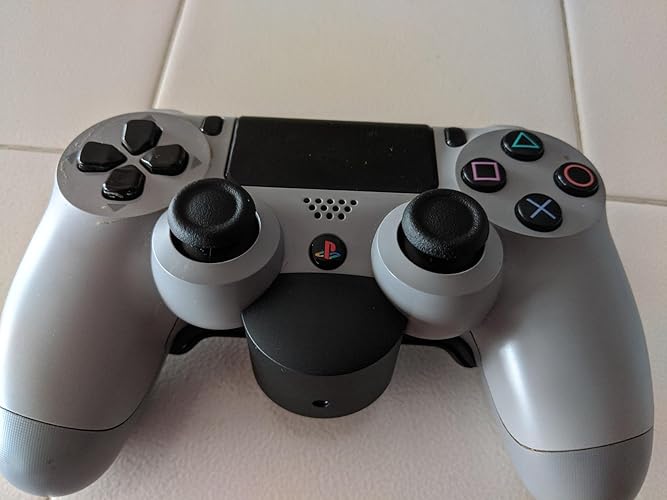
DualShock 4 Back Button Attachment - PlayStation 4

Based on 16,486 reviews
Condition: Used - Good
Checking for the best price...
$39.99
Save $34.95 was $74.94

Buy Now, Pay Later


As low as $9 / mo
  • – 4-month term
  • – No impact on credit to apply
  • – Instant approval decision
  • – Secure and straightforward checkout

Ready to go? Add this product to your cart and select a plan during checkout.

Payment plans are offered through our trusted finance partners Klarna, Affirm, Afterpay, Zip, Apple Pay, and Google Pay. No-credit-needed leasing options through Acima may also be available at checkout.

Learn more about financing & leasing here.

Free shipping on this product

This item is eligible for return within 30 days of receipt

To qualify for a full refund, items must be returned in their original, unused condition. If an item is returned in a used, damaged, or materially different state, you may be granted a partial refund.

To initiate a return, please visit our Returns Center.

View our full returns policy here.


Availability: Only 1 left in stock, order soon!
Fulfilled by RickNicks

Arrives Nov 23 – Dec 8
Order within 9 hours and 47 minutes

Available payment plans shown during checkout

Protect Your Purchase

Easy claims online, fast replacements, no fees

Checking for protection plans...

At a glance

Condition
Used - Good
Dimensions
5.19 x 1.82 x 3.75 in
Weight
0.08 g
Color
Black
Controller Type
Gamepad
Additional Features
Touchpad
Hardware Platform
playstation_4
In the box
Product Instruction
Works with
PlayStation 4 consoles and other devices supporting DUALSHOCK 4 wireless controllers

Features 3

  • Two rear-buttons map-able to any digital button of the controller a dedicated button for remapping back Buttons
  • An digital screen that shows the currently assigned Buttons ability to save and choose from different pre-sets
  • Headset pass-through for connecting any 3.5 mm wired headset to the Controller (headset not included)

Description

The Dualshock4 button attachment was designed to deliver more versatility and performance when gaming while maintaining the comfort and feel of the Dualshock4 you've come to love. Two tactile back buttons Designed for comfort and precision to get an edge in your favorite titles. A dedicated button that allows you to remap inputs on the fly so you are always prepared no matter what game you're playing. A high-fidelity OLED display that provides clean cut information around button assignments as well as the ability to save and choose button presets to fit any gaming situation. Compete at your best while experiencing games with crystal clear communication with friends and teammates through the headset Pass through. PlayStation4 system, PlayStation VR and PlayStation Camera are required to experience VR functionality.

Specs 18

Controller Type Gamepad
Connectivity Technology Bluetooth
Additional Features Touchpad
Button Quantity 2
Hardware Platform playstation_4
Power Source Corded Electric
Compatible Video Game Console Models Sony PlayStation 4
Item Weight 0.08 g

Frequently asked questions

If you place your order now, the estimated arrival date for this product is: Nov 23 – Dec 8

Yes, absolutely! You may return this product for a full refund within 30 days of receiving it.

To initiate a return, please visit our Returns Center.

View our full returns policy here.

  • Klarna Financing
  • Affirm Pay in 4
  • Affirm Financing
  • Afterpay Financing
  • Zip Pay in 4
  • Financing through Apple Pay
  • Financing through Google Pay
Leasing options through Acima may also be available during checkout.

Learn more about financing & leasing here.

Top Amazon Reviews


More convenient gaming experience
With this attachment; you are able to map two programmable buttons to paddle buttons to the back of the controller without disabling the buttons programed. Able to program any button the duel shock controller except the share and touch pad button Very ergonomic. Takes a while to get used to if you never use a controller with back paddles before. This makes it more convenient when playing first person shooters where you don't have to move your thumb off the right thumb stick to press the jump button throwing off your aim (especially in games that has double jumps, slides and/or jet packs). Good for RPGs where you can map any of the D-pad buttons for item use, or other special abilities For racing games you can buttons to shift gears or use weapons Or if you don't like to use claw method when holding the controller (for L2, R2); it's more ergonomic to use this attachment. There's no input lag when using. Able to use this wirelessly. It uses the controller's battery. Has same battery life as if you were to use controller regularly without attachment. Unless you keep touching the LED program buttons LED is not on all the time, only on when you need to adjust something No need to plug into PC/laptop, or go into Ps4 settings to map buttons. Tap the LED on back to change up to 3 profiles Hold to go to edit/map button screen, cycle through buttons you want with paddle buttons, then click LED to set. Single button mapping only. Not able to do multiple inputs, or turbo functionality. To physically install align audio jack and pres in. Once in, it fits like a glove. Button has good click to them. Not too loose and not too firm There's an audio jack pass-through for those who use wired controllers It does have a little weight. When attached will weight about same as X1 controller with batteries inside If you use dock charging stations, some 3rd party ones where you dock from bottom may get in the way with attachment on May not fit some 3rd party controllers If you're looking for a more comfortable gaming experience, or one that gives you a slight advantage when gaming it's a very good purchase. Way better than purchasing a $100+ controller* with back paddles. *Note that some of these $100+ controllers may have extra functionality such as swapable/modular thumbsticks/D-pad with sensibility adjustments, extra padding on grip, able to program multiple inputs into one button, more than 2 paddles, etc. But if you just want back paddles on your controller without the other extras it's a very affordable. ... show more
Reviewed in the United States on January 28, 2020 by Vincent

LOVE IT
I'm just purchasing a second one since they're on sale, and since I'm not sure if these will be discontinued any time soon. While I plan to eventually upgrade to a PS5, the Dualshock 4 is my go-to PC controller, and likely will continue to be even if I discover that I can get the same functionality out of a Dualshock 5 - mainly because the DS5 costs $70 and has features that aren't likely to be compatible with many PC games, if any. The buttons are clicky. They're easy to reach, but I should mention that you don't want to map anything to them that you're going to have to rapidly press over and over. Being located where it is makes it difficult to spam very fast. Nothing to do with the product - this would be the case with a Scuf controller as well. It's very easy to quickly remap the buttons, as well as to switch between profiles. The screen makes it helpful, though it would be even more helpful if it appeared on the front, so as to be able to switch on the fly without having to turn the controller around. It's a very minor gripe though, and not worth taking points away, at least in my opinion. This is a fantastic solution for someone looking for a poor man's Scuf. It's even better in a way, as it's not only far, far cheaper to buy this and a DS4, but because it can be easily switched between controllers. When something goes wrong with your controller, instead of dealing with Scuf customer service/repair and/or buying another outrageously expensive controller, you can just replace the DS4 and throw this attachment onto it. NOTE There is a very, very slight delay with its button presses. I didn't even notice it for months, until I tried to use it while playing a specific Overwatch character and tried to pull of a specific move that requires very specific timing, where two buttons need to be depressed at exactly the same time. I noticed that when using the face buttons, I had no problem performing the move, but that when I used the back-button mapping of the same face button, I could only successfully execute the move if I pressed the back-button very, very shortly before pressing the appropriate shoulder button. I'm talking a matter of milliseconds. The delay won't be relevant in almost any contexts, but it is there, and so I think it's worth mentioning for anyone considering this attachment. ... show more
Reviewed in the United States on January 8, 2021 by PristPen

Well worth the $30 if you play FPS or any other fast paced competitive games
I got a $10 discount from Amazon for pre-ordering the back button attachment. However I would have bought it for $30 as well. Although I wish Sony had an equivalent of the Xbox elite controller, the back button, for the price, does a fine job. There are 3 different programmable modes for the back buttons and it's very easy to configure. The buttons themselves have good tactile feedback and have enough resistance to prevent accidental presses. Initially I was disappointed in the purchase because it made the controller feel awkward. However, in a couple of days I got used to the new grip. I've configured the buttons to operate as the X, O buttons and have noticed a substantial improvement in my movement speed and crouch/jump controls in Modern Warfare. If you are the kind of person who normally places their index fingers on the triggers, the back buttons can also serve as useful R1 and R2 buttons. The only drawbacks of the back buttons are that the installation process is a little awkward. I kept worrying that I would break the 3.5 mm jack while installing them. I also wish that they came with 2 additional buttons so I could program the triangle and square as well. I would have been willing to pay more but understand that others might not feel the same way. ... show more
Reviewed in the United States on January 31, 2020 by Tushar

So far, so good
This is a good device. Im going to cover everything I liked and disliked about it. First of all, the thing is well made. It feels sturdy enough, and it feels like it will last a long time. Honestly I didnt expect less for a 30 dollar attachment, and it delivered. The little screen and the customization is on point. Its extremely easy to set your buttons, the screen is bright enough and overall I feel like it consumes very little battery. Very intuitive. Other not-so good things are that it feels different of course, and it takes time to get used to it. At first I felt like my fingers were spread all over the controller, and my wrist was a little sore, but eventually you get used to it. For actual gaming, Id say it is very responsive and I like the tactile feedback the buttons give. They are clicky, and can be pressed quite quickly. Probably the thing I didnt like the most, was the installation. I know, it looks very straightfoward, but it took me some 15 minutes to finally set in on position. I felt like I was going to break something because I had to apply some considerable pressure. I made several attempts and many times I decided to reverse. Just be careful, I feel it would be easy to break something if you are not careful. Overall I give it a 4. Probably leaning towards 4.5. Nicely made and works as inteded. ... show more
Reviewed in the United States on July 4, 2020 by Johanna Mendez

A great attachment that everyone should have!
This is an amazing little attachment! But just to be clear, it does not add extra buttons. It simply let's you map 2 already existing buttons onto the buttons of this attachment, like the directional buttons which are often used in games and force you to take your fingers off of the joystick. I was a little skeptical at first, but it fits into my hands as I'm holding the controller pretty naturally. I usually hold my controller in 1 of 3 slightly different ways and they're all more or less useful or made redundant using this device. You can set up to 3 profiles, which means by double clicking the center button/screen on the device, you can switch between pre-set button configurations. You can also delete these profiles if you only want to use 1 or 2 configurations. As a side note, I use the GameFreak controller grips for my controller. It did look as if this device would fit perfectly with them, but I ended up having to unwrap and cut off and small section in the back of each side. The attachment has a weird way of being connected to the PS4 controller and the male ports on the attachment are actually designed to flip back up into its default position if pressure isn't being applied to hold it down. After unwrapping my controller, it was still somewhat hard to connect the device. It fits snugly and firmly to the controller once connected though. I'd definitely recommend this device to any serious gamer! I can't believe I haven't heard about it until now! ... show more
Reviewed in the United States on January 18, 2021 by Kevin

Here's my take...
While it does add a small bit of weight, it is a great attachment for the controller. Been using it for a couple months now and it helps me a lot in games like COD and DBD, making my movements much smoother since I don't have to always take my hand off the right analog stick. In terms of feel, it honestly feels just right. It's not hard to press the buttons but it is an adjustment at first as I did find myself accidentally clicking the paddles for a week or two but I got used to it afterwards. After a while, it just becomes a piece of the controller that you hardly realize is a separate attachment. To change what button the paddles are mapped to is super simple and I never found myself accidentally changing the button mapping. Overall, I would say if you play shooters or games with heavy combos, then you will definitely find this a great buy. RPGs not so much. Good to have regardless though. ... show more
Reviewed in the United States on April 8, 2021 by Michelle

All good
All good
Reviewed in the United States on July 15, 2026 by Cristian Castro

Worth it.
Just got the product so i haven't had extensive use with it, but I have played a few games of call of duty with it. Gotta say, not disappointed with it. Feels good in the hands, and it's easy to program the buttons. All you got to do is press and hold the button at the bottom of the screen, then press the back buttons to scroll through a list of buttons you can select on each back button. Default it's circle on the right, X on the left. Here is a list of all the buttons you can program into it. Triangle, circle, X, square, up, right, down, left, L1, R1, L2, R2, L3, R3, and the start button. So no share button or touch pad button. Other than that, all I got to say is the back buttons are really easy to push in. They got a nice click to them. I did find myself accidently hitting the back buttons when I didn't want intend to. Maybe with a little more time I'll get more used to it. As of right now work the money. ... show more
Reviewed in the United States on January 27, 2020 by Dustin
Checking for best price...