Search  for anything...
DJI

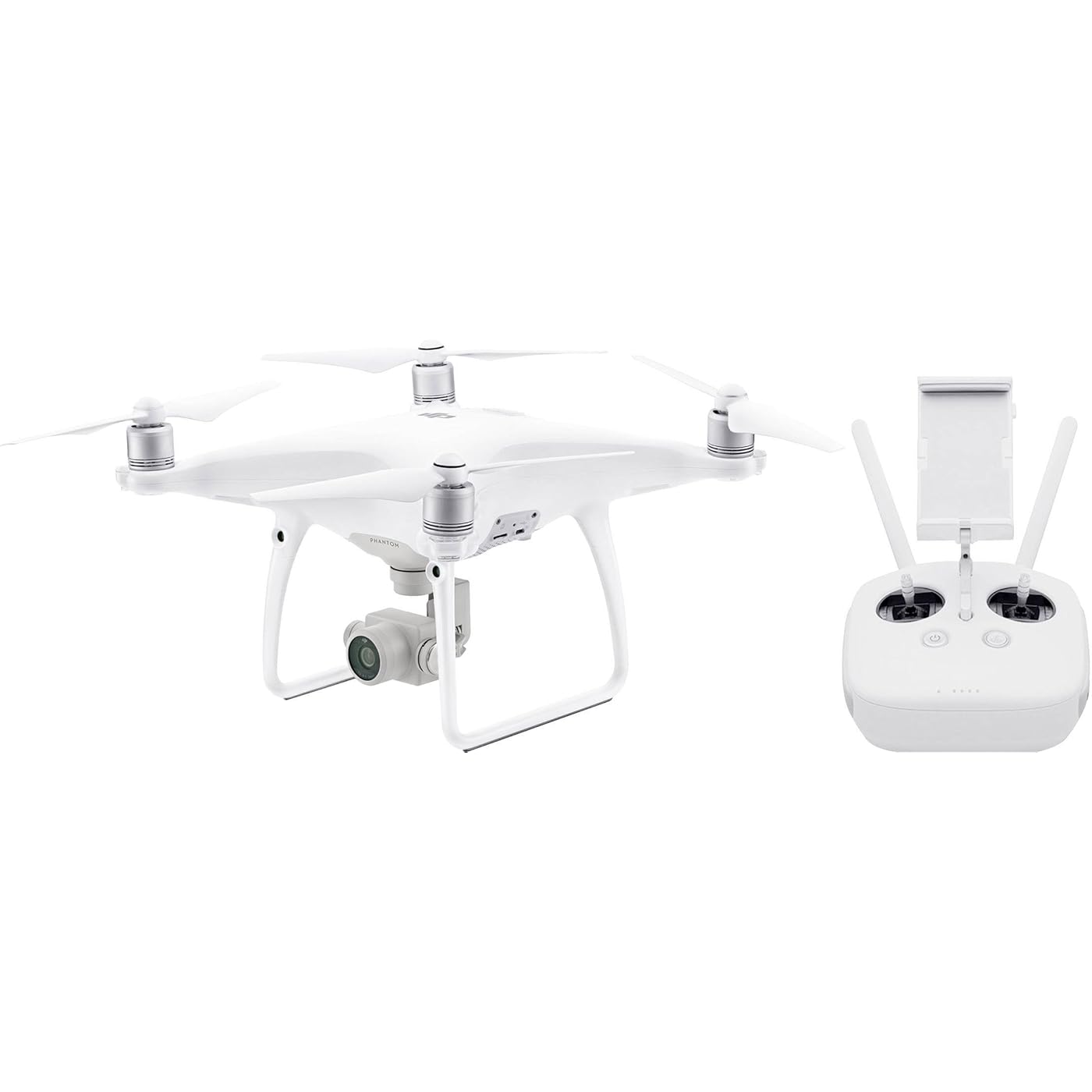
DJI Phantom 4 Advanced Drone (Version UE) |Drone Quadricoptère avec Caméra | Offre 30-Min de Vol | Caméra 4K | Photos & Vidéos HD | 5 Capteurs Optiques
  • Based on 0 reviews
Condition: Used - Like New
Checking for the best price...
$1,599.00 Why this price?

Buy Now, Pay Later


As low as / mo
  • – Up to 36-month term if approved
  • – No impact on credit
  • – Instant approval decision
  • – Secure and straightforward checkout

Ready to go? Add this product to your cart and select a plan during checkout.

Payment plans are offered through our trusted finance partners Klarna, Affirm, Afterpay, Apple Pay, and PayTomorrow. No-credit-needed leasing options through Acima may also be available at checkout.

Learn more about financing & leasing here.

Free shipping on this product

This item is eligible for return within 30 days of receipt

To qualify for a full refund, items must be returned in their original, unused condition. If an item is returned in a used, damaged, or materially different state, you may be granted a partial refund.

To initiate a return, please visit our Returns Center.

View our full returns policy here.


Availability: Only 2 left in stock, order soon!
Fulfilled by Dominion Drones

Arrives Mar 7 – Mar 13
Order within 18 hours and 26 minutes
Available payment plans shown during checkout

Protection Plan Protect Your Purchase
Checking for protection plans...

Brand: DJI


Model Name: Phantom 4


Age Range (Description): Adult


Color: White


Video Capture Resolution: 4K


Connectivity Technology: HDMI


Included Components: Remote Control, User Manual


Skill Level: Advanced


Item Weight: 2 Kilograms


Battery Capacity: 30 minutes


Brand: DJI


Model Name: Phantom 4


Age Range (Description): Adult


Color: White


Video Capture Resolution: 4K


Connectivity Technology: HDMI


Included Components: Remote Control, User Manual


Skill Level: Advanced


Item Weight: 2 Kilograms


Battery Capacity: 30 minutes


Video Capture Format: MP4


Control Type: Remote Control


Material: Magnesium, Titanium


Wireless Communication Technology: Wi-Fi


Are Batteries Included: No


Supported Image Format: JPEG


Remote Control Included?: Yes


Optical Sensor Technology: CMOS, Infrared


Rechargeable Battery Included: Yes


Global Trade Identification Number: 62


Product Dimensions: 3.94 x 3.94 x 3.15 inches


Item Weight: 4.4 pounds


Item model number: CP.PT.000687


Batteries: 1 A batteries required.


Is Discontinued By Manufacturer: No


Date First Available: April 14, 2017


Frequently asked questions

If you place your order now, the estimated arrival date for this product is: Mar 7 – Mar 13

Yes, absolutely! You may return this product for a full refund within 30 days of receiving it.

To initiate a return, please visit our Returns Center.

View our full returns policy here.

  • Klarna Financing
  • Affirm Pay in 4
  • Affirm Financing
  • Afterpay Financing
  • PayTomorrow Financing
  • Financing through Apple Pay
Leasing options through Acima may also be available during checkout.

Learn more about financing & leasing here.

Top Amazon Reviews


  • First impressions has been a fun ride to say the least
The media could not be loaded. DJI Phantom 4 first impressions has been a fun ride to say the least. In the past, the best quadcopter I used was about $150 on Amazon. While it was enjoyable to fly around, it doesn’t surmount to the level of the Phantom 4. No duh…Captain Obvious, right? Until you’ve got some experience with the Phantom 4, coming from a minor league quadcopter, you just don’t appreciate what you have in-front of you. The DJI Phantom 4 is a quality built machine that packs tons of features! Not too mention rather easy to fly. DJI Phantom 4 Unboxing One of the great things about the Phantom 4 is it’s packaging. The box it comes in can be used a case itself. No need to go out and buy a case to protect the drone. The Phantom 4 isn’t cheap, so it’s appreciated of DJI to help the user save some money. I’d rather buy an extra battery than worry about how the drone will be stored. This Phantom 4 is the base model and ships with… Drone 8 propellors/blades Controller Battery 16GB Lexmark 633x SD card Power cable/brick OTG and USB cable Box/case Manuals In this base package there is everything needed to get started. The next couple of accessories to get for the drone would be extra battery or two and a large 4k supported SD card. Apart from those accessories you can get by just fine without the need to get anything else. Thankfully, the case comes with a couple extra slots for more batteries, which is great! Personally, when I get a chance I want to get more batteries to increase the time to fly the drone in one setting. Phantom 4 Setup The biggest piece of advice about getting the drone all setup is to do two things. 1) At least read the Quick Start Guide. 2) Watch many tips and guides YouTube videos as possible. This will help familiarize what the controls are and how to successfully fly the drone. More advice includes… Use a device that can easily be seen outdoors in direct sunlight. Such as a Galaxy S6/7, Note 5 or a tablet. Get the app downloaded. Use the tutorials on the DJI Go app. Don’t be a hero. Take your time and gradually increase your skill level. Let the controller and battery charge fully before first flight. During the first flight, simply maneuver circuits and practice flying inverted. If shooting video with the included SD card, drop the resolution to 1080p to save space on the card. 4K can eat up some storage space quickly. Last, be safe and make sure no people, animals, or obstructions are nearby. Safety is very important. Make sure to know what your local regulations are for flying drones. Ease of Setup One of the things that I was pretty impressed with was how simple the setup process was. Basically, as far as the parts go all there is to be done is twist on the props and slide in the battery. Getting the software going was a little more tricky, but not too difficult. Long story short, upon first flight setup connect the remote controller to the phone or tablet of choice > download the DJI GO app, follow the instructions via app, and turn the drone on. Overall, the entire setup took me about 20 minutes and that’s with reading the Quick Start Guide provided step-by-step. First Flight Got to be honest here, nerves were pretty high because I didn’t want to mess the drone up on the first attempt to fly. I’ve got a little bit of experience flying less of quality quadcopters, but nothing used comes close to this level of drones. Not too mention the cost involved. The Phantom 4 is no inexpensive/cheap toy, it is a piece of equipment and is to be respected. Again, to reiterate the importance of knowing your surroundings and equipment. The more you know, the better. “Knowing is half the battle.” G.I. Joe. After reviewing many YouTube videos, one of the repeating pieces of advice was to start slow and steady. Don’t be hero the first day. Gradually increase difficulty and skills. Part of the advice of starting slow was to work on circuits. Basically, make a square pattern. Left, forward, right, backward, and repeat. Then once comfortable with the square pattern, move onto a rotating pattern. Completing small tasks will help lead to bigger more exciting maneuvers. First Flight First Impressions Being that nerves were high, it was best to discipline myself to basic maneuvers. However, the Phantom 4 is actually easy to learn and fly. That said, I took the Phantom 4 to new heights! After completing and getting to know the Phantom 4, I was able to take the drone high enough to capture some fantastic footage of the surrounding area! The camera on the Phantom 4 by far one of the best you can get and is definitely better than the $150 quadcopters previously flown. The difference is literally night and day. Speaking of night and day, one of the most desired subjects to capture is a sunset. Lately, there’s been spectacular sunsets, which then became a mission to get some sweet footage. The Phantom 4 did not disappoint! Other notable features that pretty great (for first flights) are the auto take off and auto home. A simple button touch will raise the drone for a safe and easy take off. Likewise, the auto home will safely return the drone to the original take off spot. Obviously, the better the phone/tablet, the better the screen, the better the viewing experience. But the Galaxy S7 Edge really adds a clear and crisp view from the app. Truly amazing! Camera First Impressions I’m no camera buff, but I do know if something looks good or not. The Phantom 4’s camera is top notch. This is actually my first time working with gimbal technology and now I want all the things gimballed! The Phantom 4’s camera setup is smooth, crispy, and high quality. It supports 4k resolution to give the best video from an entry level consumer drone. What excites me the most about the camera the most are the creative possibilities to capture footage you normally couldn’t get. Ariel footage adds an element and flavor to videos giving viewers an enjoyable scenic experience. “Use drone footage to tell your story, “Casey Neistat, one of my favorite YouTubers explains how he uses drone footage for his vlogs. That perspective will help operators/creators focus on what makes great videos from drones. That’s how I plan to use my Phantom 4. It’s more than just capturing amazing footage. Battery Life The Phantom 4 comes with a battery and optimization that can last up to 28 minutes. During the time of flight the Phantom 4 seemed to last about 23 minutes, because of the setup process and installing the latest firmware. Actual flight time was about 20 minutes, which is much much more than any quadcopter used before. The best feature about the battery is how fast it charges up. It can be to full strength in less than an hour! The reason that’s awesome is because if you’re like myself at this time I only have one battery. If you want to fly more, it won’t take too too long to charge it back up and hit the skies again. Obviously the more batteries you’ve got, the more flight time. Simply pop in a new battery and start again. More than likely I’ll be getting another battery to be able to have more flight time. Think about it, two batteries just about equal to about an hour of flying! Final Thoughts Overall, I am really impressed and very happy with the Phantom 4. It seems like one of those products that has endless possibilities for creating awesome content and just plain having fun! The build quality is top notch, camera results look fantastic, and rather simple to operate. All those characteristics combine for a great experience. Yes, the price seems heavy, but you get what you pay for. If you are in the market for a new drone that will be easy to get going and give quality results, the Phantom 4 is the way to go! Amazon.com has been pushing out some nice deals lately as well, so be sure to grab one for a discounted price when it the price drops. There’s also bundles to take notice of that come with extra batteries, SD cards, and props. At some point you’re going to need those extras, so minds as well snag em while you’re at it. What’s your thoughts about the Phantom 4? Is it cracked up to what all the hype has made it out to be? I think so. Be sure to watch the video for some footage from the Phantom 4. This was provided with a discount in exchange for an honest review. ... show more
Reviewed in the United States on July 9, 2016 by JKBane JKBane

  • AMAZING, worth every single penny
Pre-ordered through the Apple Store and received on March 14th, actually a day before you could buy in store. My company gets a discount through Apple as a partner, and I was able to get a discount there on this as well. I also own a Yuneec Typhoon Q500 4K, so this is my second quad. Here is what I can say about this incredible machine: 1. Build quality is amazing. The weight is substantial, it is a solid machine. Compared to my Q500, this thing is built like a tank and makes the Q500 feel flimsy and toy-like (and I love my Q500). Although smaller than the Q500 this gives me the feeling of I got what I paid for, hands down. 2. The included styrofoam box is pretty amazing. My Q500's inner is styrofoam as well, but falls apart and leaves flakes of styrofoam on the machine. This is coated with something that makes it hard so it does not flake apart. The latch that locks is solid. Opening the box, it is amazing how compact the package is inside this small case. Compartments for storing two batteries (though one is included), and technically you could hold 3 with 2 in the case slots, and one in the quad. Batteries store on the left side. On the right side compartment for the charger, cables, and the nylon bag of two sets of rotors. The rear is a snug compartment for the controller, and it does fit in snugly. The front slot has the documentation. A very nice free case, compact, solid, and not bad for people that just want to pack the quad from location to location and do not require a more expensive plastic case. More than meets my needs. 3. It took well over and hour for me to unpack this, setup the controller and settings (based on a lot of reviews I read on YouTube), updating the software on both the quad, and the controller (a nice thing is there is an included cable that links your iPad, or Phone to the quad to update, where the Q500 requires you to pull out a cable in the battery compartment, and connect to a computer). You probably could fly this with everything set to the defaults, but you would not be fully utilizing the software. 4. The DJI Go app is complicated. I am using with an iPhone 6+. In comparison to the Q500 settings, the Phantom 4 is way more of a professional device, with far more settings and options to go through. Whereas the Q500, you could literally take out of the box and get flying in about 15 minutes, with this machine you will certainly want to know what all of the settings and controls do before you simply get in the air. My fear was not knowing what everything did in case something went wrong and I had to assume total control in a bad situation. Automation is good, but you need to know how to operate this machine with all those automated functions turned off. 5. The camera- I am on the fence about in comparison to the Q500. I know it is basically the same camera as in the Phantom 3 Professional, with some minor improvements, and I am still tweaking with the camera settings, but I still think the quality of the Q500 4K is slightly better with respect to sharpness and detail. Perhaps when I fully get the settings manually adjusted I will change that statement, but out of the box compared to my Q500 out of the box, the Q500 is a bit clearer. There are way more gimbal settings and adjustments on the Phantom 4, which I like. I did find that the Phantom 4 does not record sound from the camera at all (I did not know that). The Q500 4K does record sound. It probably makes no difference in the end, but I find that the sound of flight in my Q500 videos adds something extra. Lastly on the camera, I will certainly be investing is a nice set of ND filters in the future so I can slow down the shutter speed and get a more cinematic look to the video. The rule of thumb is that your shutter speed should be twice the frame rate- and to get proper exposure with those manual settings you will need filters to achieve that. Most people will shoot video for fun, so it likely would not matter if you were to keep the settings to auto. Unlike things I have read about the stock UV filter on the camera, mine unscrewed with ease. I have also read that Phantom 3 Professional filters fit the Phantom 4. The included filter installed I have read is already a UV filter. The plastic gimbal / camera guard is nice, one piece that just snaps on for storage and covers the camera lens. I ditched the included 16GB MicroSD card from the start for a 64GB card, and have no issues with a budget priced card that met the published specs. You don't need a super high end card to record on this machine. Save your money for a second battery. 6. The controller is amazing. It charged fast, and the balance in my hands with the iPhone 6+ is perfect to the point that I feel that I do not need a neck strap for it. Perhaps with something heavy attached like a full sized iPad I could see my arms getting tired holding after a while. Love the tilt of the holder for the phone, and the way this folds up for storage. Tried out the "Return to Home" button a few times, and quad came to land itself literally within inches of where it took off. My Q500 sometimes will get within 10 feet of the home point when doing the same. The Q500 has the screen built in, but honestly, it can't keep up to the resolution of my attached phone on the Phantom, and there is no lag in transmission like my Q500 has. I flew this machine out as far as I could see it, way farther than my Q500 can go, and there was no lag in either control, and no loss of video signal. 7. The speed of the Phantom is incredible. I did not even try the Sport mode yet. Reaction time from the controller is almost instant, far faster in response time compared to my Q500, even when at a distance. Descent speed seemed about on par with the Q500 when coming down to land from altitude. The Q500 seems more stable to land as I think the stance of the legs are wider. At first I kept thinking the Phantom would tip over- it never did. The Q500 does not auto-take off and land with a button command, only in the Return to Home mode will it auto-land. The automated functions of the Phantom are the selling point. The only one I had time to try out was the Active Track, where the quad will follow and film a subject that is selected within the app. Probably my favorite feature. To get the Q500 to do something like that you need to have the subject holding the controller, or the Wizard so it knows what to lock onto. The Phantom 4 does this through the visual aids and the software, very cool. The other flight modes look amazing too, but I want to read up on how to properly use them before I try them out as I would hate to crash this as it is expensive. The last feature that also worked amazing was the obstacle avoidance. Even flying this at night in a dimly lit parking lot, there was enough light that the Phantom would see a light pole and just stop and hover when it realized it could not go around it or over it. Will have to play around with that feature more to fully trust it, but it is great to have. The Q500 has nothing like it. 8. The battery- wish it came with 2 like my Q500 did, they are much more expensive. I have had a second one on order from DJI since I ordered the Phantom and still have not received it. I have seen the battery last about 23 minutes- but I am flying in 39 degree weather, so I can see how I could not get the published 28 minutes run time. The included charger can charge both the battery and the controller at the same time. 9. Quick release props- amazing, the ones with the black circles go on the rotors with the black dots, the silver circle ones go on the rotors with no black dots, push down and a quarter turn and on and off, not unlike a child-proof pill bottle, same concept. Unlike the Q500 that rotate on and just seem to tighten until you feel like they are on tight enough (you are really never sure), these lock, no questions asked. Amazing. There are 2 sets included like the Q500. To sum it up I would have to say that this is an amazing piece of hardware that you could spend hours learning to fully use, or not based on how you plan to use it. For a professional photographer, there are simply some amazing things you can do with this that are very difficult to pull off with a quad that is less automated. This machine will do the things I have learned to do over time manually, and pull it off with ease and polish given you understand the setup and limits of the hardware. The quality, the features, an easy sell for this price range. If I had anything negative to say about it- it would be that it seems like there are just a ton of updates every time I go to power this thing on, and it appears that it will not fly until everything is updated and checks out- I get that for safety sake, but my Q500 rarely has an update, and never seems to prevent me from starting the machine up if I did not update. In my opinion, in this price range and feature set, this is THE machine to buy, and sets the standard- not perfect, but really really really good. * 3/21/2016 Update- taking back to Apple Store to exchange for another. No matter what camera settings I use on this pictures and video are blurry except for one quarter sized area of the frame. DJI suggests exchange as could be lens issue. I've read of similar issues on the Phantom 3, some were camera related, some the lens, some the firmware. Out of the box and with auto settings shouldn't produce something that looks like it came out of a 1999 cell phone. Hopefully the replacement is a better example- understanding these are early production builds. ... show more
Reviewed in the United States on March 20, 2016 by Hokie115

Can't find a product?

Find it on Amazon first, then paste the link below.
Checking for best price...