Search  for anything...

Corsair Hydro Series H60 AIO Liquid CPU Cooler, 120mm Radiator, 120mm SP Series PWM Fan (CW-9060036-WW)

Based on 5,119 reviews
Condition: Used - Like New
Checking for inventory...

Notify me when this product is back in stock

$119.44

Buy Now, Pay Later


As low as $19.91 / mo
  • – 6-month term
  • – No impact on credit to apply
  • – Instant approval decision
  • – Secure and straightforward checkout

Payment plans are offered through our trusted finance partners Klarna, Affirm, Afterpay, Zip, Apple Pay, and Google Pay. No-credit-needed leasing options through Acima may also be available at checkout.

Learn more about financing & leasing here.

Selected Option

Free shipping on this product

This item is eligible for return within 30 days of receipt

To qualify for a full refund, items must be returned in their original, unused condition. If an item is returned in a used, damaged, or materially different state, you may be granted a partial refund.

To initiate a return, please visit our Returns Center.

View our full returns policy here.


Availability: Unavailable
Fulfilled by Amazon

Available payment plans shown during checkout

At a glance

Condition
Used - Like New
Pattern
Cooler
Style
H60
Model
CW-9060036-WW
Dimensions
14.17"L x 6.29"W x 4.72"H
Weight
1.3 lb
Material
Aluminum, Copper
In the box
120mm radiatorwhite LED pump head
Warranty
5 years
Works with
Desktop

Features 7

  • Precise PWM Control: Dynamically adjust fan speed between 600 RPM to 1, 700 RPM with a 120 millimeter Corsair SP Series PWM fan, making it easy to minimize noise or maximize airflow
  • 120mm High Density Radiator: Experience lower CPU temperatures with a 120mm high density slim radiator
  • LED Illuminated Pump Head: White LED lit pump head adds a touch of brilliance to any system build. Fan Airflow 57. 2 CFM. Noise Level 28. 3 dBA
  • Efficient Cold Plate and Pump: Thermally optimized cold plate and low noise pump design for more efficient, quieter cooling; Radiator Material: Aluminum

Description

The Hydro Series H60 is an all in one liquid CPU cooler with a 120mm radiator built for low noise liquid CPU cooling and bold styling with a white LED lit pump head. Compatible with all current AM4, LGA 1151 and LGA 2066 socket CPUs and equipped with a Corsair 120mm SP Series PWM fan, users can adjust the fan speed between 600 RPM to 1, 700 RPM for precise control over noise and airflow. A high density 120mm slim radiator provides greater surface area for superb heat dissipation, while a thermally optimized copper cold plate and low noise pump ensure heat is quietly and efficiently channeled away from your CPU. With tool free easy installation and Corsair engineered cooling, the H60 is everything you need to keep your CPU running fast, cool and quiet. Fan Static Pressure: 2. 08 mm-H2O.

Specs 22

Product Dimensions 14.17"L x 6.29"W x 4.72"H
Brand Corsair
Power Connector Type 4-Pin
Voltage 12 volts
Cooling Method Water
Noise Level 28.3 db
Material Aluminum, Copper
Maximum Rotational Speed 1700 rpm

Frequently asked questions

This product is currently out of stock. Please check back later for shipping info.

Yes, absolutely! You may return this product for a full refund within 30 days of receiving it.

To initiate a return, please visit our Returns Center.

View our full returns policy here.

  • Klarna Financing
  • Affirm Pay in 4
  • Affirm Financing
  • Afterpay Financing
  • Zip Pay in 4
  • Financing through Apple Pay
  • Financing through Google Pay
Leasing options through Acima may also be available during checkout.

Learn more about financing & leasing here.

Top Amazon Reviews


Reliable, Long-Lasting Liquid Cooler—Great Value and Performance
I bought the Corsair Hydro Series H60 AIO liquid cooler back in 2018 and have used it in multiple builds—everything from full-size ATX towers to compact ITX cases (with slim fans). This cooler has been a rock-solid performer for years. The design is simple and clean, no flashy RGB, just solid cooling. Installation is straightforward with clear instructions, and if you ever get stuck, there are tons of tutorials online. The cooler fit every case I’ve tried, including tighter builds where a single 120mm radiator is needed. The airflow is excellent, and it’s kept my Ryzen processors (which tend to run hot) cool and stable, even under heavy loads. Durability is a huge plus. After years of continuous use, the pump still works great and there have been no leaks or failures. The only downside is that the hoses aren’t super flexible, so if you’re trying to fit this into a very tight ITX build, you might want to look for an AIO with more bendable tubing. That said, it still fit in every build I’ve tried, with a bit of careful routing. Value-wise, this cooler is hard to beat. It’s been reliable, quiet, and consistent through several PC upgrades. There are newer, fancier models out now (with RGB, more flexible tubing, etc.), but if you want a tried-and-true AIO that just works, the H60 is a fantastic choice. Maybe I got lucky with mine, but it’s lasted way longer than I expected and still performs like new. Overall, a highly recommended liquid cooler for anyone needing a solid 120mm AIO. Perfect for ATX, mATX, and ITX builds, just be mindful of the hose flexibility if you’re planning an ultra-compact setup. ... show more
Reviewed in the United States on February 13, 2026 by Paulryanp

works well, if you have enough space
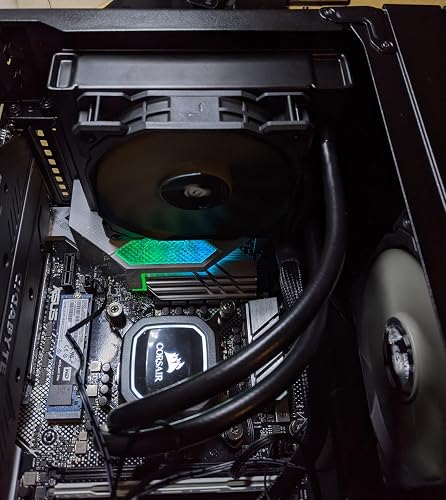
UPDATE Jan2023: Still working well after moving this into my primary desktop system. The room is much quieter than when I had CPU fans running, and the exhaust fan revving up and down under system load is relatively muted. Seems to do just fine even when this 6-core 95W TDP cpu is pegged. Orig review follows. -- This H60 is my 1st liquid cooler, but far from my first system build. It's a pretty easy install. Once installed, it doesn't take as much space as you'd expect, but does take some maneuvering room to get it in place. I included some photos to give a better idea of how it looks/fits in a typical case. It wouldn't fit in more compact case designs. Pictured in a Corsair Obsidian 500D (mid-tower). So far it works very well, keeping my i5-9600KF nice & cool, leaving plenty of overhead for overclocking, or just to run quietly under load. What you need to know: * Mounting requires access to the BACK of the mobo in most cases. In cheaper cases, that means taking everything out. * Fits many different socket types. For the Intel 115x sockets, you'll need to pop the little nubs on the rear bracket towards the center. They don't seem like they'll move, but they actually do move by the necessary 1cm. This I realized after first having an "oh no it doesn't fit" reaction. * 120mm fan is included. I'm a fan of Corsair fans. (heh) * You need a free SATA plug for power for the pump. * The pump is quiet but not silent. It's louder than the 120mm fans in the case, but quieter than a CPU fan spinning up under load. I generally like Corsair products, and this one is no exception. I dislike those whiny old stock CPU fans that spin up/down audibly... This H60 will help keep my new gaming build quiet & performing well under load. Recommended. ... show more
Reviewed in the United States on November 14, 2020 by Omar Siddique

Easy and surprising performance
Purchased for Ryzen 3700X, to replace the Wraith Prism. My biggest problem with the Wraith was its noise. Performance wise it's... acceptable. RGB is very pretty. But good god, the Wraith Prism is LOUD. Enter: Corsair's H60. My first Liquid cooling AIO. For $60? Sure, I decided to give it a shot. I was blown away by how easy it is to install. It mounts right on the AM4 knobs, unlike some other coolers which requires you to remove them. This is mostly a convenience. Performance wise this blows the Wraith Prism out of the... water (hue hue). I saw a 5 degree drop in load temps on the CPU, AND it was quieter. Replace the Corsair fan with a Noctua fan for ultimate silence. The more interesting thing I learned about water cooling is how, unlike the Wraith Prism or tower fans, is how they allow you to prioritize the GPU or the CPU. Ordinarily, both the GPU and CPU share cool air in the case. But if your GPU temps are more important, you can use the AIO as an exhaust, allowing intake cool air to primarily benefit the GPU. This is what I did, and I saw a 3 degree drop in GPU temps. I had always thought that a 240+ AIO would be needed for optimal CPU performance. I was wrong; the H60 is more than enough to handle my Ryzen chip. ... show more
Reviewed in the United States on December 30, 2019 by Derek Wang

Surprisingly Good Performance
I'm using this too cool an i5-11600K on an MSI Z590 Pro. The 11660K has a 125W TDP, so a budget 120mm AIO cooler normally would be inadequate, but it's performed great so far. I was initially worried when mounting, as the back bracket had a bit of wiggle, but after attaching the cooler everything fit securely with no movement. I removed thermal paste that came pre-applied and replaced it with MX-5. I have a very large case, but the hoses were long enough that I had some options on where I would mount the radiator. I went with a top mount and have 4 system fans in a push pull configuration. This keeps my case very cool, and may be helping some with the H60's performance. The only "overclocking" I had done was to enable XMP to get my RAM up to 3200mhz. I ran a few different stress tests for around 15 minutes. Even with an unrealistically high workload on the CPU, the temperature never got about 72 C on any core or the package, and the fans never got to 100%. Not only does this cooler handle a 125W TDP CPU without issue, but there's a surprisingly large amount of headroom for overclocking. UserBench is rating my system in the 97% percentile for systems with similar components. After 1 week I haven't had any issues. If longevity becomes a problem, I'll come back and update this review. I got this product knowing my CPU wouldn't be the bottleneck in my current system and figured I'd replace H60 in a year or 2 once I might have need to push the clock on my CPU. AIO coolers tend to degrade in performance after 2 or 3 years, so there was no need to buy something expensive right now. It was a pleasant surprise when I realized I actually had a lot of space to overclock even with this budget cooler. ... show more
Reviewed in the United States on May 31, 2021 by Keith

Great cooler with a minor flaw for non Corsair cases
Great experience with Corsair and all of their products. I love the style of the cooler in that it matches my build completely. However I did have some difficulties installing the cooler into my NZXT s340 (not elite) , the cooler got in the way of a vertical pci slot and only the bottom screw holds it in place. The cooler has significantly benefited my CPU temps by 5 degrees and benefits overclocking ability in that there is more wiggle room with the overclocks, I got ryzen 5 1600 up to 4 GHz. Overall great cooler for the price, it’s stylish and functional but however it does sometimes get difficult to install in non Corsair cases. ... show more
Reviewed in the United States on July 18, 2018 by Hongbing Zhang

Incredible quality, functionality and price!
I build custom rigs, business, gamers, PC enthusiasts, pretty much the gamete of the PC world. I have used liquid coolers and they work very well, some need maintenance such as adding the distilled water and general maintenance such as cleaning the tubing and the block out occasionally. The Corsair H-60 is self contained, absolutely nothing to do but install it. Installation was simple, however one thing I want to point out, if you have a 1511 socket and you attempt to install the back plate it appears too big, it doesn't line up with the holes in your motherboard. Fear not, the nut at the end of the plate actually slides back to accommodate the 1511 socket, you must use a little force but it will slide into place. That may be your only hiccup, other than that and now that you know the one stick in mud scenario it should take not more than 30 to 45 minutes to install. It comes with thermal paste installed on the copper plate, I removed it and put arctic silver 5, my choice of thermal paste. I love how the simply white lighted Corsair Logo look inside the case and nothing is protruding to cover up my motherboards RGB. My system is running 10 Celsius less than the Gemini 5 from Cooler master and the same for the eve 212. At 65.00 dollars this is the way to go to get started with liquid coolers. ... show more
Reviewed in the United States on May 17, 2018 by SGP

A solid cooling option for compact cases, *Ryzen 5 5600x, AM4 MOBO build*
Background and thoughts on the AIO: I'm a pretty new builder in terms of computers. I built one computer in 2014 that was just alright and I made some upgrades to a store-bought model (new fans, graphics card, ram). After completing my M-ATX build in January 2021, I decided to go full air cooler. The stock fan that comes with the Ryzen 5 5600x is not up to snuff when compared to previous fans. I saw my temps at idle getting close to 60 degrees at times. After having a ton of compatibility issues with an air cooler that clearly was NOT designed with AM4 boards in mind (Cooler Master) and didn't change my temps at all - I jumped into the world of water cooled AIOs. There are SO many options out there for AIO water coolers, and really it comes down to cost and need. If you're just trying to keep a CPU nice and chilled - this is your cooler hands down. I love the simple white LED light frankly, and the price difference to go from this model to one that has RGB wasn't worth it at all. The 120mm fan and radiator fit perfect along the rear of the case and there's a perfect amount of clearance with the motherboard heatsink so there's no rub. If you have a mini-itx or micro-atx case and you want a water cooler - this should fit and do the trick. Installation: This fan comes preinstalled with Intel mounting, and while that might scare some of you off who worry about fiddling with things - it's as easy as literally pulling with a small amount of force on the mounting bracket for it to unseat and let you push in the AMD mount. Thats. It. No screwdriver or worrying about damaging the pump. The pump also comes with thermal paste pre-applied - so unless you're worried about the stock stuff, you really don't need to buy any additional paste. IMPORTANT: If you're using this with an AM4 like I was and having a Ryzen 5600x chip - the stock backplate that came preinstalled on your motherboard is needed. The two clips on the AMD mount slide right onto the stock motherboard mount for AMD - and you tighten the screws (again, no screwdriver needed) until it's snug over the CPU. It comes with one Corsair fan - so if you're really worried about airflow and coolness - you could get a second one to have a push-pull configuration - but I found that the single fan gave me great results and an instant upgrade over my previous air cooler. Speaking of RESULTS: Cool and Breezy. I'm idling in the mid 30's now - with some moderate gaming taking it into the 50s and mid 60s. I've always been nervous about water coolers because of the whole water in the computer thing - but Corsair makes this install a pretty simple process. Just have that backplate otherwise you're in for a world of hurt. OH AND BABY IS THIS THING LOW PROFILE AND QUIET. Seriously - my last air cooler was a monstrosity that sounded like - well a monstrosity. This dropped the sound and temps - the perfect AIO in my honest opinion. ... show more
Reviewed in the United States on February 27, 2021 by Robert

Dropped temps by 20c under load
I'm running the new alienware aurora r9, i7 9700 (non-k), rtx 2080 super ... my system gets toasty. Stupidly I got the one with the air cooler, just didn't catch it, because why would a case designed for liquid cooling even have an air cooler as an option right? WRONG! My temps were crazy out of the box. Low to mid 40s while idle, mid 60s+ during gaming, 80C under load. This was unacceptable. Purchased the h60, after installation - which was a pain due to alienware and has nothing to do with corsair's design - my idle temps were in the low to mid 30s, getting up near 40 under light load, but keep in mind at completely idle on air my temps were always in the 40s. During gaming I'm in the mid 50s consistently. I've seen it hit 60, but it's it not anywhere near 70. In some cases I'm seeing roughly a 20C temperature drop compared to the air cooler. This is a massive improvement on thermals for such a tiny air cooler. My case has one intake fan, and the top mounted radiator fan in it.. That's it. There aren't any more options for intake or exhaust. Even with these limitations the H60 is keeping my system cool. I love it. I'd recommend this to anyone whether you're looking at a custom build, or desperately trying to cool a prebuilt machine like me. It works flawlessly. attached are two pics of the alienware command center software temp monitor before and after installing the cooler. In both pictures pc is running firefox with 6 or so tabs open, that's it. Temps were confirmed on the cpu package with HWmonitor and SpeedFan. ... show more
Reviewed in the United States on November 5, 2019 by Tim M.
Checking for inventory...