




8x2 Multi-View HDMI Split KVM Switch - Dual Monitor, Supports Single to Eight-Screen Modes, Split & PIP Function, Sync, Through-Screen, EDID, 4K30Hz, Hotkey Switching




Buy Now, Pay Later
- – Up to 36-month term if approved
- – No impact on credit to apply
- – Instant approval decision
- – Secure and straightforward checkout
Ready to go? Add this product to your cart and select a plan during checkout.
Payment plans are offered through our trusted finance partners Klarna, Affirm, Afterpay, Zip, Apple Pay, and Google Pay. No-credit-needed leasing options through Acima may also be available at checkout.
Learn more about financing & leasing here.
Selected Option
FREE 30-day refund/replacement
To qualify for a full refund, items must be returned in their original, unused condition. If an item is returned in a used, damaged, or materially different state, you may be granted a partial refund.
To initiate a return, please visit our Returns Center.
View our full returns policy here.


At a glance
- Condition
- New
- Style
- USB 3.0 8x2 HDMI Multi-view
- Model
- CKLau-82MVKVM
- Weight
- 5.7 lb
- Color
- Onecolor
- Material
- Metal
- Operation Mode
- manual
- Works with
- Computers with HDMI output
Features 5
- 1. Multi-view KVM HDMI Switch: 8 computers in, 2 monitors out. This KVM switch allows up to 8 computers and 2 monitors to share one set of USB keyboard and mouse, audio, and 2 USB 3.0 peripheral devices. Supports emulation EDID. Supports single-screen, quad-screen, and eight-screen modes, including split and picture-in-picture functions, sync, through-screen.
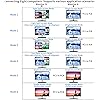
- 2. When you connect 8 PCs (each with 1 video output) to the KVM switch, 6 scenarios emerge: one monitor remains the main display for any computer (editable); the other can show eight equal split screens (each for a different computer, non-adjustable), or eight split screens with a larger main display on the left and seven stacked sub-displays on the right (interchangeable), picture-in-picture (four computers),four split screens (four computers), a single screen (any computer), or mirror screen.
- 3. Connect 4 dual-graphics card PCs to a KVM switch for 6 scenarios: 1. Extended Mode: One monitor splits into four (top for PC1's main/secondary, bottom for PC2's). The other shows either PC1 or PC4's main screen. 2. Duplicated Mode: Like Extended, but top duplicates PC1; bottom shows PC2. 3. Slicing Mode: Similar to Extended with a combined view for each PC. You can choose between Extended, Duplicated, or Splicing Mode for just one PC, utilizing both monitors for flexible display management.
- 4. Computer Switch for 8 Computers: We have been certified HDMI adopters for over 10 years. Resolution only compatible 3840x2160@30Hz and 1080P@60Hz. If your device is not in the above two resolutions, please adjust the input and output resolutions of your device to 4K@30Hz or 1080P@60Hz.
- 5. Monitor Switch for 8 Computers: Supports synchronization operation mode (synchronous operation of many computers with the same configuration). Through-screen operation mode(the HOT KEY must be on). Supports keyboard hotkey switching, mouse switching, wired remote push-button switching, and manual button switching.
Description
Designed for control rooms, security monitoring and technical workstations where multiple computers must stay visible and easy to manage. Connect up to 8 HDMI computers with one video output each, or 4 computers with dual video outputs. View selected sources, 4-way or 8-way split screens, and picture-in-picture layouts across two HDMI monitors. For 8 computers with one HDMI output each, choose the layout that fits your workflow: • One selected computer full screen • 4-way or 8-way split view • Picture-in-picture with one main source and live sub-displays Use one monitor for multi-view monitoring and the other for the computer you want to operate. Keep critical systems visible without stacking separate switches. Use multi-view layouts to monitor security, servers, test systems, broadcast sources or workstations, then switch keyboard and mouse control to the computer you need. When each computer provides two video outputs, the switch supports flexible extended, duplicated and split-screen arrangements. Keep a selected computer on one display while using the other display for multi-view monitoring or a second output. Choose the layout that best fits your application—without changing cables. Keep a selected computer on one display while the other display provides multi-view monitoring or a second output. Choose the layout that matches your workspace without changing cables. EDID emulation helps computers retain their display settings when you switch between sources, reducing display re-detection and helping maintain a smoother workflow. Built by an HDMI adopter with more than 10 years of experience. Two USB 3.0 ports support shared peripherals and data transfer up to 5Gbps. Use the audio output to share a headset between connected computers.
Specs 28
| Operation Mode | manual |
|---|---|
| Contact Type | Normally Open |
| Connector Type | Hdmi |
| Brand | CKLau |
| Switch Type | Push Button |
| Terminal | Screw |
| Material | Metal |
| Item dimensions L x W x H | 10.62 x 4.33 x 1.65 inches |
| Circuit Type | 8-way |
| Mounting Type | Panel Mount or Surface Mount |
| Actuator Type | Push Button |
| Number of Positions | 8 |
| Controller Type | Push Button |
| Control Method | Remote |
| Connectivity Protocol | Hdmi |
| Control Type | Manual, Remote |
| Color | Onecolor |
| Item Dimensions | 10.62 x 4.33 x 1.65 inches |
| Unit Count | 1 Count |
| Number of Items | 1 |
| Material Type | Metal |
| Contact Material | Metal |
| Specification Met | Hdmi 2.0, Usb 3.0 |
| Brand Name | CKLau |
| Model | CKLau-82MVKVM |
| Manufacturer | CKLAU TECHNOLOGIES INC. |
| Item Weight | 5.7 pounds |
| Part Number | KVM Switch |
No specs match.
Frequently asked questions
To initiate a return, please visit our Returns Center.
View our full returns policy here.
- Klarna Financing
- Affirm Pay in 4
- Affirm Financing
- Afterpay Financing
- Zip Pay in 4
- Financing through Apple Pay
- Financing through Google Pay
Learn more about financing & leasing here.


