Search  for anything...

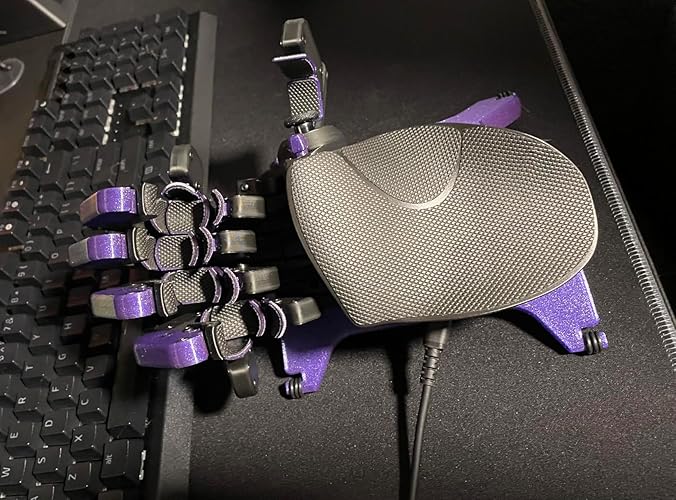
AZERON Gaming Keypad, Programmable One Handed Gaming Keyboard, with Hall Effect Analog Thumbstick and 30 Programmable Keys, 3D Printed Customized Keypad, for Righties (Black, Cyborg ll)

  • Based on 235 reviews
Condition: New
Checking for the best price...
$313.34 Why this price?

Buy Now, Pay Later


As low as / mo
  • – Up to 36-month term if approved
  • – No impact on credit to apply
  • – Instant approval decision
  • – Secure and straightforward checkout

Ready to go? Add this product to your cart and select a plan during checkout.

Payment plans are offered through our trusted finance partners Klarna, Affirm, Afterpay, Zip, Apple Pay, and Google Pay. No-credit-needed leasing options through Acima may also be available at checkout.

Learn more about financing & leasing here.

Selected Option

Free shipping on this product

30-day refund/replacement

To qualify for a full refund, items must be returned in their original, unused condition. If an item is returned in a used, damaged, or materially different state, you may be granted a partial refund.

To initiate a return, please visit our Returns Center.

View our full returns policy here.


Availability: In Stock.
Fulfilled by AZERON

Arrives Sep 11 – Sep 16
Order within 4 hours and 15 minutes
Available payment plans shown during checkout

Protection Plan Protect Your Purchase
Checking for protection plans...

Color: Black


Size: Cyborg II Standard


Features

  • The new Azeron Cyborg II Gaming Keypad offers advanced adjustability and ergonomics. Its adjustable parts ensure a perfect fit. Designed for right-handed gamers, it replaces the keyboard for left-hand use while the mouse stays on the right.
  • The new Hall Effect thumbstick eliminates stick drift and supports WASD or 360 analog movement (in compatible games). Customize dead zones, sensitivity, and cone angles, map eight directional zones, and enable analog smoothing. Can function as a mouse. Features easy calibration and a mid-click function.
  • Exclusive software provides advanced customization, including RGB lighting for game profiles, fine-tuned thumbstick settings diagonal keybinds, and analog smoothing. The thumbstick can also function as a mouse.
  • The redesigned main board allows future Cyborg II software updates and modular enhancements.
  • 30 mappable inputs can be configured as keyboard inputs, controller/mouse inputs, or Macros. Each button is individually connected with no connection matrices
  • Store up to six control layouts directly on the keypad, with additional layouts managed via intuitive Azeron software.
  • Perfect for various gaming genres, including FPS, MOBA, and RPG games.
  • Medium-sized keypad, ideal for hand sizes ranging from 6.3 to 7.5 inches. It can be used by individuals with smaller hands, though comfort may vary.

Brand: AZERON


Compatible Devices: PC


Connectivity Technology: USB-C


Keyboard Description: Gaming


Recommended Uses For Product: 3d, 3d modelling, Photo Editing, Programming, Video Editing


Special Feature: Ergonomic, Programmable Keys


Color: Black


Keyboard backlighting color support: RGB


Style: Contemporary


Material: PLA, PETG


Compatible Devices: PC


Connectivity Technology: USB-C


Additional Features: Ergonomic, Programmable Keys


Keyboard Backlighting Color Support: RGB


Power Source: USB Power


Switch Type: Tactile


Keyboard Layout: QWERTY


Hand Orientation: Right


Button Quantity: 30


Minimum Required Operating System Version: Mac OS 14 Sonoma, Windows 11


Number of Keys: 30


Number of Sections: 1


Color: Black


Style Name: Contemporary


Theme: Gaming


Enclosure Material: PLA, PETG


Brand: AZERON


Keyboard Description: Gaming


Antenna Location: 3d, 3d modelling, Photo Editing, Programming, Video Editing


Built-In Media: USB Cable


Model Number: Cyborg II


Model Name: Cyborg II


Series Number: 2


Global Trade Identification Number: 55


Unit Count: 1 Count


Manufacturer: Azeron


Number of Packs: 1


Number of Items: 1


Generation: 2nd Generation


Warranty Description: 1 Year Manufacturer


Frequently asked questions

If you place your order now, the estimated arrival date for this product is: Sep 11 – Sep 16

Yes, absolutely! You may return this product for a full refund within 30 days of receiving it.

To initiate a return, please visit our Returns Center.

View our full returns policy here.

  • Klarna Financing
  • Affirm Pay in 4
  • Affirm Financing
  • Afterpay Financing
  • Zip Pay in 4
  • Financing through Apple Pay
  • Financing through Google Pay
Leasing options through Acima may also be available during checkout.

Learn more about financing & leasing here.

Top Amazon Reviews


  • Quality Product. Very adaptable.
Color: Black Size: Cyborg II Standard
Quality Product. Very adaptable. I've had this Cyborg II for about a month. I've used it for Foxhole, Battlefield, Helldivers II, and Killing Floor. Once adjusted to my hand all the buttons are easy to reach and require very little movement to activate. The travel required to make a button click is just as I want it to be. The adjustments lock in well and don't seem to drift. By that I mean that the towers that hold the buttons don't move once properly adjusted and tightened down. I have a medium, maybe large, wide hand. I was able to get it to fit me well. The pinky tower could maybe be a little better aligned with my pinky finger, but it is still very usable. All buttons are easily reachable without shifting my palm. All the parts seem to be as sturdy as they should be. As a whole, it has a nice solid weight to it. The printed plastic has a professional, quality, and rugged look. Mine is all black. The button pads have a slight texture to them that feels good and provides feedback as to how hard your finger is pressing. But, it does not irritate my fingertips even after hours of gaming. The software is easy to learn and provides many great functions. The macros are very flexible. Take your time adjusting it to your hand. To better fit a wide hand, the towers can be slid as far apart as the rails will allow and then each tower from pointer to pinky pivoted progressively more clockwise. This helps compensate for the distance between your knuckles. I think your goal will be to make each tower as parallel with each finger as possible: parallel as you look at it from above. Adjust as little at one time as you have patience for. If you leave too many things loose at once you will accidentally mess up adjustments. But be sure not to force any adjustments! Expect to revisit earlier adjustments to tweak them. I haven't changed its current (final?) physical adjustment for about 2 weeks. The key mapping is so incredibly flexible I'm still fine tuning on a couple games. I recommend! ... show more
Reviewed in the United States on January 16, 2025 by Amazon Customer

  • Great product, just couldn't beat 40 years of M&KB muscle memory
Color: Galaxy Purple Size: Cyborg II Standard
Very cool product. It does exactly what it promises, feels comfortable in hand, and is super easy to customize. Unfortunately, at 40 years old, my hands and brain are deeply stuck in their mouse & keyboard ways. I just don't have the time to rebuild decades of muscle memory to master it right now. Still giving it 5 stars because it really is an awesome piece of gear! ... show more
Reviewed in the United States on August 13, 2026 by Becky Frazier

  • Lots of buttons!!! Better than trying to use keyboard keys.
Color: Red Size: Cyborg II Standard
Reviewing the Azeron Cyborg 2: So to start with I must say that I prefer to sit back and play games with a hand held controller. PS or X-box type at this time. But my issue with all hand held controllers that I have tried is aiming is harder than with a mouse. Some games handle it better than others. The game I wanted to play more now (Arc Raiders) does not handle the controller aiming well and two many buttons needed for current hand held controllers available. I tried to find a better hand held controller with better curve configurations with stop limits on the curves.....not really having any luck and also no controller is taking advantage of all those fingers I have on the back of the controller!!!! Boo to hand held controller designers. So a friend recommended the Azeron and mouse combo. First thing I will say is that shipping cost a lot even with prime ($40). And the shipping time was reported as weeks from overseas. Low and behold it came in two days!!!! Overnight from overseas! Now that shipping cost did not seem so bad. But I would have choose slower with no shipping cost if I had the option. This desktop controller comes with the torx driver you need to adjust the position of all the joints (lots of joints). You can slide each finger pod in and out, side to side, and angle them up and down. Same with thumb joystick. So far the only extra joint I would have liked is angling the outside thumb bump switch pod. Oh, I should mention that I use this on both the PC and Mac as I game through G-Force Now mostly. You have to have a Windows PC to configure the On Board Memory settings of this controller. It works fine on Mac after that. Only issue I ran into is switching profiles while connected to Mac would sometimes lock up the switching. I have to unplug and plug into PC to clear it. I think plugging into a power brick would have cleared it also, but have not tried (I don't really normally switch profiles while plugged into Mac). The only thing I am missing is Macros when not on Windows PC. Darn, I do wish the macros were stored in On Board Memory also like they are for my gaming mouse. This is one reason for partial star removal also (please provide either Mac version software or macros in OBM. Now the biggest issue I am having with moving to this and mouse in this game is that I can not use the joystick on the Azeron as x-box type while using the mouse and this is a game issue to be sure. Very disappointing (game programmers please sort this out!!!). The joystick ASDW simulation is way better than using keyboard, but not near as good as x-box analog stick mode. This is a game issue...so no partial star off for that. The controller can do it...the game can not (I did not mention that the issue is the game jumping back and forth between keyboard and controller mode while moving = all sorts of issues). The next biggest issue using desktop controllers is just comfort. I dislike being tied to the desk!!!! My arms and body get so sore. With this Azeron controller my fingers have no place to rest without pushing buttons by accident. I had to disable some buttons just to have a place to rest my fingers. That is OK as there are so many buttons. I do not find myself using those overhead knkle buttons much....but I still like that they are an option. I set two of them to be the same thing (like melee weapon) as I have trouble just hitting one at a time. Maybe I should switch the flashlight up there as that is something I do not use much. Anyway, I love companies trying to solve the mouse/keyboard issues that take away from gaming fun. I still would prefer the ultimate hand held controller where I do not have to sit at the desk!!! I will use this until I can find that perfect hand held controller that I do not believe is made yet. ... show more
Reviewed in the United States on February 4, 2026 by Brian B

  • Take your time it’s worth it.
Color: Galaxy Purple Size: Cyborg II Standard
I was a little worried I wouldn't like this thing. I find it really comfortable with the grip tape applied. The software is really good and intuitive. I’m still making small adjustments to the button placement and I’m loving it. I use this in Halo infinite and Cyberpunk(more games to follow). I’m a controller user primarily so this did take me a couple days to get used to. Once I set the buttons up in the software I take a picture so I can refer to it quickly. I try to keep the button positions and actions the same with different games to make it less confusing (I keep the run, jump, reload the same button position with different games and profiles). You can title your buttons once you assign them (run,jump,reload,crouch), it helps me to keep buttons straight. Yeah it takes some getting used to but now it’s my favorite game input device/keyboard. Make sure you are gentle with the adjustment screws, I did strip one. I was able to get it out and replace it luckily. Yeah, for a hand built controller the price makes sense, I’m glad I bought it. I’m not sure how easy a transition it is coming from mouse and keyboard, but from controller it wasn’t horrible at all. I’ll probably order another one as a gift. Update: gift was given and they love it. I highly recommend the grip stickers for the fingers and palm rest. It just makes it feel extra comfortable. I love this weird thing. ... show more
Reviewed in the United States on May 21, 2025 by Cat

  • Pure Fire!!
Color: Galaxy Purple Size: Cyborg II Standard
I was on the fence about ordering this. I primarily wanted it to use for modifier keys for MMOs, literally. I have used the Razer Naga since its inception circa 2008, but remapping a keyboard to make easier finger positions for Alt, Ctrl, and Shift has become just stupid. I finaly just said "screw it" and ordered this. I am glad I did! I've already mapped about 16 keys to this on top of the modifier keys. I have read some reviews about using the spacebar as jump for all these years, and that was another concern of mine, but that was EASILY overcome (I bound spacebar to the index finger right most button and I have not looked back). This thing is simply amazing. I have huge hands, they measure 2 inches over the "medium" size, or 2 inches into their "large" size, if you will, and that was another concern I had ordering it here, where the only option is medium. Not even an issue. This package included the curved palm rest, and my big ole hands and fingers fit with everything basically maxed out, but they fit, and very comfortably as well, which is huge. It's built like a brick shih house to boot, honestly, very weighty, quality construction, very much unlike the aforementioned company whose mice I have been using near 20 years. The Cyborg 2 is very hefty, the screws don't take oer forcing of any kind in order to set the positions and keep them there. The buttons are very light weight, which is taking a little getting used to with my heavy sausage links, but it's not to the point where it is annoying or impossible, it's all about taking the time (and I mean TAKING YOUR TIME) to set this up using EVERY screw available for positioning. Every screw on the exterior of this has a purposeful function. Once you take the appropriate amount of time to adjust everything, and I mean everything, this truly not only fits like a glove, but becomes a cyborg hand, it's pure fire, seriously, this thing is insane. Having used the Naga and other custom accessories over the last 20 years, I am not having a problem adjusting to the keybinds I have created for it. I also have 4 monitors, so if I really needed to, I could keep the app open on another monitor with said keybinds listed to navigate my way. I don't type up reviews very often, it takes one heck of a flop, or in this case, one heck of a zinger for me to want to put a product where it belongs. This one gets huge praise! Azeron has outdone themselves, and for that, I thank them! ... show more
Reviewed in the United States on August 27, 2025 by JL

  • Worth it!
Color: Galaxy Purple Size: Cyborg II Standard
Totally worth it! I was a little bit hesitant on the price, however once I got it and learned to use it, 100% worth it! Mainly playing elite dangerous in VR, hate blindly trying to hit my keyboard to change things, the program to assign keys is well done and easy to use, great adjustments on the pad as well. Fits my hand , comfortable, and was plug and play with my computer. Very happy with it ... show more
Reviewed in the United States on March 15, 2026 by Chris Frank

  • Great but I’m having issues
I love this product and bought one for myself Christmas of 2024. It’s now January 2025, and my thumb stick is stuck in the up position making any game or use of the device impossible. I’ve yet to get any response from Azeron and don’t know when I can expect a resolution. I don’t want to refund as I like the device and hope I can get this resolved. ... show more
Reviewed in the United States on January 10, 2025 by Omunique Johnson

  • You will not regret buying this
Color: Black Size: Cyborg II Standard
I absolutely love this product and anybody who can afford to buy. It should. Regardless of the learning curve, it is worth it.
Reviewed in the United States on July 21, 2026 by Joseph Mahony

Can't find a product?

Find it on Amazon first, then paste the link below.
Checking for best price...