Search  for anything...

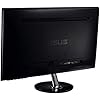
ASUS VS239H-P 23" Full HD 1920x1080 IPS HDMI DVI VGA Back-lit LED Monitor

  • Based on 1,290 reviews
Condition: New
Checking for the best price...
$199.89 Why this price?

Buy Now, Pay Later


As low as $33.32 / mo
  • – 6-month term
  • – No impact on credit
  • – Instant approval decision
  • – Secure and straightforward checkout

Ready to go? Add this product to your cart and select a plan during checkout.

Payment plans are offered through our trusted finance partners Klarna, Affirm, Afterpay, Apple Pay, and PayTomorrow. No-credit-needed leasing options through Acima may also be available at checkout.

Learn more about financing & leasing here.

Selected Option

Free shipping on this product

This item is eligible for return within 30 days of receipt

To qualify for a full refund, items must be returned in their original, unused condition. If an item is returned in a used, damaged, or materially different state, you may be granted a partial refund.

To initiate a return, please visit our Returns Center.

View our full returns policy here.


Availability: Only 1 left in stock, order soon!
Fulfilled by ❤️️⁡⁢ ⁡⁢OnlinEmart⁡⁢ ⁡⁢ (We record SN)

Arrives Mar 11 – Mar 18
Order within 14 hours and 34 minutes
Available payment plans shown during checkout

Protection Plan Protect Your Purchase
Checking for protection plans...

Style: 23" IPS HDMI D-Sub DVI


Features

  • Slim Design 23-inch display with 1920x1080 resolution and AH-IPS technology with wide 178 viewing angles
  • Single Inputs of HDMI, D-sub and DVI with HDCP Supported and Quick 5ms Response Time
  • Exclusive Splendid Video Intelligence Technology automatically optimize image quality with intelligent color, brightness, contrast and sharpness
  • Compliance and Standards- Energy Star, BSMI, CB, CCC, CE, CEL level 1, C-Tick, ErP, FCC, Gost-R, J-MOSS, PSB, RoHS, TCO6.0, UL/cUL, VCCI, WEEE, WHQL (Windows 7)
  • 50,000,000:1 ASUS Smart Contrast Ratio dynamically enhances the display's contrast to delivering lifelike images. ASUS Rapid Replacement: 3 Years Warranty, 2 way free shipping

Description

Boasting the fastest response time on an IPS monitor, the VS239H-P IPS LED monitor delivers crisp, clear visuals for both the home and the office. For added convenience, it’s VESA mountable to neatly place on a wall and has a built-in power brick while still remaining slim. Featuring Full HD quality visuals and with an energy-saving LED-backlit display, the VS239H-P is the ideal monitor for any task at hand.


Standing screen display size: ‎23 Inches


Max Screen Resolution: ‎1920 x 1080


Brand: ‎ASUS


Series: ‎ASUS COMPUTER INTL


Item model number: ‎VS239H-P


Item Weight: ‎7.7 pounds


Product Dimensions: ‎7.88 x 21.73 x 15.76 inches


Item Dimensions LxWxH: ‎7.88 x 21.73 x 15.76 inches


Color: ‎Black.


Voltage: ‎100240 Volts


Department: ‎Lcd


Manufacturer: ‎Asus


Is Discontinued By Manufacturer: ‎No


Date First Available: ‎June 22, 2012


Frequently asked questions

If you place your order now, the estimated arrival date for this product is: Mar 11 – Mar 18

Yes, absolutely! You may return this product for a full refund within 30 days of receiving it.

To initiate a return, please visit our Returns Center.

View our full returns policy here.

  • Klarna Financing
  • Affirm Pay in 4
  • Affirm Financing
  • Afterpay Financing
  • PayTomorrow Financing
  • Financing through Apple Pay
Leasing options through Acima may also be available during checkout.

Learn more about financing & leasing here.

Top Amazon Reviews


  • excellent for me!
this monitor is a huge upgrade for me, coming from a nearly decade-old dell 17-incher, that despite its age was still performing ably - just wanted something more. this... well this is definitely more! the picture quality of this monitor is fantastic, and leagues and leagues beyond my old TN monitor. a few notes from the unboxing and initial plug-in: i found the default brightness, contrast, and saturation to be too high. i also had a bit of trouble getting the full resolution to appear without flicker - but i found that this was due to the need to update the driver for my graphics card. i also tweaked the focus setting until it looked right to my (undoubtedly different than your) eyes. once those tweaks were done, all was in good order. i did try out the eco-mode setting - skip it; it caused the brightness and contrast to change by intervals depending upon the amount of text that was visible on a spreadsheet, and was very distracting. fortunately it's pretty green on electricity as it is. a couple things to note from other reviews i've seen around the interweb - some people complained about a "film" over the screen, and indeed, while it's not truly a matte finish, it's not glossy either. the screen has a sort of pearl finish, so that on white or bright blue screens or screen areas, there is an iridescence there that some may find distracting for very detail-oriented editing projects. on a completely black screen (term used loosely), there is indeed noticeable light bleed from all corners, most noticeably on this particular one on the lower right corner. additionally, this light-bled area, when seen from an angle slightly to the side, does have a bit of a maroon tinge to it. coming from an old TN monitor, however, it still looks good, and that tinge is something i'm used to seeing i suppose. another big difference is viewing angle - and a lot of reviews seem to tout this as a hugely important aspect of the experience (maybe i'm old fashioned, but i'm usually in front of my computer when i'm using it, so this isn't a major thing for me). i did look at it from side angles, and while the colors stayed true, there was a little loss of brightness as the angles got more and more obtuse. to test the various things i'll use it for, i switched only between the standard and theater "splendid" modes. in standard mode, a large spreadsheet, zoomed out, in a small font, was crisp as new linen. so were a couple of detailed google sketchup projects i pulled up, as well as photos i pulled up for my amateur-but-anal-retentive style of editing. the pearlescence of the finish did nothing to detract from any of these projects, and honestly i didn't even notice it, except when i was deliberately looking at it. in theater mode, the crash scene in Super8, streaming from Netflix, was crisp, clear, and enjoyable to watch. the light bleed / maroon issue wasn't a distraction in watching this scene - which occurs against a black background; maybe being in theater mode helped in this regard due to the naturally lower brightness level. (incidentally, this scene is where i well noticed and corrected the color saturation level, so that it no longer appeared that all the children in the scene were wearing lipstick.) truly, the light bleed i'd seen on a black screen made not the slightest bit of difference to my enjoyment or to the functionality of the screen. i didn't notice it, and don't remember even if i looked for it - but if i forgot to look for it then it wasn't really an issue, was it? it should be considered, in all this, that i was coming from an old 17" 4:3 TN monitor (that needed cleaning, too, if i'm honest) - i am not coming from a 23" IPS monitor of a different kind to this one, and if that's you, you might seriously consider seeing this in action or side-by-siding it with something else if at all possible, particularly if your profession or obsessive hobby requires that you use this monitor to fine-tune photos or something. the only connection i used was VGA via the supplied cable. i did not use either the HDMI connection or the DVI, so i cannot comment on their functionality. are there built-in speakers? honestly, i don't know; i think there are but they'd only work with an HDMI connection, which i didn't test. and you should never read a review of built-in monitor speakers, since they're always going to be lousier than a ten-dollar pair of discrete speakers. only other comment - the OSD and buttons to navigate it are unintuitive - the up-down-left-right of it takes some getting used to. they're also very uncomfortable to use, being mounted along the bottom edge. not a big deal all in all, but worth mentioning if your a constant fiddler. overall, i'm extremely pleased with this, and i would wholeheartedly recommend it. for the price (which amazon lowered by 5 bucks IMMEDIATELY after i bought it, you jerks!), you can't beat it. ... show more
Reviewed in the United States on October 10, 2012 by Julian P

  • 0.2 star off for the rebate hassle, The MONITOR is totally perfect for my purposes.
The monitor is totally perfect now for my purposes. I take off 0.2 for the pain in the butt of going through the huge number of steps and the eight week delay in getting the $10 rebate on a temporary Master card unless you want to get $9 in one week instead. You could reasonably decide just to ignore getting the rebate. Anyway, I am a retired professional. For over 15 years it was part of my job to select computers and monitors for 10 to 25 person businesses. I am careful. I selected this based on days of research, with the decision finally based on an extended review at wirecutter that says that THIS ONE IS THE ONLY ONE until you get up to paying $246 for a 24" monitor from a different company. The review advises saving up the $246, but I was in a hurry. As warned in many reviews of a number of monitors, the default setting was WAY too bright. Just be prepared to fix that. The monitor has control buttons, and you have whatever graphics properties controls that you have in your operating system. To get the visibility perfect, I set the brightness control on the monitor to zero (0), the color temp to "warm," and the brightness control under "Graphics Properties" in Windows 7 to minus 18 (-18). Black is now black and near white is near white, not totally whited out. The colors are excellent. I fiddled with the contrast a bit, but not a lot. I am VERY HAPPY with my purchase and am happy that I have no doubts at all. It is mainly for me to be able to work, but I also look at pictures and watch movies. I have a big old serious quality sound system hooked up to my computer for music and movies, so the lack of speakers in the monitor is a plus for me. P.S. Never mind about the non-existent height adjustment. I have this sitting on my desk on top of a six inch (6") high stack of six very hard and flat 8" X 11" paper-bound seminar books so that the top of the monitor sits even with the top of my head when I am sitting upright. That is the professional recommendation, and I can attest to it being the best way to work comfortably and to see for hours at a time day after day. The height can be adjusted by adjusting the number of books in the pile. :-) UPDATE: Amazon product support was the only easy part of the experience so far of doing what is necessary to get that little $10 rebate. I called to find out whether sawing the shipping label with the bar code out of the box and sending it to the ASUS rebate center as demanded for the rebate was going to deprive me of something that I might need if I ever need service under the ASUS warranty. I reached a tech support person. The woman was lovely and explained that no, I would not need the bar code again, just the invoice. She kindly sent me the direct link to the invoice at Amazon. I imagine it will be there if and when I might ever need it. I ran the monitor continuously for a week and now have been turning it on and off. It is still super and making me happy with the monitor and Windows 7 settings that I did when I first set it up 10 or 11 days ago. Again, DO buy this monitor if you are looking at it, but you might want to skip the rebate part. I did not know what I was getting into with trying to redeem the rebate until I had already invested significant time and effort, more than it's worth. I feel as though ASUS should be paying me $100 or so for my trouble! ... show more
Reviewed in the United States on September 19, 2016 by Larry A. Scott

Can't find a product?

Find it on Amazon first, then paste the link below.
Checking for best price...