Search  for anything...

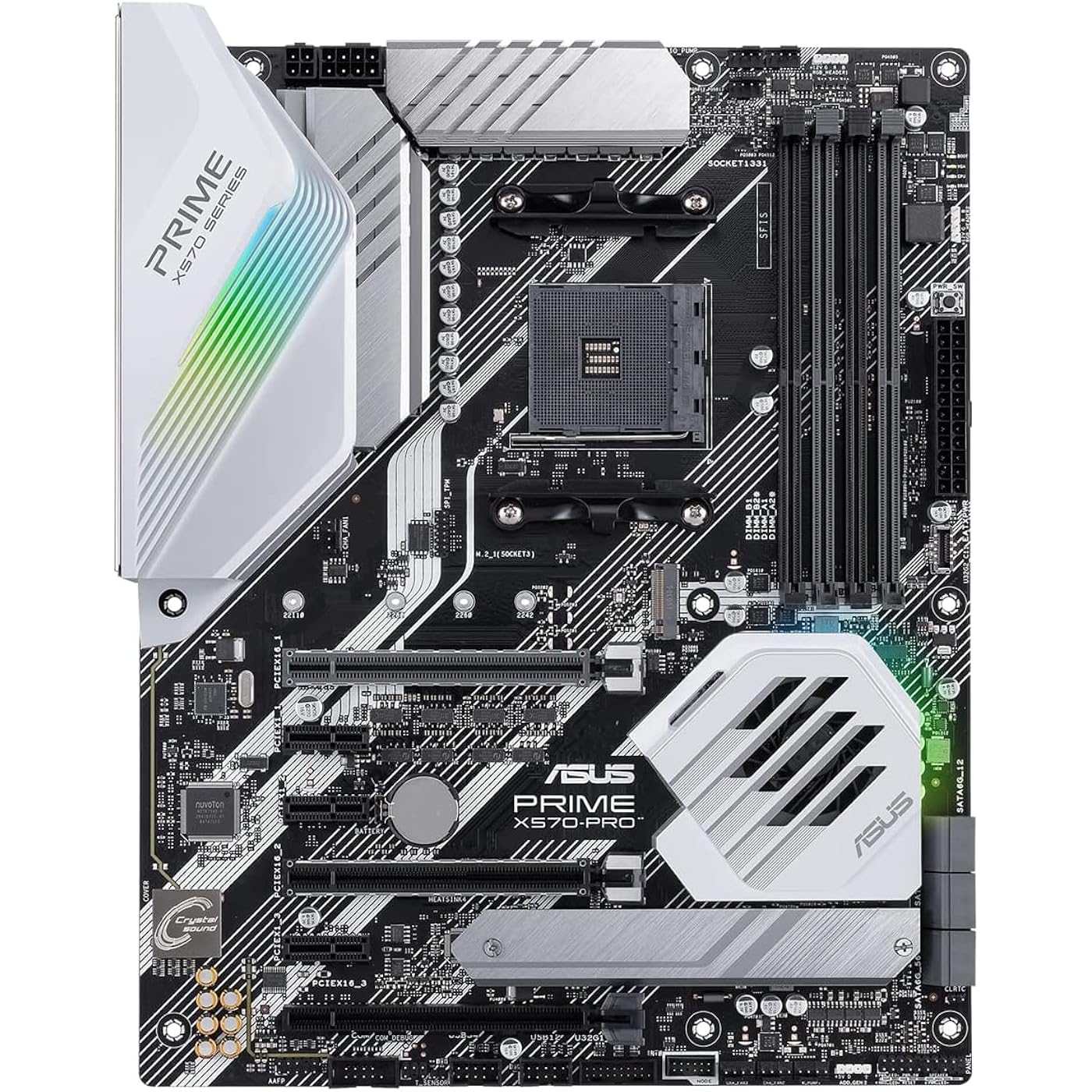
Asus Prime X570-Pro AM4 Zen 3 Ryzen 5000 & 3rd Gen Ryzen ATX Motherboard with PCIe Gen4, Dual M.2 HDMI, SATA 6GB/s USB 3.2 Gen 2 ATX Motherboard
  • Based on 3,197 reviews
Condition: Used - Good
Checking for the best price...
$199.99 Why this price?
Memorial Day Sale · 53% off was $429.00

Buy Now, Pay Later


As low as $33.33 / mo
  • – 6-month term
  • – No impact on credit to apply
  • – Instant approval decision
  • – Secure and straightforward checkout

Ready to go? Add this product to your cart and select a plan during checkout.

Payment plans are offered through our trusted finance partners Klarna, Affirm, Afterpay, Apple Pay, and PayTomorrow. No-credit-needed leasing options through Acima may also be available at checkout.

Learn more about financing & leasing here.

Selected Option

Free shipping on this product

This item is eligible for return within 30 days of receipt

To qualify for a full refund, items must be returned in their original, unused condition. If an item is returned in a used, damaged, or materially different state, you may be granted a partial refund.

To initiate a return, please visit our Returns Center.

View our full returns policy here.


Availability: Only 3 left in stock, order soon!
Fulfilled by Amazon

Arrives Jun 6 – Jun 11
Order within 16 hours and 29 minutes
Available payment plans shown during checkout

Protection Plan Protect Your Purchase
Checking for protection plans...

Style: X570-PRO


Features

  • AMD AM4 Socket and PCIe 4. 0: The perfect pairing for Zen 3 Ryzen 5000 & 3rd Gen AMD Ryzen CPUs
  • 5-Way Optimization: one-click, system-wide tuning delivers optimized overclocks and intelligent cooling for CPU or gpu-intensive tasks
  • Industry-leading cooling options: comprehensive controls for fans and dual pump headers, via fan Xpert 4 or the acclaimed UEFI
  • Asus Optic-MEM: careful routing of traces and vias to preserve signal integrity for improved Memory overclocking
  • Next-gen connectivity: supreme flexibility With PCIe Gen 4 support, Dual M. 2 support, USB 3. 2 Gen 2 ports and front-panel header
  • Please ensure your BIOS is up to date if installing a compatible Ryzen 5000 series CPU. Visit ASUS site search by motherboard model name, click on Support tab, Drivers and Tools, then BIOS & Firmware to download the latest BIOS.

Description

Powered by AMD Ryzen 2 and 3 AM4 processors, the Asus Prime x570-pro delivers customizable performance. 5-Way Optimization provides intelligent auto-tuning and dynamic fan calibration, while on-board dual M. 2 support and USB 3. 2 Gen 2 deliver maximum transfer speeds. Outshine the competition and personalize your build with AURA Sync RGB. Free 3-months Adobe Creative Cloud Subscription: Receive complimentary access with the purchase of this product (offer valid from 9/15/2021 to 9/15/2022) visit to claim.

Brand: ASUS


CPU Socket: Socket AM4


Compatible Devices: Personal Computer


RAM Memory Technology: DIMM


Compatible Processors: AMD 3rd Generation Ryzen


Chipset Type: AMD 570X


Memory Clock Speed: 2133 MHz


Platform: Windows 10


Model Name: PRIME X570-PRO


CPU Model: Ryzen 5


Processor Socket: Socket AM4


Compatible Devices: Personal Computer


RAM Memory Technology: DIMM


Compatible Processors: AMD 3rd Generation Ryzen


Chipset Type: AMD 570X


Memory Clock Speed: 2133 MHz


Platform: Windows 10


CPU Model: Ryzen 5


Memory Storage Capacity: 128 GB


Ram Memory Maximum Size: 128 GB


Main Power Connector Type: 24-Pin


Graphics Card Interface: PCI Express


Memory Slots Available: 4


Number of Ports: 4


S/PDIF Connector Type: Optical


System Bus Standard Supported: SATA 3


Total SATA Ports: 6


USB 2.0: 2


Total Usb Ports: 6


Total Number of HDMI Ports: 1


Total PCIe Ports: 2


Brand: ASUS


Model Name: PRIME X570-PRO


Model Number: 90MB11B0-M0EAY0


Manufacturer: Asus


UPC: 192876254011


Global Trade Identification Number: 11


Mfr Part Number: PRIMEX570-PRO


Item Type Name: Asus Prime X570-Pro AM4 Zen 3 Ryzen 5000 & 3rd Gen Ryzen ATX Motherboard with PCIe Gen4, Dual M.2 HDMI, SATA 6GB/s USB 3.2 Gen 2 ATX Motherboard


Item Weight: 2.2 Pounds


Warranty Description: 3 years


Item Dimensions L x W x H: 10.74"L x 2.68"W x 13.31"H


Frequently asked questions

If you place your order now, the estimated arrival date for this product is: Jun 6 – Jun 11

Yes, absolutely! You may return this product for a full refund within 30 days of receiving it.

To initiate a return, please visit our Returns Center.

View our full returns policy here.

  • Klarna Financing
  • Affirm Pay in 4
  • Affirm Financing
  • Afterpay Financing
  • PayTomorrow Financing
  • Financing through Apple Pay
Leasing options through Acima may also be available during checkout.

Learn more about financing & leasing here.

Top Amazon Reviews


  • Sparse on mounting hardware/cables/stickers. Excellent AMD Ryzen9 3900X Platform
Style: X570-PRO
One of the cheaper ASUS motherboards for the new Ryzen 9 AMD X-570 chipset. Wasn't my first choice, was looking at the TUF-Gaming boards, but they were out of stock. I wasn't disappointed. It worked great out of the box. I was a little concerned as the motherboard box did not have any kind of seal on it, nor did the static-package. I carefully looked over the board, took pictures, and found no apparent damage or signs of previous use. I've build a couple of dozen systems in the past 20 years. This board is great. I am guessing most of the negative reviews are user error and/or an occasional fluke. I've yet to have a problem with an ASUS motherboard. My M4A89GTD PRO/USB3 from 2010 is still rocking away just fine...although barely starting to slow down. With regard to the Memory DDR4 mounting brackets being "cheap", only having one moving locking end, as one reviewer commented on--I honestly can't imagine that being a problem. Pushing straight down on the DDR4 DIMM as the manual shows works great, and the locking pin is secure. Honestly one of the easier DIMM insertions I've done. I don't treat my cases with kid gloves, and move systems around a fair amount, and I can't imagine the DIMMs coming out. My verdict on that complaint is that it is unfounded/exaggerated. The box is sparse on mounting hardware. Not sure if ASUS is cost cutting, or if this is because it is a lower end ASUS board (and no ASUS board is junk, they just have cheaper options), but the only fasteners included were the spacers and screws for the M.2 port. Fortunately for me the Rosewill case I bought came with mounting hardware, and I had leftover screws and such from previous builds. That said be aware if your PC case doesn't come with the motherboard mounting screws, you may be delayed in your build. They do include the ASUS "Q-Connector" in the box, which makes connecting all your PC Case's front I/O cables (Power switch, Power LED, Reset Switch, Drive Access light, Front Audio etc...) much easier. Only 2 SATA Cables come in the box. No ASUS Sticker : ( Seems cheesy, but my biggest gripe is no stickers. Guess you have to buy ROG or Tuf-Gaming to get an ASUS sticker included in the cost. Seems like their marketing folks should spring for a few cents to support brand loyalty and brand pride (I'll be ASUS until I get burned--and not by something dumb I do, but by shoddy products, which I've yet to experience--as long as they stay quality they've got a customer for life, with or without the sticker). THE UEFI BIOS worked great. I was able to update the BIOS Firmware directly from within the BIOS over the internet before I installed Windows 10. Worked like a champ. Updated to version 1005 dated 8/12/2019 without ever leaving the BIOS or having an OS installed. The only install hiccup I had was more likely due to my older defective LG BH12LS35 SATA Blu-Ray burner. It has been acting odd, not wanting to read/burn DVD's sporadically. The UEFI BIOS recognized it fine, but it seems as if there were mechanical problems. Ended up using the Windows 10 Media Creation Tools to make Thumb Drive installation media, which worked great. I was a little concerned that my new Sabrent Rocket PCIe 4.0 M.2. SSD (one of the fastest drives currently available for consumers, one of the few devices early adopters can play with PCIe 4.0 with) may not cooperate well with the motherboard, and Windows 10 install. Here ASUS could have made the motherboard manual more clear. I am not sure if I understood the instructions correctly, or it just worked. Pages 1-13, 1-21, 3-14, and 3-15 of the motherboard manual are the sections that pertain to setting up PCIe 4.0 drives (you can download the motherboard manual off of the ASUS website to pre-view this--or any other ASUS board you are considering). 1-13 briefly mentions selecting either AHCI or RAID mode for the SATA connectors. Here I was a little confused as the M.2 sockets can run in either PCIe 4.0x4 or SATA mode, and I wasn't sure if changes made in the BIOS section for the SATA changed anything on the PCIe drive, as there didn't seem to be a settings page for PCIe drives. In the end I reverted back to AHCI mode, as I needed the Blu-Ray Burner to work. My previous boards allowed some ports to run RAID and others AHCI, this did not seem to be an option. Perhaps the RAID controller software is sophisticated enough to allow some ports to run as AHCI. I don't know for sure. I briefly considered using both M.2 sockets with 2 Sabrent Rocket PCIe 4.0 drives in a RAID configuration...but that just seems silly. In the forums some users have talked about the fact that there is nothing you can really copy from this drive to, that would take advantage of its insane speed. It does boot fast LOL. Page 3-14 references NVMe RAID mode. Here I am not sure if running the PCIe 4.0 Sabrent Rocket in RAID would be selected here, I think so. It is just an enabled/disabled option. I believe I enabled it, despite only having one drive. Finally on page 3-15 the manual mentions the PCIEX16_2 Bandwidth ( the physical PCIEX16_1 slot is the one closes to the CPU socket, and the one they recommend using for a single GPU and putting a 2nd SLI GPU in PCIEX16_2, see pg 1-7). The two options for PCIEX16_2 Bandwidth are [X8 Mode] or [PCIe RAID Mode]. The explanatory note for [PCIe RAID Mode] states "The Hyper M.2 x16 card and other add-on M.2 devices all run at x4 mode, which allows you to create a PCIe RAID array." A further note below that states "Use PCIe RAID Mode when installing the Hyper M.2 X 16 card or other M.2 adapter cards. Installing other devices when using PCIe RAID mode may cause your PC to fail to boot up." I am using an other M.2 adapter card, so that is why I selected PCIe RAID mode for this setting and elsewhere. It is still not very clear to me what I was supposed to do, but she is up and running. I've yet to tweak my Memory to get the full speed out of it, currently in the default setting not using the XMP profile for the JDEC values. Benchmarking everything on defaults with Passmark puts the CPU and Sabrent Rocket in the 99th percentile both. So good job AMD with the Ryzen 9 3900X and this board seems to "play well" with that CPU right out of the box, as well as the new Sabrent Rocket (not listed on the QVL). I wasn't going to wait around for Samsungs PCIe 4.0 solution. So far very pleased with this configuration. ... show more
Reviewed in the United States on August 20, 2019 by Chris Quimby

  • Great motherboard, now with debug LED
Style: X570-PRO
I’ve had both Asus Prime X470 and have now upgraded to the Asus Prime X570 to extend the lifespan of my system and I’m very happy with it. On my old X470 I’ve done everything from upgrading the GPU, adding RAM and even upgrading the CPU from a 2700X to a 5950X and every time it was simple with no hangups. I’m happy to say that the Prime X570 seems to be as stable as its X470 predecessor and I’m hoping it’ll get as good of a productive lifespan. These boards are imo world class motherboards in terms of stability and they are affordable. They offer everything you need and none of the things you don’t need. A couple of nice additions on the X570 Prime is the addition of a debug LED so you can figure out what is causing your system not to boot, something that the X470 Prime regrettably did not have. Another small improvement is the screws provided for screwing down the M.2 SSD can now be turned by both a small star or flat head screwdriver and are much harder to strip. Something that is very welcome since I had difficulty getting the SSD in and out of the X470 Prime as the screw driver I used was slightly older and damaged these screws very easily. Extremely frustrating… One issue I have is that you cannot move the SSD heatspreader to the top M.2 slot on the board as there isn’t a way to screw it in. My SSD is now without a heatspreader since I prefer using the top slot… Overall though the ASUS X570 Pro is a solid and stable board and at a really good price point. You won’t be disappointed. Additionally ASUS are really good at supporting these boards with firmware and bios upgrades so you’ll get a good life out of the board. ... show more
Reviewed in the United States on August 21, 2022 by Ferdinand

  • The Armoury Crate software is frustrating.
Style: X570-PRO
Trash...I am so sick of my RBG always screwing up. The aura/MOBO driver update doesn't work correctly in the armory crate software. I spent a lot of money on my rig. I think I have something special and it is problematic. I usually don't knock Asus, but this Aura/Armoury Crate software problem has been going on for years. Armoury Crate shows I need updates. I click on update and it tells me to reboot, so I reboot my system. Then I go back into AC and it says I need to update. It is stuck in a loop. AC won't recognize my motherboard or memory. My CPU fan, RBG strip, and memory are stuck in a hot pink color. I have had it with trying. I'm frustrated trying to fix the unfixable. The software is an online installation. They should create a standalone software that can be uninstalled and reinstalled if it gets buggy. I have been reading a lot of posts that state Asus support is horrible now. If you are making this purchase in the hope of getting a cool RBG rig, RUN. The effects aren't all that great when they are running. I think I will disconnect my fans from the RBG header on the mobo and use the presets that came with the fan kit. ASUS you get a failing grade from me. I am building a rig for a friend next week. I will stay clear of Asus this time. UPDATE: I raised my one-star rating to a two-star rating. I think I figured this out. I was frustrated, but I am stubborn. I did a clean install. When it first boots after installing Windows 10, Armoury Crate pops up asking if you want to install it. I did not install it, but I did not say no either. I installed every program I plan on using and I updated Windows 10. When I was all done the Armoury Crate window was still there. I then made a restore point. Then I installed the Armoury Crate. I only installed the device drivers. I didn't install anything else. The motherboard driver is in an update loop, but all the lights are working. The version it is stuck on is 1.01.04. It says it needs updating, but it won't. Asus please fix your glitchy software. Hire better programmers! UPDATE: I think they got it right now. I have increased my 2-star rating to a 5-star rating. Everything seems to work correctly. I am pleased to say it has not messed up once in over two months. There was an update in Armory Crate for the components and the updates went smoothly. I didn't see any difference in the way the motherboard operated. The lights all look the same and work correctly. Good job Asus. I now can recommend this motherboard. ... show more
Reviewed in the United States on October 28, 2019 by OG

Can't find a product?

Find it on Amazon first, then paste the link below.
Checking for best price...