Search  for anything...

Mag-Safe to USB C, USB C to Mag-Safe 1&2 Charging Adapter

Based on 124 reviews
Condition: New
Checking for the best price...
$33.97

Buy Now, Pay Later


As low as $8 / mo
  • – 4-month term
  • – No impact on credit to apply
  • – Instant approval decision
  • – Secure and straightforward checkout

Ready to go? Add this product to your cart and select a plan during checkout.

Payment plans are offered through our trusted finance partners Klarna, Affirm, Afterpay, Zip, Apple Pay, and Google Pay. No-credit-needed leasing options through Acima may also be available at checkout.

Learn more about financing & leasing here.

Selected Option

Free shipping on this product
This item's return window has been extended for the holiday season: Returnable until Jan 31, 2027

To qualify for a full refund, items must be returned in their original, unused condition. If an item is returned in a used, damaged, or materially different state, you may be granted a partial refund.

To initiate a return, please visit our Returns Center.

View our full returns policy here.


Availability: In Stock.
Fulfilled by Amazon

Arrives Wednesday, Nov 25
Order within 16 hours and 58 minutes

Available payment plans shown during checkout

Protect Your Purchase

Easy claims online, fast replacements, no fees

Checking for protection plans...

At a glance

Condition
New
Size
0.62 ft
Weight
0.03 kg
Color
White
Hardware Interface
USB Type C
Special Feature
Plug and Play
Operating System
Macos, Ios
Works with
Laptops

Features 5

  • [Environmental Protection]: Answin Mag-safe to USB C adapter is designed for environmental protection. Power supply devices inside contains a lot of harmful substances to the environment, scrapping large quantities of discarded power will seriously pollute our living environment. With USB C to mag-safe adapter you no longer have to dispose your old chargers as they can help you charge your devices
  • [Compatibility]: With the smart chips, Answin USB C to Mag-safe adapter works with almost all usb c device: iPhone 15 series, Macbook, Macbook pro, Nintendo Switch , Dell NoteBook, Galaxy S8/S9 and more. When using the Answin adapter to charge a device that requires higher wattage (i.e. MacBook 1260W or MacBook 1587W) it will charging at a slower rate and the product may some heat (which is expected) particularly when running high CPU intensive task
  • [Safety]: With the highest quality technology -Intelligent design offers full protection against overheating, over current voltage and overcharging, for safe and complete charging
  • [Lightweight Design]: The compact and lightweight design of USB-C to Mag-safe adapter is easy for you to take in your bag and easier to leave charger cable in different places you use instead of unplugging and plugging in wherever you go. It also perfects for traveling, enterprise, school teaching

Description

Specification: Product name: USB C to Mag-Safe Adapter Brand: Answin Color: White Working Temperature: -40°F~+180°F Compatibility: Input with MacBook (Pro) 45W 60W and 85W Mag-Safe 1 or Mag-Safe 2 Power Adapter. Output for MacBook Pro 2016/2017/2018 and other usb-c-equipped laptops, mobile phones. Games Consoles: For Nintendo Switch Feature: Double sides of adapter can work: Double sides of adapter can be plugged into your devices, so you don’t have to spend time on distinguishing which side you should plug in. How to connect: 1. Connect the power brick to AC source, and then connect USB C charger connector to this USB C port. 2.Connect this Mag-Safe connector to your MacBook. Here, the signal light won’t turn on, but it will not affect the charging effort. 3. The signal will be connected about 20 seconds. Important Note: The maximum output is 45W when you connected the Mag-Safe 1&2 adapter if you use MacBook old 45W and 60W adapter to charge, and for the 85W adapter, the output power is 60W. When you using our USB C-PD to Mag-safe1 Mag-safe2 adapter to charge MacBook 15’’ in the output power of 45W, computer may become little bit heat and slower charging than your original USB-C adapter. However, slower charging is better for the protection of the battery.

Specs 14

Brand Answin
Color White
Hardware Interface USB Type C
Special Feature Plug and Play
Additional Features Plug and Play
Total Usb Ports 1
Number of Ports 1
Operating System Macos, Ios

Frequently asked questions

If you place your order now, the estimated arrival date for this product is: Wednesday, Nov 25

Yes, absolutely! This item's return window has been extended for the holiday season: Returnable until Jan 31, 2027.

To initiate a return, please visit our Returns Center.

View our full returns policy here.

  • Klarna Financing
  • Affirm Pay in 4
  • Affirm Financing
  • Afterpay Financing
  • Zip Pay in 4
  • Financing through Apple Pay
  • Financing through Google Pay
Leasing options through Acima may also be available during checkout.

Learn more about financing & leasing here.
Top Amazon Reviews


Fantastic!
Size: 0.60 ft
This little device brings mighty power to my MacBook Pro M1 2020 from my 27" Thunderbolt Display. Since the power cable comes directly from the back of the monitor, this adapter eliminates the tangle of extra cables. Since this version of the MBP didn't have MagSafe charging, it has USB-C/TB, this device works wonders! There was a couple of times that it was not working very effectively, but I flipped the MagSafe back and forth, that maybe the prongs weren't as responsive. But after some tinkering, it wound up working great. ... show more
Reviewed in the United States on February 11, 2025 by Chris Farrell

I purchased 2 of these... they both overheated and stopped working after a few weeks
Size: 0.62 ft
I purchased two of these and they worked fine for the first month, then they overheated and stopped working. The 30 day return window was past so I have no recourse. Save your money and don't buy this item.
Reviewed in the United States on August 9, 2024 by Brad Hamilton

Works as advertised
Size: 0.60 ft
Works well, but gets pretty warm.
Reviewed in the United States on July 1, 2026 by Trickdog60

Adapter overheats, stops working
Size: 0.62 ft
Out of the blue, this adapter started overheating -- enough to be painful to the touch and alarming. None of the troubleshoot suggestions apply -- it's been used with same outet, same computer, lot of air circulation all along. Out of the return period so just stopped using. Another one of these, older, just stopped working overall. They're great while they last but they don't last long. ... show more
Reviewed in the United States on April 24, 2026 by Mike Steere

Works well, but you may need to tweak it a bit
Size: 0.60 ft
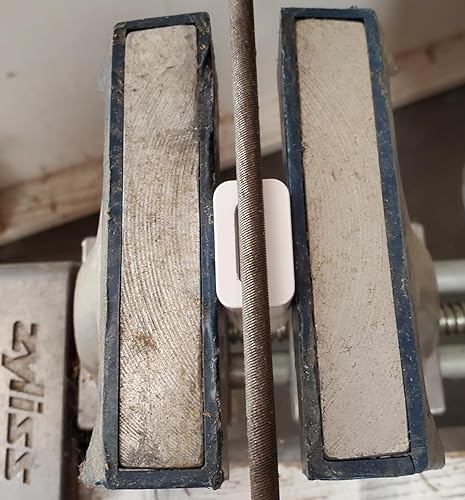
Works well, but you may need to tweak it a bit to get it to charge properly. This dongle allows you to use both your old MagSafe1--AND--MagSafe2 chargers with your newer USB-C charging port Mac. If you're . . . frugal like me, it's worth the money and time to make it work. I hate to throw away a good charger and I use my MacBook Air all over the house, so for convenience I prefer to keep many chargers in many places (bedroom, office, living room, porch, deck, etc). This dongle is a bit pricey, but it's not a simple adapter like the old MagSafe1-to-MagSafe2 piece (see pics), and it's nowhere near as small and unobtrusive. It works and charges well with both the original Apple T-format MagSafe1 and the MagSafe2 (at least all of mine), BUT: 1) it does NOT work (reliably) with the L-format MagSafe1 connector (where the cord comes out parallel to the side of the computer), as the barrel hits the shoulder surface of the socket and does not completely seat flat, making a very poor connection (if at all), and 2) it does not work with the MagSafe 1-to-2 adapter that some of you might have bought to continue to use your MagSafe 1 chargers with your new MagSafe 2 Macs (the shoulder is too fat to nest into the socket like the stock one, so it doesn't make a connection, see pics), and 3) according to some pics from other reviews here, the build quality is not great and the insulation will degrade over time and use (the device and cord get hot during use and that, along with frequent flexion, takes a toll on the insulation as it ages and becomes brittle). However, you can easily fix both of these issues. :-) 1) you can file a groove across the end of the socket to give the barrel of the L-format Magsafe 1 connector just enough clearance to seat flat and make a strong connection (see photos), and, 2) just remove the MagSafe2 adapter and use the original MagSafe1 connector with the modifications made in 1) above (if it is not a T-format charger) and 3) to address the added strain and the heat fatigue on the insulating cover of the small cord (see the pics in the other reviews, and mine here), I added some tape and heat-shrink to reinforce the cord and prolong the life of the dongle. My pre-cut pieces of heat shrink were not quite long enough to go all the way from one stress relief to the other, so I actually used three pieces and overlapped them. It's not nearly as flexible anymore, but it will outlive me now. ;-) While I would have preferred a much cheaper and smaller alternative, I could not find anything like my MagSafe1-to-MagSafe2 charger adapters here to go to a USB-C charge port connector, and this dongle does do the job (after some extra work tweaking it), so I'm happy overall. Now I just have to carry the dongle with the laptop when I move instead of the whole charger. :-D ... show more
Reviewed in the United States on July 17, 2025 by Leslie B. Edmonds

Lets me save my old Mac power supplies
Size: 0.60 ft
Works great, allows me to resurrect my mag-safe chargers and use them on my new USB C devices and MacBook Air. Now I can keep a charger ready at my desk and one in the back pack.
Reviewed in the United States on April 13, 2026 by tj raif

Dead after less than 4 months
Size: 0.62 ft
What a waste of money. It is just a converter. How hard can it be to actually make it work? It has been less than 4 months of only intermittent use and it no longer functions! Ridiculous! The magsafe charger still works to charge a magsafe device. And the USB-C device can be charged by USB-C charger. So it is definitely this product. And no replacements. I do NOT RECOMMEND! ... show more
Reviewed in the United States on February 2, 2024 by Caryn L Anderson

Does it work? ....Yes....however
Size: 0.60 ft
The product does what I need it to do. I had a Cinema Display sitting in the closest for a while and I started working from home more often. I decided to break it out and use it with my Dell Lattitude 5431 (work issued). The first thing I needed to do is find a dongle to get the display output. For those wondering, the USB-C that can be used for display output with a Dell dock does not work with the Cinema Display, at least one I bought didn't. A HDMI to minidisplay one worked though. As for this product. Well, it's a couple of small things. At first I didn't think it was working at all. I then discovered that the MagSafe was wasn't staying connected. I then discovered that the dongle wants it connected only one way. So while MagSafe is omni-directional this dongle is not. So, if you're having trouble with it staying connected flip the MagSafe connector and it should work a lot better. Next, the power output in the listing has me all confused but regardless of that the power output with my Dell Lattitude is quite terrible. When I use a 65w USB-C laptop charger I was getting "57 minutes complete until charge complete". With the dongle it was 2 hours and 57 minutes, meaning this thing is outputting 20w-25w. For the type of tasks I'm doing it's fine but if you expect your processor to be running full tilt for any lenght of time this dongle will not keep up. Last, and this one isn't the least problematic but I thought should be mentioned in the listing, the ports on the dongle (Type C PD and the the old USB-A) are power ONLY. They do not handle data. So, if you wante dto charge your smart phone and access the content only it, you're out of luck So for me, it'll get the job done but the price for this does not justify the quality and its shortcomings. ... show more
Reviewed in the United States on June 4, 2025 by Jared G
Checking for best price...