




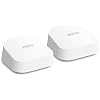
Amazon eero 7 dual-band mesh Wi-Fi 7 router (newest model) - Supports internet plans up to 2.5 Gbps, Coverage up to 4,000 sq. ft., 2-pack
Condition: New






Buy Now, Pay Later
As low as
$47.50
/ mo
Learn more
- – 6-month term
- – No impact on credit to apply
- – Instant approval decision
- – Secure and straightforward checkout
Ready to go? Add this product to your cart and select a plan during checkout.
Payment plans are offered through our trusted finance partners Klarna, Affirm, Afterpay, Zip, Apple Pay, and Google Pay. No-credit-needed leasing options through Acima may also be available at checkout.
Learn more about financing & leasing here.
Selected Option
Free shipping on this product
30-day returns
Learn more
FREE 30-day refund/replacement
To qualify for a full refund, items must be returned in their original, unused condition. If an item is returned in a used, damaged, or materially different state, you may be granted a partial refund.
To initiate a return, please visit our Returns Center.
View our full returns policy here.
Availability:
Only 10 left in stock, order soon!
Arrives
Sunday, Oct 4
Recently Viewed


Style: Without eero Plus
Configuration: 2-pack
Features
- OUR MOST AFFORDABLE WI-FI 7 ROUTER - eero 7 helps you future-proof your network and make the most of Wi-Fi 7 performance starting today.
- SAY GOODBYE TO DEAD SPOTS - eero 7 minimizes network disruptions to help ensure you have fast, reliable wifi in every room of your home.
- FULL SPEED AHEAD - Support for internet plans up to 2.5 Gbps with two auto-sensing 2.5 GbE ports and wireless speeds up to 1.8 Gbps.
- HIGHLY CONNECTED - Two eero 7s support 120+ devices and 4,000 sq. ft. of coverage, so theres plenty of reliable Wi-Fi 7 performance to go around.
- LATEST TECH - eero 7 delivers better performance, building on Wi-Fi 7 exclusive features like multi-link operation (MLO).
- OUR SOFTWARE MAKES ALL THE DIFFERENCE - Our patented TrueMesh software, combined with TrueRoam and TrueChannel, proactively keeps you on the optimal and most reliable wifi connection possible.
- ADVANCED DIGITAL SECURITY - An optional subscription to eero Plus provides Advanced Security, Ad Blocking, Parental Controls, Malwarebytes, 1Password, VPN powered by Guardian, and more.
- BUY WITH CONFIDENCE - New eero Wi-Fi 7 routers are backed by an industry-leading three-year warranty. Our highly trained support team is ready to help resolve any setup or wifi issues at or +.
Frequently asked questions
If you place your order now, the estimated arrival date for this product is:
Sunday, Oct 4
Yes, absolutely! You may return this product for a full refund within 30 days of receiving it.
To initiate a return, please visit our Returns Center.
View our full returns policy here.
To initiate a return, please visit our Returns Center.
View our full returns policy here.
- Klarna Financing
- Affirm Pay in 4
- Affirm Financing
- Afterpay Financing
- Zip Pay in 4
- Financing through Apple Pay
- Financing through Google Pay
Learn more about financing & leasing here.
Similar Products


Top Amazon Reviews
Style: Without eero Plus
Configuration: 1-pack
The Amazon eero 7 dual-band mesh Wi-Fi 7 router has been an excellent upgrade for my home network. Setup was quick and simple through the eero app, and I had everything running in just a few minutes. The instructions were clear, and the app made the whole process stress-free. Performance has been outstanding. Speeds are fast and consistent throughout the house, with strong coverage reaching areas where my old router struggled. Streaming, gaming, video calls, and connecting multiple smart devices all run smoothly without buffering or dropouts. I also appreciate the sleek, compact design that blends in nicely instead of looking bulky or outdated. The added benefit of Wi-Fi 7 support makes it feel future-ready for newer devices and faster internet plans. Overall, this is a reliable, easy-to-use router that delivers strong coverage and excellent performance. Highly recommended for anyone wanting a modern mesh Wi-Fi upgrade.
...
show more
Reviewed in the United States on April 29, 2026 by James Mc
Style: Without eero Plus
Configuration: 3-pack

This is the easiest electronic device I’ve set up in our home in years. We had an Orbi mesh wifi setup with ATT 1GB Fiber. The Orbi went end of life end of support. I shopped. I researched. I asked friends. Several friends said Orbi. Several friends said eero. I’m thrilled with the eero7, the least expensive WiFi 7 solution. Our home is 4000 sq ft single story. The signal strength is fantastic- I can get signal out in the yard. The setup was maybe 10 minutes, and that’s because I had to climb a stepladder to place the unit on top of bookshelves. I was able to keep my previous naming convention with a click. No reprogramming anything. Perfect! The units are small, unobtrusive and mighty. The speed and data throughout is fast, probably 3x the Orbi we had for years. Buy it. The low cost, high speed, easy setup is a total win. The reliability has been perfect. I didn’t need to adjust anything, eero just works. Perfect consumer experience.
...
show more
Reviewed in the United States on July 23, 2026 by Ted
Style: Without eero Plus
Configuration: 1-pack
Edit and update. After my review EERO support reached out and explained they would love to help. Paul took me thru some settings, and I gave them permission to directly access and he was able to help us speed it up. After some further evaluation they saw an issue and replaced my pods. The new pods are flying and I’m seeing and using my WiFi again. And now w WiFi in the pool (I’m in fact writing this from the pool on the WiFi.). Thank you EERO and Paul for spending the time to make it right. Ok so I figured i would install a new router into my eero 6 setup so that way I’d benefit from my 2.5 gb fiber connection since I no longer have to split house WiFi w teens etc. The install and taking over the network went very well. I go ahead and pay for eero plus as well. No need to redo my network, and at first it was great until 20 minutes post install when my wife went to watch the firestick in the living room that has one of the mesh routers in the room next to tv. Suddenly the firestick is running on slow, having connection issues etc. I think ok, the network is working itself out but let me go take a look. Just crazy but seems like it working but in reality it’s just been like I’m running WiFi 802.11b in the house. Always issue, wife no longer connects phone into network cause it won’t download pages fast etc etc. I like the eero software, but I made a mistake and should have just started whole new network with different brand I think. 170 dollars of learning. Good luck, great if not adding to your current eero system
...
show more
Reviewed in the United States on July 24, 2026 by Zweck
Style: Without eero Plus
Configuration: 3-pack
Internet issues had been going on for months. At and t replaced router and still spotty coverage. Had an old araknis system x2 ($500 each) not working properly. Bought the newest eero system with a recommendation from my brother in law. Wow. I’m not a tech expert but the video on how to install made it super easy. Now we have full coverage throughout the house and even coverage outside. If you want to boost your coverage, this is a super easy system with easy to explain directions and not terribly expensive for a 3 unit system. And it’s the most recent Wi-Fi 7 to boot. Skip the others and just go with this. The units look nice on your table or shelf and the one you plug into the router comes with a new Ethernet cord. 3 bars all day and night for the win!
...
show more
Reviewed in the United States on May 22, 2026 by Karen
Style: Without eero Plus
Configuration: 2-pack
I am satisfied with my purchase and feel I should be very happy with it overall. Everything works properly and performs well—the connectivity is excellent, and it’s easy to set up and program through the app. However, like with any electrical equipment, poor design can lead to issues over time. The main problem is that the unit is not well ventilated. It overheats easily if the room is not well ventilated or if it’s placed on a surface without enough clearance for airflow. To solve this, I had to order silicone bumpers to raise the unit and improve air circulation. I believe the design could be improved by adding better ventilation or even a built-in cooling fan to help prevent overheating. And leads to interruption on my internet services
...
show more
Reviewed in the United States on April 9, 2026 by Rudy0362
Style: Without eero Plus
Configuration: 2-pack
Great coverage, speed, and incredibly easy setup with app. Great value!
Reviewed in the United States on July 20, 2026 by David Chancellor
Style: Without eero Plus
Configuration: 1-pack
First things first… This is an Amazon company/product advertised to work seamlessly with Amazon smart home devices. My house is loaded with Alexa/Echo/Fire devices. Bought this as an upgrade from the original Eero I have had for a few years. After upgrading my internet to gig fiber I wanted to maximize that bandwidth. I contacted Eero support to inquire about benefits and backwards compatibility with my original Eero mesh units. I was told the this upgrade would increase my coverage/speed/smart device support. I purchased this on sale and utilized the Amazon trade in option, so I saved quite a bit of money. Initial setup was done following the instruction manual and using the iPhone app. Now we get to how terrible this decision was. Compatibility with my Fire TV devices, multiple generations of Fire sticks and Fire cubes, this includes current generations. The Fire devices would only work with Amazon Video. Netflix would report unable to connect to server. YouTube MIGHT advertise a video but once launched it would buffer and then sit at a black screen for 15 minutes up to 5 hours before the video would play Let me reiterate… Amazon video worked just fine. iPad, laptops and PC’s all work as expected via browser or apps. Just the Amazon devices do not work. Reminder… Eero is an Amazon company/product and advertises full compatibility with Amazon devices and legacy Eero’s. Eero support did not even know that they were an Amazon company. After 2 hours on the phone with support I was told that they did not know what was wrong and to return it to Amazon for a replacement. Got the replacement set it up and had the same issues!! Did some research and found that this is not an isolated issue with Amazon streamers. Many posts about incompatibility and Eero not able to resolve the issue. Spent 2 more hours on the phone with support. No one acknowledged that this is a know issue, even though it is discussed on the Eero support forums. One suggested fix was to connect Streamers to the “Guest” network. At first it would stream but my “Amazon Home Theater” setups would not work because the speakers (Echo/Dot/Studio) are all on the standard network and will no longer communicate. Eventually the streaming also stopped working. One of the legacy access points would not connect unless I brought it to the base station. Then it would not support full bandwidth in the room it has been in since I initially bought it. Speaking of bandwidth… The satellites now only support 1080 streaming to my 4K devices. Support finally stated that Eero was still working on compatibility issues with “some” devices and suggested I step backwards to the last generation of Eero. Well this creates another issue. I bought this on sale and also utilized the Amazon Device trade in to get an even better deal. The suggested replacement would cost me almost $100 more. Support was unable or unwilling to even acknowledge this issue and offered no help. I have returned this and rolled back to my original setup. The exchange only took a few days with no questions asked. The return took almost a month to refund my money. As of this time I have lost the 20% trade in credit and can not get it to apply to another qualified product.
...
show more
Reviewed in the United States on October 4, 2025 by I Bought That?
Style: Without eero Plus
Configuration: 3-pack

I bought three of these to replace an older Eeros system that became outdated, and it works just as well (even faster, actually) than the prior Eeros system, which was great for its time. With one on the ground floor, one at the far end of the upstairs when the coax feed comes in, and one at the other end of the upstairs, we get a strong signal anywhere in the house. They're a snap to activate, and as you can see from the photo, if you buy the holders, they plug into the wall very neatly with no loose wires or such. Love 'em!
...
show more
Reviewed in the United States on July 29, 2026 by RLM