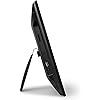
Aluratek 8 Inch LCD Digital Photo Frame with Auto Slideshow Using USB SD/SDHC (ADPF08SF) - Black






Buy Now, Pay Later
- – 6-month term
- – No impact on credit to apply
- – Instant approval decision
- – Secure and straightforward checkout
Ready to go? Add this product to your cart and select a plan during checkout.
Payment plans are offered through our trusted finance partners Klarna, Affirm, Afterpay, Zip, Apple Pay, and Google Pay. No-credit-needed leasing options through Acima may also be available at checkout.
Learn more about financing & leasing here.
Selected Option
This item is eligible for return within 30 days of receipt
To qualify for a full refund, items must be returned in their original, unused condition. If an item is returned in a used, damaged, or materially different state, you may be granted a partial refund.
To initiate a return, please visit our Returns Center.
View our full returns policy here.
Recently Viewed


Size: 8" (w/o Built-in Memory)
Features
- Share the memories an Aluratek digital frame makes a great gift for grandparents moms and just about anyone who would like to SHARE in your family's most memorable moments
- Crisp clear pictures all of your pictures will be displayed noticeably clearer and vibrant in color on our "true digital" Lcd Panels
- Automatic Slideshow simply connect a USB flash drive or an SD card into the frame and your photos will automatically play in Slideshow mode
- Perfect for small spaces The functional and compact frame makes a great addition to the decor of any room of your house or office The frame fits nicely in tight spaces
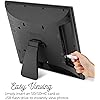
- Easy to use the frame's user interface is designed for easy navigation through the push button controls on the back of the frame There is no required setup and no software to install
- Digital signage solution present a message to your customers Place the frame on any counter surface in your place of business where space is a premium
Description
Aluratek 8 inch digital photo frame is a wonderful way to bring your treasured memories to life with incredible image clarity in rich and vibrant colors on the true color LCD panel at 800 x 600 resolution at an ideal 4 3 aspect ratio The functional and compact frame makes a great addition to any room of your house or office Laurite digital photo frames make a great gift for grandparents moms and just about anyone who would like to SHARE in your families most memorable moments Display photos from your most recent vacation graduations anniversaries and birthdays and relive them over and over again From the Manufacturer Share all your digital pictures, videos and music files with family and friends. View larger Recognizing a wide number of photo, audio, and video formats for ease of use. View largerWhat separates Aluratek digital photo frames from other brands is picture quality, ease of use, and affordability. You cannot get a better quality image or video than what Aluratek frames deliver, thanks to the best quality "true digital" LCD panels that are available on the market for production. Combined with an easy-to-use interface, wide format support, and the simplicity of automatic playback, Aluratek digital photo frames are the best choice for storage and playback of your important memories.View hi-resolution pictures, listen to music and watch videos easily on the TFT true color LCD panels at amazing resolutions. Most Aluratek frames come with built-in flash memory ranging from 256MB to 2GB. Transfer files quickly and easily to the on board memory with USB 2.0, or easily insert a compatible memory card directly to the memory card slot on the frame. With Aluratek's digital photo frames, you can share all your digital pictures, videos, and music files with family, friends, and coworkers.True Digital LCD Panels for Clearer PicturesWhat does it mean to use a true digital LCD panel in an Aluratek digital frame? It means that all of your pictures or videos will be noticeably clearer and much crisper than others that have decided to use analog panels as cost-cutting measures. The advantage of utilizing digital panels over analog panels is very similar to the difference in watching HDTV (High Definition Television) instead of standard definition TV. It makes a big difference to watch in crisp clear HD as all the vibrant colors and intricate details will be noticeably better.Easily Enjoy Slideshows The best choice for storage and playback of your important memories. View largerAluratek frames will play in slideshow mode once they are powered on, or a memory card is inserted. If you have any music files loaded onto the frame or loaded onto your SD card, they will also begin to play during your slideshow viewing.Aluratek photo frames recognize a wide number of photo, audio, and video formats automatically, and you can add photos via USB, memory card, or thumb drive. Playback is as simple as turning the frame on.Ultimate User FriendlinessIn addition to high build quality, Aluratek has also answered the call when it comes to affordability and ease of use. With the non- technical consumer in mind, Aluratek has designed and developed the User Interface software to be as user friendly as possible. Even if you're giving a digital photo frame as a gift item, you can rest assured that anyone can comfortably use an Aluratek digital photo frame.What's in the BoxAluratek 8" Digital Photo Frame, power adapter, instructional manual, warranty/registration card.Which Aluratek Digital Photo Frame is Right for You? 19" Digital Photo Frame 15" Digital Photo Frame 14" Digital Photo Frame 12" Digital Photo Frame 8" Digital Photo Frame 8" Digital Photo Frame 7" Digital Photo Frame Model Number ADMPF119 ADMPF315F ADMPF114F ADMPF512F ADMPF108F ADPF08SF ADPF07SF Memory 2GB Built-in Flash Memory 2GB Built-in Flash Memory 512 MB Built-in Flash Memory 512MB Built-in Flash Memory 512MB Built-in Flash Memory Resolution 1440 x 900 1024 x 768 1366 x 768 800 x 600 800 x 600 800 x 600 480 x 234 Functions Photos/ Video/ Music Photos/ Video/ Music Photos/ Video/ Music Photos/ Video/ Music Photos/ Video/ Music Photos Photos Memory Card SD / SDHC SD / SDHC SD / SDHC SD / SDHC SD / SDHC SD / SDHC SD / SDHC Dimensions & Weight 20.5" x 3" x 14.5" 15 lbs 16.375" x 2.5" x 13.375" 6.5 lbs 16" x 12" x 2.6" 2.5 lbs 11.5" x 3.2" x 9.25" 2.5 lbs 8.5" x 1" x 7" 1.1 lbs 8.5" x 1" x 7" 1.1 lbs 8" x 0.875" x 5.375" 0.8 lbs Connect USB Hard Drive / Thumb Drive Built-in Clock and Calendar High Speed Transfers via USB 2.0 Remote Control Included Auto Video Play Upon Power On Setup Slideshows with Background Music Wall Mountable
Brand: Aluratek
Color: Black
Resolution: 1080p
Compatible Devices: Personal Computer
Screen Size: 8 Inches
Resolution: 1080p
Compatible Devices: Personal Computer
Connectivity Technology: wired
Power Source: Corded Electric
Touchscreen: Unknown
Aspect Ratio: 43
Memory Storage Capacity: 32 GB
Control Method: Remote
Color: Black
Frame Material: Wood
Display Size: 8 Inches
Item Dimensions L x W: 7"L x 9"W
Brand: Aluratek
Model Number: ADPF08SF
UPC: 734911326620 812658010863 763615795302 012300170727 100177435121 014445063261 012301846287 021112444667 102930706240 666672856590 531475627688 168141450204 172304233719 872182816232 777780597944 172302679397 803982740342 151903008768 354318594554 080850284867 163120268726
Manufacturer: Aluratek
Global Trade Identification Number: 26, 63
Item Weight: 16 ounces
Unit Count: 1.0 Count
Warranty Description: 1 Year Manufacturer
Frequently asked questions
To initiate a return, please visit our Returns Center.
View our full returns policy here.
- Klarna Financing
- Affirm Pay in 4
- Affirm Financing
- Afterpay Financing
- Zip Pay in 4
- Financing through Apple Pay
- Financing through Google Pay
Learn more about financing & leasing here.