Search  for anything...

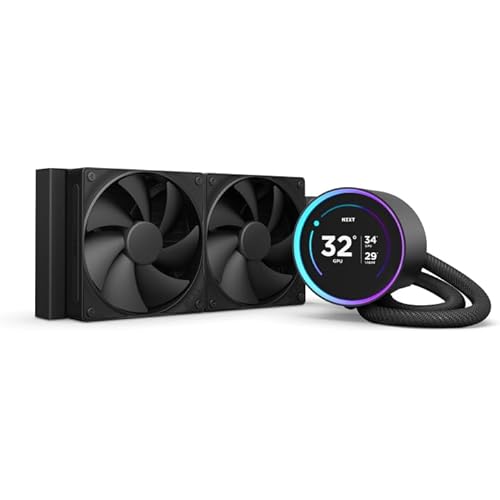
NZXT Kraken 240 - RL-KN-240-B1-240mm AIO CPU Liquid Cooler - Customizable 1.54" Square LCD Display for Images, Performance Metrics and More - High-Performance Pump - 2 x F120P Fans - Black

  • Based on 2,737 reviews
Condition: New
Checking for the best price...
$186.86 Why this price?

Buy Now, Pay Later


As low as $31.14 / mo
  • – 6-month term
  • – No impact on credit to apply
  • – Instant approval decision
  • – Secure and straightforward checkout

Ready to go? Add this product to your cart and select a plan during checkout.

Payment plans are offered through our trusted finance partners Klarna, Affirm, Afterpay, Zip, Apple Pay, and Google Pay. No-credit-needed leasing options through Acima may also be available at checkout.

Learn more about financing & leasing here.

Selected Option

Free shipping on this product

This item is eligible for return within 30 days of receipt

To qualify for a full refund, items must be returned in their original, unused condition. If an item is returned in a used, damaged, or materially different state, you may be granted a partial refund.

To initiate a return, please visit our Returns Center.

View our full returns policy here.


Availability: Only 1 left in stock, order soon!
Fulfilled by OneDealOutlet Online

Arrives Sep 13 – Sep 20
Order within 6 hours and 8 minutes
Available payment plans shown during checkout

Protection Plan Protect Your Purchase
Checking for protection plans...

Color: Black


Size: 240mm Radiator


Style: Kraken


Features

  • PERSONALIZATION THAT POPS: Display a favorite animated GIF or static image, monitor real-time PC performance metrics, see music that's currently playing, integrate web content and more with NZXT CAM software.
  • LCD DISPLAY: 1.54"" square LCD display with 240x240 resolution, 30 Hz refresh rate, and bright 300 cd/m2 backlight brings on-screen content to life.
  • HIGH-PERFORMANCE PUMP: The powerful Asetek pump operates at up to 2,800 RPM to ensure efficient and quiet coolant circulation.
  • POWERFUL COOLING: Static Pressure Fans with fluid dynamic bearings provide an optimal balance of high static pressure and airflow for powerful cooling with minimal noise.
  • SIMPLE SETUP: A single breakout cable from pump to motherboard makes for easy installation.

Description

NZXT Kraken 240 - 240mm AIO CPU Liquid Cooler - RL-KN240-B1 - Customizable 1.54" Wide-Angle LCD Display for GIFs, Images, Performance Metrics and More - High-Performance Pump - Black.

Product Dimensions: 10.83"L x 1.18"W x 4.84"H


Brand: NZXT


Power Connector Type: 4-Pin


Voltage: 12 volts


Wattage: 12 watts


Cooling Method: Water


Compatible Devices: Desktop


Noise Level: 30.6 db


Material: Rubber


Maximum Rotational Speed: 1800 rpm


Power Connector Type: 4-Pin


Voltage: 12 volts


Wattage: 12 watts


Cooling Method: Water


Compatible Devices: Desktop


Noise Level: 30.6 db


Maximum Rotational Speed: 1800 rpm


Item Dimensions L x W x H: 10.83"L x 1.18"W x 4.84"H


Material Type: Rubber


Brand Name: NZXT


UPC: 810074842686


Global Trade Identification Number: 00


Warranty Description: 6 years manufacturer


Number of Packs: 1


Manufacturer: Nzxt


Number of Items: 1


Unit Count: 1 Count


Included Components: Cable


Item Weight: 4.2 pounds


Model: RL-KN240-B1


Part Number: RL-KN240-B1


Frequently asked questions

If you place your order now, the estimated arrival date for this product is: Sep 13 – Sep 20

Yes, absolutely! You may return this product for a full refund within 30 days of receiving it.

To initiate a return, please visit our Returns Center.

View our full returns policy here.

  • Klarna Financing
  • Affirm Pay in 4
  • Affirm Financing
  • Afterpay Financing
  • Zip Pay in 4
  • Financing through Apple Pay
  • Financing through Google Pay
Leasing options through Acima may also be available during checkout.

Learn more about financing & leasing here.

Top Amazon Reviews


  • Great cooling performance and perfect match with NZXT fans
This 240mm AIO liquid cooler has been a great upgrade for my PC build. It keeps my CPU temperatures under control even during longer gaming sessions and heavy workloads. The cooling performance has been reliable, and the fans run smoothly without creating excessive noise. One of my favorite things about it is how well it works with my other NZXT fans. The design matches perfectly, and being able to keep the same style and lighting throughout my build gives everything a clean, premium look. Installation was straightforward, and the mounting hardware made the process simple. The build quality feels excellent, from the radiator to the pump and included cables. It looks great in a glass-panel case and adds both performance and aesthetics to the setup. Overall, this is a solid AIO cooler that delivers good temperatures, a clean appearance, and great compatibility with NZXT components. It's a great choice for anyone looking to improve their cooling while keeping a consistent PC theme. ... show more
Reviewed in the United States on July 29, 2026 by Angelina Hill

  • Not only works better than the original, has some amazing bells and whistles too!
Color: Black Size: 240mm Radiator Style: Kraken
You really need to hear this story. Read it in a Morgan Freeman voice, I promise it will be enjoyable. After all, I wrote it in a Morgan Freeman voice. I had a computer which was actually pretty great, I just needed one with more power. Nothing wrong with it, it was only a couple years old, but it was time for an upgrade. Both computers had liquid cooling systems, because that's just me. After I got the new computer, I stored the prior computer hoping to gift it to a friend, any friend. I laid it in the box that the new computer came in, on its side. Now, this may be common knowledge to people other than me, but apparently you shouldn't store liquid-cooled computers on their side for over a year. This is how I found that out. I gifted the computer to a friend of mine. Well, they got it home and set up. Then they reached out to me: "Hey, Visa, looks great but after a few moments, an overheating warning comes up and the computer shuts down." Well, I just had to guess that the problem was the liquid cooler, which had been horizontal for over a year. Now, I know this was a free PC for my friend (my friend's daughter, actually, but the daughter of my friend is my friend and all), and maybe I could have told them they were on their own, but I felt a bit bad about that. Well, I insisted (and believe me, I had to insist) on getting a replacement cooler. Their price? They'd have to install it. And I found this one. And, welllll, because I like to over-do things, I got them some pretty nice thermal paste (unnecessary for this item, I must say). Well, from what I understand, this new pump allows the same amount of cooling as the old pump. Yes, it's pretty. But it's also powerful enough to keep the CPU cool. Cable length wasn't a problem. Well, this little gadget by default shows you the temperature of your CPU. And apparently, there's a way to make it display things from YouTube like Jellyfish, I'm told. I was hoping for a picture of that, but, well, the way the PC is set up (digital face of the pump facing a wall) won't allow that. That's all right. Well, it's been 8 months now child, and this pump is still going strong. It is definitely a durable replacement. They're happy they have an amazing PC. I'm happy that amazing PC found a great home. In the end, everybody wins, and it's especially nice that all it took was a reasonably priced pump with some optional extras (that I admittedly can't tell you how to do). ... show more
Reviewed in the United States on November 7, 2025 by visacrum

  • Great cooler, looks outstanding.
Color: Black Size: 280mm Radiator Style: Kraken
I've only had mine up for a short time now, installed on a B650 Gigabyte Aorus Elite AX motherboard with a 7800x3D in an NZXT H6 Flow case, but it's been perfect for what I wanted. The AIO itself is probably overkill for a 7800x3D, so if you're strictly looking to cool your fancy shmancy new processor you don't have to spend this much to do it. Go for a Thermalright Phantom Spirit or something inexpensive; this is only really necessary if you want the aesthetic that it provides. Since I live in an old house with no AC, an AIO can be a nice help in the hot summer months and the ease of airflow in and out of the case makes keeping the entire system relatively cool a lot easier, but still... it's a premium price for the look you want more than the functionality. This AIO does include brackets for AM4, AM5, and for Intel LGA1700 installs, and it's deceptively easy to install; the instructions aren't particularly clear, and I've normally just stuck with air cooling in the past so this was a new one for me. Since I installed it on AM5, it was just a matter of removing the plastic CPU brackets on the motherboard and then screwing in the dual-post screws (long side toward motherboard, instructions are unclear on this) with the AIO's included plastic brackets for each facing in the indicated way for AM5. The metal bracket on the CPU cooler twists off easily, and you can then just replace it with the version you need if the pre-installed bracket wasn't what you wanted. Thermal paste is pre-applied to the cooler, and the pipes from the cooler to the radiator are flexible enough to be adjusted to however you need them to be. And that's pretty much it, just screw it on with the provided thumb screws and you're done. Watching an install video can help if you're a first timer or uncomfortable with the process, but it's much easier than it appears at first glance and was much more simple than dealing with some of the annoying backplate support designs that some air coolers have. The NZXT CAM software has been easy to use and has plenty of useful information on it, you can rotate and customize the display of the CPU cooler to show what you want (I use GPU/CPU temp information on mine, looks nice and functionally useful). No complaints about the software at all, sometimes that sort of thing can be futzy to deal with but this was very simple to set up and understand how to use. Overall, it's outstanding. The install was easy, the fans aren't silent but aren't any louder than my case fans, it keeps everything very cool even on a warm day.... couldn't ask for much more. If something like this looks cool to you for the build you're doing and you can afford the price difference over air cooling, I can't imagine anyone being unhappy with this one. ... show more
Reviewed in the United States on May 23, 2024 by T. A. Clark

  • Works well even for older CPUs; can reuse older generation mounting brackets
Color: Black Size: 280mm Radiator Style: Kraken
Recently, my 8-year-old PC's water cooling pump took a crap on me. It was an older NZXT model, and while I don't recall which one it was, it's their original 280mm model (I think it was called the Kraken X61?). Anyway, while building a new PC altogether would probably be the best route given this PC's age, currently my savings are going towards a down payment on a new car, so a new PC isn't in the cards right now. I also could have just bought a nice air cooler for a fraction of the price, but $135 for a 280mm water cooler isn't bad (especially not if it lasts another 8 years!). I could use the additional cooling ability, given where I live and that my PC often runs for a couple days at a time. I've also been happy with the previous NZXT cooler, so why not stick with what's worked so well for so long? The newest versions of NZXT's coolers say that they only support AMD sockets AM4 and up, but that's ONLY because that just happens to be the hardware they include with the kit due to anything below AM4 being old/irrelevant anymore. However, if you happen to have NZXT (or rather, Asetek) pump mounting brackets for an AM3 CPU, you can keep your old brackets and simply reuse them. The Asetek pump head design hasn't changed in YEARS, and still uses the exact same "cog" style of interlocking rings. The same could be said for Intel processors; as long as you can find (or keep) the old mounting brackets, the new pump will work perfectly fine. Now as for the product itself, I'm quite happy with it! The new 280mm model keeps my AMD 8350 Black Edition idling at 25C, while hardly even reaching 40C in gaming or using Adobe applications. Previously, I'd be lucky to keep idle temps below 45C, and that was in a comfy 70F air-conditioned home. Installation was a breeze, given it's almost the EXACT same process as the original X61; the only exception being that now all the wires coming from the pump head are plugged in together with one big plug, rather than permanently attached. It took me all of 45 minutes to remove the old radiator, pump, and wiring, along with installing the new rig. I also recommend buying a CPU paste kit, as most of them will come with some handy isopropyl wipes for cleaning off old CPU grease. You shouldn't need the grease itself though, as NZXT actually pre-applies a pad of grease to the pump block. I can see why people are a little disappointed in the screen size on the basic model, but I wasn't interested in spending another $60 just to be able to put animated GIFs on a slightly larger screen. However, for me the cooling efficiency, ease of installation, that it was an IMMEDIATE drop-in replacement for an older model, and its compatibility with the already-installed CAM software and of course the hardware itself, it was very difficult to pass on this. I'll still be rocking an NZXT cooler when we're all flying cars and speaking in megabytes. ... show more
Reviewed in the United States on June 16, 2024 by Jon S.

  • Keeps my 13700k cold at 35c
Color: Black Size: 360mm Radiator Style: Kraken
The NZXT Kraken 360 is a liquid CPU cooler designed for high-performance cooling in desktop systems. In this unbiased review, we'll evaluate its various aspects to provide you with a comprehensive overview. **Cooling Performance (4.5/5):** The NZXT Kraken 360 offers excellent cooling performance, thanks to its 360mm radiator and powerful fans. With a larger surface area and efficient liquid cooling, it's capable of keeping your CPU temperatures in check even under heavy workloads or during overclocking. It's a great choice for users who demand top-tier cooling capabilities. **Noise Levels (4/5):** While the Kraken 360 provides impressive cooling, the noise levels can be a bit of a concern. The included fans can get a bit loud when running at full speed. However, this can be mitigated by adjusting fan profiles through the software. At lower speeds, the noise levels are more acceptable, but if you're looking for a whisper-quiet system, you may need to make custom fan curve adjustments. **Build Quality (4.5/5):** NZXT is known for its quality build, and the Kraken 360 is no exception. The cooler features a solid construction with a durable pump and radiator. The tubes are flexible yet sturdy, and the overall build instills confidence in its long-term reliability. **Installation (4/5):** Installing the Kraken 360 can be a bit more involved than air coolers, especially due to the radiator and fan setup. However, NZXT provides clear and detailed instructions, and most users with a basic understanding of PC components should be able to handle the installation. The mounting system is secure, ensuring proper contact with the CPU. **Software (4/5):** The NZXT CAM software is a crucial part of the Kraken 360 experience. It provides comprehensive control over the cooler, allowing you to fine-tune fan speeds and monitor temperatures. The software is user-friendly, but some users may find it resource-intensive. It's worth noting that you'll need to install the software to unlock the cooler's full potential. **Aesthetics (5/5):** The Kraken 360 is known for its aesthetics. It features customizable RGB lighting on the pump head, allowing users to match it with their system's color scheme. The RGB effects are vibrant, and the pump head design is sleek, making it a visually appealing addition to any build. **Value (4/5):** The NZXT Kraken 360 is positioned in the premium cooler category, and while it offers excellent cooling performance, build quality, and aesthetics, it might not be the best value for users on a tight budget. If you're willing to invest in a high-end liquid cooler with top-notch features, this is an excellent choice. **Conclusion:** The NZXT Kraken 360 is a high-performance liquid CPU cooler that excels in cooling capabilities, build quality, and aesthetics. It's an ideal choice for enthusiasts and gamers who prioritize efficient cooling and want a cooler that looks as good as it performs. While the noise levels at high fan speeds could be a drawback for some, the overall experience and customizability provided by the NZXT CAM software make it a premium cooling solution for those willing to invest in their PC setup. ... show more
Reviewed in the United States on October 19, 2023 by ILoveWritingReviews

  • Great AIO, easy to install but I did replace the fans
Color: Black Size: 360mm Radiator Style: Kraken
This is a great little AIO, I did not think I needed the Elite model, the lager elite display is nice but my PC is hidden behind a triple monitor sim rig, so didn't care about the larger elite screen. Easy install thanks to youtuber Mr Matt Lee, thank you sir. I'm no expert and I'm sure the supplied fans and thermal paste work juts fine. Because this was my first build in a long time using high-end cpu and gpu, I changed both out. I wiped off the included thermal past and applied some Noctua NT-H1 3.5g, Pro-Grade Thermal Compound Paste with a spreader to the i9 cpu directly. Who knows if that is truly better but for the cost of the paste and the time it took why not. I swapped out the supplied fans with 3 ASUS ROG Strix XF120 Whisper-Quiet that were on sale and used the supplied fans as case fans. The original fans should/would have worked fine, I picked up the Asus fans as case fans originally, but decided they seemed better quality (i'm no expert) so I swapped them I also used a Thermalright Intel 12th/13th Generation LGA1700 Anti-Bending Buckle, instead of the default cpu chip holder. This supposedly gives better even thermal coverage, preventing motherboard flex, the idea is sound and for the cost, why not. As this was a new build I have no before and after numbers. Software is a simple install and you can change display and temp read outs, here in the USA we use anything other than metric system so Fahrenheit or elephant ear flap speed makes more sense than Celsius. All in all very please works fine, keeps the temperature low, I do have a great case with great airflow with 9 fans including the 3 fans in the AIO. Highly recormend. ... show more
Reviewed in the United States on August 25, 2023 by harrypottar

  • Fans Ran At 100%
I could not get this white NZXT RGB 360 to change fan speeds. I tried different fan headers... the AIO Pump header, and the CPU & CPU Options fan headers, and the three 120mm fans on the AIO ran only at 100%. Actually the fan RPMs ran normal a few minutes at first, and would jump to full speed with my CPU still at idle & 28C degrees. The fans plug into the AIO pump, and the pump controls the RPMs. The NZXT software's fan adjustments did absolutely nothing to lower the RPMs, and it even has a sliding adjuster on the software interface. No matter which position I set it to, the RPMs remained at 100%. Other people posted complaints about this problem on a forum, and the only fix was to return it, or plug the three NZXT fans into your motherboard directly; not on the pump. Since I was still in the 30-day return period I took the easy way out. This AIO looks really nice, and I would have done more troubleshooting, except the NZXT software required to run everything kept trying to phone home, and I didn't like that. During bootup my computer is not connected to the internet until I manually turn on my VPN... and the NZXT software didn't like that, and would just hang there on a blank screen until I turned my VPN on, and made an internet connection; then the NZXT software dashboard appeared. That is something I'm very leary about. I bought a $110 air-cooler with just one 140mm ugly tan/brown fan between two massive heatsink towers, and to my surprise my cpu does not even reach 60C during intense gaming, and at idle the temps are exactly the temperature of my room... wow! To be fair many people bought this NZXT AIO, and it ran good, and without problems. There are many good reviews with NZXT liquid coolers, and this NZXT AIO looked very good inside my case. It felt solid and well made. I might have kept it had the fans worked properly, however, I'm still skeptical about their Cam software required to run this AIO, and the fact it wouldn't open during bootup unless I had a live Internet connection. Ohh, and there is an option to uncheck for the Cam software not to share your PC performance stats with NZXT, yet somehow it kept appearing with a check in the box to share my PC info with them.... ... show more
Reviewed in the United States on July 17, 2024 by Malice In Cyberland

  • Ease of Installation and Good Cooling.
Color: Black Size: 360mm Radiator Style: Kraken
This model does not have RGB lights, but it does have three 120mm fans. I did not need the lights, but wanted three fans for better cooling. It's just lower profile without the lights and that's O.K. It also still has the display over your CPU that defaults to temperature, but can be configured. Can even import a family photo onto the display. The NZXT CAM App is nice. Displays PC performance and data plus allows configuration of the cooler. There are wires that plug into the top of your motherboard. It may be easier to mount the fans and radiator assembly later until you plug in the wires. Unit is also quiet. Directions prefer that you mount the liquid tubes toward your graphic card or down. This is because the display orientation defaults that way. I mounted mine toward the memory slots. The tubes seemed more out of the way and not sitting on the graphic card. You can do it this way, but bear in mind your display will be sideways until you log into Windows. After that the NZXT App will pick up your former settings. ... show more
Reviewed in the United States on January 29, 2025 by Christopher R. Davis

Can't find a product?

Find it on Amazon first, then paste the link below.
Checking for best price...