




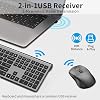
Wireless Keyboard and Mouse Combo, Slim Silent Full Size Computer Keyboard with Calculator Button, Sleek Design, Long Battery Life, USB Receiver, Quiet Optical Mouse 6 Buttons, for Laptop PC - Gray




Buy Now, Pay Later
- – 4-month term
- – No impact on credit to apply
- – Instant approval decision
- – Secure and straightforward checkout
Ready to go? Add this product to your cart and select a plan during checkout.
Payment plans are offered through our trusted finance partners Klarna, Affirm, Afterpay, Zip, Apple Pay, and Google Pay. No-credit-needed leasing options through Acima may also be available at checkout.
Learn more about financing & leasing here.
Selected Option
FREE refund/replacement until Jan 31, 2027 Learn more
To qualify for a full refund, items must be returned in their original, unused condition. If an item is returned in a used, damaged, or materially different state, you may be granted a partial refund.
To initiate a return, please visit our Returns Center.
View our full returns policy here.


At a glance
- Condition
- New
- Color
- Grey
- Weight
- 1.3 lb
- Movement Detection
- Optical
- Power Source
- AA Battery(Not included)
- Keyboard Layout
- QWERTY
- Operating System
- Windows
- Warranty
- 1 year
- Works with
- Gaming Console, Laptop, Personal Computer, Television
Features 8
- 2-in-1 USB Receiver, Plug & Play Just plug the tiny 2-in-1 USB receiver (works for both keyboard and mouse) into your laptop or desktop and start typing instantly. Reliable 2.4G wireless connection up to 33ft (10m) delivers smooth, lag-free performance in meetings, at your desk, or on the go a true plug-and-play wireless keyboard mouse combo for office, home, and travel
- Ultra-Slim Full-Size Keyboard with 9 Ergonomic TiltThis ultra-slim wireless keyboard with number pad saves valuable desk space while looking sleek and modern. The fixed 9 ergonomic tilt promotes a natural wrist position for all-day typing comfort ideal for long work sessions, data entry, and everyday productivity
- Productivity HotkeysPlus a dedicated numeric keypad for fast Excel and accounting entries, and 18 shortcut hotkeys for email, calculator, volume, and media your most-used tools just one click away
- Comfortable Ergonomic Mouse with Side Buttons Sweat-resistant, contoured wireless mouse fits naturally in your palm for hours of comfortable use. Two handy side buttons give instant forward/backward navigation perfect for browsing documents and web pages
- Ultra-Quiet Typing & Silent ClickingScissor-switch keys and silent mouse micro-switches produce minimal noise, so you can type and click freely without disturbing coworkers. Perfect for open-plan offices, libraries, shared workspaces, and late-night overtime
- Long Battery Life & Auto Power SavingPowered by AA batteries (2 for the keyboard, 1 for the mouse; batteries not included). Boasting ultra-low power design, this wireless keyboard and mouse set supports extended battery runtime. It features smart auto-sleep: both units enter deep sleep after 8 minutes of idle time. Wake easily with any keypress or mouse click
- Wide CompatibilityWorks seamlessly with Windows 7/8/10/11, XP, Vista, Mac OS, Linux, Chrome OS and Android.(Note: For Mac OS, this set offers basic compatibility; some advanced shortcut functions may not be supported.) It is ideal for desktops, laptops, PCs, MacBooks, Chromebooks and all other devices equipped with a USBA port
- Invisible Light Optical Mouse with 3 DPI SettingsFeatures invisible light sensor for steady tracking with no visible red glow. 3 selectable DPI levels (1000, 1600, 2400) let you quickly adjust cursor sensitivity for daily office use and light gaming, ensuring smooth, accurate operation
Description
Is there only one USB connector? YES, keyboard and mouse share ONE USB receiver. lf the mouse does not respond and the keyboard is working properly, how can l re pair the mouse? 1.Unplug the receiver of computer. 2.Simultaneously press and hold the wheel button, the left button, and the right button for 5 seconds. (no lights wilight up) 3.nsert the USB receiver into the computer within 15 seconds. If the keyboard is unresponsive and the mouse is working properly, how can l re pair the keyboard? 1.Unplug the receiver of computer. 2.Press and hold the "ESC" and "=+" buttons for about 3 seconds, the keyboard enters pairing mode, and the power indicator light turns red. 3.Insert the USB receiver into the computer within 15 seconds. How do l use the multimedia or F1-F12 functions? To access the F1-F12 function keys, simply press the Fn key +F1-F12 key,Fn key locked, press Fn+Esc to unlock; Mac os system is not compatible withF1-F12 functions.
Specs 17
| Brand | ACOZYKITTEN |
|---|---|
| Color | Grey |
| Connectivity Technology | USB Wireless |
| Special Feature | Calculator Button, Ergonomic, Power-Saving, Soundless, USB Wireless |
| Other Special Features of the Product | Calculator Button, Ergonomic, Power-Saving, Soundless, USB Wireless |
| Movement Detection | Optical |
| Power Source | AA Battery(Not included) |
| Keyboard Layout | QWERTY |
| Compatible Operating System Family | Android, ChromeOS, Linux, MacOS, Windows |
| Minimum Required Operating System Version | ChromeOs 134, Fedora 1, Linux Mint 1, Mac OS 10.12 Sierra, Windows 7 |
| Operating System | Windows |
| Item Weight | 1.3 pounds |
| Keyboard Description | Membrane |
| Antenna Location | Gaming, Home, Office |
| Number of Packs | 1 |
| Manufacturer | ACOZYKITTEN |
| Unit Count | 1 Count |
No specs match.
Frequently asked questions
To initiate a return, please visit our Returns Center.
View our full returns policy here.
- Klarna Financing
- Affirm Pay in 4
- Affirm Financing
- Afterpay Financing
- Zip Pay in 4
- Financing through Apple Pay
- Financing through Google Pay
Learn more about financing & leasing here.
Similar Products

Logitech G PRO X Superlight Wireless Gaming Mouse - Black


Apple Magic Bluetooth Wireless Laser Mouse - A1296 (Renewed)

SteelSeries Apex Pro Mini HyperMagnetic Gaming Keyboard


Top Amazon Reviews


