


Search  for anything...

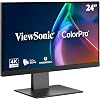
ViewSonic VP2488-4K 24 Inch 4K Mac-Ready Monitor, IPS with 100% sRGB, 98% DCI-P3 and Pantone Validated for Mac Studio and MacBook Pro, Advanced Ergonomics, Thunderbolt 4, USB, HDMI, and DisplayPort

  • Based on 49 reviews
Condition: New
Checking for the best price...
$452.49 Why this price?
Save $97.50 was $549.99

Buy Now, Pay Later


As low as / mo
  • – Up to 36-month term if approved
  • – No impact on credit to apply
  • – Instant approval decision
  • – Secure and straightforward checkout

Ready to go? Add this product to your cart and select a plan during checkout.

Payment plans are offered through our trusted finance partners Klarna, Affirm, Afterpay, Apple Pay, and PayTomorrow. No-credit-needed leasing options through Acima may also be available at checkout.

Learn more about financing & leasing here.

Selected Option

Free shipping on this product

30-day refund/replacement

To qualify for a full refund, items must be returned in their original, unused condition. If an item is returned in a used, damaged, or materially different state, you may be granted a partial refund.

To initiate a return, please visit our Returns Center.

View our full returns policy here.


Availability: Only 5 left in stock, order soon!
Fulfilled by Amazon

Arrives Wednesday, Jul 15
Order within 7 hours and 9 minutes
Available payment plans shown during checkout

Protection Plan Protect Your Purchase
Checking for protection plans...

Size: 24-Inch 4K


Features

  • PREMIUM MONITOR: 24 Inch 4K (3840x2160p) IPS Mac-ready monitor with 60Hz refresh rate
  • THUNDERBOLT 4 CONNECTIVITY: Enjoy lightning-fast data transfer speeds of up to 40 Gbps for data, video, and audio transmission while delivering up to 100W of power
  • 4K DAISY CHAIN SOLUTION: Enhance your 4K dual monitor setup with a frameless design and daisy chain via Thunderbolt 4
  • MAC-LEVEL COLOR ACCURACY: 100% sRGB, 98% DCI-P3 colors for deep contrasts that align perfectly with Mac's industry-leading color performance
  • PANTONE VALIDATED: This monitor has been certified as capable of reproducing Pantone Matching System colors
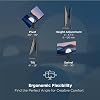
  • ERGONOMIC STAND: Advanced ergonomics (tilt, swivel, pivot, and height adjustment) for all-day comfort
  • FLEXIBLE CONNECTIVITY: The VP2488-4K supports laptops, PCs, Macs and more with Thunderbolt 4, USB Hub, HDMI, DisplayPort, and USB-C inputs

Description

Designed for creative professionals, the ViewSonic® ColorPro® VP2488-4K delivers stunning 4K Ultra HD resolution and 98% DCI-P3 color accuracy in a compact 24” display—perfectly tuned for the Mac ecosystem. With Thunderbolt 4 connectivity, enjoy fast data transfer, up to 100W charging, and seamless daisy chaining—all through a single cable. Effortlessly connect two VP2488-4K monitors in a dual-display setup for expanded screen real estate and streamlined productivity. Additional HDMI and DisplayPort inputs offer broad compatibility, while the integrated USB-C and USB-A hub keeps your workspace connected and clutter-free. An ergonomic stand with height, tilt, and swivel adjustments ensures all-day comfort. Whether you're editing, designing, or streaming, the VP2488-4K brings your work to life with vibrant, precise visuals.

Brand: ViewSonic


Screen Size: 24 Inches


Resolution: 4K UHD 2160p


Aspect Ratio: 169


Screen Surface Description: Matte


Aspect Ratio: 169


Screen Finish: Matte


Contrast Ratio: 13001


Refresh Rate: 60 Hz


Display Type: LCD


Display Technology: IPS


Viewing Angle: 178 Degrees


Brightness: 500


Color Gamut: 1.0


Has Color Screen: Yes


Picture Quality Enhancement Technology: IPS panel, DCI-P3 color accuracy, Pantone validation


Screen Size: 24 Inches


Item Dimensions D x W x H: 8.33"D x 21.27"W x 20.42"H


Item Weight: 13.7 Pounds


Resolution: 4K UHD 2160p


Display Resolution Maximum: 3840 x 2160 Pixels


Native Resolution: 3840x2160


Power Consumption: 222 Watts


Connectivity Technology: DisplayPort, HDMI, USB Type A, USB Type C


Hardware Connectivity: DisplayPort, HDMI, Thunderbolt 4, USB


Adaptive Sync: FreeSync


Additional Features: 100W USB-C charging, Daisy chain, Ergonomic, Mac-compatible, Thunderbolt 4


Specific Uses For Product: Business, Desktop, Photo Video Editing


Color: Black


Mounting Type: 100 x 100mm


Compatible Devices: Desktop, Laptop


Warranty Type: 3 Years Manufacturer Warranty


Shape: Flat


Brand: ViewSonic


Model Number: VP2488-4K


Model Name: VP2488-4K


Warranty Description: 3-Year limited warranty on parts, labor and backlight


UPC: 766907032291


Manufacturer: ViewSonic


Built-In Media: 3-pin Plug (IEC C13 / CEE22), AC/DC Adapter, DisplayPort Cable, HDMI Cable, TBT4 Cable, USB Type-C to Type-A 3.2 Gen2 Cable, Quick Start Guide, VP2488-4K


Response Time: 5 Milliseconds


Total Number of HDMI Ports: 1


Total Usb Ports: 4


Total Thunderbolt Ports: 1


Number of Component Outputs: 2


Total USB 2.0 Ports: 4


Total USB 3.0 Ports: 4


Frequently asked questions

If you place your order now, the estimated arrival date for this product is: Wednesday, Jul 15

Yes, absolutely! You may return this product for a full refund within 30 days of receiving it.

To initiate a return, please visit our Returns Center.

View our full returns policy here.

  • Klarna Financing
  • Affirm Pay in 4
  • Affirm Financing
  • Afterpay Financing
  • PayTomorrow Financing
  • Financing through Apple Pay
Leasing options through Acima may also be available during checkout.

Learn more about financing & leasing here.

Top Amazon Reviews


  • ASTONISHING pixel density and color volume! ASTONISHING pixel density and color volume!
Size: 27-Inch 5K
I'm glad Amazon left the option to order this monitor despite it being temporarily out of stock. I ordered it on March 26 and received it on April 24. How is it? ASTONISHING! I've used the iMac 5K in the past and have played around with the current Apple Studio Monitor and iMac 4.5K. Those screens look truly impressive. The pixel density is something else. However, the Mac OS is optimized for that resolution. I wasn't ready for how things would look in Windows in 5K. Much less how games would look in 5K with all eye-candy enabled. First of all, the grain on this matte screen is bigger than the actual pixels. The pixel density is so high on this monitor, even with my HD reading glasses at 12 inches away, I can barely spot individual pixels. This means that in games, textures and the utmost tiny details are so defined, they look like you could pick them off the screen with your nails. Horizon Forbidden West in 5K on the RTX 5090 at 70 Hz looks incredible (75 Hz looks stuttery due to half being 32.5 frames). Do not exceed 70 Hz. It looks surreal. Light and shadows moving in the screen are startling in how much they resemble actual reality. Everything just pops off the screen. You need to experience this. 4K resolution looks great whether in TVs or monitors, but this is the next-level if you've been wanting more and an 8K TV is not in your cards. If you are a true pixel-peeper, this VP2788-5K monitor truly will leave you breathing heavy from how sharp and detailed everything looks, and how colors just glow off the screen without being oversaturated. I haven't tested color accuracy. All I know is this looked correct from first power-up, and I just thought to myself, "Wow...those colors". Black levels are grayish, since it's an LCD monitor, but as long as not much black is showing in a scene, black objects and details do look inky black. In summary, it's a pretty bright display and looks as good as the Tandem OLED display on my iPad Pro, which is currently the best OLED display in the market. In terms of dead pixels, I saw two tiny black clusters, one on the left and one topmost in the center. They're super tiny, smaller than a little dust. That's within spec, so I'm not returning the monitor just for those barely noticeable details that I can only see if the screen is just one single color. That only happens on the LCD dead pixel checker website I used, ha-ha. The rest of the screen is perfect. I'm so thrilled with this monitor. I haven't felt excited about a monitor in years. This is something else! ... show more
Reviewed in the United States on April 30, 2025 Reviewed in the United States on April 30, 2025 by JESUS SAVED ME

  • Great 4k monitor
Size: 24-Inch 4K
This is a great small-sized 4k monitor. Build quality, brightness and color accuracy are all excellent. I definitely recommend it to anyone who is looking for a 24 inch 4k monitor.
Reviewed in the United States on April 19, 2026 by MC

  • Sharp Picture and Good Feature. Great with MacMini M4 Pro. Could use better AdobeRGB.
Size: 27-Inch 5K
The picture is sharp and overall it has many good features. The OSD is a little complicated but the options give you complete control of the monitor. However, if you are a photo/video/graphic person you may not get the calibration you want for Adobe RGB and NTSC. The best I could do was 81% NTSC, 88% Adobe RGB, (100% sRGB, 99% P3 as adveritised) using datacolor Syder X Elite software and hardware. My Asus PA279CRV-2 runs 99% to 100 % on all the profiles. The color looks great but I wish Adobe RGB was better since I do a lot of work in Photoshop and Capture One. A prefect Match for the MacMini M4 Pro. Four stars instead of 5 for AdobeRGB shortfall. ... show more
Reviewed in the United States on April 7, 2025 by Lightmanrt

  • Expensive yet buggy monitor
Size: 27-Inch 5K
This monitor is buggy and difficult to use. It won’t reconnect automatically when the Macbook goes to sleep. When it goes to sleep, any USB-C device connected to it disconnects or also goes to sleep; however, they don’t reconnect when the computer or monitor comes back from sleep. Example: With my current Thunderbolt monitor, my USB-C soundbar stays on through sleep cycles when powered by the monitor — and reconnects automatically on restart cycles. With this ViewSonic 5K 27” monitor, it disconnect and turns off every single time the monitor goes to sleep as it loses power or something. The same is true for every single USB device connected to it. The monitor also has trouble staying connected to the Macbook, which can become distracting. The power delivery from the monitor to the devices and Macbook is meager and poor — even tho it has a power brick!! I frequently get macOS messages that a device is consuming too much power and it’s being turned off. My current monitor is 1/3 the price, has no power brick and it can power everything with ease. I wish my current monitor was 5k… This monitor also loses all its setup config with macOS on reset. If you were mirroring the laptop, you gotta set up that again. The UI of the monitor settings is confusing and the actual settings feel at odds with picture quality. Another sign of buggy software powering this monitor. The connector ports are a pain to use and access! The only redeeming qualities are that it’s compact design and the image can look nice if you get the right settings… and it stays connected. It’s too expensive to feel and act this defective. It’s my first and probably last ViewSonic. I think I’ll stick to Samsung or DELL as they have similarly priced products with hopefully better quality. The cheaper Asus Pro Art 5k may be a better choice. I only got this ViewSonic because of how hyped was it’s “out of the box” easy connection and setup with macOS… and the daisy chaining. I planned to buy a second monitor to daisy chain but if one can’t even stay connected… how would two of them? I do not recommend this product. Use your money on something else. ... show more
Reviewed in the United States on October 9, 2025 by Red Panda

  • Optional use
Size: 24-Inch 4K
Not sure what to say. Like the compact size. Good amount of usbsm wish had a extra hdmi and head phone jack. Controls are simple. My ps5 look good on if. My acer nitro 5 have thunderbolt 4 support. Not sure if its worth for 500ish or 600 bucks. Like the price I got using my Amazon balance. I might get 1 for my ps5 if its around 250 or 260 bucks ... show more
Reviewed in the United States on February 14, 2026 by Tony

  • UPDATE UPDATE
Size: 27-Inch 5K
After going on a year's use I'm upgrading my review to 5 stars. The hidden pointing-down ports are actually nice in that they're out of the way yet accessible with the phone-in-selfie-mode trick which I should have figured out sooner. I've take the one hub out and have my webcam plugged straight into a USB port. I'm also using the second thunderbolt port to charge my headphones. I haven't touched it in months and still loving it. Original Review: I bought this to use with a new 13" M4 MacBook Air. I love the stand; solid base, pivots left/right up/down, height is adjustable! I found what I believe to be the Thunderbolt ports and plugged my the Mac into the display, and with a little bit of playing with the OSD and Mac System Settings, I got the desktop. The display itself looks great! The problem came when I tied to connect things to the USB Ports. I believe there are two USB-C ports, but there are also two USB-A ports, which is great as I can connect my old hub as well as the new one I bought for this display. Fist off, the ports are located in the worst possible position. They point straight down, and once I had the MacBook connected it was impossible for me to get to them and see what I was doing. TIP: PUT YOUR PHONE INTO SELFIE MODE AND LAY IT UNDER THE DISPLAY, that will let you see the ports while you try to connect stuff. Once I had the hubs plugged in, they weren't working. Sometimes an SSD would disconnect unexpectedly, sometimes it wouldn't even recognize when the SSD was plugged in. I played with the settings on the OSD for a long time. Got the display way out of whack, but was able to reset to factory settings. Eventually I got everything working (hooray) I think my main problem was solved by turning USB Charging and Thunderbolt Charging, ON. Right now I have: The MacBook plugged into a Thunderbolt port and it shows that it is charging; A 1TB SSD plugged directly into one of the USB-A ports; A hub plugged into the other USB-A port with my webcam plugged into that; A hub plugged into a USB-C port which I tested by plugging two thumb drives into it and verified that they showed up on my desktop, I could open docs out of them, and I could eject them. Everything is working now! so I'm not messing with it anymore. It just took too much fiddling. ... show more
Reviewed in the United States on July 4, 2025 Reviewed in the United States on July 4, 2025 by OpenSprit

  • Super clear, great 4k clarity and color! Super clear, great 4k clarity and color!
Size: 24-Inch 4K
Viewsonic continued to offer superb monitor quality, if you're willing to pay for it. Excellent 4K resolution with a clear, crisp picture and a solid build quality - nothing feels flimsy or cheap. The monitor is easy to set up right out of the box, and it's large and bright enough to ease eyestrain for older eyes. If I have any nits to pick, it's that the setup instructions are TINY, and like many manufacturers today, they don't include and operating manual. ... show more
Reviewed in the United States on August 31, 2025 Reviewed in the United States on August 31, 2025 by Devlin Church

  • 185 ppi is perfect for 2x on a Mac
Size: 24-Inch 4K
I have this next to an OG 2003 Apple Cinema Display (20") and the scaling matches very well. I previously tried the KTC H27P3 which, while nice, renders things a little too small with its 218 ppi.
Reviewed in the United States on May 12, 2026 by John Simons

Can't find a product?

Find it on Amazon first, then paste the link below.
Checking for best price...