




Oassuose USB Power Cable Adapter for Fire TV Stick,Powers Streaming TV Sticks Directly from T V USB Port(Eliminates AC Adapter and Very Long Power Cable)




Buy Now, Pay Later
- – 4-month term
- – No impact on credit to apply
- – Instant approval decision
- – Secure and straightforward checkout
Ready to go? Add this product to your cart and select a plan during checkout.
Payment plans are offered through our trusted finance partners Klarna, Affirm, Afterpay, Zip, Apple Pay, and Google Pay. No-credit-needed leasing options through Acima may also be available at checkout.
Learn more about financing & leasing here.
FREE 30-day refund/replacement
To qualify for a full refund, items must be returned in their original, unused condition. If an item is returned in a used, damaged, or materially different state, you may be granted a partial refund.
To initiate a return, please visit our Returns Center.
View our full returns policy here.

Features
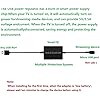
- Power Fire TV stick device directly from the TV's USB port,Eliminates AC Adapter and very long power Cable,Replacing the Fire Stick's USB cable keeps your installation clean and tidy.
- Compatible with all streaming devices that support micro USB ports, works with all Fire-Stick models (including the new 4K/Max version), Roku/Chromecast/TV Sticks and other streaming sticks.
- Easy to install, plug and play, no driver required, just plug the micro USB into the Fire Stick, and then plug the USB A into the USB port on the side of the TV, which perfectly solves the problem of some TVs failing to start or restarting repeatedly due to insufficient power supply.
- Built-in 5V power conversion module, multiple protection circuits, the TV's USB voltage through the chip for constant voltage and constant current output, so that the streaming media stick works stably. The highest output is 5V/1.5A, Allows you to provide enough power support when enjoying 4K movies.
- Note: Please wait patiently for about ten minutes to charge the device before the initial installation and use. The device only provides the fire stick power when the TV is turned on. After the TV is turned off, the power supply will automatically stop, saving energy and environmental protection. If you have any questions, please feel free to contact us, you will get a satisfactory answer within 24 hours.
- Important Safety Warning Must Read Before Use This product contains a built-in energy storage component: To ensure safety and product lifespan, do not squeeze, puncture, or disassemble the product, and avoid placing it in high-temperature environments (such as near heaters, in direct sunlight, or inside enclosed TV cabinets). Please ensure the usage area is well-ventilated.
Description
The Oassuose power multiplier provides a stable operating voltage and current for streaming media devices by multiplying the TV's USB voltage. Replacing the original power cord suspension, the AC power supply is omitted and the Smart TV Stick is powered directly from the TV's USB port. Make the space neat and clean.How to connect the power stabilizer to the streaming media stick?Step 1: Insert the Micro USB male connector into the TV Stick/Chromecast female connector, making sure it is seated in place.Step 2: Plug the Fire TV Stick/Chromecast into your TV's HDMI input.Step 3: Plug the USB A cable into the TV's USB port (USB3.0 port supported).Step 4: Turn on the TV, wait for the streaming stick to turn on, enter the startup screen, and enjoy high- definition picture quality.Specifications and parameters:Input: 5V 1AOutput: 5V 1.5A (max)Note: When using for the first time, the battery power may be low and it will not start working immediately, please charge the device for ten minutes before use.Note: Does not charge phones or tablets.Compatible with the following Amazon device models:Fire TV StickFire TV Stick LiteFire TV Stick 4KFire TV Stick 4K MaxFire TV Ultra 4KFire Stick 4K Ultra HDPacking List: 1 Power Stabilizer ( Fire Stick Don't including )After-sale service:provides a 12-month warranty and lifetime customer support, please rest assured to buy. If you have any questions, please feel free to contact us, you will get an answer within 24 hours.Safety Use and Warning Guidelines To ensure your safe use of this product and enjoy its best performance, please strictly follow the following precautions: Regarding the product's interior: This product contains an energy storage component used to stabilize voltage. This component is sensitive to physical impact and high temperatures.Disassembly, puncturing, impact, or forceful squeezing of the product casing is strictly prohibited. Regarding the usage environment: Keep away from heat sources: Do not place the product above TV vents, inside cars, or in other high-temperature environments that may exceed 40 ° C. Ensure ventilation: Avoid completely sealing or enclosing the product in confined spaces (such as against a wall or crammed among tangled cables). It should be placed in an open, well-ventilated location. Moisture and humidity protection: Avoid using in damp or dusty environments. Regarding installation and storage: During installation, do not excessively bend the cables or subject the product to external pressure. When not in use, store in a cool, dry place, away from children and pets. Handling abnormal situations: If you notice any deformation, bulging, cracking, smoke, or unusual odor from the product casing, immediately stop using it and unplug all connections. Do not attempt to repair it yourself; please contact our customer service for assistance.Following these guidelines will greatly extend the product's lifespan and ensure safe use. Your safety is our top priority.
Compatible Devices: Tablet, Television
Connector Type: Micro USB
Color: Black
Item dimensions L x W x H: 3.5 x 1.7 x 0.6 inches
Brand: Oassuose
Product Dimensions: 3.5 x 1.7 x 0.6 inches
Item Weight: 2.39 ounces
Item model number: HL-002
Batteries: 1 Lithium Polymer batteries required. (included)
Date First Available: May 15, 2022
Manufacturer: DGHL
Frequently asked questions
To initiate a return, please visit our Returns Center.
View our full returns policy here.
- Klarna Financing
- Affirm Pay in 4
- Affirm Financing
- Afterpay Financing
- Zip Pay in 4
- Financing through Apple Pay
- Financing through Google Pay
Learn more about financing & leasing here.


![IVANKY 10K 8K HDMI 2.1 Cable 15ft, 48Gbps Ultra High Speed HDMI Cable | [8K@60Hz 4K@120Hz, HDR10, HDCP 2.3, 3D, eARC], Braided 8K HDMI Cord Compatible with PS5, PS4, UHD TV and PC](https://m.media-amazon.com/images/I/71Sj8yL8IbL._AC_US500_.jpg)


