Search  for anything...

Unitek USB 3.0 to IDE and SATA Converter External Hard Drive Adapter Kit for Universal 2.5/3.5 HDD/SSD Hard Drive Disk, One Touch Backup Function, Included 12V/2A Power Adapter

  • Based on 9,417 reviews
Condition: New
Checking for the best price...
$28.07 Why this price?
Holiday Deal · 22% off was $35.99

Buy Now, Pay Later


As low as $7 / mo
  • – 4-month term
  • – No impact on credit
  • – Instant approval decision
  • – Secure and straightforward checkout

Ready to go? Add this product to your cart and select a plan during checkout.

Payment plans are offered through our trusted finance partners Klarna, Affirm, Afterpay, Apple Pay, and PayTomorrow. No-credit-needed leasing options through Acima may also be available at checkout.

Learn more about financing & leasing here.

Selected Option

Free shipping on this product
This item's return window has been extended for the holiday season: Returnable until Jan 31, 2026

To qualify for a full refund, items must be returned in their original, unused condition. If an item is returned in a used, damaged, or materially different state, you may be granted a partial refund.

To initiate a return, please visit our Returns Center.

View our full returns policy here.


Availability: In Stock.
Fulfilled by Amazon

Arrives Tuesday, Dec 16
Order within 12 hours and 25 minutes
Available payment plans shown during checkout

Protection Plan Protect Your Purchase
Checking for protection plans...

Color: USB A


Features

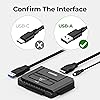
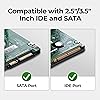
  • Support 2.5 "/3.5" SATA HDD and SSD; 2.5 "/3.5" IDE HDD; DVD-ROM, CD-ROM, CD-RW, DVD-RW, DVD + RW Optical Drive. Dual-Head IDE Connector (40pin and 44pin) plus one SATA II Connector.
  • Allow to operate three HDDs Simultaneously. Data transfer rates up to 5 Gbps, backward compatible with USB 2.0/1.1.
  • Included 12V 2A power cable is for providing stable electricity supply. Please connect the power supply when using it, so that it will work more stable, especially when reading three hard drive at the same time.
  • 4PIN Power Cable is designed for 3.5 IDE drive, SATA drives are not applicable and unnecessary.When you need to read a 3.5-inch IDE hard drive, you must connect the 44-pin power cable.
  • Plug and play; Hot Swap; One Touch Backup function; On/Off Switch for HDD protection. LED light shows power and activity status.
  • What we offer: USB 3.0 to IDE+SATA Adapter, USB 3.0 Cable, 4PIN Power Cable, Power Adapter, 24h customer email support.

Compatible Devices: Desktop, Laptop, PC


Connector Type: USB Type A


Color: USB A


Item dimensions L x W x H: 3.8 x 2.7 x 0.63 inches


Brand: Unitek


Product Dimensions: 3.8 x 2.7 x 0.63 inches


Item Weight: 7.2 ounces


Item model number: Y-3322


Is Discontinued By Manufacturer: No


Date First Available: August 12, 2013


Manufacturer: Unitek


Frequently asked questions

If you place your order now, the estimated arrival date for this product is: Tuesday, Dec 16

Yes, absolutely! You may return this product for a full refund within 30 days of receiving it.

To initiate a return, please visit our Returns Center.

View our full returns policy here.

  • Klarna Financing
  • Affirm Pay in 4
  • Affirm Financing
  • Afterpay Financing
  • PayTomorrow Financing
  • Financing through Apple Pay
Leasing options through Acima may also be available during checkout.

Learn more about financing & leasing here.

Top Amazon Reviews


  • Avoid ai-otb software. Device is pnp is great.
Color: Type-C Hard Drive Adapter
The device works great alone. I didn't like the software that was provided. I couldn't uninstall it, I couldn't restore my laptop. The Chinese software was infused to the laptop... I go to its main folder, install.exe file was gone, the .dll's were gone... the .exe programme file was there, but it not work, the uninstall file was there, but a programme service was still active. It only had 4 components after you extracted the zip file. I couldn't bring up the programme to use it. It gave me a message that it was already running. So I stopped the service in administrative area of the laptop. I denied all ✔️'s on users, system, administration and it's access, deleted its access directly- Gotta be careful there...you delete the right one. Then I stopped the service, with the control panel open for ai-otb uninstall programme. I un-installed it and all components. Success! I ran a registry programme to clean out any orphaned registry values along other registry orphaned keys. I no longer have that Chinese programme on my laptop. Sadly, nothing is made in USA, in most electronics and or programming. Need to make things here and let go of China and their products. When you cannot uninstall a programme, it becomes a concern...up to no good, spying, malware, phishing... who knows what it was doing behind the scenes and sending info back important info to China... especially when .dll's were deleted. I should double check under "C drive" in default, users, public, and your access folders: programme files, programme 32 files, common files, anywhere programme's may be stored to be sure it's gone- Ai-otb software. The device alone is super... with several old hdd's and sdd's. Gave myself extra storage devices, yay! Can use windows to format, defrag, delete and etc to that storage device. You can find that device on Device manager and access using disk management programme. Usb port, i have the usb a & c versions. Compactness is small, fits on desk fine. Speed using 3.0 was fast. Functionality got access to the old hdd & sdd drives. The ease of installation: ai-otb software, I'd go against it as discussed above. Good luck. ... show more
Reviewed in the United States on June 14, 2025 by Kratos Suvarious

  • If you have a desktop pc hard drive, get this!
Color: USB A
Multiple customizable options for many different computers. So to make a long story short before I got this item, I wound up getting a data transfer for laptops which did not work because it did not have extra power to go to the hard drive. This product works extremely well just make sure you hook it up to a plug to provide power to the external hard drive. Additionally, I believe that this product is very easy to use, and the cord is long to make it convince to use. Finding the data on the hard drive is the real challenge though. However, this product is well worth the money. ... show more
Reviewed in the United States on September 30, 2025 by Chase

  • Works as it should, good for transferring and backing up drives- with a recommrndation
Color: USB A
Works as it should, good for backing up drives or moving data over before destroying drives on old computers. I also recommend this https://amzn.to/3IaeIn7 to complete the job.
Reviewed in the United States on September 7, 2025 by GnshpCSO

  • Fantastic product.
Color: USB A
I have had a old External HD that I've had in the closet for about 15 years. I knew it stopped working when plugged it in and I stopped using it. I lost all cables and couldn't destroy it until I figured what was on it. I found this product and read the reviews. I gave it a shot and it worked perfectly. I've got the data off and didn't have to download any software for it to work. It was truly PnP. ... show more
Reviewed in the United States on November 2, 2025 by Alex Krycek

  • Works Perfectly! A God-send for Crashed Computers.
Color: USB A
The Unitek USB to IDE and Sata Converter is a life-saver! The device works perfectly and with zero complications to retrieve data from a hard drive--a task that might cost hundreds of dollars if performed professionally. What a great value! Caution: this device will not fix a hard drive that is itself damaged. It is for use if the hard drive is intact but the computer motherboard is damaged or fried and the computer will not boot. No instructions come with the Converter but they aren't really necessary. In order to make using the device easier, I recommend removing the hard drive from your desktop or laptop first. It's difficult if not impossible to attach the device to the hard drive if the drive is still installed in the computer. For a desktop, the removal of the drive is easy. Most desktop hard drives are mounted in a cage in the case. Simply detach the screws holding the cage to the case and then push down on a lever holding the cage to the case at the wall. The cage pops right out. There are many videos on YouTube that show how to do this. Takes about 30 seconds to accomplish. No need to remove the hard drive from the cage. Laptops can be a little more time-consuming. You probably will have to remove the back of the laptop--8 or 10 screws--to access the hard drive. Once it is exposed it simply needs to be disconnected and pulled out. Once you have the hard drive out, find the appropriate connector on the converter (there are 3 available) and plug it into the IDE or SATA port of the hard drive. Attach the power cord to the converter and plug it in. Turn on the power switch on the back of the converter. A blue light will go on. Now attach the included USB cable to the converter and plug the other end into a working computer. The old hard drive will show up on the working computer as a new external drive. Select it and it will open a File Explorer window. Generally, you will browse down to Users and find the user whose files are to be rescued. You will see all of the standard folders--Desktop, Documents, Pictures, Music--exactly as you would on the original computer's File Explorer. Copy and paste any or all folders or files you want to rescue to the new computer . That is all there is to it! I have even used the Unitek converter to transfer files from a Windows formatted hard drive to a Mac. Worked like a charm! Note that the Unitek website doesn't provide much help unless you are fluent in Korean. But documentation help is not really necessary. This is a really easy DIY project that will rescue your data and potentially save time, money and grief. Extremely simply and effective! So happy that I bought the Unitek converter! ... show more
Reviewed in the United States on August 15, 2017 by rgj21

  • Knowing how to find the files you want to retrieve
Color: USB A
Used it once so far and it worked great. Was able to retrieve my pictures off of a hard drive from a laptop that stopped working. Easy to hook up. Need some knowledge of how to find what you want off of it
Reviewed in the United States on November 6, 2025 by Thomas J Landwehr

  • Supported on Linux
Color: USB A
Works great on Linux - maybe that's obvious since it's a standard interface. I saved data from a 27 year old drive (and got the dreaded click of death on a 25 year old Quantum Fireball - but that's not the adapter's fault). Very fun - I found photos and data I thought were gone forever. Speed was good, and appeared to be limited by the drives, not the device. ... show more
Reviewed in the United States on November 4, 2025 by Robert Bushman

Can't find a product?

Find it on Amazon first, then paste the link below.
Checking for best price...