
Search  for anything...

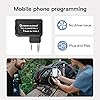
TIDRADIO Ham Radio Wireless Programmer Adapter APP and PC Program for Baofeng UV-5R and Multiple Models No Driver Issues Instead of Program Cable

  • Based on 3,315 reviews
Condition: New
Checking for the best price...
$13.75 Why this price?
Holiday Deal · 31% off was $19.98

Buy Now, Pay Later


As low as $3 / mo
  • – 4-month term
  • – No impact on credit
  • – Instant approval decision
  • – Secure and straightforward checkout

Ready to go? Add this product to your cart and select a plan during checkout.

Payment plans are offered through our trusted finance partners Klarna, Affirm, Afterpay, Apple Pay, and PayTomorrow. No-credit-needed leasing options through Acima may also be available at checkout.

Learn more about financing & leasing here.

Free shipping on this product
This item's return window has been extended for the holiday season: Returnable until Jan 31, 2026

To qualify for a full refund, items must be returned in their original, unused condition. If an item is returned in a used, damaged, or materially different state, you may be granted a partial refund.

To initiate a return, please visit our Returns Center.

View our full returns policy here.


Availability: In Stock.
Fulfilled by Amazon

Arrives Saturday, Dec 27
Order within 8 hours and 29 minutes
Available payment plans shown during checkout

Protection Plan Protect Your Purchase
Checking for protection plans...

Features

  • For Hot RadiosSupports BAOFENG radio UV-5R mini, 5RM(AR-5RM, UV-5RM), GM-15 PRO, UV-5G Plus, 5RM-GMRS, GM-5RM, UV-21R, UV-17R, 5RX, K5Plus. For a full list of radio models, please visit the ODmaster APP/Web.(8 TD-H3 & TD-H8 radios have built - in Bluetooth programming function, no external programmer needed.)
  • BIG BOOMNow with Odmaster, directly connect PC Bluetooth and program radios on Odmaster Web. Supports CHIRP CVS import, no plugins required - just open the web and link programmer. APP & Web share freq data across phones & PCs for easier programming. Program on PC, sync to account, and write to radio via BL-1 on phone when needed. Pre-programmed templates work for the same model, not different ones. (First web login? Enable in APP Settings-Remote Programming-Open.)
  • Customize Your Walkie talkie QuicklyAPP works with your mobile phone to quickly program, quickly connect to the nearest repeater, customise the buttons of the radios, share the frequency scheme between the same models, and more function. More convenient and smarter than Chirp, you can use Web Odmaster batch prog on PC)
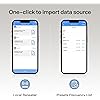
  • One-click Import Local RepeatersEasily import nearby repeater configs to radio, helping connect to local repeaters for wider range. Set distance or search location in top-right to get list. Select channel, click "Import", then "Save" (if no other channel data changed, just "Save", no need for "Write").
  • 4 Select correct model. For 5R series, try other 5R models for test reading if needed. 5 Register as per manual. Registration/login issues? Contact us. Without registering, you can read & program but no data saving. 6 Get location permission to quickly link nearby repeaters, if forbid, you still can search or import repeaters shared by others. 7 MIC permission for in - APP comms. Turn off if not used. 8 TD-H3 & TD-H8 radios have built - in Bluetooth programming function, no external programmer needed.
  • 365-day Quality Guarantee Click yellow "Add to Cart" for worry-free buying. Not satisfied? Tell us, we're always improving. Have questions or suggestions? Contact us anytime. SUPPORTGoing to 'Orders' > 'Get help' > select the order > click 'other' > send 'seller' > then send your problem

Brand: TIDRADIO


Color: Black


Number of Channels: 12


Special Feature: Wireless, Work with PC(ODmaster Web), Work with Phone(ODmaster APP)


Frequency Range: No


Talking Range Maximum: 10 Meter


Voltage: 3.7 Volts (DC)


Water Resistance Level: Not Water Resistant


Number of Batteries: 1 Lithium Polymer batteries required. (included)


Included Components: USB cable, User Manual, baofeng uv-5r programmer


Product Dimensions ‏ : ‎ 0.3 x 0.2 x 0.5 inches; 1.76 ounces


Item model number ‏ : ‎ TD-BL-1


Batteries ‏ : ‎ 1 Lithium Polymer batteries required. (included)


Date First Available ‏ : ‎ July 7, 2021


Manufacturer ‏ : ‎ TIDRADIO


Customer Reviews: 4.2 4.2 out of 5 stars 3,315 ratings


Item Weight: ‎1.76 ounces


Product Dimensions: ‎0.3 x 0.2 x 0.5 inches


Item model number: ‎TD-BL-1


Batteries: ‎1 Lithium Polymer batteries required. (included)


Display Type: ‎No


Warranty: ‎6


Date First Available: July 7, 2021


Frequently asked questions

If you place your order now, the estimated arrival date for this product is: Saturday, Dec 27

Yes, absolutely! You may return this product for a full refund within 30 days of receiving it.

To initiate a return, please visit our Returns Center.

View our full returns policy here.

  • Klarna Financing
  • Affirm Pay in 4
  • Affirm Financing
  • Afterpay Financing
  • PayTomorrow Financing
  • Financing through Apple Pay
Leasing options through Acima may also be available during checkout.

Learn more about financing & leasing here.

Top Amazon Reviews


  • TIDRADIO Excellent wireless programming option...
Style: 2.0 Wireless Programmer
I saw some videos on the TIDRADIO wireless programming device and i was curious, so I ordered it. I was pleasantly surprised. It paired up quickly with the Odmaster app and when you download the radio settings to the app it is faster than doing it on the computer. I could immediately see how this could be useful when camping or off roading etc. It makes it simple to clone or program radios when you are in a situation where connecting to a computer is not practical or even possible. It's true that radios like the Baofeng UV-5R can be programmed from the keypad, but that can sometimes be tedious. Moreover, some older radios have firmware bugs that will allow you to change some settings, but those settings will revert back the next time you turn the radio on. With the TIDRADIO wireless option, the settings stick. There are a growing number of radios supported by Odmaster, but not every radio is. Most popular models and even some more obscure models are supported, either outright or in a beta form. The software interface is a bit involved and if you're used to CHIRP, there will be a bit of a learning curve regarding location and wording of some settings, but you can do a lot with the software. Once you have your Odmaster account set up you can also access your frequency lists from a web browser if you like. You can save different configurations to your phone and the Odmaster portal. I liked that. I feel that for the price this is a very good programming option. It isn't necessarily the best or easiest option for every circumstance, but in certain situations this is outstanding. They have been updating the software regularly and the number of supported radios continues to grow. I highly recommend this, especially if you find yourself in situations where you wish you could quickly change the radio configuration in the field where traditional cloning is difficult if not possible. For example, if you want different repeaters in different remote locations and your radio doesn't support custom channels, you could create multiple configurations and simply upload them to the radio when needed. No internet, phone service or computer needed. Just your phone, the Odmaster app and the TIDRADIO programmer. Make sure to charge the TIDRADIO Bluetooth programmer before hitting the road. It isn't powered by the accessory port. It has it's own battery. They include a cable, but you will need to use your own charger. Even if you wouldn't need this on a daily basis, it is a nice-to-have for those situations where you might need it for a specific situation or location. I have used it many times since I purchased it and it has not failed or glitched once. It works perfectly. Just make sure to be careful plugging it into the accessory port because it is lopsided and I could see where pushing too hard on one side could possible cause a problem. Just push it in directly above the pins. Also, make sure it is all the way in. Sometimes it feels like it's in, but can go in a bit further. Excellent device. 5 Stars. ... show more
Reviewed in the United States on November 19, 2021 by James

  • Programming on-the-move, Reliable Wireless Sync, Compact.
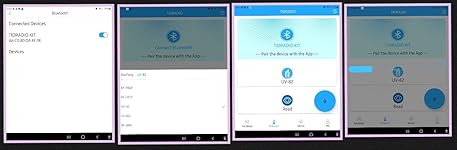
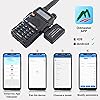
My Scenario - I've a programming cable that connects the radio (via the K1 plug) with the desktop (via the usb port). This cable works great with the open-source CHIRP software (essentially a spreadsheet interface with all available channels attributes) for programming channels in bulk. Great but I cannot bring this programming method along when I'm venturing outside! When I'm out offroading with a group of friends, there are times whereby we need to program a channel (not already programmed as one of our preset channels) and I won't have my desktop with me. While I can program a channel within the radio itself, it is a cumbersome and frustrating experience doing that on a number keypad - it's just plain unproductive! Here is where this Bluetooth Wireless Programmer Adapter comes to my rescue. Solved - All I need is this TIDRADIO Wireless Programmer Adapter, my Baofeng radio, my mobile phone, and the Odmaster App (it's free via Google Play Store). Now, I can easily program in the wild without my computer and the programming cable! From my uploaded pictures, the first image shows the sequence of the programming and I'll share some troubleshooting steps too. 1. Select 'Connect Bluetooth' > this prompts the software (Odmaster App) to discover this wireless adapter. Choose the 'TIDRADIO KIT' when it appears and slide the radio button to the right to select it. Now if you don't see any device displayed on this screen, there are couple of things that can help troubleshoot. - Ensure the adapter is snugly plugged into the radio, you should not see any visible part of the 2 connecting pins. - Ensure both the radio and adapter is switched ON. The adapter should have a blue light when it's ON. - On your phone, ensure 'TIDRADIO KIT' is displayed under 'Available devices'. DO NOT pair via your phone bluetooth screen. If it is showing up under 'Paired devices', you'll want to unpair it. - If all the above are correct and yet you don't see it showing up in Odmaster App, turn ON 'Airplane mode' on your phone. This will disconnect all communication interface on your phone and help resolve any software conflict. Then turn ON 'Airplane mode' again. Resetting your phone will work too. 2. 'Select Model' for your radio > simply choose your radio's brand and its model number. If you have UV-82HP, just choose UV-82. The programming attributes are the same. 3. Next select the 'Read' > this will import all your programming configurations from your radio to your phone. 4. The second picture shows how a downloaded channel looks like (under Channel) and some limited radio settings (under Function). This Odmaster App is not a full featured substitute of the CHIRP desktop software, but it is adequate to get you going when outside. 5. When you're done programming, simply select the 'Write' button to upload everything back to your radio. Wish List - The Odmaster App is written against older versions of google code. This causes security alerts on my phone; flagging the App can be used to overwrite system settings and compromise my phone. As such, I uninstalled the App after each use. Last I checked, they are working (with google) to update the outdated code. Note: - The claimed battery life is 1 day standby. Not an issue since the supplied USB-C (becoming ubiquitous) cable is easily charged in the car. I've not been able to drain the battery flat yet even after several reads and writes. - I've wasted almost an hour trying to troubleshoot why the wireless adapter was not discoverable in the app (related to the above troubleshooting step). I can only suspect it is related to the outdated app code in the Odmaster App. Regardless of the flaws for the App, this Bluetooth Wireless Programmer Adapter is worthy of 5 stars for solving my outdoor programming headaches. Once connected, the configurations sync flawlessly between the radio and phone. ... show more
Reviewed in the United States on June 27, 2022 by Yoda 7th Yoda 7th

  • Device works fine, but highest rated Baofeng not supported by app
Style: 2.0 Wireless Programmer
I bought this device because I purchased the TIDRadio H3 and already was using the Odmaster app on my phone to program it. I thought it would be great if I could use this adapter to also program some of the other Chinese radios I have. Let me be clear, my issues here are NOT with this device, they are with the program developed to work with it. This is a simple Bluetooth device, and it does its job. As for the Odmaster app (at least the Android one): It will program the Baofeng UV-82. It will not program Baofeng BF-F8HP, the most and highest rated Baofeng radio on Amazon. It will also not program the Baofeng GMRS v1. I think if they made the radios that this thing supported a bit more ubiquitous, this would be an awesome adapter. Being able to program the Chinese radios on the road / on the fly is great for traveling, emergency comms situations, and things like race support where you may need to switch frequencies on short notice. ... show more
Reviewed in the United States on September 17, 2024 by Jay R. Baker

Can't find a product?

Find it on Amazon first, then paste the link below.
Checking for best price...