Search  for anything...

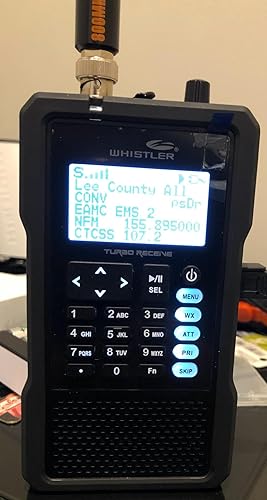
Whistler TRX-1 Handheld Digital Police Scanner Radio – Portable Scanner with EZ Scan, APCO P25 Phase I & II, DMR, NXDN, and USA/Canada Database – Black

  • Based on 2,010 reviews
Condition: New
Checking for the best price...
$614.07 Why this price?

Buy Now, Pay Later


As low as / mo
  • – Up to 36-month term if approved
  • – No impact on credit to apply
  • – Instant approval decision
  • – Secure and straightforward checkout

Ready to go? Add this product to your cart and select a plan during checkout.

Payment plans are offered through our trusted finance partners Klarna, Affirm, Afterpay, Apple Pay, and PayTomorrow. No-credit-needed leasing options through Acima may also be available at checkout.

Learn more about financing & leasing here.

Selected Option

Free shipping on this product

FREE 30-day refund/replacement

To qualify for a full refund, items must be returned in their original, unused condition. If an item is returned in a used, damaged, or materially different state, you may be granted a partial refund.

To initiate a return, please visit our Returns Center.

View our full returns policy here.


Availability: In Stock.
Fulfilled by Amazon

Arrives Sunday, Jun 14
Order within 4 hours and 29 minutes
Available payment plans shown during checkout

Protection Plan Protect Your Purchase
Checking for protection plans...

Style: TRX-1


Features

  • Flexible Scanlist Management: Group stored objects into up to 200 customizable Scanlists plus a dedicated Skywarn list. Assign objects to multiple Scanlists for flexible and powerful scanning combinations.
  • Smart Alerts & Visual Notifications: Get instant alerts with programmable audible alarms and a tri-color LED that can be customized to flash specific colors and patterns, even mimic emergency vehicle strobes.
  • Audio Recording & Playback: Record up to 50 hours of radio traffic to the included 2GB MicroSD card. Replay recordings directly on the TRX-1 or transfer to a PC for long-term storage and review.
  • Wake-Up & Auto Scan Functionality: Set a specific time for the TRX-1 to power on and begin scanning automaticallyideal for scheduled monitoring or early-morning activity tracking.
  • Raw Discriminator Output: Output unprocessed data for use with third-party decoding softwareno risky hardware modifications needed.
  • Easy Navigation & Use: User-friendly keypad and interface with intuitive Scan, Pause, Skip, and Navigation controls. The TRX-1 is compact, rugged, and designed for one-handed operation.
  • Advanced Object-Oriented Database: Supports millions of stored objects (limited only by MicroSD capacity), powered by Whistlers exclusive database system.
  • V-Scanner II & PC Interface: Save and load up to 200 V-Scanner configurations via the TRX-1s PC software. Connect via USB to access files, stream data, or upgrade firmwaremini USB cable included.
  • Broad Compatibility & Scanning: Monitors Motorola, EDACS, LTR, and P25 trunked radio systems. Supports talkgroup and individual call monitoring for comprehensive coverage.
  • Emergency & Weather Alerts: Receives and alerts for NOAA weather broadcasts and storm spotter frequencies by countystay informed ahead of the news.

Description

Whistler TRX-1 Handheld Digital Scanner Radio. Frequency coverage (MHz) -25-54, 108-174, 216-512, 764-960(minus cellular phone ranges), 1240-1300

Scanner Type: other


Brand: Whistler


Model Name: TRX-1


Connectivity Technology: USB


Product Dimensions: 1.81"D x 5.6"W x 7.56"H


Resolution: 300


Item Weight: 7.4 Ounces


Optical Sensor Technology: CIS


Minimum System Requirements: USB port


UPC:


Scanner Type: other


Connection Type: USB


Resolution: 300


Optical Sensor Technology: CIS


Media Type: USB


Item Dimensions D x W x H: 1.81"D x 5.6"W x 7.56"H


Item Weight: 7.4 Ounces


Minimum System Requirements: USB port


Brand: Whistler


Model Name: TRX-1


UPC: 052303408229


Global Trade Identification Number: 29


Built-In Media: User Manual


Warranty Description: 1 Year Limited


Item Type Name: Handheld Digital Scanner Radio


Manufacturer: Whistler


Frequently asked questions

If you place your order now, the estimated arrival date for this product is: Sunday, Jun 14

Yes, absolutely! You may return this product for a full refund within 30 days of receiving it.

To initiate a return, please visit our Returns Center.

View our full returns policy here.

  • Klarna Financing
  • Affirm Pay in 4
  • Affirm Financing
  • Afterpay Financing
  • PayTomorrow Financing
  • Financing through Apple Pay
Leasing options through Acima may also be available during checkout.

Learn more about financing & leasing here.

Top Amazon Reviews


  • Great Little Scanner Great Little Scanner
Style: TRX-1
This is an excellent little scanner. But, pay attention, you need the programming software. If you own a Mac, you'll need to find a PC to program this, as the software will not work on a Mac. The radio's performance has been excellent. I have a trunked APCO P25 Phase II system where I live and it decodes it perfectly. None of the channels are encrypted. If your channels are encrypted it is not going to get them. About the software. It's not intuitive. But it is very powerful. I tried to program with the software about a dozen times using the instructions I found in videos on-line, only to discover that an important step in the programming process had been left out. When you set up this software you can have it program all your local channels into a series of call lists starting at list # 151. If you do this you can select those that you want to listen to and the scanner will scan dozens of channels you may not give a hoot about. I wanted just to scan certain frequencies where I knew there would be traffic. So I used the software, selected those channels, and every time I did it wouldn't program the scan lists. I went back and re-did this several times following the instructions I copied from the video, then watched the video again. Finally, I did something I almost NEVER do... I read the damned instructions. When you select a PREFERRED scan then you can program your own scan lists and import just the channels you want. You have to be careful though, because once you program it, it's difficult to change it. The radio has excellent reception, however, I replaced the stock antenna with an 800 mhm antenna available here on Amazon. That improved the reliability of the scans of my 800 mhz channels locally without adversely affecting the conventional channels I also receive. Overall, 2 thumbs up on this radio. I can firmly recommend. AD0DQ ... show more
Reviewed in the United States on June 11, 2020 Reviewed in the United States on June 11, 2020 by A. L. DeWitt

  • Great quality 👍🏻
Style: TRX-1
Great scanner. Easy setup and best quality I have seen. Very rugged unit.
Reviewed in the United States on April 7, 2026 by John W.

  • Overall, very good scanner. I would buy again
Style: TRX-1
I've had this about a day and my initial impressions are: Pro - Very flexible programing. I'm using the scan sets in conjunction with the scan lists to tailor different scanning objects The unit is very configurable on its own without the EZ-Scan software Good interface in the scanner to quickly get up and running by zip code, county or city The unit is really high quality - good sound, easy to read buttons and great case for protection. You can charge while listening. You can create v-scanner folders with different scanner frequencies which are selectable on the fly. I use one folder per state. Con- That EZ- Scan software. It is powerful and you can do a lot, but it is NOT intuitive. It took me several hours to figure it out (even when using documentation. It can take a bit of time to go operational when it is turned on. Mine takes about 30 seconds as it parses through the config files / databases. Instant scanning when turned on is not possible. I suppose it would take less time with less frequencies though I would prefer a knob for volume control, rather than the up and down arrows. ... show more
Reviewed in the United States on April 28, 2017 by Kurt Rees

  • I so wanted this to be the scanner.
Style: TRX-1
I am an experienced scanner user since 1970. There were only two companies and Whistler would become a fuzz buster. I opted for the top of the line Uniden (Regency died a slow death long ago). The Uniden was the unnecessarily hardest to program scanner I had ever seen. I sent it back since the cryptic system wasn't well supported. I took a chance on Whistler figuring they had figured it out and had a programming system that worked. To my surprise, the programming was excellent. The software actually worked but the ability to control the scanner quickly gave way to cryptic programming and slow scan speed. For trunking, I almost never heard both sides of the conversation. I found it difficult to select only one trunked system and exclude all others--but wait, I just paid $500 for a miracle scanner that did it all. It almost did. Almost. Big con for me was the inability to program it with a Mac. Next con was the poor audio system. Too weak for mobile use. Then there's the digital warble of poorly decoded speech. When the TRX-1 worked it's best, it was still mostly unintelligible. I miss VHF. I miss Regency. I miss crystals. I also missed my $500 so I took it back. Someday a completely controllable system will be built and will be easily programmable. Alpha numeric labeling is the finest thing that any newsroom can have. Maybe Whistler can make such a scanner. It would be worth $500. The TRX-1 is not. ... show more
Reviewed in the United States on June 17, 2017 by Stephen D. Guttery

  • Solid scanner, hard set up Solid scanner, hard set up
Style: TRX-1
After weeks of struggling to program it, it is finally working and correctly. Scanner is incredible and works great. Ok battery life, fast scanning. Works with everything
Reviewed in the United States on January 8, 2026 Reviewed in the United States on January 8, 2026 by Maxwell Anderson

  • Not hard to take out of the box and start listening
Style: TRX-1
Whistler trx-1 I looked at this radio and the Uniden HP 4 3 6 I believe both are excellent radios but I like the wraparound case on the trx-1 Whistler both are easy to set up if you're just going to listen to police Fire EMS in your area you can just simply use the ZIP code method or go into a browse Library go under your state and County and pull up information there and you can select from a random menus I gave this a 5-star rating only because I was just surprised with the information the radio has in it anything I was interested in all I had to do was going to browse Library my state county and find it there already program all I had to do was just turn it on setting up Banks I had a little bit of trouble but after I sat down and kept playing with it I got used to it and started setting up my own banks channels so when I go from one state to another I can turn off the police in that state and listen to the ones of the state that Iam now in if you are a ham operator this is the radio for you only because it already has the two systems that ham radio operators are interested in having you want hp 436 you will have to pay additional fee to have it put on the radio the Uniden is capable with GPS that's so you could set it up where when you go from state to state the ready it will automatically start changing according to the location you're at TRX would have to be programmed for this it does not have a GPS feature ... show more
Reviewed in the United States on January 4, 2019 by Jeff

  • OK scanner, bad software
Style: TRX-1
The Whistler TRX-1 is an OK scanner, hobbled by bad software and some questionable design decisions. The bottom line is that if you just want an easy-to-use, works-out-of-the-box scanner you probably should avoid this one. If you are experienced with tweaking scanner settings and computer software, need the advanced digital trunking features, and have some time and patience, this might be for you. Read reviews and especially the RadioReference.com Whistler forum, to help you decide if you want this scanner. One of the commenters on the RadioReference.com Whistler forum asked why scanners seem locked into 1970s technology. I'd place the tech level at the mid-80s, e.g. DOS command lines, serial ports, and primitive software. Consider that for about the same $500 price we can buy a state-of-the-art phone/computer with fast processor, lots of memory, great screen, advanced battery, and reliable software, and the phone transmits as well as receives on similar frequencies. Whistler, a company best known for cheap radar detectors, bought the GRE scanner business. But apparently they're having some struggles with modern technology, especially reliable, user-friendly software. I have a GRE-PSR500 and it's been great. But most of my county's police, fire, EMS, and other government recently moved to a P25 Type II system which the GRE-PSR500 doesn't track. I'm retired now after 30+ years in software development, so I figured I could handle the quirks and tweaks of the TRX-1. Having written both good and bad software myself, I think I can tell the difference. But I was not prepared for what was involved. Here's the quick overview. The good: - Uses downloaded RadioReference database. - Receives modern digital trunking systems - P25 Type I and II, LTR, DMR, NXDN, etc. - Good sensitivity and sound quality. - Records reception to SD card and plays it back. - Can store multiple "virtual" scanners, i.e. different configurations The bad: - Buggy, unreliable, unsigned USB driver. - Manual onboard programming of scanner is for masochists only. - Undocumented Function-key combinations. - Entering alphabetic characters via keypad uses bizarre, non-standard method. - In-scanner battery charging is via a time setting and not via voltage/current monitoring. The ugly: - Tiny, low contrast, black and white display, with lots of cryptic symbols. - Protective rubber case with aesthetics of a brick. - Useless ugly plastic inserts to rubber case. The merely annoying: - EZ-Scan program does not scale to screen resolution above 1080. - Have to remove protective rubber case to access batteries and SD card. - Volume change is by up/down key press. Let me give some further detail: When you open the box and insert batteries, you can turn it on and use the pre-installed software and database. I suggest you only do this to be sure the scanner powers up. You can also manually change things using the tiny screen and minimal keypad. But manual onboard programming of the scanner is for masochists only, and you really need to use the EZ-Scan program. The on-board menus are inconsistent as are the key presses. Sometimes "back" takes you back one step, sometimes back to a menu to start over. DO NOT connect the scanner to your computer until you have read the instructions for downloading and installing the latest software. Installing/updating in the wrong sequence will cause major problems. I also suggest you spend time on the RadioReference.com Whistler forum to see what others have found out the hard way. Almost every USB device - MP3 player, printer, thumb drive, portable hard drive - is just plug-and-play. You connect it, the device is recognized, a driver is installed, and off you go. But not this device. For some reason you must hold down the "menu" key while inserting the USB cable. The USB driver is unsigned and requires a multi-step workaround to get it to install on Windows 10. I have not been able to get it working on my Windows 7 Pro 64 bit desktop. But that's just as well, since the EZ-Scan program does not scale to my 2560x1440 monitor and garbles the display image. The USB driver emulates a serial port, so the scanner shows up in Device Manager under "Ports (COM & LPT)" as a serial device, e.g. COM1 or COM3. Really? In 2017 they are still using this ancient protocol instead of a modern USB interface? It also transfers data at a very slow speed. Even though I managed to get the unsigned driver installed in Windows 10, the connection is unreliable. Too many times the scanner screen shows a "waiting for USB" message and seems to be locked up. Pressing keys does nothing - even the power off key is unresponsive. You have to remove the batteries, and the screen goes blank. But when you put the batteries back in, you're right back at the same message, still locked up. It looks like you've bricked the scanner. Apparently this has happened and continues to happen enough that Whistler provides a "fix-it" program on their web site to reload the scanner CPU software, which is apparently getting hosed by the buggy USB interface. Really? They can take the time to write a patching program, but can't take the time to fix the bug? I found that the best way to avoid the USB driver hell is to remove the SD card from the scanner and connect it directly to my laptop. The EZ-Scan program can then read/write the SD card as drive G: using native USB at a reasonable speed. However repeated removal/insertion may lead to reduced life of the SD card, so you need to have a backup. I tried to use the EZ-Scan program to format a Samsung 16gb class 10 card as backup. The program said it formatted and copied all the data files over, but the scanner refused to boot from it. Comparing to the original SD card showed that some folders and files were missing, and I still haven't got it to work. Another example of bad software. Although you can charge NIMH batteries in the scanner, you should not do this in order to reduce the possibility of damage to the radio. The charging option uses a charging hours setting rather than voltage/current monitoring, and given the other buggy software, I would not trust it. Use some eneloop batteries and a good standalone external charger. Between needing to swap batteries and pulling the SD card, you'll come to hate and avoid the rubber protective case. It looks like a brick, but it's not as ugly as the useless plastic inserts, particularly the puke green one. It's too bad Whistler could not spend the money to do the software right instead of wasting it on junk. They also saved a few cents by removing the volume knob and requiring use of the up/down arrows on the keypad. The old GRE-PSR scanners had a more convenient way with concentric volume and squelch knobs. I really want to like this scanner, but I'm disappointed and now just tolerating it. I've managed to work around the problems and get it set up to my liking. But I'm wary of the software, so I won't be changing much until Whistler provides a fix for the USB problems. ... show more
Reviewed in the United States on March 22, 2017 by Zanzara

  • Works great, even P25 Phase 2
Style: TRX-1
So-far so-good. It has only been a few days though. So I am a ham operator and been a scanner hobbyist since I got my first police scanner from my grandpa at age 7. I wanted a scanner that was capable of receiving a large variety of digital signals without breaking the bank for software keys like other scanners. So the TL;DR is, It of course is picking up all the analog signals just fine in my local immediate area. At my house it does get a weak signal on the P25 Starcom system but that is expected as I don't live immediately close to a transmitter and I've only been using the rubber ducky antenna supplied with the scanner. Keep in mind, with digital it is different than analog. The signal is either there or not there. With UHF, location, altitude & the antenna mean everything. So I ordered a BNC adapter to try hooking it up to an antenna on my roof. So inside my home right now, the P25 system comes and goes to the point I can't understand anything. However, when I was on the road yesterday, as soon as I got out closer to areas that actually use the Starcom P25 Phase 2 system, it was working great! I also tried it with DMR and it worked great with that system as well. Our schools are using an NXDN system but since its summer break I haven't been able to test it on that mode yet. I travel state to state quite often in areas that mostly only use P25 Phase 1 without any encryption so it should work just fine if programed for the proper towers I will be near (and like i said, i am a licensed amateur radio operator so I can scan & drive legally before the Karens wine about it). It has also been working with Starcom as well for now like I said, but I don't plan on using it for that system as reliable sources that work for the state have told me several times that Motorola is planning on making the entire statewide starcom system encrypted soon. So just a heads up to anyone that wants to make a purchase solely for listening to starcom related traffic (although they have been saying that for quite a while now). I'll edit if my thoughts on the product or anything changes in the next month or two. 73s ... show more
Reviewed in the United States on July 17, 2023 by L.B.

Can't find a product?

Find it on Amazon first, then paste the link below.
Checking for best price...