


Search  for anything...

SteelSeries Nimbus Bluetooth Mobile Gaming Controller - Iphone, iPad, Apple TV - 40+ Hour Battery Life - Mfi Certified - Supports Fortnite Mobile
  • Based on 4,042 reviews
Condition: New
Checking for the best price...
$99.00 Why this price?
Labor Day Deal · 35% off was $152.99

Buy Now, Pay Later


As low as $16.50 / mo
  • – 6-month term
  • – No impact on credit to apply
  • – Instant approval decision
  • – Secure and straightforward checkout

Ready to go? Add this product to your cart and select a plan during checkout.

Payment plans are offered through our trusted finance partners Klarna, Affirm, Afterpay, Zip, Apple Pay, and Google Pay. No-credit-needed leasing options through Acima may also be available at checkout.

Learn more about financing & leasing here.

Selected Option

Free shipping on this product

30-day refund/replacement

To qualify for a full refund, items must be returned in their original, unused condition. If an item is returned in a used, damaged, or materially different state, you may be granted a partial refund.

To initiate a return, please visit our Returns Center.

View our full returns policy here.


Availability: Only 2 left in stock, order soon!
Fulfilled by Amazon

Arrives Tuesday, Sep 8
Order within 1 hour and 22 minutes
Available payment plans shown during checkout

Protection Plan Protect Your Purchase
Checking for protection plans...

Style: Nimbus - iOS


Features

  • Victory Royale is in your hands with the fortnite ready Nimbus controller
  • Enjoy a true wireless console experience on your iOS device or Mac via Bluetooth 4.1
  • Compatible Devices iPhone 6S, iPhone 6S Plus, iPhone 6, iPhone 6 Plus, iPhone 5, iPhone 5C, iPhone 5S, iPad Mini 4, iPad Mini 3, iPad Mini 2, iPad (4TH Generation), iPad Air 2, iPod Touch (6TH Generation) and Apple TV (4TH Generation)
  • Pressure sensitive buttons and familiar ergonomic console layout
  • Recharges via Lightning cable for 40-plus hours of nonstop gaming
  • 4 LEDs display your player status during multiplayer gameplay

Description

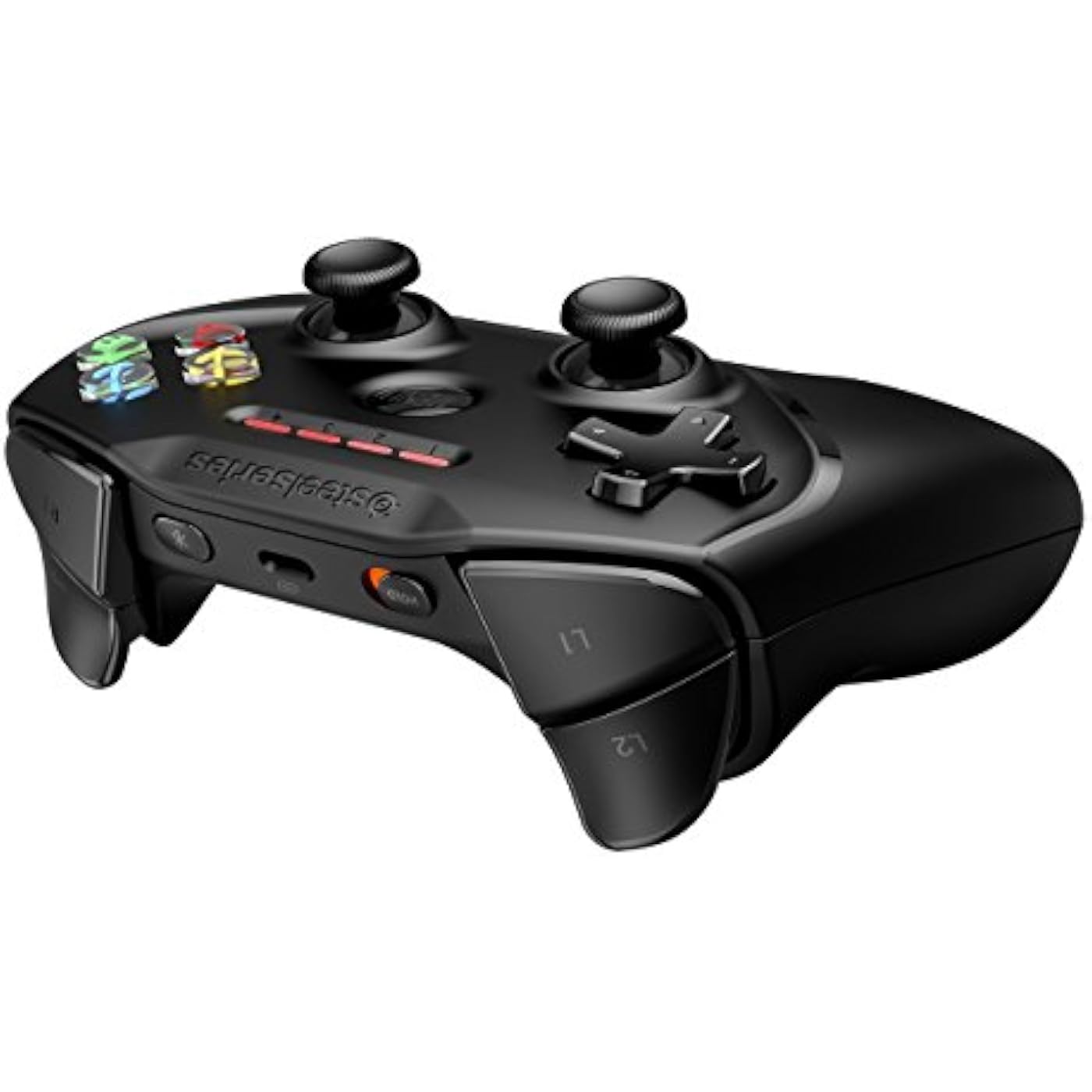
Play hundreds of your favorite controller supported games with the new Nimbus wireless Controller on your Apple TV. This controller is full sized, wireless, and based on an ergonomic console design. Other features include 40+ hours of gameplay with just a quick charge via Lightning connector, LED notification, an easy to navigate menu button, and to top it all off, pressure sensitive buttons for the most precise controls. Experience some of the best features that Apple and steel Series has to offer, all in the palms of your hands.

Brand: SteelSeries


Model Name: STEE


Compatible Devices: iPhone 6S, 6S Plus, 6, 6 5, 5C, 5S, iPad Mini 4, 3, 2, (4TH Generation), Air iPod Touch (6TH Apple TV Generation) See more


Controller Type: Gamepad


Connectivity Technology: Bluetooth


Compatible Devices: iPhone 6S, 6S Plus, 6, 6 5, 5C, 5S, iPad Mini 4, 3, 2, (4TH Generation), Air iPod Touch (6TH Apple TV Generation)


Controller Type: Gamepad


Connectivity Technology: Bluetooth


Additional Features: Ergonomic


Button Quantity: 12


Hardware Platform: Tablet


Power Source: Battery Powered


Item Weight: 8.48 ounces


Package Quantity: 1


Item Dimensions: 4.33 x 2.49 x 5.9 inches


Color: Black


Brand Name: SteelSeries


Model Name: STEE


Warranty Description: 1 year


Manufacturer: SteelSeries APS


Global Trade Identification Number: 76


UPC: 813810019915


External Testing Certification: 04086-17-10511


Included Components: Nimbus Controller^User Manual


Item Type Name: SteelSeries Nimbus Bluetooth Mobile Gaming Controller - iPhone, iPad, Apple TV - 40+ Hour Battery Life - MFi Certified - Supports Fortnite Mobile


Model Number: 69070


Manufacturer Part Number: 69070


Frequently asked questions

If you place your order now, the estimated arrival date for this product is: Tuesday, Sep 8

Yes, absolutely! You may return this product for a full refund within 30 days of receiving it.

To initiate a return, please visit our Returns Center.

View our full returns policy here.

  • Klarna Financing
  • Affirm Pay in 4
  • Affirm Financing
  • Afterpay Financing
  • Zip Pay in 4
  • Financing through Apple Pay
  • Financing through Google Pay
Leasing options through Acima may also be available during checkout.

Learn more about financing & leasing here.

Top Amazon Reviews


  • Learn from the foolish king
It was like opening an early birthday present when I received this controller today. I was anticipating it and looking forward to it greatly. I'm going to say straight ahead this is completely my fault. So I went into Bestbuy two days ago wanting to price match a ps4 controller that I could use to play Fortnite on my Mac only to have two of the employees tell me "the wireless ps4 controller doesn't work on older versions of mac" which is a complete LIE I believed. I bought this controller desperately not even bothering to see if it's compatible with Fornite I just cared that it was compatible with Mac as apparently most controllers don't seem to work with mac (according to the Google.) Like I stated earlier I got the controller delivered to me today and I opened that package up quick and immediately hopped onto my mac and launched Fortnite to test out this bad boy. As eager as I was I quickly found that Fortnite only recognized the analog stick on this controller and not the D-pad despite me switching the controls to X-box 360 in hopes that would solve the issue as the controllers are similar. I was a dummy. Clearly, Fortnite allows for x-box or ps4 controllers ONLY yet I kept pushing for it to happen to work ever so desperately. I've been craving Fortnite for days and wanted to play "like a pro" with a controller. I stupidly spent $5 downloading the joystick mapper app from the app store trying to set this controller up to work with Fortnite. I spent time researching something that couldn't happen despite Google telling me it couldn't work I was so blind in wanting a way. I then realized it wasn't the controller itself it was the game itself and it was me, I ended up spending more money than I should've just to play Fortnite how embarrassing. I have peaked the lowest humanity can go. So I decided to go to my local video game store and before he could finish saying "or new" I blurted out "USED" and purchased a used Ps4 controller named The D (according to Bluetooth), (because bish I'm broke and trying to save SOME coins) I didn't even bother to confirm whether it would work or not with a Mac this time, I didn't care one bit. I used an android charger that I surprisingly had laying around because, I don't own a PS4 and didn't even think about buying a charger earlier that day for it, and I connected that puppy to my Mac and BAM my dream of playing Fortnite became a reality. Who says PS4 controllers don't work on older macs now huh? I have the late 2013 MacBook pro retina 15'' in case ya'll were wondering. Ok back to the nimbus controller itself. I like it honestly but I just wanted a controller in order to just play fornite so I will be returning this sadly otherwise it will just be collecting dust. It's easy to connect as well. I tried it out on my iPhone as and it works with Minecraft woo! (even though I don't play it any more thought I'd test it out.) This nimbus controller is only compatible with so many games to be careful to research what it's compatible with before purchasing and avoid being that dummy (me). It's not the controller's fault, in the end, it's the games fault for not offering compatibility with different controllers besides Xbox and PS4. I will also tell you that this Nimbus controller wouldn't work with Fortnite mobile either. I can't tell you much about this controller such as battery life because I only used it for so much time trying to set it up to work fully with Fortnite but I can tell you that it's light and slim (I have long skinny fingers lol.) So long nimbus controller it was fun while I had it but it just wasn't for me. 5 stars for shipping and the product being as advertised. ... show more
Reviewed in the United States on August 23, 2018 by Anita2u

  • Better Than a PS4 Controller (IMHO)
With the release of iOS 13 and the push for compatibility with iOS and PS4 or XB1 controllers, I thought I'd return to my review for the Nimbus and give my impressions after using the PS4 controller with my iPad. I actually PREFER using the Nimbus. Yes, the R3/L3 buttons don't work on the Nimbus, but so far that hasn't been an issue. The positives here are a VERY premium feel, more or less rock solid performance, and great battery life. On top of that, using a PS4 controller requires you to drag another micro-USB cable along with you (the Nimbus charges over lightning). With Apple pushing controllers, and more and more indie PC games making their way to iOS, now is definitely the time for a dedicated gaming controller. And sure, this thing is expensive (I was lucky enough to get an Amazon Warehouse deal). If you already have a PS4 or XB1 controller lying around, then use what you've got handy. Otherwise, you can't go wrong with the Nimbus! ------ Not sure why Apple has never made a bigger deal out of MFI. I started playing Stardew Vallew on iOS, and grew increasingly frustrated with the clumsy touch controls, which led me to researching bluetooth controllers that worked with iOS. The Nimbus has the same feel and quality as a Playstation or XBOX controller, with all of the buttons, triggers, and analog sticks that you will ever need for iOS/OSX gaming (aside from the L3/R3 inputs found in PS/XB). The controller works perfectly with any game designed to accept MFI inputs, which is really the only problem with this controller -- the games/apps have to be PROGRAMMED to work with MFI. There are several websites that will tell you which games DO work, but you have to go into this knowing that a vast majority of iOS titles will NOT function with this, or any, controller. Like other Apple products (ex AirPods), the Nimbus can seamlessly switch between all of your iOS or OSX devices and works perfectly well for Mac gaming. Definitely recommend! ... show more
Reviewed in the United States on March 9, 2019 by M. Sommer

  • Works great with Apple TV. Love the built-in rechargeable battery.
I am an 80's old school gamer, so I have never been a fan of these game pads. But, it's better for Apple TV games than using the remote. This controller works well, though none of the games I have make use of all the extra buttons, and Steel support was not able to suggest any apps I could try that did. I knock off one star because it does not have any tilt controls, so many games (that play well using the Apple Remote or iOS app) using tilt have to be played using buttons. It's much hardware to steer racing games using the tiny analog thumb stick versus tilting. And far less realistic. It has a built-in rechargeable battery that you charge up using a lightning cable, the same way you charge up the Apple TV remote. This is very convenient. It also claims to work with iOS games, but I have yet to test that. If I do, I will update this review. I like it. I saw the white version at the local Apple Store (an exclusive color for them), but thought a black controller would not show dirt as easily. ... show more
Reviewed in the United States on February 11, 2017 by Allen C. Huffman

  • Love it!
I have a hard time writing reviews but this controller has been amazing! It is the perfect size so it is not big and bulky but it also isn't super small and hard to press buttons. When I first picked it up I could tell it was sturdy and well made. All of the buttons look and feel like an Xbox controller and it links seamlessly and is smooth and fast in connection. The only complaint I have is not with the controller but the game developers. Some of the button layouts make no sense for some of the games, and some games you have to both touch the screen of your phone and use the controller. It doesn't make much sense. The controller itself however works perfectly and makes games that with good layouts so much more fun. I highly recommend it as it has turned my iPhone 6 into a traveling game console. Good Games for the controller (That I have played) Minecraft Grand Theft Auto San Andreas Gangstar 4 Storm Raiders Asphault 8 Games that didn't work as well: Call of Duty Strike Team (It is fun but you still have to touch the screen at some points) Trial Xtreme were not as functional All in all it was a worth it purchase as it is not specific to iPhone or iPad but works with all. I bought a Moga controller in the past that I could only use with my iPhone 5, so this was a must fro me. Enjoy! ... show more
Reviewed in the United States on January 5, 2017 by Aumray

  • Blown Away
I normally don't write reviews, but I was so blown away with this product that I just had to. The body of the controller is made of a hard plastic, and the 2 center joysticks are both a rubber-like material. It has a rechargeable battery, but can only be charged with an Apple Lightening adapter. It works with almost every Apple device (almost all that were released in the past 5 years). At the moment, I have mine BTed to my Apple TV (4th Gen, I believe) and my iPhone 5c. PROS: -Comfortable to hold -Pressure sensitive buttons/joysticks (This allows you to do things like control speed in a game; it is not just 0% or 100%) -Easy setup -LED display for battery level, BT device pairing, etc. -Menu button for pausing a game or going home on an Apple TV -Letter buttons are clear with a 3D colored letter inside them -Charges quick -Compatible with lots of games, but certainly not all -Works seamlessly on almost any Apple device -Every once in a while you discover a game optimized for this controller (Minecraft PE, Apple TV AG Drive, etc.) -Free prime 1-Day was insanely fast- Ordered at 3:00 pm on Saturday, at my house by 10:00 am on Sunday -Product box was nice. It had foam on the inside to prevent it from breaking. CONS: -Sometimes BT does not automatically pair with my phone. Solved by going into BT settings and manually connecting (which quickly gets annoying). -No lightening cord or wall brick included, but must be charged with them -Not sure why, but the ON/OFF switch is labeled "HOLD." Not really a con, just interesting. All in all, this was a great purchase. I will definitely buy more products from SteelSeries in the future. ... show more
Reviewed in the United States on October 31, 2016 by Jill

  • Better than xbox or playstation.
Ok so this product is pretty mind blowing. For starters the build quality is even better than any xbox or playstation controller (especially the joysticks sensitivity range and overall functionality. Could be partly do to the superior nature of ios/ipad os but I would guess most of the credit goes to this amazing company. Next I should mention that of any controller I ever used this one is far superior when it comes to ergonomic design. The dimensions are perfect, the layout is perfect and overall it just feels like an extension of your digits. I get addicted to just holding this controller let alone it's superior responsiveness and sensitivity range while actually using it. Ok so final gush here but no less impressive is it's battery and bluetooth connectivity. It connects seamlessly upon the press of the start button in just over a second and has a standby mode which rivals the iphone. This means that on one charge the battery can last WEEKS on end with hours upon hours of intense gameplay and within less than a minute of no interaction it goes into standby mode which uses virtually no battery power whatsoever so you never have to worry about forgetting to switch if off EVER and when needed you just hit the big round 'start' button and you are good to go.... for sometimes over a month before it needs a charge. Oh btw it charges with a lightening cable which is not included. ... show more
Reviewed in the United States on July 14, 2019 by iPad artist

  • Steel series nimbus r1 and r2 fumbling problem.
quite a fantastic controller it looks good it's durable everything you see is ok things like limited button setups are not the controllers fault ok let's see why I've turned this 5 star controller into a 3 star review and looking at the competition. I play modern combat 5. The schematic I use in order to use the knife as 'A' button requires me to shoot with r1. And throw a grenade with r2. The way the controller fits allows your finger to barely hit the corner of r1 and lately I've been misfiring grenades because I keep accidentally hitting r2. Some people would know what I'm talking about. Some may take it has an advantage. To me it feels a bit too compact and the design in the back could be done better with the angles and I think a stiffer r2 would make it more realistically luxurious and believable. I am nitpicking to some degree but there are at least two other controllers out there besides the steel series xl which has poor to average reviews. I like what I see with the steel series xl and might just try it despite 3 stars on Amazon. I will probably put this in a droor and try the madkatz or the other one I forget the name of that also allows a phone to port. ... show more
Reviewed in the United States on October 15, 2016 by Azeo

  • Nimbus vs Stratus Duo
Since Amazon combines both the nimbus and Stratus Duo reviews, I have to put both those reviews here. Nimbus Review: Because I saw that someone had posted on YouTube that this controller does not work with OpenEmu, I thought that I would clarify that at the time of this review (Feb 19, 2017), it does work. It connects just fine to the Mac via bluetooth, and there is no button that does not get detected and function just fine (including the joysticks). Don't be fooled though, outside of OpenEmu, there was no game on my Mac that worked with it. Obviously it works great with iOS though and I definitely preferred it for that over other MFI controllers that I found. Edit: I wanted to add that I have further tested this controller and it also works with the "Dolphin" Emulator (which runs GameCube games), except that it doesn't sense the start button. In case you're wondering, this doesn't work at all with the "Boxer" emulator (that's a DOS emulator for Mac). Also, although this controller doesn't work with most regular Mac Games (including Steam games), you can make it work with many games by using a program called Joystick Mapper or something similar. If you go that route, you can remap the inputs to read as keyboard inputs inside of your games, which still doesn't work in every game (plus the D-Pad and Start Button aren't picked up at all by that program), but it certainly extends the usefulness and capabilities of this controller. Stratus Duo Review Summary The Stratus Duo feels just like the Nimbus Controller for iOS, except for small improvements to the triggers and D-Pad. The Wi-Fi connection dongle has an amazing range and was fairly reliable on windows. The Bluetooth is essentially useless for anything but an android phone. Battery life seems great as long as you use the dongle and not Bluetooth. The Details Look and Feel This controller looks and feels almost identical to the Nimbus controller. I was a big fan of the Nimbus, so having one that works natively on PC is awesome. The things that are different are the triggers, D-Pad, and front LED’s. The triggers have a shorter range, and are slightly more ergonomic/curved. I would say that they’re better than the Nimbus in that regard. The front LED’s are a step down in the sense that they’re white instead of red. This makes them a lot more distracting in dark environments compared to the Nimbus’ red lights. They also seem brighter. So they constitute a strange design change in my opinion. The D-Pad is bigger than the Nimbus, the surface is different. It feels better to me than the Nimbus but is definitely more stiff than the PS4 controller. Wi-Fi Dongle When you plug in the dongle to a PC, it’s basically is plug and play, and the range is incredible. I was planning on using the Bluetooth setting to connect to my Steam link a couple rooms away, but the connection is so good using the included dongle, that I was able to play on my Steam link while still connected directly to my PC. That means that the connection has a greater range than even my Xbox One Controller when I connect it to my PC through Microsoft’s proprietary USB dongle. It’s also substantially better than the Bluetooth range on my PS4 controller, which cuts out before even reaching my living room (where the steam link is). As far as negatives go… This does not work at all with an Xbox One. I tried it, and it doesn’t even detect that something is plugged in. It also has a strange issue on PC, where if you turn the controller off, it will often connect as the second player controller when you turn it on again, which means that you can’t play any one player games because of being considered a second player. You have to restart your PC to fix that issue. Windows is fairly buggy with controllers sometimes, and this could very well be their issue and not the this controller’s issue. However, I haven’t had that problem with my Xbox One controller or my PS4 controller. Bluetooth By far the biggest failing with this controller is its extremely bad Bluetooth. I guess when they say that it works with Android and VR, they really just mean those two and nothing else. It connected with the Steam link, but had a bug where the left joystick moves the mouse slightly, while also moving the joystick at the same time. No other controller has that issue on my Steam Link. iOS 13 brought xinput and direct input controller support with it and I can confirm that both the Xbox One and PS4 controllers connect and work just fine. This controller… not so much. iOS can’t even see this controller in the Bluetooth connection menu. I tested that on multiple iOS devices. So don’t plan on using this with iOS. My MacBook was able to see it and connect to it, but then I couldn’t use it in any way, not even in OpenEmu, which is something that even the Nimbus can be used with. The lights also indicated that the connection was unstable or something, since they went back and forth from showing the looking-for-a-connection pattern to the now-connecting pattern. So don’t count on using the Bluetooth for anything but Android. Durability The controller’s durability has yet to be evaluated, so I might update this review with that in the future. I will say that the Nimbus had a design flaw that caused the triggers to become sticky within a fairly short time. iFixit has a page about how to fix that issue, and they also explain what causes it. This controller feels very similar to the nimbus as far as the triggers go, so I wouldn’t be surprised if it has the same flaw. ... show more
Reviewed in the United States on February 19, 2017 by Daniel Musser

Can't find a product?

Find it on Amazon first, then paste the link below.
Checking for best price...