Search  for anything...

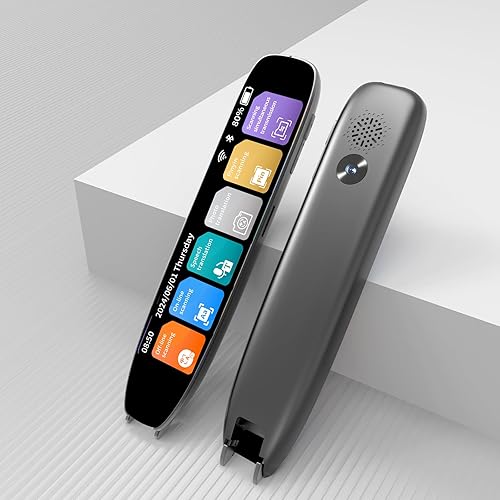
Scanmarker Air Reading Pen & Pen Scanner | Translator Pen for Dyslexia, Students & Professionals - Compatible with Mac, Windows, iOS & Android

  • Based on 5,386 reviews
Condition: New
Checking for the best price...
$149.00 Why this price?

Buy Now, Pay Later


As low as $24.83 / mo
  • – 6-month term
  • – No impact on credit to apply
  • – Instant approval decision
  • – Secure and straightforward checkout

Ready to go? Add this product to your cart and select a plan during checkout.

Payment plans are offered through our trusted finance partners Klarna, Affirm, Afterpay, Zip, Apple Pay, and Google Pay. No-credit-needed leasing options through Acima may also be available at checkout.

Learn more about financing & leasing here.

Selected Option

Free shipping on this product

FREE 30-day refund/replacement

To qualify for a full refund, items must be returned in their original, unused condition. If an item is returned in a used, damaged, or materially different state, you may be granted a partial refund.

To initiate a return, please visit our Returns Center.

View our full returns policy here.


Availability: In Stock.
Fulfilled by Amazon

Arrives Saturday, Oct 17
Order within 21 hours and 28 minutes
Available payment plans shown during checkout

Protection Plan Protect Your Purchase
Checking for protection plans...

Size: Scanmarker Air


Color: Black


Features

  • SAVE TIME & BOOST PRODUCTIVITY: Create summaries faster than ever! Simply open the web app, connect your pen scanner, and slide it across a line of printed text watch it appear instantly on your screen! This versatile scanner pen is perfect for busy students and professionals. Note: Connection to a computer or mobile device is required to operate the scanner.
  • POWERFUL LANGUAGE TRANSLATOR DEVICE: Enjoy accurate and rapid multilingual OCR scanning. This translation pen supports over 140 languages, seamlessly integrating into our web app or applications like Microsoft Word. Whether you need a pen translator for travel or academic use, the Scanmarker Air is your go-to tool.
  • TEXT TO SPEECH FOR ENHANCED LEARNING: The Scanmarker app reads the text aloud in real-time while scanning! Perfect for memorization and reading comprehension, this reader pen also serves as an effective assistive tool for those with dyslexia or reading difficulties. Ideal as a reading pen for dyslexia or any learning challenge.
  • ULTRA PORTABLE & CONVENIENT: Scan and edit on the go! The Scanmarker Air is a lightweight, wireless translator pen, designed for ultimate portability. Easily connect to computers, smartphones, or tablets via Bluetooth 4.0 or higher, making it ideal for scanning, translating, and editing anywhere.
  • FREE SUPPORT & 1-YEAR WARRANTY: Questions or concerns? We offer free software updates and 24/7 technical support for the lifetime of your product. With no hidden fees, we also provide a full one-year warranty, ensuring peace of mind with every purchase.

Description

Founded by Dr. Reuven Regev, who discovered the need during his studies in Stanford University. Scanmarker is a brand behind an innovative, multiplatform application which includes a pen-shaped digital highlighter. Scanmarker helps transfer text directly from the page into more than 40 languages. Scanmarker products are invaluable tools that aid students and professionals save time and also help those with reading difficulties build their confidence and become more self-sufficient in their studies and daily activities.

Scanner Type: Text


Brand: Scanmarker


Model Name: Scanmarker Air


Connectivity Technology: Bluetooth


Product Dimensions: 5"D x 0.9"W x 0.7"H


Resolution: 300 dpi


Item Weight: 27.22 g


Standard Sheet Capacity: 1


Optical Sensor Technology: CCD


Minimum System Requirements: Windows 7


Scanner Type: Text


Connection Type: Bluetooth


Resolution: 300 dpi


Standard Sheet Capacity: 1


Optical Sensor Technology: CCD


Media Type: USB


Item Dimensions D x W x H: 5"D x 0.9"W x 0.7"H


Item Weight: 27.22 g


Minimum System Requirements: Windows 7


Brand: Scanmarker


Model Name: Scanmarker Air


UPC: 798304391268


Global Trade Identification Number: 68


Manufacturer: Scanmarker


Warranty Description: 1 Year Manufacturer Warranty


Frequently asked questions

If you place your order now, the estimated arrival date for this product is: Saturday, Oct 17

Yes, absolutely! You may return this product for a full refund within 30 days of receiving it.

To initiate a return, please visit our Returns Center.

View our full returns policy here.

  • Klarna Financing
  • Affirm Pay in 4
  • Affirm Financing
  • Afterpay Financing
  • Zip Pay in 4
  • Financing through Apple Pay
  • Financing through Google Pay
Leasing options through Acima may also be available during checkout.

Learn more about financing & leasing here.

Top Amazon Reviews


  • Reliable, targeted product.
Color: Black
I'm an academic and this is a great device. Caveat: when I got mine, it would not stay connected to my computer. I filed a request for assistance on their web page (as per instructions) and they got back to me within a few hours. We set up a phone appointment, and in less than 10 minutes they corrected the problem, and I've had zero difficulties since. Now, with that caveat, here is my review: this is a very targeted device. It has one primary job, and it does it splendidly. That job is to copy text from the book or paper you are reading (or from a Kindle: it works flawlessly with kindle paperwhite reader) from the page, into your notes. It will scan into Scrivener, into Word, into Pages, into plain text. It does so quickly and accurately and reliably. Why would you pay to have that done? Why not just type the quotes in yourself? Well, you could, but this is so much faster and more accurate. And when you are doing initial research on a project, your first weeks involve little more gathering quotes and possible notes from others. You can spend an entire day in the library doing nothing but collecting relevant snippets for your paper, and during those long hours, this device is a godsend. You get so much more done in so much less time. You scan in your quote (maybe even a paragraph or two) in no more time than it would take you to highlight it. Then type in your comments and cross-references and the whole thing is already sitting in your notes, and so what, in earlier days would have been your highlights and your marginalia are suddenly already filed away and they are both searchable text-- so you can actually find that quote again when you need it. Brilliant. Especially if you are working with library texts that you cannot highlight, this is great. Pros: speed, accuracy, battery life, workload reduction, faster research and writing: all plus plus plus. The only con, and it's a reach: This is not a device for older texts-- I am thinking here of anything 18th century or before--even some 19th century. Like any OCR scanner, the software simply cannot read the older fonts. Additionally, you should be aware that the pen lights up strongly as it scans and transfers text, so any text the library will not let you photograph with a flash will not be available for use with this pen either. Also, this is a text only device. It will not scan formulae or images. But even with that sort of very limited limit, this thing is worth its weight in gold to any academic or student. I've a dear young man in my life who is headed off to university this year, and I will absolutely be purchasing a second one of these to send with him. I don't doubt he'll put some miles on the thing. ... show more
Reviewed in the United States on July 4, 2019 by Hermogenes

  • Save time creating notes and outlines!
Color: Black
Just finished highlighting the key points from a whole chapter in the book I'm reading. Overall, I am very happy with this product - will make note taking much easier. It was also very easy to share it once I was done with the document (I uploaded it to my Dropbox directly from the app). I am using it with my Samsung Galaxy 6(Android), and it was working within 5 min of trying to get it setup. Very easy to use. I tried setting it up with an older Android tablet, but the app was not compatible (something to be aware of if you have an older Android!). Things to get used to: - I noticed that it seems to scan best when you try to be smooth and scan faster rather than slower (as the tips suggest). But when you get the technique down, it really does a nice job recognizing the correct letters. - I sometimes noticed the first or last words being left out of lines that I scanned. Apparently I need to scan a few spaces in front of the line, then keep going past the last word in the line a little too. - It doesn't scan apostrophes very well (it usually just leaves them out) - When a line ends in a hyphen (to designate the middle of a word), it usually just puts a space between the first half of the word and the second half of the word (requiring you to go back manually and delete that space). - There is a limit to how big of font it will scan (then it just starts to scans in a funny way). Some chapter titles were hard to scan, but you won't have problems with normal text. A possible area of improvement (it'd be great if the developer notes this!): - As another reviewer noted, it would be really nice if they updated the app so that if you don't like the line you just scanned, with the press of a button it would allow you to delete it and try again. As of right now, it is a pain in the butt to delete the whole line (either hold down backspace for 100 characters until it is deleted, or highlight with your fingers the words you want deleted - either way it just takes way too long) ... show more
Reviewed in the United States on January 29, 2017 by Frank

  • Don't Use for Japanese Text!
Color: Black
I bought this product specifically to scan Japanese text and translate to English. I already knew from experience with other devices that most have a problem with translating Japanese to English for some reason but I thought this one would be different based on the reviews I read here on Amazon. I figured as long as this Scanmarker Air didn't use Google Translate there was hope that it might give a good translation. That hope was short-lived as I removed the product from the shipping package and the first thing I spotted on the back of the box was the Google Translate icon. I immediately assumed I spent over $100 on another "Google Play Store app wrapped in plastic". Still, I had to go through the motions just to confirm my fears... After a couple hours practicing just holding the scanner (I was about to trash the device just because it kept telling me my scan attempts were not smooth, too slow, etc.) I thought I finally got the hang of it. I was scanning English text from books, research papers, etc. for practice and it worked fine in that regard. It worked great scanning English from books to MS Word, Excel, etc. My next test was trying to scan regular horizontal Japanese text and translate to English. I tested on a few book titles, paragraph sentences, both single words and single line of text. Both tests failed. I got nothing but garbled gibberish... I tested some of my vertical text Japanese books and in this test I got gibberish + odd symbols. I tried horizontal Japanese text from a document published this year but instead of translating, I just scanned the Japanese text it produced to Word then copy/pasted the scanned text into other online translation apps (Yes, Google Translate too) and got the same results... gibberish that made no sense what-so-ever. I don't know if this product bases its translations from the Google Translate database but when will someone on this earth come up with a half-descent Japanese to English translator? Until there is an answer to this question, I will just have to continue relying on my poor wife (who's Japanese) to translate Japanese for me until I become fluent. It is not a total loss, I am a researcher and so I think I may still hold on to this product for note scanning (from English text) however, I would NOT recommend this product to anyone that hopes to use this to translate lines for Japanese text (horizontal and vertical) from literature. ... show more
Reviewed in the United States on August 8, 2017 by HAZ

  • Good product - does the job.
Color: Black
On the whole, this scanner is about as good as you can get for its price range. Its reading accuracy is superb as long as it is used intelligently and with an eye to its limitations. Limitation 1 - I simply cannot get a good scan without using a ruler or straight edge to keep it straight. The product guidelines say that the software self corrects for small wavers in freehand scanning but if you are scanning books, as I do, rather than a flat sheet of paper, ... well, you will have to re-scan or correct it manually. So... use a ruler. I use a drafter's triangle which has a conveniently placed handle to hole in place. Works like a charm and a very high scan accuracy except for limitation 2. Limitation 2 - Words that curve into the fold. This scanner is very sensitive to the speed of the scan as well as the flatness of the page. When scanning lines in a book, as you approach the margin near the fold the scanner tends to slip and you get deformed text or graphic. If you slow down as you approach the end of the line it can also give you an error message and just simply not pick up the words. If you recognize its limits, then this product does well. I use it a fair amount and the only real pain for me is the second limitation. I can't afford one of those big whole page scanners so this one will remain my staple. ... show more
Reviewed in the United States on October 30, 2020 by John A. Van Devender

  • Works, but isn't very efficient
Color: Black
When I first received the product I was extremely excited to try out. After using it for a few days I got the hang of how to use it and was starting to enjoy it. However, A lot of the time when I scan the textIt just produces symbols or letters in the Word document. I find myself spending a lot of time trying to fix the errors and having to delete what is not right more often than it actually working. I will be contacting customer support to try and return the product as I don't think it's very beneficial. For the few times that it worked, It seemed great and would be an awesome option if it worked. ... show more
Reviewed in the United States on February 23, 2020 by Jordyn

  • It makes my work easy
Color: Black
Every researcher should have this scanner!
Reviewed in the United States on September 3, 2026 by LELEITTO SANG

  • incredible customer service
Color: Black
5-9-2024 In 2018 I purchased a Scanmarker Air pen scanner. Very glad I did. Used it frequently until my circumstances changed and I had to store away my computer toys for several years. Recently I tried to use the Scanmarker and could not get it to perform as desired. After several emails to/from customer service, I came to realize the problem is with me: Essential steps had been forgotten. Long story short: I received a surprise very lengthy phone call from the owner of Scanmarker who patiently got my case straightened out. I also learned the company is based in the Middle East and that is where their call originated. Never heard of any customer service willing to go this distance to help. As we all know, In the last few years, customer service just about everywhere, has slid downhill so fast that it seems unlikely it will ever be what it once was. This is one company that shines above the rest. Fabulous service and without it, I still would be unable to scan as intended. Oddly, I could not find adequate video or other online instruction to solve my concerns. Finally, I was assured if any further problems, I am always welcomed to reach out again. Scanmarker earned ten stars from this satisfied USA customer! ... show more
Reviewed in the United States on May 10, 2024 by anon

  • Mac user here: If you need this to work—it will
Color: Black
I had been eyeballing this thing for some time and I finally decided to go for it with some trepidation after reading a few of the reviews. I am more than happy with this product. It does what I need it to do, so, like my title says—if you really need this to work, go for it. Yes, it is not perfect, but the overall performance is excellent in my opinion and I am very happy with this purchase. You do not have to press hard and it will not mar the pages of your book as another reviewer mentioned. The cons: -intermittent loss of Bluetooth connection but it is rare and reconnects quickly. -has difficulty when you’re scanning the left side of a book so it takes a little finagling to make the curvature of the page not interfere with accuracy. -isn’t great at picking up bullets but it does punctuations and citations just fine -will not scan white text on colored backgrounds -so far, that’s about it! Pros -fast and incredibly reliable—far surpassing my expectations -easy to set up -great battery life Scans incredibly small fonts and larger texts with surprising accuracy -this thing also scans friggin barcodes: added bonus if you ship a lot of stuff-no more manually entering tracking numbers! Whoop! Seriously, if you are a student, just shut up and buy it. You need this ... show more
Reviewed in the United States on January 20, 2021 by patricia

Can't find a product?

Find it on Amazon first, then paste the link below.
Checking for best price...