




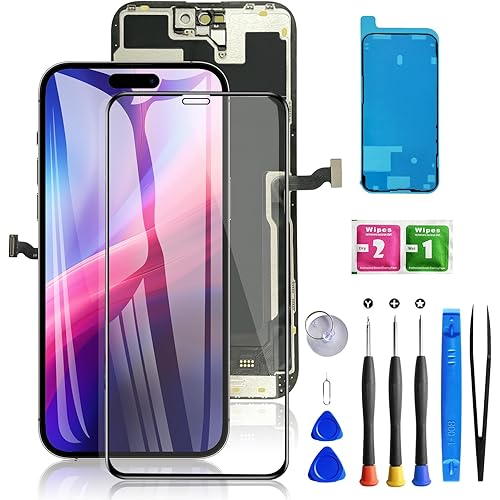
Replacement LCD Display with Asus ROG Phone 9 Pro/8 Pro 6.78" Touch Screen Digitizer Assembly Compatible with Tools Black


Buy Now, Pay Later
- – Up to 36-month term if approved
- – No impact on credit to apply
- – Instant approval decision
- – Secure and straightforward checkout
Ready to go? Add this product to your cart and select a plan during checkout.
Payment plans are offered through our trusted finance partners Klarna, Affirm, Afterpay, Zip, Apple Pay, and Google Pay. No-credit-needed leasing options through Acima may also be available at checkout.
Learn more about financing & leasing here.
30-day refund / replacement
To qualify for a full refund, items must be returned in their original, unused condition. If an item is returned in a used, damaged, or materially different state, you may be granted a partial refund.
To initiate a return, please visit our Returns Center.
View our full returns policy here.
Recently Viewed

Features
- Brand New Item With High Quality ,It can replace your broken device well.All the screens have been tested before shipping.
- Mobile phone screens are packed in sturdy boxes to avoid damage during transportation.
- Recommended to install the screen with the guidance of the tutorial videos on YouTube. You can search "Asus ROG Phone 9 Pro/8 Pro" Screen Replacement" on YouTube for a tutorial videos of how to do the replacement.
Description
Item Specs Type:AMOLED Glass:LCD Resolution:1080x2400 pixels Packaging: 1 x LCD,1 x tools Compatible with Asus ROG Phone 8 Pro, Asus ROG Phone 9 Pro A few tips for intallation 1.When you receive the screen, please check if it is in good condition. If the item is damaged on arrival, please let us know by sending us a message. 2.Please carefully remove your cracked screen and connect the new screen to the mainboard,then turn on your phone to see if it works before installation. A hair drier will help you to remove your cracked screen. 3. The cable on the screen is very fragile, do not bend it hard. 4.There're lots of instruction videos on internet, you can watch some videos to learn how to fix it or find a professional technician to help with you. How to protect your cellphone screen 1.Do not put your phone together with keys, coins or other metalworks, because these things may scratch your phone screen. 2. Use a screen protector to protect your screen. 3.Keep your phone away from Magnetic materials, because the magnetic materials may cause dead touch if you put them together for a long time. 4.Do not use a low quality third-party charger adapter to charge your phone, it will also damage your screen. 5.Do not put it close to you when you sleep, because your careless hit may let it drop on the floor and the screen may got broken. Contact us If you have any questions or any issues when using our product, please send us a messsage, we will answer you within 24hrs. Thank you for your time.
Package Dimensions: 5.31 x 3.94 x 0.87 inches
Item Weight: 3.52 ounces
Other display features: Wireless
Manufacturer: Shenzhen DeRui Trading Limited Company
Date First Available: March 10, 2026
Frequently asked questions
To initiate a return, please visit our Returns Center.
View our full returns policy here.
- Klarna Financing
- Affirm Pay in 4
- Affirm Financing
- Afterpay Financing
- Zip Pay in 4
- Financing through Apple Pay
- Financing through Google Pay
Learn more about financing & leasing here.




![BEN'SHOME® Lifetime Couch Cushion Support [19.7”x 58-67"] - Strong Solid Wood Seat Insert for Fix Sagging Cushions Living Room Sofa Seat| 0.5" Thick & Durable](https://m.media-amazon.com/images/I/81WW-6HHNzL._AC_US500_.jpg)
![Replacement Battery KX50 [Upgraded] for Motorola Moto G Stylus XT2043-4/G Stylus XT2043 XT2043-5 XT2043-6/G Pro XT2043-7 Battery Free Adhesive Tool](https://m.media-amazon.com/images/I/713u2m5e2QL._AC_US500_.jpg)
