Search  for anything...

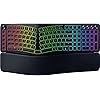
Razer Pro Type Ergo Wireless Split Ergonomic RGB Keyboard – Adjustable Tilt, Wrist Rest, Natural Typing, Multi Device Connectivity (2.4 GHz, Bluetooth, USB Type C), Windows/Mac Compatible – Black

  • Based on 0 reviews
Condition: New
Checking for the best price...
$189.99 Why this price?

Buy Now, Pay Later


As low as $31.67 / mo
  • – 6-month term
  • – No impact on credit to apply
  • – Instant approval decision
  • – Secure and straightforward checkout

Ready to go? Add this product to your cart and select a plan during checkout.

Payment plans are offered through our trusted finance partners Klarna, Affirm, Afterpay, Apple Pay, and PayTomorrow. No-credit-needed leasing options through Acima may also be available at checkout.

Learn more about financing & leasing here.

Free shipping on this product

FREE 30-day refund/replacement

To qualify for a full refund, items must be returned in their original, unused condition. If an item is returned in a used, damaged, or materially different state, you may be granted a partial refund.

To initiate a return, please visit our Returns Center.

View our full returns policy here.


Availability: In Stock.
Fulfilled by Amazon

Arrives Wednesday, Jun 10
Order within 13 hours and 2 minutes
Available payment plans shown during checkout

Protection Plan Protect Your Purchase
Checking for protection plans...

Features

  • SPLIT ERGONOMIC LAYOUT WITH ADJUSTABLE TILT Reduces wrist strain with a split layout, 10 slope, adjustable 4 or 7 tilt, and dual "B" keys for natural posture during long workdays and extended typing sessions
  • ULTRA LOWPROFILE FINGERTIPSHAPED KEYCAPS Improves speed and accuracy using spherical indents and a lowprofile design that reduces finger travel for comfortable and faster typing across emails, documents, and coding
  • COMMAND DIAL AND 5 DEDICATED MACRO KEYS Boosts efficiency with a dial supporting up to 8 custom functions, expandable up to 100 via Razer Synapse, plus macro keys for multitasking workflows
  • AI PROMPT MASTER FOR MODERN PRODUCTIVITY Saves time with onetouch AI shortcuts to summarize text, draft emails, and trigger custom actions through Razer Synapse for everyday professional use
  • BUILTIN PLUSH WRIST REST Minimizes wrist pressure and fatigue with an integrated cushioned wrist rest designed for extended typing, all-day work, and backtoback deadlines

Description

Wireless Split Ergonomic Keyboard for Productivity The Razer Pro Type Ergo is a wireless split ergonomic keyboard designed for professionals who spend long hours typing and want both ergonomic comfort and advanced workflow control. It combines a posture‑supporting layout with customizable productivity features to help you stay comfortable and efficient throughout the day.Split Ergonomic Layout with Adjustable Tilt A split key layout supports more natural hand placement, while a built‑in 10° slope helps promote healthier wrist posture. Adjustable forward and backward tilt options of 4° or 7°, along with dual “B” keys, allow you to tailor the typing angle for long sessions of writing, coding, or office work.Ultra Low‑Profile Fingertip‑Shaped Keycaps Sculpted keycaps with spherical indents guide fingertips naturally for improved accuracy and comfort. The ultra low‑profile design reduces finger travel, enabling faster typing with less effort compared to traditional full‑height keys.Advanced Workflow Control with Command Dial and Macro Keys The Razer Command Dial supports up to 8 customizable functions and can be expanded to 100 through Razer Synapse. An additional column of 5 dedicated macro keys provides quick access to shortcuts, tools, and commands, making it ideal for productivity‑focused users who multitask frequently.AI Prompt Master for Modern Workflows Assign a single key to trigger AI‑powered shortcuts such as summarizing text, drafting emails, or activating custom actions through Razer Synapse. These shortcuts help reduce repetitive steps and support modern, AI‑assisted productivity workflows.All‑Day Comfort with Multi‑Device Flexibility A built‑in plush leatherette wrist rest offers lasting support during extended typing sessions. Connect up to 5 devices using HyperSpeed Wireless, Bluetooth, or wired USB‑C mode and switch seamlessly between laptops, desktops, and tablets with one keyboard.

Brand: Razer


Compatible Devices: Desktops, Laptops, Mac, PC, Tablet


Connectivity Technology: 2.4GHz Wireless, Bluetooth, USB-C


Keyboard Description: Multi Functional


Recommended Uses For Product: Everyday Use, Gaming, Programming, Student, Video Editing


Special Feature: Split Ergonomic Layout, Adjustable Tilt, Low-Profile Fingertip Keycaps, Command Dial, Dedicated Macro Keys, AI Prompt Master, Built in Plush Wrist Rest, Multi-Device Connectivity See more


Color: Black


Keyboard backlighting color support: RGB


Product Dimensions: 16.78"L x 7.49"W x 1.77"H


Material: Plastic


Compatible Devices: Desktops, Laptops, Mac, PC, Tablet


Connectivity Technology: 2.4GHz Wireless, Bluetooth, USB-C


Additional Features: Split Ergonomic Layout, Adjustable Tilt, Low-Profile Fingertip Keycaps, Command Dial, Dedicated Macro Keys, AI Prompt Master, Built in Plush Wrist Rest, Multi-Device Connectivity


Keyboard Backlighting Color Support: RGB


Language: English


Power Source: Battery Powered


Switch Type: Linear


Keyboard Layout: QWERTY


Hand Orientation: Right


Button Quantity: 104


Total USB 2.0 Ports: 1


Minimum Required Operating System Version: Windows 10


Compatible Operating System Family: Windows


Color: Black


Item Dimensions L x W x H: 16.78"L x 7.49"W x 1.77"H


Enclosure Material: Plastic


Keyboard Plate Material: Aluminum


Brand: Razer


Keyboard Description: Multi Functional


Antenna Location: Everyday Use, Gaming, Programming, Student, Video Editing


Built-In Media: HyperSpeed Wireless Dongle, Important Product Information Guide, Razer Pro Type Ergo Keyboard, USB Type A to Type C Cable


Model Number: RZ03-05440200-R3U1


Model Name: Pro Type Ergo


Unit Count: 1.0 Count


Manufacturer: Razer


UPC: 840272919811


Mfr Part Number: RZ03-05440200-R3U1


Warranty Description: 2 Year Manufacturer


Frequently asked questions

If you place your order now, the estimated arrival date for this product is: Wednesday, Jun 10

Yes, absolutely! You may return this product for a full refund within 30 days of receiving it.

To initiate a return, please visit our Returns Center.

View our full returns policy here.

  • Klarna Financing
  • Affirm Pay in 4
  • Affirm Financing
  • Afterpay Financing
  • PayTomorrow Financing
  • Financing through Apple Pay
Leasing options through Acima may also be available during checkout.

Learn more about financing & leasing here.

Top Amazon Reviews


  • Razer actually does it right this time. Split / Ergonomic perfection.
Let me get this straight, Razer wants to focus on productivity over gaming? Does it work? Having at the Razer Pro Type TKL black and white variants from a few years ago, the ones I got were tactile and while called silent, they were not silent. These were loud keyboards and had a serious case ping to it. What I wanted was something that could fit well on a gamer desk during the evening, but with a quick RGB change to white or turning RGB off entirely could be a great ergonomic professional / productivity board. This does that. I had bought the ASUS ROG Falcata for Christmas, hoping that it would bridge that gap between gaming and ergonomics. While it does to a degree, its lack of a dual B key makes a huge difference. I found myself fumbling through typing with the lack of having the dual B on the Falcata and making a lot of typing mistakes. I do not have that issue with the Razer Pro Type. But I think the elephant in the room is the switch type. I primarily use mechanical keyboards for productivity and Hall Effect keyboards for gaming. I had long moved past scissor switches or membrane keyboards. So, knowing that coming in, I was daring that the ergonomics alone would be enough sway me losing my mechanical switch. I won't lie, there are times when I miss my mechanical switch when typing on this. But because the keycap is so low profile, and the actuation is so light, it becomes incredibly easy to type on. After having used it for a while now, I don't think I miss it nearly as much as I did in the beginning. With its low actuation and the absolute love of the split keyboard layout combined with the built in wrist rest, everything about this board is extremely comfortable. I think ultimately at the end of the day, what wins this board over for me is its comfort. If you're in it for the RGB, then that's great - you have the option. But on pure comfort, the Razer Pro Type Ergo wins; especially if you are here to get a board that would fit well in a professional setting and a gaming desk setup. Paired this with the Razer Pro Type Vertical and it's an amazing combination. You actually got me this time, Razer! ... show more
Reviewed in the United States on April 25, 2026 by Chris @ Jester's Motley

  • Quit working after 2 weeks
I really liked this keyboard. It felt nice to type on and was feature loaded, but after 2 weeks of use it just died on me mid game. It won't charge. It won't turn on. It just sits there a now worthless piece of expensive plastic. How so very disappointing.
Reviewed in the United States on May 1, 2026 by P. Mortis

  • Good Concept, Poor Execution. KVM Users Beware!!
The keys feel a bit cheap, but overall I'm enjoying the keyboard. I do wish the navigation cluster — Home, End, Delete, and the arrow keys — had slightly different colored keycaps to make them easier to locate at a glance, but that's a minor gripe. What's barely tolerable is the lack of KVM support. When switching back from my work laptop to my PC via the 2.4GHz dongle, the keyboard loses its profile entirely. The right spacebar and backspace stop working, function keys revert to media keys, and pressing Fn kills the backlighting. Who ships a keyboard where one of the spacebars doesn't work by default? Sane defaults shouldn't require a constant software battle. The 2.4GHz dongle also has a surprisingly weak signal. Placed adjacent to a Logitech Bolt dongle on my KVM, the keyboard was virtually unusable. Inserting a USB audio adapter between them as a physical spacer resolved it — but that's an absurd workaround for a $150 keyboard. Better dongle design and competent software would go a long way. At this price, a keyboard should be plug-and-play, not a ongoing fight requiring reboots and profile management just to get basic functionality. Edit: Found a trick for better KVM behavior — use the tray icon's "Exit All Apps" option to fully close Synapse and related apps. ... show more
Reviewed in the United States on May 18, 2026 by Russ LeBar

  • Missing FN Lock
Solid built, quality keyboard. Missing function lock on keyboard. For a pro keyboard that’s a pretty big disappointment. I don’t care about stupid media keys. You can only set function lock via Razer Synapse. My Logitech Ergo K860 has a function lock key on the keyboard. You don’t have to constantly run LogiOptions to use it. Hope Razer releases a firmware update for this. ... show more
Reviewed in the United States on May 30, 2026 by Hugh Jass

  • I would buy it again
I very happy with my Razer keyboard. I wanted an ergonomic keyboard with pretty colors and I got both. I also wanted a wired keyboard which is an option. It has a nice feel to it and is pretty quiet. I use it for my work computer so I am not allowed to download the software. I can do without programming shortcuts, but I was concerned about not being able to have the pretty colors. You can still get the rainbow colors out of the box. I didn’t know this for the first week because I had it plugged into my hub. When I plugged it directly into my laptop I got a pop up alerting me of this option. You just need to go into the workstation settings, otherwise you are stuck with 1 solid color, which you can change on the keyboard itself. When my computer was locked, I got the wave (rainbow) effect. When it was unlocked and active, it would return to 1 solid color. Blah. In Windows go to Settings > Personalization > Dynamic Lighting > Effects > then choose your preference. I chose Rainbow. There is only 1 thing I would change in order to make this the “perfect keyboard” for me and that is the width. I wish the wrist rest was smaller or removable. There are 2 reasons. First, due to my carpal tunnel, I was advised to ditch the wrist rest but this one is not removable. My condition has since improved so I’m not overly concerned. Second, I have cats and therefore, require a plastic cover to shield them from walking on my keyboard. The shield is not wide enough, nor do they make one wide enough. I have concerns that their claws will eventually pierce the leather like material on the wrist rest and ruin it. ... show more
Reviewed in the United States on April 24, 2026 by Jessica

  • Razer Pro Type Ergo Wireless
I like the custom keys and dials this keyboard has, however I'm finding the battery life is shorter than what is expected. Im not liking how it takes a bit for the keyboard to be responsive after it goes to sleep and trying to wake it up requires you to wait a bit before you can type on it. Otherwise, the keyboard has a nice feel to it. ... show more
Reviewed in the United States on April 22, 2026 by Andy Vo

  • The Best Ergonomic Keyboard The Best Ergonomic Keyboard
The best ergonomic keyboard yet! I've used the Logitech Ergo K860 for 3 years and loved it, but the Razer Pro Type is a definite upgrade. The leather padding is more comfortable and premium, and the key travel feels like a MacBook Pro. I love the macros and the knobs to adjust volume and vertical scroll on each side. Tried WoW with it and worked fine. Highly recommend this keyboard. ... show more
Reviewed in the United States on May 17, 2026 Reviewed in the United States on May 17, 2026 by ThaiTan N.

  • Failed in 1 month under lite usage.
Worked great.... for less than a month. First time I've had a Razer product fail in such a short amount of time. I've already returned it and waiting for the refund. Very disappointing.
Reviewed in the United States on May 16, 2026 by THOMAS CELAYA

Can't find a product?

Find it on Amazon first, then paste the link below.
Checking for best price...