Search  for anything...

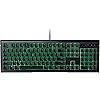
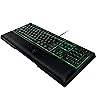
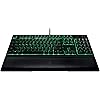
Razer ORNATA Expert: Mecha-Membrane - Individually Backlit Mid-Height Keys - Leatherette Wrist Rest - Gaming Keyboard - Gaming Keyboard (RZ03-02041800-R3U1)

  • Based on 772 reviews
Condition: New
Checking for the best price...

Buy Now, Pay Later


As low as $13.24 / mo
  • – 6-month term
  • – No impact on credit
  • – Instant approval decision
  • – Secure and straightforward checkout

Ready to go? Add this product to your cart and select a plan during checkout.

Payment plans are offered through our trusted finance partners Klarna, Affirm, Afterpay, Apple Pay, and PayTomorrow. No-credit-needed leasing options through Acima may also be available at checkout.

Learn more about financing & leasing here.

Free shipping on this product

This item is eligible for return within 30 days of receipt

To qualify for a full refund, items must be returned in their original, unused condition. If an item is returned in a used, damaged, or materially different state, you may be granted a partial refund.

To initiate a return, please visit our Returns Center.

View our full returns policy here.


Availability: Only 1 left in stock, order soon!
Fulfilled by Amazon

Arrives Jan 9 – Jan 29
Order within 10 hours and 56 minutes
Available payment plans shown during checkout

Protection Plan Protect Your Purchase
Checking for protection plans...

Features

  • MECHA-MEMBRANE KEYS - Soft cushioned membrane rubber dome with a crisp tactile mechanical click
  • MID-HEIGHT KEYCAPS: Custom designed keycaps for quicker actuation without missing a single stroke
  • INDIVIDUALLY BACKLIT KEYS: Progammable keys with dynamic lighting effects
  • LEATHERETTE WRIST REST: Ergonomic magnetic wrist rest for ultimate comfort
  • 10-KEY ROLLOVER ANTI-GHOSTING: Perfectly execute up to ten commands at the same time

Description

ERROR:N/A

Brand: Razer


Compatible Devices: Gaming Console


Keyboard Description: Gaming


Recommended Uses For Product: Gaming


Special Feature: Magnetic


Color: Backlit


Number of Keys: 10


Style: Ornata Expert


Product Dimensions: 6.7"L x 18.24"W x 1.3"H


Material: Plastic, Metal


Brand: Razer


Included Components: keyboard, wrist rest


Model Number: RZ03-02041800-R3U1


Series: 2015


Material: Plastic, Metal


Color: Backlit


Style: Ornata Expert


Recommended Uses For Product: Gaming


Item Dimensions LxWxH: 6.7 x 18.24 x 1.3 inches


Product Dimensions: 6.7"L x 18.24"W x 1.3"H


Keyboard Description: Gaming


Hand Orientation: Ambidextrous


Number of Keys: 10


Compatible Devices: Gaming Console


Operating System: Linux


Special Feature: Magnetic


Number of Buttons: 10


Number of USB 2.0 Ports: 1


Frequently asked questions

If you place your order now, the estimated arrival date for this product is: Jan 9 – Jan 29

Yes, absolutely! You may return this product for a full refund within 30 days of receiving it.

To initiate a return, please visit our Returns Center.

View our full returns policy here.

  • Klarna Financing
  • Affirm Pay in 4
  • Affirm Financing
  • Afterpay Financing
  • PayTomorrow Financing
  • Financing through Apple Pay
Leasing options through Acima may also be available during checkout.

Learn more about financing & leasing here.

Top Amazon Reviews


  • Nice keycaps. Beautiful lighting. Still Razer, for good and for bad.
I had gotten used to full-sized chiclet keyboards and wanted one with a backlight. Unfortunately they seem to be nearly non-existent and I could only find two. One by Monoprice and another by a no-name company that had terrible reviews. The Monoprice keyboard felt very nice, but the backlighting was very dim, and only available in blue. The materials used also reacted very poorly to cleaning. Using rubbing alcohol (considered one of the best cleaning agents because it's less likely to damage internal components if any gets inside, unlike water or water-based cleaners) resulted in the paint on the keycaps and bezel slowly wearing off, and because the chiclet-style keys were not just caps but solid and sat in a key well, the keys would start rubbing against the sides with greater and greater friction. Essentially, the two plastics become "too" clean, without the residue of the molding release agent acting as a lubricant. So after going through a few of these keyboards, I decided to was time to find one that had a good backlight, and would last. I had previously sworn off Razer after encountering multiple QA issues with their Orochi. One mouse would have loose side buttons, another would have an inconsistent feel to clicks occasionally, while another would have a ridiculously tight top that took so much force to remove that it actually put a permanent bend in the plastic (the battery compartment is under it.) Otherwise, I loved the mouse. Except it too had a flaw when it came to cleaning. If any liquid accidentally got into the scroll wheel area (which is wide open on the front), it would either short out the mouse temporarily or kill it dead outright. Dealing with dust and finger gunk became a hazard to this mouse. The other reason I swore off Razer products was Synapse: It's utterly stupid to require an account-based cloud program that wants to run continuously, just to get full use out of your hardware. Let's call it what it really is: Spyware that wants to datamine you so Razer can sell marketing data and make more money. I refuse to keep it installed. I'd configure the Orochi then uninstall it. But every time I had to replace one, I'd have to use it again. I'm done with Synapse. So back to the keyboard. I was looking for one that fit multiple criteria: Membrane kays as close to chiclet-style as possible in a standard US layout without extra keys, a normal-sized bezel without built-in palm or wrist rest, and green or RGB backlighting. Despite my previous misgivings, the Razer BlackWidow would've fit this perfectly if not for the huge, permanent palm rest. I kept coming across keyboards that got close to these criteria, but they'd have a flaw like an extra row of keys where I rest part of a hand, or a EU-style Enter key, or goofy permanently-cycling RBG lights. Or were mechanical (despite being a gamer, I'm not fond of mechanicals.) I ordered a cheapy no-name keyboard in the "floating keys" bezel-less style. This turned out to be uncomfortable to me. After so many years on low-height keys, the full-height keys now felt way too high. They were also set in an ergonomic curve and I prefer level keys. The lack of a bezel was also uncomfortable as I rest a couple of my fingers on them. Returning to try and find something better, I looked at Razer's products again, and after dismissing the Ornata due to the wrist rest previously, I actually looked at it and realize it was detachable. Looking at its other features, it seemed very close to what I wanted. has a standard US layout without any extra keys, and they were medium-height with slightly wider spacing than normal (so closer to a chiclet-style.) It was also available in a non-RGB model (plain green) so Synapse wouldn't be required for setting the colors. I didn't care for the mechanical-like clickiness, but I realized I was going to have to compromise somewhere to get a keyboard as close to my preference as possible. Upon getting the keyboard, I was impressed with the matte texture the keys have (which matches my mouse, a Corsair Sabre) and the bright, individually-lit keys. And the keys are indeed clicky. Also, let's be absolutely clear on this: This is NOT a mechanical keyboard. It's a membrane keyboard that they've made simulate a mechanical by added a small plastic bump to the key stem, and a matching metal "spring" in the key housing that makes it click when it runs back and forth over it. If you're getting this an expecting a mechanical, turn back now. This keyboard is not for you. I would describe most real mechanical keyboards as having a "KA-KLUNK" sound. With the Ornata I'd say it was a "ki-klick." It's softer and lighter in sound, but it's still very, very much present and not quiet at all. As someone who hasn't used a mechanical regularly since the IBM Model M stopped being a stock keyboard for most professional systems, I'm having to get used to it again. I still prefer the quietness and soft touch of a membrane keyboard. There's a small issue with these faux-mechanicals, though. Not all of the keys feel the same. Some of them have a lighter click, and a couple barely click at all. While I'd prefer no clicking, I'd rather they all be consistent if I have to have it. The keyboard has cable management in the form of a groove that runs its length on the bottom, enabling you to run the cable out either end or out the top like normal. The cable snaps down tightly into this groove, so once in, it's staying unless you pull it out. It also features a "Game Mode" that disables the Windows key and turns on 10-key anti-ghosting rollover mode. Synapse isn't required for this, but if you want to add additional keys like Alt-Tab or Alt-F4 to the list of keys it deactivates, it is. There's also a Macro mode that lets you record a key sequence and assign it to a specific key. Unfortunately this seems to require Synapse to function at all. The keyboard also features multimedia key functions assigned to the F-keys and accessed in combination with the Fn button. Backlight brightness can also be controlled via the hardware (and without the need for Synapse) but the lighting steps are very subtle, and will need multiple presses (or holding a key) to see a difference. The multiple lighting modes cannot be accessed without Synapse, the keyboard defaults to static. This is unfortunate because they could've made them selectable via hardware if they wanted. While I prefer static, it would've been nice to have access to those other modes via hardware alone. If a cheap, no-name Chinese keyboard can do this, why can't the Ornata? Because Razer wants you using Synapse. My one real complaint is a minor one: The keyboard itself is a bit high. While it's comfortable to type on, I wish the overall base height was half of what it is. I have not used the wrist rest so I cannot comment on it. In short: Pros: -Medium-height keycaps feel good, giving closer to a chiclet-style feel than a regular key. -Matte texture feels nice and should keep your fingers from slipping. -Clicks similar to a mechanical if that's your thing. -Standard, non-funky layout. -Beautifully bright, individually-lit keys. -Cord management lets you place the cable where you want it. -Big, honking wrist rest. Again, if that's your thing. Cons: -If you think this is a mechanical, you'll be disappointed. -Built-in features have only partial functionality without using Synapse. -Inconsistent tactile feel between some keys. -Base height seems a little high. ... show more
Reviewed in the United States on March 9, 2018 by Drakkenfyre

  • Quality, comfort + pretty
The media could not be loaded. fire keyboard. very pretty, comfortable, not too loud (compared to my previous one, huge difference). the wrist rest is comfortable and has a very high quality feel. soft and supportive. testing it out, typing feels very smooth and I can already feel I can type faster on this one. the packaging is beautiful, this would be a GREAT gift for someone. I got it on sale for -65%. Take advantage of that deal while you can. ⭐️⭐️⭐️⭐️⭐️ ... show more
Reviewed in the United States on November 20, 2023 by Martina L.

  • Best Keyboard Ever
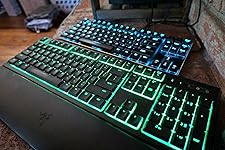
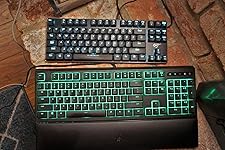
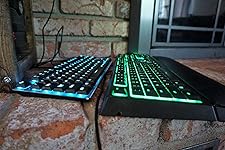
I'm a huge fan of this keyboard. For the price (it seems to hover around ~$50), I absolutely think it's unbeatable. The tactile feedback is the best I've ever experienced (30+ years of typing on various keyboards for work and play). It nice and clicky like a traditional blue-switch mechanical keyboards but not nearly as loud. Even better, it has more resistance than them and also has sort of a 'pop' to its compression when pressing down on the keys (the membrane's contribution). --Think of it sort of like a compound bow; lots of resistance at the initial pull, but once you push past a certain threshold it suddenly pops back to full extension, due to the momentum of pulling past the hardest part of the string's resistance. That's this keyboard! So freakin' sweet.... I can type on it all day and be happy. Keep in mind, a quality membrane keyboard, such as my old keyboard, Logitech Illuminated Ultrathin Keyboard K740 with Laser-etched Backlit Keyboard and Soft-touch Palm Rest , will give you this feeling as well, but it won't have that added mechanical switch feeling and audible 'click'. Really, it's the marriage between the two techs that make this so wonderful. My 2nd favorite keyboard is the 'Havit Low-Profile Mechanical Keyboard' which is what you see in my pictures next to the Razer to compare. Mechanical Keyboard HAVIT Backlit Wired Gaming Keyboard Extra-Thin & Light, Kailh Latest Low Profile Blue Switches, 87 Keys N-key Rollover HV-KB390L (Black) --The Havit has better build quality and has a pleasing light-blue color backlight vs the Razer's bold bright-green that can be a little much. It's also very streamlined to take up minimal space with a nice aluminum trim where the Razer is a bit bulky and plastic'y, and even creaks if you apply even the slightest twisting force to the keyboard - Don't get me wrong, the Razer's frame is plenty stiff and sturdy... just not as refined and elegant as the Havit's. But the Havit *doesn't have* that wonderful added membrane that gives it that prominent tactile pop of compression that's unique to Razer's Ornata, only the "click" of the switch which is more sound than feeling. The Havit is also significantly more expensive, especially for the full sized keyboard, and doesn't included wrist pad like the Razer, which is surprisingly comfortable! Speaking of the wrist pad, I love how it's attached via magnet! ...though I wish the magnet strength would be a tad stronger when typing on my lap for HTPC use. Both are amazing keyboards and this may be even a slight apples to orange comparison since the Havit is trying to be as compact as possible. But if I had to choose just one, the Razer wins. There is one other rather large con to the Razer, is that in order to access the more advanced software features, you have to login to Razer's online services. I know that's a huge turn-off for some of my friends and it does bother me a little too but not enough to dock a star given how much I enjoy the hardware. I don't bother logging in. The keyboard without those features is easily still sweet enough to warrant a 5 star rating in my book. For the price ($50, plus or minus), nothing beats it. ... show more
Reviewed in the United States on June 2, 2018 by Kinh Williams Kinh Williams

Can't find a product?

Find it on Amazon first, then paste the link below.
Checking for best price...