Search  for anything...
QRD

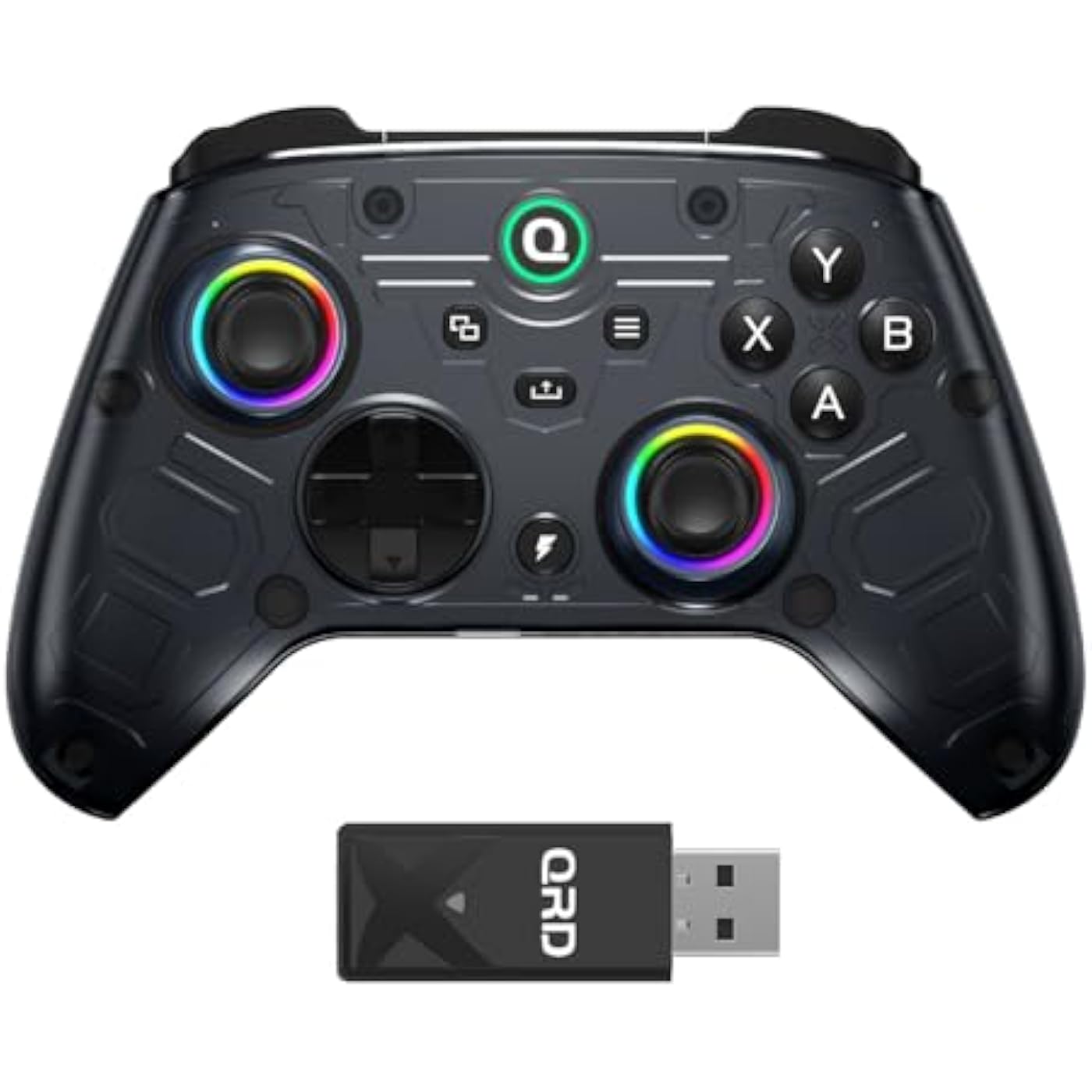
QRD FERROX M5 Wireless Controller for Xbox Series X|S, Xbox One,Switch,PC,Xbox Controller with 2.4Ghz USB Dongle,Flexible Macro Recording,Turbo

  • Based on 24 reviews
Condition: New
Checking for the best price...
$59.99 Why this price?
Save $9.99 was $69.98

Buy Now, Pay Later


As low as $10.00 / mo
  • – 6-month term
  • – No impact on credit
  • – Instant approval decision
  • – Secure and straightforward checkout

Ready to go? Add this product to your cart and select a plan during checkout.

Payment plans are offered through our trusted finance partners Klarna, Affirm, Afterpay, Apple Pay, and PayTomorrow. No-credit-needed leasing options through Acima may also be available at checkout.

Learn more about financing & leasing here.

Free shipping on this product

FREE 30-day refund/replacement

To qualify for a full refund, items must be returned in their original, unused condition. If an item is returned in a used, damaged, or materially different state, you may be granted a partial refund.

To initiate a return, please visit our Returns Center.

View our full returns policy here.


Availability: In Stock.
Fulfilled by Amazon

Arrives Monday, Feb 16
Order within 11 hours and 49 minutes
Available payment plans shown during checkout

Protection Plan Protect Your Purchase
Checking for protection plans...

Features

  • Multi-Platform Wireless Connectivity:Compatible with Xbox Series X/S, Xbox One, Nintendo Switch, PC, iOS, and Android. Supports stable, low-latency wireless connection via a dedicated USB wireless adapter.
  • Note:Please check the video about setting and connection on page.QRD Ferrox M5's latest firmware update v1.23, resolves compatibility connected issues with the recent Xbox system update. If any questions, please contact QRD after-sales customer service.
  • Turbo Speed Function:Supports A, B, X, Y, RB, LB, RT, LT, and M1M4 buttons with customizable Turbo function. Users can toggle between semi-automatic and full-automatic Turbo modes, catering to diverse gameplay requirements.
  • Customizable RGB Lighting Effects:RGB lighting on both left and right joysticks supports multiple animation modes and allows adjustment of brightness and color, adding personalized visual flair.
  • Flexible Macro Recording:Enables macro recording and assignment for complex operations with a single button press, significantly improving gaming efficiency and combo execution.
  • High-Quality Vibration Feedback System:Adjustable vibration intensity with multiple levels, saved settings allow for personalized feedback tailored to various gaming scenarios, enhancing immersion.

Release date: December 6, 2024


Package Dimensions: 7.8 x 5.43 x 2.87 inches; 15.84 ounces


Type of item: Video Game


Item Weight: 15.8 ounces


Manufacturer: QRD


Batteries: Lithium Polymer batteries required.


Date First Available: December 6, 2024


Frequently asked questions

If you place your order now, the estimated arrival date for this product is: Monday, Feb 16

Yes, absolutely! You may return this product for a full refund within 30 days of receiving it.

To initiate a return, please visit our Returns Center.

View our full returns policy here.

  • Klarna Financing
  • Affirm Pay in 4
  • Affirm Financing
  • Afterpay Financing
  • PayTomorrow Financing
  • Financing through Apple Pay
Leasing options through Acima may also be available during checkout.

Learn more about financing & leasing here.

Top Amazon Reviews


  • Pretty solid alternative to 1st party control
for being a 3rd-party controller, this one is pretty solid. The build quality feels like a step up from their past controllers. I really like the back buttons and the Hall Effect thumb sticks both add a nice touch. One downside is that it won’t connect to an Xbox One without the included dongle, which means you’ll use up a USB port. It might connect directly to an Xbox Series console, but I can’t confirm since I don’t have one to test. Overall, it offers some cool features you don’t usually see on standard controllers. I think it’s worth considering if you’re looking for something different. ... show more
Reviewed in the United States on August 19, 2025 by Gatorback Gatorback

  • Awesome controller actually has turbo
This thing does have turbo so that's nice I was skeptical. You do need to push a few buttons for the turbo function but that's pretty standard. I just got this thing on Nov 28th of 2025 and it's worth the money. By now you've already read a few other reviews but don't let the bad ones dissuade you from buying this. The price is about the same from GameStop but they don't sell any with the turbo function. If you want controller attachments this is not the controller for you. But it lights up and has the common audio jack port on the bottom. ... show more
Reviewed in the United States on December 2, 2025 by maxwell M.

  • Very good controller, its battery lasts a long time.
This controller is absolutely fantastic! It connects quickly to the console and doesn't lose connectivity. It's ergonomic, and the buttons don't make that annoying clicking sound. I highly recommend it!
Reviewed in the United States on December 24, 2025 by Gabriela

  • Excellent PC/Xbox controller that also works with Switch/2 and Android
Since the release of the Steam Deck, I have become completely spoiled by the functionality of back buttons. In the Dark Souls series and any Soulslike games especially, I rely so heavily on those that I have often sacrificed playing at a higher resolution simply because the helpfulness of having those buttons on Steam Deck for functions like sprinting, healing, changing weapons and items, etc. without having to stop moving or losing control of the camera was too great to pass up. As a primarily PC gamer, playing games with the Xbox Series controller or DualSense has felt oftentimes like a step backwards without the back buttons, despite everything I love about them. And since Valve has not put out a new Steam Deck style controller, finding a controller that has the same functionality without breaking the bank seemed a very difficult task. But then I was introduced to the QRD Ferrox M5. Not only does it boast 4 programmable back buttons I have been wanting, but hall-effect joysticks, adjustable RGB lighting, adjustable vibration, the ability to switch between full analog and digital style triggers, and simple integration with not only the Xbox Series consoles it was made for, but PC, Nintendo Switch/2, and Android/iOS. And best of all, the price is much less than what any of the current gen consoles offer, let alone the high-end controllers offered by many third-party manufacturers. But is it as good as it claims to be? In short, yes. It is not by any means perfect, but it has become my go-to for the majority of PC games. And after a few weeks of testing across a variety of different games, I have a lot to say about it. In terms of how the controller looks and feels, I am largely a fan. It is very comfortable in my big hands, basically feeling the same as an Xbox Series controller, albeit with a glossy front shell, a larger d-pad than the Series controller, and the added RGB lighting, which can be adjusted to suit your preferences in colors. Personally, I went with a solid blue, but there are several different options. The buttons seem to strike a nice balance between clickiness and squishiness that for me is pretty much perfect. It has sticks that appear to be identical to those found on the Series controller and the d-pad seems to have the same level of clickiness as the Series controller, albeit bigger and thus easier to use. The back buttons are much smaller than those on the Steam Deck, but that aside, I actually like them a bit better because they feel more like regular controller buttons (requiring less force to press) than those on the Deck. Connecting it to PC was extremely easy. Just plug in the USB adapter, press the button on it, then press the sync button on the controller and it works immediately, being recognized as an Xbox controller. And what was really impressive to me about connecting it to PC is that unlike what happens with the regular Series or DualSense controllers, as soon as I plugged in the adapter on a different PC, it still worked immediately. I was able to move it from one device to another and it worked with no fiddling or anything. I was also able to check it out on my nephew’s Xbox Series S and it did not require any extra syncing. I just plugged in the adapter, turned it on, and pressed the Home (Q) button. It connected with ease and with the testing my nephew did in one of his games, it worked just as well as the first party Xbox Series controller that came with the console. On both the Switch and Switch 2, it connects easily to the dongle, but there is a small workaround required to make it usable. Simply going to the Settings menu, then Controllers & Accessories, and then enabling the function “Nintendo Switch Pro Controller Wired Communication” made it so that it recognizes this USB dongle and the controller works. In both cases, it worked flawlessly once I enabled that feature. On Android, the only way it seems to work is with a wired connection, so I plugged it in with a USB C to USB C cable on my Samsung Galaxy S22 Ultra and tested it with the original Sonic the Hedgehog. It worked immediately upon connecting and without any issues (although having to do a wired connection on a phone is kind of awkward). I do not have an iOS device for testing, so I cannot confirm its functionality there. With regards to how it functions in-game, this is where it really shines. Not only does it function exactly as a normal Xbox controller, but setting up the back buttons for both standard button presses and macros was extremely easy. Simply hold the Turbo (Lightning bolt) button and the back button you wish to program until the Home (Q) button starts flashing. Then input whatever desired button or combo you want mapped to that back button and press the back button again to save it. While I mostly used it in place of single buttons, I also tried it out with a basic macro for healing in Assassin’s Creed Odyssey (LB+X) and it worked flawlessly every time. With a variety of games tested, including Another Crab’s Treasure, Lies of P, Horizon Forbidden West, Assassin’s Creed Valhalla, Persona 3 Reload, Sonic Racing CrossWorlds, Chrono Trigger, and Metal Gear Solid 3: Snake Eater, it worked perfectly. Having those back buttons for the games where I used them is immensely helpful and makes me not want to use any other controller on PC for most of them. But as great as the controller is, there are a few aspects I do not like as much. For starters, I am not a fan of the glossy front shell. It makes what otherwise feels like a premium controller look a bit cheap and it makes fingerprints stand out a lot more. But that is really just a small nitpick as the majority of the time, I am not looking at it. I also think that having the letters of the buttons colored would be more aesthetically pleasing, but that is once again, a nitpick. Gyro is a feature which not advertised and is understandably absent (as it is designed first as an Xbox controller, and Xbox controllers do not currently feature gyro) but is the one feature that would make this controller better than it is. There are not many games where I feel like I need to have that feature, but in those where I want it, I may opt to stick to a different controller. One final thing to note is regarding battery life. This one is a bit harder to judge, because there are two aspects to using up the battery. There is the initial power switch on the back to turn it on, then the battery usage when it is connected. Most controllers, when disconnected, do not use much (if any) battery power, so the amount of life you get from the battery is much more predictable. But with this controller, if you forget to flip the switch off on the back when you are done playing, it still uses battery even in the disconnected state. It boasts long battery life, but I have found myself having to charge more often than with either my Xbox Series or PS5 controllers if I forget to flip the switch on the back of the controller. Since this is user error above a clearly demonstrable issue with the controller itself, I cannot definitively say the battery life is poor or not. It is just an issue to be aware of when purchasing this controller. The QRD Ferrox M5 is an excellent controller for Xbox and PC, which also works on Switch, Switch 2, and Android. If you are looking for a more affordable Xbox style controller with hall effect joysticks and/or triggers, programmable back buttons, customizable vibration and RGB, or any other features listed, this controller is HIGHLY recommended. Just keep in mind that if you need gyro features, this controller does not have those. It has become my go-to for PC gaming and will likely remain so for the foreseeable future. ... show more
Reviewed in the United States on September 25, 2025 by Nathan D. Dugas Nathan D. Dugas

  • Great controller
Definitely a nice controller. it's very hefty and durable and feels very solid in your hands. The batteries last a long time, I was playing games for about 4 hrs a day and only had to recharge around the 4th day or so. Connectivity with the USB dongle is very fast and quick. There's extra buttons in the back that you can bind for more action when you need it. ... show more
Reviewed in the United States on November 28, 2025 by Dennis Luo

  • Better option than a Microsoft Xbox controller
Solid wireless Xbox controller for the price. Sticks feel a little looser than some but nice, and they're hall effect so there shouldn't be any stick drift. The trigger locks aren't bad but there are better feeling triggers out there. I don't use the back buttons much but I prefer just two in the back personally, but some will like 4, which this controller has if that's your preference. I have no complaints about this controller, but qrd could of knocked it out of the park if the xyba buttons were mechanical. Great controller for 60 dollars though, a better option than a Microsoft Xbox controller in my opinion. ... show more
Reviewed in the United States on September 25, 2025 by Nathanael R. Nathanael R.

  • Pretty bad for Xbox!
The first firmware upgrade solved and input lag issue, but added another new one: every time you connected your headset to the controllers 3.5 jack the controller just turned off ... then a new firmware upgrade came out and fixed that issue but another issues arrived: Crack noises out of your headset, The controller gets unpaired with the dongle every time you turn off your Xbox so every single day you have to pair it again, sometimes even the controller gets reseted to fabric setting and you have to configure it from zero again, sometimes while you hear those crack noises or the sound gets cuttings also in that specific lapse of time the controller gets disconnected or the signal get lost so you feel a very awkward response ... and not to mention that the client support is awful ... the never answer you back ! not even to tell you that they are working on the solution ... so you never know what is going to happen next! ... show more
Reviewed in the United States on September 24, 2025 by Cata87

Can't find a product?

Find it on Amazon first, then paste the link below.
Checking for best price...