Search  for anything...

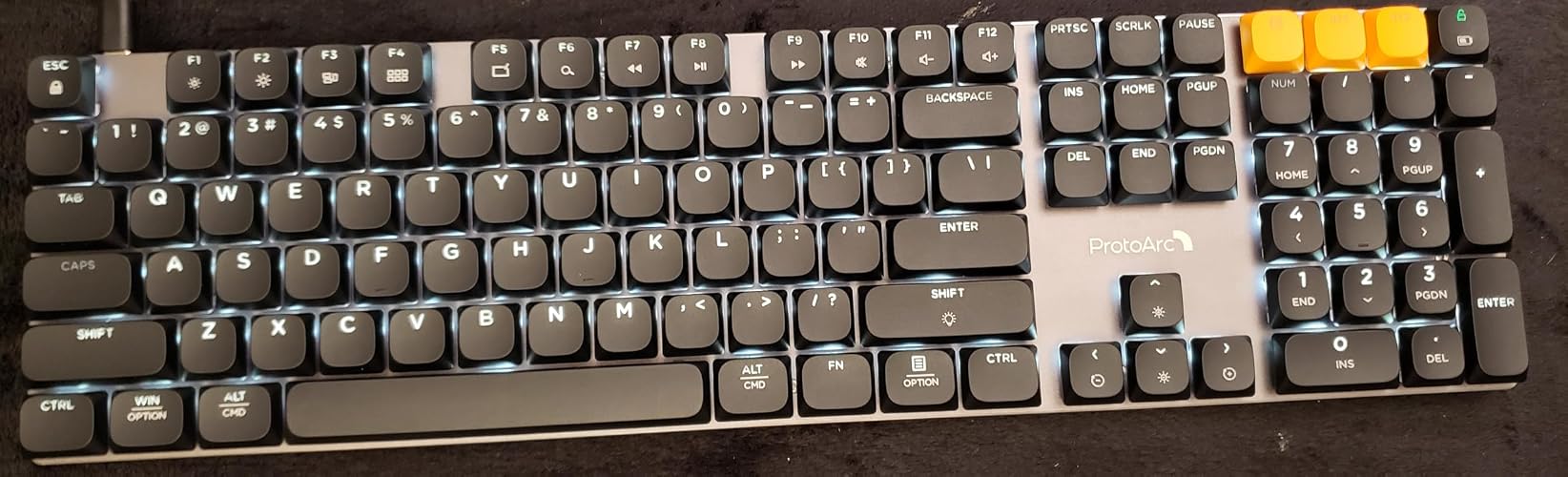
ProtoArc K310 Pro Backlit Bluetooth Mechanical Keyboard, Linear and Quiet

Based on 51 reviews
Condition: New
Checking for the best price...
$44.98
Save $30.00 was $74.98

Buy Now, Pay Later


As low as $11 / mo
  • – 4-month term
  • – No impact on credit to apply
  • – Instant approval decision
  • – Secure and straightforward checkout

Ready to go? Add this product to your cart and select a plan during checkout.

Payment plans are offered through our trusted finance partners Klarna, Affirm, Afterpay, Zip, Apple Pay, and Google Pay. No-credit-needed leasing options through Acima may also be available at checkout.

Learn more about financing & leasing here.

Free shipping on this product

FREE 30-day refund/replacement

To qualify for a full refund, items must be returned in their original, unused condition. If an item is returned in a used, damaged, or materially different state, you may be granted a partial refund.

To initiate a return, please visit our Returns Center.

View our full returns policy here.


Availability: In Stock.
Fulfilled by Amazon

Arrives Saturday, Nov 7
Order within 10 hours and 49 minutes

Available payment plans shown during checkout

Protect Your Purchase

Easy claims online, fast replacements, no fees

Checking for protection plans...

At a glance

Condition
New
Model
K310 Pro
Dimensions
17.64"L x 6.1"W x 1.77"H
Color
Space Gray
Keyboard Description
Mechanical
Style
Classic
Power Source
Battery Powered
Warranty
2 year
Works with
Laptop, PC, Smartphone, Tablet

Features 6

  • Linear Quiet Typing: The wireless mechanical keyboard features low-profile linear red swtiches keys and precise red switches deliver linear and smooth typing experience. Delivers authentic mechanical feel while keeping noise levels minimal - perfect for office environments without disturbing others
  • Seamless Multi-Device Connectivity: Mechanical wireless keyboard connect up to 3 devices using either the USB receiver or Bluetooth technology, makes this your go-to keyboard for all work and entertainment needs. Effortlessly transition between Windows, Mac, iOS, and Android devices with single-button convenience. Compatible with Windows 8/10, Mac OS X 10.12, Android 4.4 or higher
  • 10 Adjustable backlight: Mechanical keyboard include 10 backlight effects. Lighting speed and level can also be adjusted according to your need. Different backlit setting add fun to your typing sessions and create your own personalized setup
  • Macro customization: The K310 Pro mechanical keyboard supports recording and editing macro to customize key functions and backlight effects(except for a few keys). Suitable for work and casual gaming.Currently only supports use 2.4G USB connections(Note: The device cannot be detected when using a multi-port hub and Safari is not supported)

Description

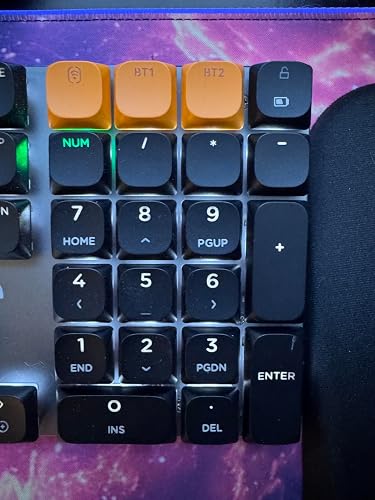
You can sync up to three devices. The Bluetooth 5.1 and 2.4G enables fast and stable connection Silky linear feel. Silent, sensitive, effortless, ready to work Low-profile mechanical keys with a short travel and solid feedback offer a responsive and smooth typing experience Red keys provide smooth, linear keystrokes and low actuation force Aluminum mechanical keyboard offers enhanced durability and a sleek, professional appearance It simplifies your tasks, allows you to execute commands effortlessly K310 Pro Quiet Mechanical EK01 Plus Backlit Ergo K110-A Backlit Mac KM310 Ergo Mechanical KM40 Wireless Ergonomic EKM01 Plus Wireless Ergo KM100-A Backlit Mac How does the mechanical keyboard feel when typing? Is the sound noisy? Wireless mechanical keyboard is equiped with low-profile keys and precse red switches, responsive, smooth feel, and quiet cicking, not disturbing for office and late night use. How many devices can be connected at the same time? Is it easy to switch? Support 2 4G + Dual Bluetooth connection modes wireless mechanical keyboard can effortlessly connect up to 3 devices. Short press the orange switch button to switch between devices in 3s (as fast as 1s)—no need to re-pair. What is the difference between the Low-Profile and the Hight-Profile Linear Red Switch? The low-profile key switches delivering more responsive typing feedback. You can type with less force, which means reduced finger fatigue during work. For users new to high-sensitivity keyboards, it may take some time to adjust. Is using the programmable features complicated? No. Just click to open the driver webpage, and you’re ready to go. You can also find more detailed instructions on the ProtoArc Hub official website, including written guides and video tutorials.

Specs 27

Brand ProtoArc
Connectivity Technology Bluetooth, USB-A
Keyboard Description Mechanical
Recommended Uses For Product Business, Everyday Use, Multimedia, Personal, Programming
Special Feature Backlit, Multi-Device, Programmable Keys, Rechargeable, Smooth and Quiet
Color Space Gray
Keyboard backlighting color support Single Color
Style Classic

Frequently asked questions

If you place your order now, the estimated arrival date for this product is: Saturday, Nov 7

Yes, absolutely! You may return this product for a full refund within 30 days of receiving it.

To initiate a return, please visit our Returns Center.

View our full returns policy here.

  • Klarna Financing
  • Affirm Pay in 4
  • Affirm Financing
  • Afterpay Financing
  • Zip Pay in 4
  • Financing through Apple Pay
  • Financing through Google Pay
Leasing options through Acima may also be available during checkout.

Learn more about financing & leasing here.

Top Amazon Reviews


This is a very solid keyboard with an aluminum top plate.
You can tell something is different about this keyboard when you just pick up the box for the first time. It is considerably heavier than my other keyboards. I have a few different keyboards, but I have been using the Dell keyboard that came with my computer because it doesn't take up too much space. This ProtoArc keyboard actually takes up even less space. There is no plastic margin around the edges, and the physical size is just slightly narrower and slightly less deep. It has legs on the back to tilt it towards you, which is what I prefer. The keys feel crowded, but in reality, the letter portion takes up the exact same amount of space. The difference is that each key is physically larger on the ProtoArc with very little space between, while the Dell keys are actually smaller with a larger gap between. I am fat fingering these keys a little, but I am already getting used to it on the first day, so a week from now, it will be a non-issue. The advantage of the additional weight is quickly apparent. The keyboard has rubber strips for traction, and the additional weight keep this keyboard anchored. I am using mine on my Dell computer with the dongle. However, I have a mini-computer that is air cooled for recording because it doesn't have the fan noise. It is a small chassis with only a few USB ports. The Bluetooth is a good feature for this keyboard with that computer. I will go through just a couple of things to make this easy to use right out of the box. First note is that only a few keys were backlit. If you press the "FN" key and hold it while pressing the right shift key, it will go through different lighting modes. I think there are ten different modes. I wanted a solid backlight. I went through all the modes and eventually found it. It stays on while you are using it and automatically shuts off if you don't use it for a while, but it stays on for probably 10 minutes. There is another mode that just lights briefly while you are actually typing, then goes out. To turn off the backlight, hold the "FN" key and the right shift key for three seconds. Doing the same thing when it is off will turn it on to the same mode it was on before turning it off. F10, 11, and12 are the keys to turn your speakers up and down, but you have to hold the "FN" key down while doing this. This should be enough to at least get you started, and the keyboard comes with a fairly decent user manual, which is a nice touch in this day and age when things arrive with essentially no user manual. The packaging is also very nice. That doesn't improve the keyboard, but it signals that this is a better-quality product. So, to end this review, this is a really high-quality keyboard, and I am definitely going to use it and put my old keyboards away. It has a very positive feel to the keys and doesn't miss punches like my old one kind of does. Easy 5 stars. ... show more
Reviewed in the United States on October 12, 2026 by J. M. Chaney

A wireless full-size keyboard done right
I've tried quite a number of different keyboards, and it has become clear that designing a good one must be quite challenging, since so few actually get it right. For instance, many backlit keyboards have key characters that are very hard to read when the backlight is enabled. Others have odd design choices, such as putting the power button under the Caps Lock key, forcing you to remove the keycap to access the switch. And that's only the beginning. This keyboard gets it right. The backlighting works very well, and the legends on the keys are easy to read from bright daylight down to total darkness. There are a couple of exceptions: the media functions on the top row (F1–F12) are not illuminated. That is, the upper portion of those keys is lit, but the media labels printed on the lower portion are not. The same applies to certain keys on the numeric keypad. For instance, some of them include secondary functions such as PgUp and PgDn, etc. However, these are duplicates, since dedicated PgUp and PgDn keys (and others) are already present on the keyboard, so this is not really an issue for me. Note that the backlighting is white only, with a few exceptions: the Caps Lock and Num Lock keys are normally unlit, but when Caps Lock or Num Lock is activated, they light up green. At first, the idea of these two keys not being illuminated concerned me, but in practice they are very easy to locate even in complete darkness. The Caps Lock key sits between two large keys (Shift and Tab), and Num Lock is located at the top-left corner of the numeric keypad, making it just as easy to find. Additionally, these keys are used fairly infrequently. Many backlit keyboards are hard to read in different lighting situations. For example, when the lettering is not white but transparent, the characters can be difficult to see with the backlight off during daytime use. Others use very thin lettering strokes, which do not allow enough light to pass through, making them hard to read in certain conditions. However, I found this keyboard easy to read in all situations. Even though the backlighting is white-only, it still offers several lighting effects, allowing for a bit of customization and fun although my personal preference is to just leave the lighting on a static always on backlight. I should also mention that the backlighting is quite subtle. Other backlit keyboards tend to be significantly brighter, but I suspect this is intentional. First, because the keyboard is wireless, this helps conserve battery life. Second, the lighting level seems well tuned to keep the keyboard clearly visible in any lighting conditions so it really does not need to be any brighter but you do still have a choice of several brightness levels. I think that ProtoArc has chosen settings that work well. As for build quality, the keyboard deck is made of aluminum, though it must be relatively thin since the keyboard is surprisingly lightweight. However, this is not necessarily a drawback. The keyboard still feels sturdy, with no noticeable flex during typing and this keeps the weight to reasonable level making it practical to even travel with this keyboard. The keys also have a smooth linear feel which I am particularly fond of. The user manual provides clear explanations of all functions and shortcut keys. It is also refreshing to have a guide that is actually readable without needing a magnifying glass. ProtoArc has an online utility that can be used to customize settings on the keyboard and I found the utility to be very intuitive and easy to use. I just wish that they would also provide a utility that could be used offline. As it stands now, this utility is only available on the web so Internet access is a must for access. I realize this review has been fairly straightforward, so it may not fully convey how much I like this keyboard. I've tested and reviewed roughly a dozen or more keyboards so far, and it is no exaggeration to say this one is one of my favorites. While other keyboards may be more flashy, this one feels focused and practical. I alluded earlier to some of the shortcomings of other keyboards, so it was genuinely refreshing to finally find one that simply gets everything right. In my view, this is an excellent keyboard offered at a very reasonable price. I can confidently give it my highest recommendation. ... show more
Reviewed in the United States on September 29, 2026 by HannesS

Well built and priced keyboard
I previously used a full-size mechanical keyboard with standard keycaps, but I found it a bit uncomfortable to type on. Since I already own a ProtoArc mouse (EM11 Pro) and have been happy with it, I decided to give this keyboard a try as well. So far, I am very impressed with the design and build quality. The top and sides are made of metal, which wraps around the edges, while the bottom is plastic. It feels sturdy and has virtually no flex. There are also some nice attention-to-detail touches. The USB dongle attaches magnetically to the back of the keyboard. You can pair the keyboard with another compatible dongle. The kickstand even has markings to indicate the different angles. I have also found that my typing speed has improved quite a bit with this keyboard. The backlight has some cool animations, but I prefer to keep it on a steady setting. The keycaps are doubleshot and allow light to shine through. Markings that are not backlit are slightly raised but cannot be felt unless you are looking for it. Battery life has been very good so far. The battery was at around 80% when I started using it, and after about five weeks, it is now at 40%. That is with the backlight enabled. I have the backlight set to turn off after 2 minutes of inactivity. I use the keyboard over Bluetooth. There is sometimes about a one-second delay when my computer wakes up before the keyboard starts responding. It is a minor issue and only seems to happen 1 in 5 times. It may be an OS issue. The software is also interesting. There is nothing to download or install since it works directly through the browser in Chrome. You can customize various settings, including the brightness of individual keys, which is a nice feature. I went in here to change the keyboard into Mac mode to use the function row. The packaging is also well done. The box feels nice, and the included documentation is printed clearly on good-quality paper. It gives the product a more premium feel. The keyboard reminds me of the Logitech MX Mechanical, which costs around $180. At about $65, and an additional 10% off coupon, this keyboard offers excellent value for the money. Overall, this is a well-designed wireless mechanical keyboard with solid build quality, good battery life, useful customization options, and a very reasonable price. ... show more
Reviewed in the United States on October 9, 2026 by Abhinav

Pretty good, but there's a bit of "grit" to some keystrokes and low-profile isn't for everyone
The K310 is a full-size (albeit pretty compact-- there aren't much in the way of bezels or surrounding structure) low-profile mechanical keyboard, and if you're looking at it you know what that's going to mean. If you don't have somewhere to rest your wrists, the keyboard isn't going to help you out; if you want nice deep keystrokes, the relatively shallow keystrokes won't satisfy. But given this, it's a good, solid keyboard that's generally well set up. The keys actuate linearly, so they're on the quiet side for a mechanical setup. You get basic backlighting (in that they are single-color) that is configured through a cycling/"sliding" keyboard shortcut setup and tri-mode connectivity. There's a recess in the bottom of the keyboard that lets you store the 2.4Ghz wireless adapter, which works quite well in my experience. Fn lock is disabled by default, but it is present so you can have the function keys work however you'd like. A lot of the above are table stakes, so I'll jump to my two complaints. The first is that there were a few keystrokes where I noticed a bit of "grit" in the actuation motion, meaning that the lubrication was a bit suspect. It wasn't enough to produce squeaking or substantially uneven feedback, but I've tried other boards where the lubrication was flawless across the...board. The other is that the backlighting setup includes the usual frilly patterns that do little for practical use; this isn't me being the fun police so much as noting that it makes the "cycle" you have to iterate through to find a pattern you like quite long. This is in contrast to boards made by companies like Keychron that offer UI-based configurators that take the cycling and "watch-and-see" aspect out of the thing. Ideally, you'd set this once to your liking and forget about it, but I found that I inadvertently triggered the cycling once or twice and then had to tediously work my way back to my desired configuration. These are ultimately pretty minor. The biggest two things you should bear in mind here are that the switches are linear (which won't be to everyone's taste) and low-profile (meaning the travel depth is short). This produces a very particular typing experience that you may love or hate. I find myself not super enamored with it (I prefer a longer press), but that isn't due to a fault of the keyboard as it's a design choice. On the balance? A solid keyboard and very flexible with tri-modal connectivity. Just make sure you know what you're buying first! ... show more
Reviewed in the United States on October 2, 2026 by Gale Lee

Love ProtoArc Keyboards!!!
I have been using the ProtoArc K110-A Backlit Wireless Keyboard for Mac for about a year and I absolutely love it. When I came across the K310-Pro, which is also backlit but with Mechanical Keys, I knew I had to have it for my work laptop. It's very hard to find a wireless keyboard that is also backlit and this is one of the few brands I've found that has that. The other nice feature is that it has the ability to be used with 3-different Computers as there are 3 BT's button on the top, far right row. Once you connect it to a device and want to use it with another, you can easily do that with the tap of a button. And, as they are far on the top right, you won't find yourself accidentally hitting one while your typing. Also, I love the quiet mechancial key feel to it. It's still sleek, and the keys aren't as large as say...my old Commodore 64 that I learned to type on, yes I'm old; but the keys are still really smooth and nice and very responsive. The other thing I like is that while it may go to sleep after a period of non-use, it reconnects quickly, just like my other one. It wakes and reconnects after just one or two keystrokes. The backlight is also another reason I wanted another from this brand. I really like that you can adjust the brightness, thus saving to charge it so often. Hopefully it's like the other one and can be used for a good long time before needing to be charged. One nice feature, since I will be using this for work, is that if it does run out of power you can still use it while it's plugged in and charging. Overall I give this 5-stars as you can tell this a high quality keyboard, the keys have a nice feel to them, are responsive and the Bluetooth connection has been reliable, at least for me. Which is odd as I had another wireless keyboard that always seemed to loose/drop the BT connection, which drove me nuts as I had to stop what I was doing and reconnect it often. As I mentioned prior, my other one from ProtoArc never did this, and the one that did, I ended up using with my iPad. If for some reason that happens with this one, I'll update. It also has a nice weight, which may just be because of the battery, but the contruction feels really good. ... show more
Reviewed in the United States on September 26, 2026 by Jimme'

Excellent typing acoustics, solid wireless connectivity, and all-day comfort!
The ProtoArc K310 Pro Backlit Mechanical Keyboard is an exceptional choice if you want the tactile delight of a mechanical board without the loud noise. It seamlessly bridges the gap between high-performance mechanical switches and quiet office usability. The standout feature of this keyboard is its linear switches. The keystrokes feel remarkably smooth, fluid, and consistent from top to bottom, with zero tactile bump or noisy click. It delivers a deep, satisfying sound profile that is quiet enough for shared workspaces or late-night work sessions without distracting nearby coworkers. The overall typing feel is responsive and comfortable, reducing hand fatigue during long typing sessions. Connectivity across multiple setups is fast, flexible, and completely hassle-free. With options for Bluetooth, a 2.4GHz USB receiver, and USB-C wired mode, switching between a PC, laptop, and tablet takes just a single button press. The connection remains rock-solid with no noticeable input delay or dropped keystrokes in daily productivity tasks. The build quality feels reassuringly solid on the desk. It features a full-size layout with a dedicated number pad, making it fantastic for data entry. The inclusion of a cushioned wrist rest offers great ergonomic support, keeping your wrists neutral and comfortable throughout the workday. Additionally, the soft white LED backlighting provides clean, even illumination with adjustable brightness levels that make low-light typing effortless. The built-in rechargeable battery holds up impressively well over wireless connections, charging conveniently via the included USB-C cable. Because it is a full-sized mechanical keyboard complete with a wrist rest, it does take up a bit more desk space than compact tenkeyless alternatives, but the full feature set and ergonomic comfort are well worth the footprint. Overall, the ProtoArc K310 Pro delivers a quiet, premium, and feature-packed typing experience that is ideal for home offices and shared work environments alike. Highly recommended! ... show more
Reviewed in the United States on September 27, 2026 by Amz

A quiet, low-profile mechanical keyboard my wife loves for her editing and transcription work
My wife works from home doing editing and transcription work, so she’s on her computer all day and a low-profile mechanical keyboard has always been a plus for her. She likes the subtle click of the mechanical keys and says it’s not as "clicky-clacky" as some others she has used. The red switches are smooth and responsive, and the typing is quiet enough that it won’t disturb anyone at home while she works. You can type with less force because of the low actuation, which means less finger fatigue over a long day. If you’re new to a high-sensitivity keyboard, it may take a little time to adjust. She still uses a wrist pad to keep her wrists at the same height as the keyboard. She also really appreciates the full-size layout with a 10-key number pad on the right side. Having the number pad within easy reach makes entering numbers quick and comfortable, which is a big help for her work, and she doesn’t have to give up that convenience just because the keyboard is low profile. The backlighting is new to her, since her old keyboard didn’t have it, and she likes being able to adjust it. The aluminum top case gives it a sleek, professional look and feels durable. It’s also wireless and rechargeable, and it connects to up to 3 devices over Bluetooth or 2.4G, with programmable keys too. Highly recommend it for anyone who types a lot. ... show more
Reviewed in the United States on October 11, 2026 by Jackrabbitjon

Excellent Keyboard, Except for That Lock Key
The key feel on this is probably my favorite part. It still has that mechanical response I like, but the click is softer and quieter instead of stiff and loud. For working all day, I much prefer this feel. The keyboard itself is sleek, low profile, and feels very well built. The aluminum construction gives it a premium feel without making it look bulky. I also specifically wanted a full-size layout because I use the number pad constantly, so having a proper 10-key was important to me. Pairing was easy, and so far I haven’t had any sticking keys, missed inputs, or connection dropouts. My one annoyance is the screen lock key. I don’t think I’ve ever accidentally locked my computer this many times with any keyboard. I really wish there were an obvious way to disable it. Maybe there is and I just haven’t found it yet, but it’s the one thing I’d change. Other than that, I really like this keyboard. It also looks great alongside the matching ProtoArc mouse, mouse pad, and wrist rest. I’ve used enough keyboards to know pretty quickly when one is going to stick around, and this has officially replaced my old one as my primary keyboard. ... show more
Reviewed in the United States on September 28, 2026 by R3V13W_L06
Checking for best price...