Search  for anything...

Smart Dimmer Switch with Touchscreen, ORVIBO Matter-Certified Single Pole Wi-Fi Dimmable Light Switches, Works with Alexa & Google Home, Neutral Wire Required (Dimmer)

  • Based on 256 reviews
Condition: New
Checking for inventory...

Notify me when this product is back in stock

Buy Now, Pay Later


As low as $13.17 / mo
  • – 6-month term
  • – No impact on credit
  • – Instant approval decision
  • – Secure and straightforward checkout

Payment plans are offered through our trusted finance partners Klarna, Affirm, Afterpay, Apple Pay, and PayTomorrow. No-credit-needed leasing options through Acima may also be available at checkout.

Learn more about financing & leasing here.

Free shipping on this product

30-day refund/replacement

To qualify for a full refund, items must be returned in their original, unused condition. If an item is returned in a used, damaged, or materially different state, you may be granted a partial refund.

To initiate a return, please visit our Returns Center.

View our full returns policy here.


Availability: Unavailable
Fulfilled by Amazon
Available payment plans shown during checkout

Features

  • Smart Touchscreen Dimmer SwitchIt's compatible with Alexa and Google Assistant, giving you multiple options for precise dimming from 0% to 100%. You can use the touchscreen panel, app control, voice control, or physical button to adjust the lighting. The 1.9" screen lets you view real-time weather at any time. Set up schedules to turn the lights on or off at specific times with preset brightness levels. Plus, you can share the app with your family members to easily control the switch together.
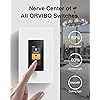
  • Nerve Central for All Your LightsThe MixPad D1 smart dimmer can control all ORVIBO switches and personalize scenes for sleeping, leaving home, working, and turning on/off all lights. With the ability to create customized scenes, you can set different brightness levels for your chandelier, light strip, and floor lamp. Simply click the "Movie" scene and enjoy the perfect lighting for your viewing experience.
  • Intercom and BroadcastWith two or more MixPad D1 dimmers, you can easily achieve voice intercom and home broadcast. Whether it's letting your family know that dinner is ready or chatting with parents in different rooms, ORVIBO smart dimmers make communication a breeze.
  • Easy InstallationPlease note it does not support Smart Bulbs. Single pole only, not available for 3-way. The MixPad D1 smart dimmer can handle up to 250W INC and HAL, 120W LED and CFL, and 250W MLV and ELV. MixPad D1 smart Wi-Fi dimmer switch is designed to replace the traditional light switch easily and can quickly be installed in a standard 1-gang junction box. It requires Neutral and Ground wires.
  • Trusted & ReliableORVIBO is a technology company specializing in whole-house intelligence and has opened nearly 1,700 stores worldwide, providing smart home products and services to more than 4.5 million users. We aim to bring you a more comfortable living experience. If you have any questions, please contact us to get the best solution the first time.

Operation Mode: Off


Current Rating: 2.5 Amps


Operating Voltage: 120 Volts (AC)


Contact Type: Normally Closed


Connector Type: Crimp


Brand: ORVIBO


Terminal: Wires


Item dimensions L x W x H: 4.12 x 1.75 x 1.8 inches


Circuit Type: 1-way


Actuator Type: Touchscreen


Product Dimensions ‏ : ‎ 4.12 x 1.75 x 1.8 inches; 4.8 ounces


Item model number ‏ : ‎ V70X


Date First Available ‏ : ‎ July 15, 2022


Manufacturer ‏ : ‎ ORVIBO


Country of Origin ‏ : ‎ China


Best Sellers Rank: #71,439 in Tools & Home Improvement (See Top 100 in Tools & Home Improvement) #151 in Dimmer Switches


#151 in Dimmer Switches:


Customer Reviews: 3.8 3.8 out of 5 stars 256 ratings


Frequently asked questions

This product is currently out of stock. Please check back later for shipping info.

Yes, absolutely! You may return this product for a full refund within 30 days of receiving it.

To initiate a return, please visit our Returns Center.

View our full returns policy here.

  • Klarna Financing
  • Affirm Pay in 4
  • Affirm Financing
  • Afterpay Financing
  • PayTomorrow Financing
  • Financing through Apple Pay
Leasing options through Acima may also be available during checkout.

Learn more about financing & leasing here.
Top Amazon Reviews


  • Works best if you have two or more switches
Style: Dimmer
The media could not be loaded. I had some initial problems with the setup process. After a lot of trial and error I discovered it was best to do a reset using the menu on the switch. This reconnected the switch with my wifi and linked up with the Alexa skill. Reach out to their tech support if you have problems. They were very helpful in getting it back online and working. Actually a lot of features once you get it setup. It's a dimmer that can be controlled four ways. A switch below the touchscreen, the touchscreen control, voice control, and from another switch. It's a clock and has weather. It's a whole house intercom, and it's a switch to switch phone. Having multiple switches throughout your house will use the full features of this device. Once they are linked together in the app you can call any other switch and also control (turn on or turn off) any other switch using the touchscreen. Has all the standard features you would expect with a smart switch. Alexa control with your voice, on and off timers, and app control. You can also set up scenes to vacation mode that will randomly turn on lights, set the brightness to automatically go to a certain level, or press a scene button and turn every switch off or on. The app is a little confusing when you have multiple switches. Be sure to name each one something different and set which room it is in. This will help when configuring the features so you know exactly which switch you are configuring. Instalation is standard as with any other smart switch. You need a neutral wire, hot, ground, and load wire. Pretty basic if you know how to wire a switch. Next step is a little tricky because you need to scan a QR code with the app to setup the wifi. Hold the phone really still and try to focus on the code with your camera. Once it reads the QR code setup in the app is pretty basic. Give it a name and set which room it is located in. If you have multiple switches you have to enable the calling features. At the top of the page for the features you will see the name of a switch with an arrow down, click on the arrow and will list all the switches, click on the one you want to configure. If you are having wifi issues or it will not respond to voice commands with Alexa/Google try a reset in switch menu. In the app always check the top of the page to determine which switch you are configuring, be slow and steady and have good lighting when scanning the QR code. This will fit in a standard 1gang, 2gang, or 3gang box which is not always the case with a lot of smart switches. It comes with a screw less one gang cover. If you are into home automation and like really cool looking switch devices this is a winner. Get multiple switches to use the intercom and calling features. ... show more
Reviewed in the United States on December 18, 2022 by CapeFear

  • Easy to Install!
Style: Dimmer
Works great. It was much easier to install and set up than I thought it would be. I needed a switch that dims as well as sets a timer on our outside lights. I was able to do both with this switch quite easily.
Reviewed in the United States on May 4, 2025 by JC

  • Great concept but needs more work
Style: Dimmer
Purchased two of these items for possible home integration. It is easy enough to install and configure (for me). It's also promised Matter compliance which will prevent obsolescence and enable local control. The concept is of combining a multifunction switch and display is great. The devices that I have are on software revision HOME AI 4.0.0 - This item appears to have been introduced earlier this year mid-2022 but as of today, it is not listed on the Orvibo website ... why? When searching online, there's no access to an instruction manual. The product does ship with a hardcopy manual. - Eliminate the ability to change the Home Screen from a long press and have it only accessible from the Settings menu. Guests in the home are not familiar with the switch operation and could change the setting. Another reason is covered in the next point. - When trying to control a light and the display is at the Home Screen, a user must first swipe right to access the Light Control Screen then toggle on/off or adjust the dim value. That's an extra press each time a light needs to be adjusted plus it is not intuitive for guests. Instead, create a new setting to opt in for when the display is at the Home Screen and when pressed, have the display immediately go to the Light Control Screen. After a period of idle time (configurable in settings), have the display return to the user specified Home Screen. ... show more
Reviewed in the United States on December 29, 2022 by Chuck L

  • Does not work alone on a 3way setting.
Style: Dimmer
01/02/2024 update: Unstable, unreliable, deserves a negative start....................... They failed to mention that for a 3way setting you need 2 of these ($$), weird to have in the same room with all those features. they should a reduced companion. Getting below 30% will get flickering and not too accurate (shuts down on 20%). So far they are not too reliable, One of my units stop responding and the support suggestion given (I asked for factory reset, they send me a reboot) did not work. the web manual talks about factory reset but it can't be found anywhere. what work was to shut down the breaker and "mess" with the unit before it reboots. The other unit refuses to stay at 100% after pairing with "Matter" (compatible LED that was working fine for months). ... show more
Reviewed in the United States on December 8, 2023 by Nilson

Can't find a product?

Find it on Amazon first, then paste the link below.
Checking for inventory...