Search  for anything...

OptiShot 2 Golf Simulator

  • Based on 714 reviews
Condition: New
Checking for the best price...
$749.99 Why this price?

Buy Now, Pay Later


As low as / mo
  • – Up to 36-month term if approved
  • – No impact on credit to apply
  • – Instant approval decision
  • – Secure and straightforward checkout

Ready to go? Add this product to your cart and select a plan during checkout.

Payment plans are offered through our trusted finance partners Klarna, Affirm, Afterpay, Zip, Apple Pay, and Google Pay. No-credit-needed leasing options through Acima may also be available at checkout.

Learn more about financing & leasing here.

Free shipping on this product

This item is eligible for return within 30 days of receipt

To qualify for a full refund, items must be returned in their original, unused condition. If an item is returned in a used, damaged, or materially different state, you may be granted a partial refund.

To initiate a return, please visit our Returns Center.

View our full returns policy here.


Availability: Only 3 left in stock, order soon!
Fulfilled by Global Bridge Logistics

Arrives Sep 7 – Sep 9
Order within 6 hours and 3 minutes
Available payment plans shown during checkout

Protection Plan Protect Your Purchase
Checking for protection plans...

Features

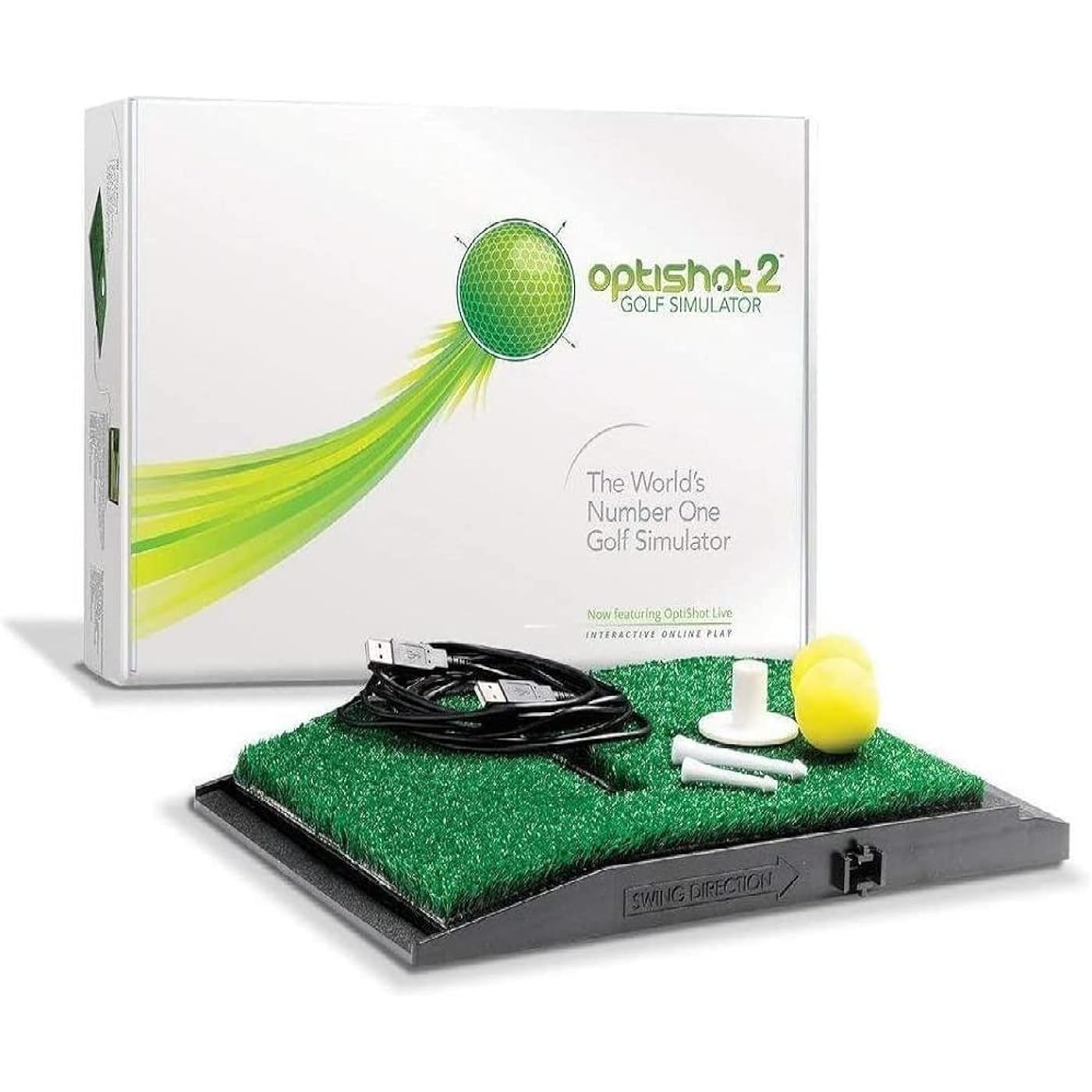
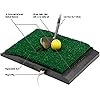
  • What's Included: Enjoy indoor golf simulation with the included Optishot 2, software, USB cable, adjustable rubber tees, and two foam practice golf balls.
  • Golf Swing Trainer: The golf swing analyzer includes 15 premium real-world golf courses and an infrared sensor that tracks club speed, carry distance, face angle, path, face contact, and tempo.
  • Premium Golf Courses: Enjoy indoor sports with our golf simulator for home including 15 premium real-world golf courses available to play online or offline.
  • Compatibility: Use our golf training equipment with Windows 8, 10 or 11. 3GB Hard Disk Drive Storage. 4GB RAM. USB 2.0 Port; Not compatible with MacOS.
  • Warranty: Enjoy a 1-year warranty on the OptiShot2 Simulator including the base, internal electronics, and black plastic housing; a 30-day warranty on the golf mat, net, USB cable, tees, tee gripper, foam balls, and turf.

Description

Say hello to the award-winning OptiShot2 Golf Simulator. Affordable, accurate and effective. It's compact and amazingly smart. It needs no room of its own, no six-figure income. And best of all, it will improve your game. Guaranteed. So come on in, get to know the world's number one golf simulator better.If there are any other sources of infrared light in the room, then the detectors will have a hard time reading its emitter's infrared pulses

Color: Optishot 2


Golf Club Flex: Stiff


Hand Orientation: Right


Golf Club Loft: 1 arc_minute


Brand: OptiShot Season Pass


Shaft Material: Graphite


Item Weight: 3.3 pounds


Golf Putter Lie Angle: 2.8


Grip Material: Rubber


Grip Size: Standard


Brand Name: OptiShot Season Pass


Style Name: Optishot 2 (Simulator Only)


UPC: 894801001065 894801001089 894801001003 796254028036


Number of Items: 1


Global Trade Identification Number: 03, 65


Model Series: OptiShot 2


Golf Club Type: Putter Golf Club


Manufacturer: Dancin' Dogg Golf


Model Number: 2014 0037


Manufacturer Part Number: 2014 0037


Flex: Stiff


Hand Orientation: Right


Loft: 1 arc_minute


Golf Club Putter Lie Angle: 2.8


Grip Type: Training


Item Weight: 3.3 pounds


Grip Size: Standard


Item Dimensions L x W x H: 11.22"L x 16.14"W x 3.94"H


Shaft Material: Graphite


Grip Material: Rubber


Color: Optishot 2


Frequently asked questions

If you place your order now, the estimated arrival date for this product is: Sep 7 – Sep 9

Yes, absolutely! You may return this product for a full refund within 30 days of receiving it.

To initiate a return, please visit our Returns Center.

View our full returns policy here.

  • Klarna Financing
  • Affirm Pay in 4
  • Affirm Financing
  • Afterpay Financing
  • Zip Pay in 4
  • Financing through Apple Pay
  • Financing through Google Pay
Leasing options through Acima may also be available during checkout.

Learn more about financing & leasing here.

Top Amazon Reviews


  • Excellent Golf Simulator for competition training
My 9 year old daughter has been playing Golf since she was 3 years old and spends most of her time in the Golf course or the range. Last year I splurged and had a Putting, chipping green and also a Bunker installed in our back yard. That allowed us to spend more time at home and also decreased our practice time in half. I said to her the only thing missing is a Virtual Golf course. The other Virtual Golf products costs from 1500 to 50,000. so when I saw all the good reviews from fellow golfers I decided to try it. I also read the negative reviews of Golfers with Clubs that have a dark sole, irregular shape that causes misreads but I knew how to deal with that. PROS 1. Ease of setup. All you need to do is take it out of the box, plug the USB to your laptop and run the Optishot Application. That's it. 2. Calibration of individual clubs. You can use the default settings but I would not trust it. It will ask you to take some slow swings in a square, open and closed position. You only do this once for each golf set. You can have several golf sets. Then you will have to edit each Club and adjust the length and loft primarily. 3. Accuracy. My daughter was swinging and hitting to the Virtual driving range within 20 minutes. We setup a Swing speed Radar beside the Mat to compare the accuracy. After hitting about 500 balls, we can see that most of the time it is within 2 mph +/- or the same as the Swing Speed Radar. That means it is accurate enough for me. 4. Playing Golf Courses. She spends most of her time trying increase her distance and accuracy on the Optishot Driving range. Then when she is ready, she switched to the game. In playing the course mode, you can leave the default settings or you can configure it to be more realistic. You can adjust so many factors like the speed of the green, fairway and rough. You can configure wind speed and rough. There are so many more you can change. This is what I like. The courses are very realistic indeed. I sometimes use a projector on to an impact screen, or on the TV. But you still need the laptop obviously. 5. Saving money. Since we got this we only go to the course once a week instead of everyday. CONS: 1. The only struggle you may have with this is if your club cannot be detected. My daughter had that issue with her Woods. During the calibration phase, people think they need to take full swings. You should not! You just need to chip and move the club slowly so that the sensors can tell if the face is open, square or closed. Since the sole of her woods are black, I got the aluminum insulation tape and cut a strip about 4 inches long and half an inch thick and taped it to the edge of the sole of the club below the club face. I made sure that it lined up perfectly with the face. It worked immediately. I have done this with some Irons I have that are not all silver underneath. Works great. We tried woods that are silver and flat soled, and they all work without tape. So we decided to have an indoor set and an outdoor set which are her regular clubs. SUMMARY: There are more expensive Virtual golf products out there. They track the ball so you can get more information and more accurate results. They can tell if you hit fat or thin so it will adjust the flight of the ball. But I don't need that. I can see the ball flying and can hear if we hit fat or thin. When we have any shot like that we delete that swing. When we use Foam balls, we have to adjust the yardage settings. We reduce the yardage by 10 percent. The club swings faster when it hits a foam ball than with real balls from what we can see. We went to a pro shop with a Trackman and compared her swing speed, and the average swing speed is very close. Also, you have to configure it for hitting a real golf ball, foam ball or no ball so that it can accurately measure your hit. My daughter is a World champion golfer and she loves her Optishot 2. She has more time for herself and has more of a life now outside the Golf course. It is a super convenient, and great training tool. If you are having issues with detecting your clubs, let me know and I will try to help you get the most out of your Optishot. Happy Golfing. >>>>UPDATE after 3 years of using it<<<<< So it has been 3 years since I bought my Optishot 2. To be honest, I have had to buy another one because we beat up the original one I purchased so bad, hitting hundreds of balls every day, it finally gave up. But replacing it was simple and we now also use a Skytrak on top of using the Optishot 2. The idea behind this is that we would use the Optishot to track the behavior of the swing and the club. We can monitor the Clubface angle at impact, swing speed, and swing plane. We then put the Skytrak beside the Optishot so that we can get a more realistic analysis of the Launch, Ball flight behavior, Side spin, Backspin and the skills training of the Skytrak. I actually use the Skytrak to calibrate the Optishot. So that the distances are more or less the same. You should not use the Optishot without Calibrating and modifying each and every club. You have to adjust the total distance, swing speed, club length and offset. You could use a Swing speed radar, but the Skytrak is more accurate when it comes to actual distance. Once it is dialed in, the Optishot becomes more accurate when it comes to playing the courses. Playing the built-in courses is where the Optishot really shines. You don't have to pay anything to play them, unlike the Skytrak which requires an expensive subscription, which is more expensive than the Optishot by a mile. It is a no brainer for me. I just put the Red Laser of the Skytrak aimed at the center of the Optishot swing pad and level it. I have my high power Epson projector and an Impact Screen for the Skytrak. I then have my 70 inch TV to view the stats from the Optishot 2. I love this setup and it works great when it comes to dialing in your swing for several thousands less than a Trackman. One piece of advice would be to buy the Thicker Grass for the swing pad. That pad will take a beating if you use the thin one. ... show more
Reviewed in the United States on December 31, 2016 by Dr. Who

  • After 4 years I love this golf simulator!
Here is a review of the Optishot 2 golf simulator and more importantly a few tips that 1st time users wouldn't otherwise know unless they found this info in forums. 1st off I absolutely love this golf simulator. I've had it for 4 years and play at least 18 holes everyday. In the 1st couple of years my Uncle who is a pretty good golfer kept asking me if this simulator transfers to real golf. After playing on the Optishot for 2 years we had a Topgolf open where I live and within just a couple of weeks I was number one on the leader board in 6 out of the 9 games, and get this, within another month I hit the number 1 score In The WORLD in Topgolf Advanced Pressure with a score of 2250! (I held that spot for 2 months, still so cool!!) I practice hard and smart but yes the Optishot 2 had everything to do with me hitting that score. Here are the some basics and then to the tips. For $300 out of the box you get about a dozen courses. For an additional $49 a year you'll receive more courses and the ability to play in 2 tournaments a month. After the 1st year I joined the Pro Tour which gives you several more courses and from 3 to 4 tournaments a month. This last year Optishot gave us the ability to pay $200 to have a lifetime subscription to be in the Pro Tour with no other annual fees from now on. I counted 62 courses and these are some of the finest courses not only in the US but several from around the world including Scotland, South Africa, Thailand and Taiwan. We also have tournaments called Closest To The Pin about once a month where you get 9 attempts. Peer to peer allows you to set up a game or play with other people from around the world. When setting up a game you decide on 6 different wind speeds and directions, 5 different green speeds, fairway, rough and bunker difficulties that go from easy, moderate, demanding to very demanding. Other features include allowing yourself to have mulligans or not, gimmy putts to whatever distance you choose, different camera angles, tracer shot technology, replay shots, save game, etc. In practice mode you can choose any course any hole and any ball placement for that hole as well as a practice range. Here's some important tips. Before you begin you need to calibrate your clubs. You'll be asked to do 5 strokes with a square club face then 5 closed and 5 open. The trick is to use a PUTTING STROKE not a full swing which can be inconsistent. Next in the bottom right hand menu go to edit Club Set and you will determine the speed adjust and distance adjust to match the distance you want each club to be. Most of my clubs are at 110% in both speed and distance. I've seen reviews that criticize putting. I totally disagree. As real golfers know putting is a combination of putter speed, slope, green speed and whether you're hitting up or down hill and the degree of that. I think some people try to hit across the pad at an angle to adjust for slope. It's better to use the arrows on your keypad to determine where you would aim taking into account your green speed setting (fast greens break more than slow ones) how many inches up or down hill and the severity of break. Then hit squarely with your putter on the pad. In real golf you want to be able to hit your putter squarely with the correct speed at a target according to all the variables and this thing is extremely sensitive and consistent. If you want to compete at a high level in our tournaments you need to be putting lights out and making birdies. As David Duvall says golf is all about being able to repeat. Optishot 2 will reward you if you do something right. Optishot 2 does not measure ball spin or launch angle but for the reviews that say it doesn't measure hitting fat they're just plain wrong. Hit fat and you'll see not only a loss of distance but usually your clubhead will be open just like in real golf. By the way, I don't hit with a ball since I play aiming at my TV and like not having wear and tear on my 63 year old joints. I used to think I would have to win a big lottery to have a $50,000 golf simulator in my house. That would be nice but for the price I love this thing just as much as I did when I first got it. You'll find me in the tournaments as MarkMak. Best of luck! ... show more
Reviewed in the United States on February 3, 2020 by MarkMak

  • Fun for the money, not for improving your swing.
Overall for the price it's nice to be able to play a round of golf in the garage on a cold rainy day in the pacific northwest. For the most part I agree with most of the reviews found here but I would like to add a few things that I did not see mentioned. 1. If you hit down on the ball the optishot is a tough transition, unlike real grass it has almost zero bounce so it will effect your swing speed most of the time as 5-15 mph slower and your shot will be short. 2. Most moderns drivers will not work. The infrared sensors need a shiny surface to register the club and to identify the edge to know if it's open or closed. Most modern drivers are mostly black and have a rounded bottom edge that makes it very hard to pick up and accurate reading. (I just use my 3-wood for Driver shots with a little strip of white tape on the edge.) 3. Software could really use an update. The need to add the ability to select a "shot type" Punch, Flop, Chip, etc They do have arrows to adjust the ball height but it does not effect the distance at all and the highest ball flight on a 60 degree wedge is not even close to a flop shot. If you are in a deep bunker (>5-6') you might as well give up. Also, Skins game does not track scoring correctly and many other little annoying things. I don't think the programming team were golfers :) 4. The driving range: why can't I pick custom flags for distance? Really limits practice. 5. Putting. You have to pick "Slow" greens for every course you play to even get it close to real distances. Anything above that and you can expect the ball to roll 40' when you hit a 10' real life putt. 6. Approach shots: The ball never rolls more then 3' on every single approach shot. no matter if you are chipping from the fringe or 130 yards out. I really wish it was more realistic. 7. For best accuracy; make sure all your irons are shiny clean, use 3-wood for driver with some white tape, have a florescent light shining directly down on the sensors, and learn to sweep with irons. ... show more
Reviewed in the United States on May 26, 2020 by J Ceruti

  • Great Sim with some effort.
I've had the simulator for a few weeks now and have to admit there where some initial doubts. I spent some time researching forums (golfsimulatorforum.com) and others to finally tune it to reasonably realistic simulator. With the combination of taping clubs (used white medical tape) and lighting there are no problems. I use foam balls but have used real balls on occasion; I do not suggest using the NO BALL format. I purchased the Season Pass Pro Tour yesterday and honestly amazed how accurate the courses are and can't wait to start playing in tournaments. The practice environment is AMAZING; it took me a a while to realize you can move the ball anywhere on the range (bunkers, greens and any distance to targets, wind direction) to get a varied practice situations. There are other fine tuning elements such as club editing that really helps keep everyone competitive and plan to create a youtube video to streamline and consolidate many of the issues and questions I had and may reduce some of the frustrations I had for other new users. If you have the room and willing to add the impact screen/projector this thing is as good as any sim. I will say the most important factor is the PC; you must have the RAM and Graphics capability to run the software or this will be a certain bust. Good Luck ... show more
Reviewed in the United States on December 13, 2016 by Kman

  • A fun game, better than Wii.
This is a great family game during the Coronavirus quarantine. The kids love it, especially playing simulated golf courses. As far as being a realistic golf simulator, it isn't much better than Wii. It measures club speed, the degree to which the club is open or shut, whether the club is on plane and that is about it. If your favorite shot off the tee of a short par 4 is a stinger, this simulator cannot mimic that. Same for a flop shot. Even if you have calibrated your clubs, the simulator cannot measure whether you have closed the face to hit a low shot or opened it to hit a high shot. The program can't capture ball trajectory because it doesn't measure ball spin,or anything to do with a ball, but rather club head movement over the two sensors. In fact, it doesn't really matter what club you swing, it registers it as if you had used the club designated on the screen. You can play the entire course using the same club and hitting it different distances based on the club designate on the screen. This provides an unexpected benefit: If you tape a piece of aluminum foil to a kid's plastic golf club, it works just like a real club. It is useful if you want to fix an out to in swing, or to see if the club face is square in the impact zone, even though it is not all that accurate since there is about 6" between sensors. It cannot tell whether your club hit the "ball" with a descending blow or topped it. It's not particularly accurate as to distance, but you can manually overcome that by designating the distance for each club. The kids love that when they hit a drive 300+ yards. The kids beg to play it and have loads of fun. And it is fun to play with your kids especially on a famous golf course that is simulated on screen. It comes with a generous variety of golf courses. A fun game to play, but not particularly realistic. Highly recommended if you have young children and you want to get them excited about playing golf. ... show more
Reviewed in the United States on June 5, 2020 by TheClick

  • I found the best way to do my calibration as follows
I have my optishot to set up in my basement with an 8 foot 6 tall ceiling and it works quite well. However, I do occasionally tap the ceiling with my driver. I have taken time to adjust my swing speed and distance, and this tends to be fairly accurate with my real game. A weakness of the optishot system is that it cannot track vertical movement and therefore only knows about Loft what you tell it in the settings. I found the best way to do my calibration as follows: 1. Have a reasonably accurate determination of how far you hit each Club. 2. Determine the average swing speed that you hit your driver. You can go to golf shop where they have accurate monitors to determine your swing speed. If they measure ball speed note that swing speed is 68% of ball speed (the ball speed is 1.5 times the club speed due to the mass of a larger object transferring momentum to a smaller object - the ball). You can also calculate this using your distance. The club speed (mph) = the total di7stance you hit the ball in yards divided by 2.3 this is a good value for average amateur golfers. My average drive is 180 yards so my swing speed is 78 mph (I'm 68 years old & started golfing at age 61). Be realistic. 3. Enter (for each club) an Optishot Speed Multiplier starting with 100. Try several swings and change the multiplier until the swing speed is fairly accurate. 4. Enter (again for each club) the Optishot Distance Multiplier (start with 100). Take several swings and change the multiplier until you distance is fairly accurate. 5. You will soon realize that there is a big difference between hitting a shot all out versus quite comfortably and reproducibly. 6. As you play rounds, and you feel that the distance is different than your real game, adjust these multipliers. Just a few thoughts From A Satisfied user. ... show more
Reviewed in the United States on February 15, 2017 by Bruce

  • DO NOT PURCHASE! Possible fraud!
DO NOT PURCHASE. This product is not longer supported or active as advertised online. Optishot 2 has been acquired by another company called Red Stakes Golf. I have not been able to find any documentation, announcements or notices anywhere on OptiShot’s website nor on Red Stakes’ website or any other social platforms informing potential consumers about this acquisition. This is highly misleading, unethical and potential fraud. Optishot 2 initially required online registration to download the golf courses mentioned as included as well as other features. As of March 1, 2025, OptiShot servers were taken offline so new users could not register and download the advertised content. Additionally, as recently as April 16th, 2025, the website for OptiShot has gone offline and is no longer a valid domain. I found this rather strange as companies that acquire other companies usually keep the old domains active for quite some time and automatically redirect internet traffic directly to the new company’s website until the new company/branding has taken enough time to establish during a transitional period. Through an obscure Google search, I was able to determine that Red Stakes had acquired OptiShot and reached out the Red Stakes for support on the matter. When you call their support number, there is no over the phone support you can speak with. I called back to speak with a sales rep and they directed me to reach out to support via email to obtain a download link to download the content manually. I emailed Red Stake support today 4/17/25 and am waiting to hear back from support. LTDR: No longer supported. Optishot was acquired by Red Stake Golf. Optishot hardware and software are not backward compatible with Red Stakes’ software. Cannot play unless you contact support as online services no longer exist. No mention whatsoever on Red Stakes’ behalf of acquisition nor is there any transitional information anywhere. I’m not sure if this is a colossal oversight on Red Stakes’ behalf (which someone needs to look for another job) or complete negligence in which Red Stake Golf is misleading, unethical and fraudulent. I will update review with more information as communication with Red Steak unfolds. ... show more
Reviewed in the United States on April 17, 2025 by Tony P

  • $30 to send back when sensors randomly stop working.
I’ve had OPtiShot for over a year now and have become extremely disappointed with the product. At first it was wonderful to be able to have some feedback while hitting golf balls in my garage however keep in mind it does not read whether a ball is hit thin or fat. Also it allows for manipulation of swing speed and distance in setting so it will be up to you in how honest you keep your settings. The software is decent for the price but a little more detail would certainly have gone a long way in giving it a more real feel. My biggest issue so far is if any of the sensors stop working which happens to mine in less than a year it will no longer work correctly. The support team did finally get back to me but not with any real urgency and required me to ship back to them which cost $30 dollars. They then shipped me a replacement unit which was obviously refurbished and didn’t even have the top hitting mat glued in the correct location causing the tee to not be placed I straight. I have now has this replacement with probably 10 hours of play on it and two of the front sensors have stopped working again. I have emailed customer support and am still awaiting a response. I will update this section again once I find out if they will be covering the shipping cost. I do want to add that this product does get two stars because when everything is working correctly it is nice to be able to hit balls and get feedback like club face orientation, swing speed(as long as you don’t fudge the settings) and swing plane. I also enjoyed playing some of the same courses as the pros while watching them on tv. Unfortunately if you are looking to play Augusta National whenever you feel like it they only make it available during the Masters week. ... show more
Reviewed in the United States on July 26, 2020 by Dustin Poirier

Can't find a product?

Find it on Amazon first, then paste the link below.
Checking for best price...