Beautiful, Compact, and Great to Use Beautiful, Compact, and Great to Use
Color: Pale Grey
Style: USB-C Charge
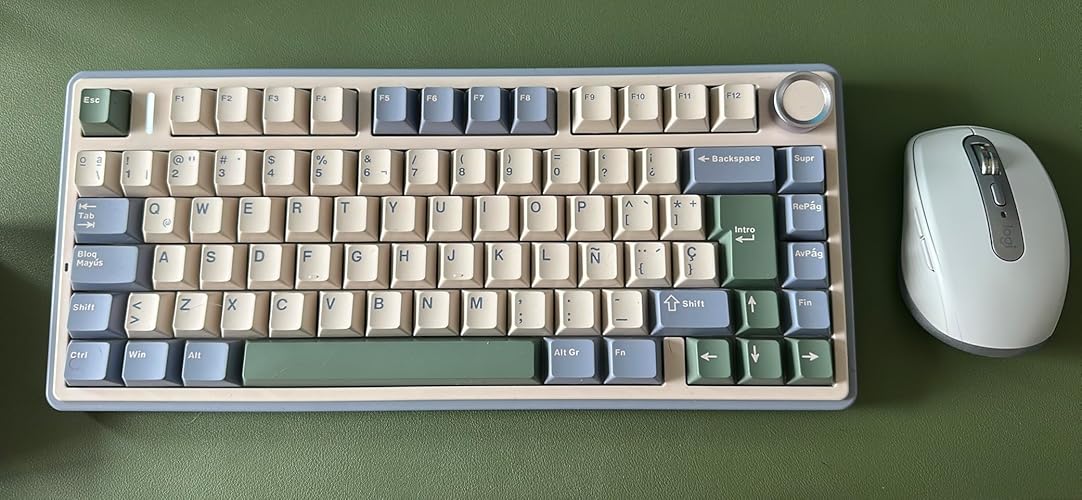
I really like this mouse. It looks clean, minimal, and very premium. The design is beautiful, and it fits perfectly with a well-organized home office setup. It’s compact but still feels solid and high quality. The clicks are very pleasant and quiet, and overall it works smoothly and reliably for ever
yday use. In my case, my computer didn’t have Bluetooth, so I paired it using the Logitech Bolt receiver, and it works perfectly. Overall, it’s a great combination of design, comfort, and quality. It also pairs really nicely with my keyboards and the overall aesthetic of my workspace. Highly recommended.
...
show more
Reviewed in the United States on March 24, 2026 Reviewed in the United States on March 24, 2026 by Alexander
Best mouse for work or casual settings Best mouse for work or casual settings
Color: Rose
Style: USB-C Charge
Very good mouse -The battery lasts insanely long. I have been using it for over 20 hours, and it has only lost 10%. It automatically goes into sleep after some time of no use, so I dont need to worry about it dying if i leave it on by accident. -Very quiet. The clicking is soft and barely noticeable.
The scroll wheel is very quiet too -Nice feel. It has soft edges and a pleasant grip. My hand does not cramp or become sore, even after hours of use -Has two customizable buttons by the thumb. By default they are undo/redo, and I keep it as such -Scroll wheel can switch between smooth scrolling and a “clicky” scroll. -Works on all surfaces. I have yet to find a surface it does not track on, including a blanket or my own thigh -No lag. I have not had any issues with delay or connection issues -Easy to connect and can easily switch between devices with the button on the bottom -Stays clean. I have had issues with some mice accumulating grime (I am a clean person, it just happens from oils or dust). This mouse does not collect any grime Overall, I love it. It took me a second to adjust to the size, since it is smaller than my previous mouse. I would not go back. Very happy with it
...
show more
Reviewed in the United States on October 12, 2025 Reviewed in the United States on October 12, 2025 by Coral Wooten
Excellent Small Mouse With A Couple Of Flaws
Color: Graphite
Style: USB-C Charge
The Logitech MX Anywhere 3S is a compact mouse that feels surprisingly premium for its size. The plastic body has a solid, high‑quality feel—lightweight but not cheap—and it holds up well during long work sessions. The quiet clicks are one of the standout features; they’re soft, muted, and perfect fo
r shared spaces or late‑night use. The scroll wheel is also excellent, especially with its ability to automatically switch between tactile step‑scrolling and smooth free‑spin. It makes moving through long documents or spreadsheets feel effortless. Where the mouse falls short is in the side buttons. They’re positioned in a way that makes them a bit finicky to use, and even once you get them configured, they don’t consistently work across all applications. It’s frustrating when you expect a back/forward action and nothing happens. Another drawback is that Logitech now requires a new software program to configure the mouse. Even if you’ve used their older devices, you still have to download and set up this new software, which feels unnecessary and adds extra steps. Overall, it’s a great little mouse with excellent build quality and smooth performance, but the side button behavior and software requirement keep it from being perfect.
...
show more
Reviewed in the United States on March 8, 2026 by Max
Great little mouse and I love it, but...
Color: Graphite
Style: USB-C Charge
I Love these mice for my main PC and other PC's. They are smaller and have a nice weight to them. They used to be a little heavier so I liked those better. The mouse stays charged up probably about 90-days and I've had it for a couple years already. Also the reception is good and no issues with me on
any computer. The bad part is, (and there's always a bad part) the dumb rubber they put on the sides. It always becomes sticky and gross feeling. I used to wash my mouse with spray foam window cleaner and that got it very clean. I've always done that. I like a very clean mouse and can not stand any stickyness on it. One mouse I had before this one but same model, I took masking tape and taped over the rubber. That became the greatest mouse. I wish they would sell them without the rubber. Bad #2 is the left mouse button on these mice, and maybe all Logitech mice will go bad and do unpredictable double-clicks, randomly drop things when you're draging them then you spend a half day trying to find where they went. When the double-click issue begins (and it will), it's unfixable and you must buy a new mouse. I have kept purchasing these because there’s nothing on the market to match them, so to me it’s worth it to get a new one every once in a while. Look up logitech double-click issues on google. There is a lot of reading to do out there but unfortunately Logitech doesn’t seem to read reviews. I do reccomend this mouse with a 5 STAR rating knowing the rubber becomes sticky and the left button gives trouble after some time. TO LOGITECH: Please make a version of this mouse that just has the same slick finish over the whole mouse, and LEAVE OFF THE DEGRADING RUBBER.
...
show more
Reviewed in the United States on October 7, 2025 by Top Ranked Reviewer
A Mouse with no Tail
Color: Graphite
Style: USB-C Charge
This is a classically superb mouse from Logitech. I must have 5 or 7 different mice and they are all from Logitech. Different mouse for different purpose. This is an incomparable wireless mouse that uses Bluetooth for communication. It has great action, smooth response and quiet action.
Reviewed in the United States on May 29, 2026 by VN PH CIB TET
Just got it and it improved my computing experience. Fast, comfortable and accurate.
Color: Graphite
Style: USB-C Charge
Pros: For a plastic mouse, this is really solid work. It's my new go-to mouse to replace the awful sticky "touchpad" causing me heartburn over its lack of sensitivity, accuracy, and consistency. This mouse has all of these. It's quiet. I was expecting a loud click on the buttons; nope, it's really qu
iet, and that might be small, but it is an improvement. I don't need audio feedback to know I clicked. I can feel it (haptic feedback, maybe?) It's VERY fast out of the box. It connected to my corporate Win10 laptop by BT with zero issues, no adaptors, and no fuss. It just worked. It is comfortable for 10 hours a day chewing through spreadsheets and documents (I know... get a life). All of the buttons work in a way to accelerate my work instead of being a PITA to set the way I hoped they'd work. They worked this way out of the box. No changes. It's wireless, but you can still use it plugged in with the supplied USB C to USB cable. It is accurate even though it's fast. Really solid granularity in cursor placement. It's refreshing that a mouse has all of these qualities. It makes me happy to use it for work. CONS: It's a little expensive. My retail price was about $70 (US), which is a little high for a mouse (gamers have their $150 wired mice but this is for an office-only rig). But then again, my car's replacement fob was $500 and it's smaller than this mouse, with different, but the relatively same amount of tech, in them. Past reviewers have stated that the sensor-tech finish can become tacky over time (I just got it, so I can't speak to this). It's got a battery in it, so as good as it is, eventually, it'll wear out the battery (I believe it can be changed, but you may not get to that point of replacing a permanent rechargeable with this mouse's chassis in normal use). BOTTOM LINE: I give it 5 stars for how it works, feels, my initial user experience and the overall apparent quality of the engineering and parts that went into building a next-level wireless mouse. I'd recommend you buy it if you want a comfortable mouse and you like a quiet no bells and whistles approach of getting work done.
...
show more
Reviewed in the United States on July 26, 2024 by Steve-Torrance
Great for fingertip grip and small hands Great for fingertip grip and small hands
Color: Graphite
Style: USB-C Charge
Posting this because I could never find a review that helped me so hoping this will help someone else lol. I think I'm a fingertip grip but not the kind that hovers. My palm never touches the mouse but rests on the mousepad and never leaves unless I type. I move the entire mouse with my fingers, not
move my whole hand/arm. I have very small hands. For instance, I wear the smallest adult size for gardening gloves because kids gloves are too tight, but the adult glove fingers are too long. It's a compromise. So I was looking for a very small mouse for working (not gaming). I'm coming from the M325c which I love but has no fancy features. I wanted a mouse with various buttons I could program. After trying many different mice, I've realized that gaming mice are not a good fit for me because I'd grown so accustomed to the scroll wheel on the M325c that a rigid ratchet wheel was painful (not literally but figuratively). So that narrowed the options down pretty quickly. After trying various mice, I realized I enjoyed the Logi Options+ software that comes with their office line mice. Very neat. I'm sure there are other programs out there but I was looking for ease. That combined with the awesome free spin scroll wheel and the amazing compact size, and I'd found my mouse! I was originally skeptical of the mouse based on reviews but I think those reviews aren't applicable if you grip the mouse how I do. Some of the reviews that made me anxious: • The sides are sharp. I totally get what people are saying but that has never been something I've noticed while actually using the mouse. Probably something that could affect one person but not the next. • It's heavy. Because I use my fingers, I set my sensitivity pretty high and hardly move it at all. Again this is for work, not gaming. I only notice the weight when I pack it up to travel. • The top scuffs/gets dirty. I am starting to see the beginnings of that (had it about 5 months) but it's very minor for me. Probably because I don't rest much of my hand/fingers on it at all. I was also initially wary of the mouse for some of its features, but those proved to be a non-issue too. • Bluetooth/no receiver. I had absolutely zero issue connecting to my laptop and love not worrying about losing the receiver (ADHD lol). • No batteries. To be fair, I wanted to move away from batteries but wasn't sure how the battery life would actually be. I use this mouse heavily and have only charged it three times in about 5 months. So yeah if you have small hands and a fingertip grip, this is an excellent office mouse! If you use any grip style where your palm rests on the mouse, this is not a good moue. Even with my tiny hands, that grip feels awful and I imagine an average hand the fingers would be beyond the mouse.
...
show more
Reviewed in the United States on August 27, 2025 Reviewed in the United States on August 27, 2025 by Casey Shinn
⭐⭐⭐⭐⭐ Review: Logitech MX Anywhere 3S Compact Wireless Mouse
Color: Graphite
Style: USB-C Charge
The Logitech MX Anywhere 3S is a compact productivity powerhouse that delivers impressive performance in a travel‑friendly size. It’s exceptionally well‑built, tracks smoothly on virtually any surface, and offers quiet, satisfying clicks that make it ideal for both office and on‑the‑go use. The Logit
ech MX Anywhere 3S is one of the best compact wireless mice available today. It’s reliable, comfortable (for most hands), and packed with thoughtful features that make everyday work smoother. If portability and premium feel matter to you, this mouse is absolutely worth it.
...
show more
Reviewed in the United States on April 2, 2026 by Andres