Search  for anything...

MT-VIKI VGA KVM Switch, 2 Port USB VGA KVM Switch for 2 Computers Share 1 Monitor Keyboard Mouse Printer, + 2 KVM Cables

  • Based on 1,468 reviews
Condition: New
Checking for the best price...

Buy Now, Pay Later


As low as $4 / mo
  • – 4-month term
  • – No impact on credit to apply
  • – Instant approval decision
  • – Secure and straightforward checkout

Ready to go? Add this product to your cart and select a plan during checkout.

Payment plans are offered through our trusted finance partners Klarna, Affirm, Afterpay, Zip, Apple Pay, and Google Pay. No-credit-needed leasing options through Acima may also be available at checkout.

Learn more about financing & leasing here.

Selected Option

Free shipping on this product

FREE 30-day refund/replacement

To qualify for a full refund, items must be returned in their original, unused condition. If an item is returned in a used, damaged, or materially different state, you may be granted a partial refund.

To initiate a return, please visit our Returns Center.

View our full returns policy here.


Availability: 20 left in stock
Fulfilled by Amazon

Arrives Saturday, Oct 17
Order within 17 hours and 23 minutes
Available payment plans shown during checkout

Protection Plan Protect Your Purchase
Checking for protection plans...

Size: 2 Port


Features

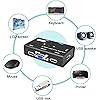
  • VGA KVM switch: MT-VIKI 260KL 2 port KVM Switch enables 2 computers to share 1 set of monitor, keyboard, mouse, one U-disk, printer or USB speaker (not 3.5mm jack)
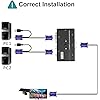
  • IMPORTANT NOTE: This USB VGA KVM Switch is power by USB cable, pls plug the USB+VGA head into your computer, the VGA head plug into this KVM Switch, otherwise, the monitor will not have any display. Meanwhile, this kvm switch can't support mechanical keyboard and mouse.
  • Compatibility: Support windows 10/8/7 / XP / Vista (32/64-bit), Mac, Linux, DOS, Win3, WINNT, Netware, and Unix. But not support docking Station
  • Package: VGA KVM Switch 2 port *1, 1.2m USB VGA KVM Cable*2, User Manual*1; Please plug the VGA cable w/ USB pigtail into the computer port.

Operation Mode: ON-ON


Current Rating: 1 A


Operating Voltage: 5 volts


Contact Type: Normally Open


Connector Type: Female Vga


Brand: MT-VIKI


Switch Type: Push Button


Terminal: Through Hole


Material: Plastic


Item dimensions L x W x H: 3.43 x 3.98 x 8.23 inches


Operation Mode: ON-ON


Current Rating: 1 A


Operating Voltage: 5 volts


Contact Type: Normally Open


Connector Type: Female Vga


Switch Type: Push Button


Terminal: Through Hole


Circuit Type: 2-way


Mounting Type: Plug-In Mount


Actuator Type: Push Button


Number of Positions: 2


Upper Temperature Rating: 50 °C


Controller Type: Push Button


Control Method: Push Button


Connectivity Protocol: Usb


Compatible Devices: Computer


Color: Black


Item Dimensions: 3.43 x 3.98 x 8.23 inches


Unit Count: 1 Count


Number of Items: 1


Material Type: Plastic


Contact Material: Gold


International Protection Rating: IP56


Specification Met: CE


Brand Name: MT-VIKI


Model: MT-260KL


Manufacturer: MT-VIKI


UPC: 749185499840


Included Components: 2in1 USB VGA cable


Item Weight: 0.1 kg


Part Number: MT-VGA


Frequently asked questions

If you place your order now, the estimated arrival date for this product is: Saturday, Oct 17

Yes, absolutely! You may return this product for a full refund within 30 days of receiving it.

To initiate a return, please visit our Returns Center.

View our full returns policy here.

  • Klarna Financing
  • Affirm Pay in 4
  • Affirm Financing
  • Afterpay Financing
  • Zip Pay in 4
  • Financing through Apple Pay
  • Financing through Google Pay
Leasing options through Acima may also be available during checkout.

Learn more about financing & leasing here.

Top Amazon Reviews


  • Works Good..
This KVM switch works great. I frequently have to switch between computers. I've been using this switch for a couple months now and have had no problems. My mouse/keyboard dongle plugs into the switch. Everything switches back and forth flawlessly. This sure beats the old one I had to pound on over and over to switch. ... show more
Reviewed in the United States 🇺🇸 on October 17, 2022 by Sportsman

  • Does de job.
Does the job, and that USB port is really useful to me, I put a USB stick and works as a share drive between the two equips.
Reviewed in the United States 🇺🇸 on October 3, 2022 by Reuter

  • Works great
It works perfectly and accomplished what I wanted. Only wish there were written directions instead of pictures. If my husband wasn't a computer geek, I won't have known I needed a mini hdmi adapter to hook up the monitor to my laptop.
Reviewed in the United States 🇺🇸 on August 16, 2022 by Amazon Customer

  • Works as expected, good price not an ideal design
The unit is fine it does what it needs to do, and does it flawlessly so far. The only issue, and this is typical of these low cost KVMs, the connector for the monitor is on the front of the device and the usb port is on the side, out of sight. That means that there is no graceful way of routing the monitor cable and have the control button visible. If there were a hot key to switch monitors, you could tuck it away out of sight, or if the monitor jack was on the side, you route the cable to the left or right. But as configured, the cable comes out towards the user, and then has to be directed back towards the monitor. Like I said, it works well, I'd buy it again if I needed a small low cost KVM, but it just isn't very elegant. ... show more
Reviewed in the United States 🇺🇸 on April 28, 2022 by Joe Ambrosino

  • Does the job
I was a bit skeptical at first after reading some of the reviews but this device works great. Allows me to keep my older workstation and new one side by side sharing same monitor, keyboard, and mouse. No performance issues. Simply push a button to switch between workstations. Seller provides all the necessary VGA cables. ... show more
Reviewed in the United States 🇺🇸 on August 31, 2022 by Tbuyer

  • Plug and play
Added cameras for our game club's indoor range. However, there is only the one pc in the office. Solution add a KVM switch! This one does the job nicely. Plug and play, shares the mouse and keyboard, with a simple button on top to switch between units! Great little switch.
Reviewed in the United States 🇺🇸 on August 14, 2022 by John

  • Watch out ... could be more of a pain than a benefit
The video aspect when switching between computers is not seamless and is impossible to remedy as navigating to operating system's video settings in the device's aspect view.
Reviewed in the United States 🇺🇸 on September 12, 2022 by Demetri

  • Didn't work for me
Other buyers may have better luck and success with this item, but it did not work for me. The monitor was, if it matters, a 4:3 screen (1280x1024), and when I tried to run 2 PCs (a laptop and a desktop computer) into it with this switch, the screens appeared way off-center on the monitor, blocking much of the content. Also, the image flickered almost constantly so that the whole arrangement was not usable. Be aware, you have to use the special cables that come with it, which include USB "pigtail" wires and plugs at one end along with the VGA plug; and even if you do not plan to share a USB keyboard or mouse across PCs using this switch, the USB connections I believe are necessary in order to power the switch. ... show more
Reviewed in the United States 🇺🇸 on October 19, 2022 by Kerumbo

Can't find a product?

Find it on Amazon first, then paste the link below.
Checking for best price...