Search  for anything...
HP

HP Sprocket Studio 4x6” Instant Photo Printer – Print Photos from Your iOS, Android Devices & Social Media

  • Based on 4,504 reviews
Condition: Used - Very Good
Checking for the best price...
$129.99 Why this price?
Save $180.00 was $309.99

Buy Now, Pay Later


As low as $21.67 / mo
  • – 6-month term
  • – No impact on credit to apply
  • – Instant approval decision
  • – Secure and straightforward checkout

Ready to go? Add this product to your cart and select a plan during checkout.

Payment plans are offered through our trusted finance partners Klarna, Affirm, Afterpay, Apple Pay, and PayTomorrow. No-credit-needed leasing options through Acima may also be available at checkout.

Learn more about financing & leasing here.

Selected Option

Free shipping on this product

This item is eligible for return within 30 days of receipt

To qualify for a full refund, items must be returned in their original, unused condition. If an item is returned in a used, damaged, or materially different state, you may be granted a partial refund.

To initiate a return, please visit our Returns Center.

View our full returns policy here.


Availability: Only 1 left in stock, order soon!
Fulfilled by -SkyMall-

Arrives Jun 16 – Jun 18
Order within 2 hours and 7 minutes
Available payment plans shown during checkout

Protection Plan Protect Your Purchase
Checking for protection plans...

Style: Wi-Fi Printer


Color: 4x6


Features

  • COOL FILTERS, FRAMES & STICKERS - Customize Your Prints with Editing Tools on the HP App. Augmented Reality Fun & Templates for Albums, Greeting Cards, Photo IDs & Collages.
  • RUSH TO PRINT - Just link your social media account to the HP app and connect via Bluetooth to print photos instantly. Sprocket Studio supports multiple users at once.
  • COMPACT STYLING - Less stuff, more life. With its desktop-ready design. Plug in for Continuous Use, or Go Wireless. Enjoy up to 80 prints on a single charge.
  • CONNECT TO MULTIPLE DEVICES - Set Up Sprocket at Parties So Friends Can Print Instantly Shareable Photos At the Same Time! Personalized LED Light Lets You Know Whos Printing.

Description

Make more of your memories with your own personal photo lab—the compact HP Sprocket Studio turns every fun-filled moment into beautiful, frame-worthy color prints that last. Download the free HP Sprocket app to get easy-to-use photo templates, and customize your water-resistant 4x6” photos with frames, emojis, stickers, and more. The app also lets you print your smartphone and social media photos quickly, and even offers the option of viewing the photo queue in augmented reality.

Brand: HP


Connectivity Technology: Bluetooth


Printing Technology: Dye Sublimation


Special Feature: Cloud Print Enabled, Network-Ready, Portable


Color: White


Model Name: HP Sprocket Studio Plus 4x6” Instant Photo Printer


Printer Output: Color


Maximum Print Speed (Color): 1 ppm


Max Printspeed Monochrome: 1 ppm


Item Weight: 1 Pounds


Printer Type: Dye Sublimation


Other Special Features of the Product: Cloud Print Enabled, Network-Ready, Portable


Printer Output Type: Color


Item Weight: 1 Pounds


Item Dimensions D x W x H: 6.65"D x 10.75"W x 2.68"H


Controller Type: iOS App


Print media: Glossy photo paper


Scanner Type: Photo, Portable


Maximum Copy Speed Black and White: 1 ppm


Compatible Devices: Smartphones


Warranty Type: limited warranty


Maximum Copies Per Run: 18


Ink Color: Black


Additional Printer Functions: Print Only


Control Method: App


Number of Trays: 1


Processor Count: 1


Resolution: 300 x 300


Maximum Media Size: 4x6


Maximum Sheet Capacity: 10


Paper Size: 3.9 x 5.8


Output sheet capacity: 10


Maximum print Resolution Color: 300 dpi


Maximum Print Resolution Black and White: 300 dpi


Wattage: 60 watts


Dual-sided printing: No


Duplex: Simplex


Brand: HP


Model Name: HP Sprocket Studio Plus 4x6” Instant Photo Printer


Model Number: HPISPSUS


Built-In Media: Printer, power cord, printer ink cartridge, photo paper


Model Series: HPISPS4X6


Specific Uses For Product: Photo Printer


UPC: 194850120428


Global Trade Identification Number: 28


Manufacturer: HP


Warranty Description: One-year limited warranty


Item Type Name: Hp sprocket studio plus 4x6” instant photo printer.


Unit Count: 1.0 Count


Color Pages per Minute: 1 ppm


B&W Pages per Minute: 1 ppm


Initial Page Print Time: 61 seconds or slightly more


Color: White


Color Depth: 24 bpp


Printer Connectivity Type: Bluetooth


Hardware Interface: USB 2.0


Total USB 2.0 Ports: 1


Total Usb Ports: 1


Maximum Copy Resolution Color: 300x300 dpi


Maximum Copy Resolution Black and White: 300 dpi


Frequently asked questions

If you place your order now, the estimated arrival date for this product is: Jun 16 – Jun 18

Yes, absolutely! You may return this product for a full refund within 30 days of receiving it.

To initiate a return, please visit our Returns Center.

View our full returns policy here.

  • Klarna Financing
  • Affirm Pay in 4
  • Affirm Financing
  • Afterpay Financing
  • PayTomorrow Financing
  • Financing through Apple Pay
Leasing options through Acima may also be available during checkout.

Learn more about financing & leasing here.

Top Amazon Reviews


  • THIS is the one you want!
After spending the better part of 2 months, whenever able, on weighing out the pros, cons, features, set backs, common issues, etc. on every mini photo printer I could find to do so with, I finally pulled the trigger and got this for my wife as a surprise gift. She was hinting at the Ivy (pff) while having no clue ones like this existed. While priced higher, its 100% worth it. Make sure to crop and follow the instructions in the booklet - and you will have some shockingly good quality photos with very little effort. Amazing quality I personally think. The power this little gadget has surprised me indeed. One of the best purchases made out of all my years with Amazon. Paper and carts are a little on the pricey side but I am meaning it when I say it prints high quality photos so this truly seems fair to me. (So long as your shot is high quality when you took it.) A low resolution shot will still be a low resolution print. A high quality shot will come out a rather shocking high quality home printed photo. I bought the pack of 80 extra with the printer. She has 20 left I think. Its been a week? And not one came out disappointing, not a single paper jammed or failed to feed, and its steady begging for more. This is one purchase she will love you for and one that after you see it in action, will become proud you made. ... show more
Reviewed in the United States on September 1, 2021 by Joshua

  • LOVE
I love this little printer! I needed something that i could have out ready for a random picture here and there....It's very convenient....yes, i know that it would be cheaper to send my pictures elsewhere to be printed....however, there are times when i just want a few pics here and there as i build my family album for the year. This was perfect and simple to use. I previously had a canon selphy and hated it. That printer (for some reason) would zoom in on my phone pictures and ruin the picture. I ended up throwing it away. I waited awhile...then decided to try this one. Very pleased with this purchase. The quality of the photos is fantastic! ... show more
Reviewed in the United States on April 24, 2020 by Amazon Customer

  • Great photo printer! Great photo printer!
I bought this in November and after 2 months if useing it I have to say it is a great little printer. I got it to makes 4x6 size prints and it does pretty well. Very easy to use. You download the app load the ink cartridge and paper add any boarder or frame and print. You can even add text, the only reason I didn't give it 5 stars because I feel there should be more editing available in the app. Now you can edit the photo in your phones picture app or a separate editing app then go onto the printer app, but alot of the time I don't think about it till I'm in the printer app. The other thing the ink could last a little longer but other then that I'm very happy with this printer. For people like me who do thess type of things late night or hours the stores don't have this is worth it to me and I get great satisfaction in it. ... show more
Reviewed in the United States on January 17, 2022 Reviewed in the United States on January 17, 2022 by Barbara

  • Great Printer, Some Small Flaws Great Printer, Some Small Flaws
The printer is very easy to setup. All you need is Bluetooth on your phone and the HP Sprocket app. It comes with an adapter as the power source, 10 sheets, and 1 ink cartridge. The ink cartridge only prints 10 photos. You can purchase 2 ink cartridges and 80 sheets here on Amazon for $35 as of right now. (08/10/2021) The quality of the pictures is good. It resembles the picture quality on your phone pretty well. There appears to be just a slight quality difference, but it really won't make a huge difference. I don't see a yellow tint that a lot of people have mentioned. You can print either horizontally or vertically depending on the picture. Note that it takes time to print the photo, so please don't remove the photo until it's fully done printing. The app will tell you the print time in a loading bar, and the final photo will end up on the tray of the printer. Here is my only issue: when I printed my final photo, it damaged the ink cartridge's glossy paper. I'm not sure if this is because of the low resolution of the picture I printed, or if it's just a simple error in the machine. The app will notify you if the photo's resolution is too low, but I decided to print it anyway. Maybe that's why it damaged it. Fortunately, it was the last photo, so the ink cartridge was empty anyway. Overall, I am satisfied with this device and will continue to use it. I will update this review if anything happens to the printer. Update - I ordered new ink and sheets, and it works fine. No problems have occurred yet, and I am satisfied with this printer. ... show more
Reviewed in the United States on August 10, 2021 Reviewed in the United States on August 10, 2021 by Lee

  • Absolutely 💘 this printer!!😃 Absolutely 💘 this printer!!😃
I actually own the mini Hp sprocket also, but wanted larger pictures. This machine prints BEAUTIFUL pictures!! 4 by 6, the perfect size. It's a little slow because it has to run through like 4 times. But, the results are worth it. It did jam once only because there was tape on one of the photo paper, but, I just pulled it out and all was well. I have no complaints with this printer. At least so far.. 😉. ... show more
Reviewed in the United States on June 2, 2021 Reviewed in the United States on June 2, 2021 by Amazon Customer

  • Great 4x6 Photo printer
I finally printed more than one picture at a time. It works fantastically easy just use the free download app. Printing from the iPhone to HP Sprocket Studio Printer 1- Plug in printer and turn it on (make sure there is paper in printer paper holder) 2- Turn on Bluetooth on iPhone 3- Open the HP printer app on the iPhone 4- Select picture to print on iPhone in the printer app. 5- Edit if required using the “pencil” icon 6- Depress circular print button with green circle on iPhone, a pop-up tells you that it’s printing 7- Use the left arrow to select the next picture to print or shut down printer. then start again with step 5 & 6 Don’t forget to turn off Bluetooth on iPhone Another pop-up appears to warn you 3-4 pictures before the cartridge runs out of ink. When required to change ink cartridge it keeps the previous pictures data stored and will finish after new cartridge is installed. You cannot print through the “Photo”iPhone app only use the HP Studio app to print, which has worked fine so far. total of 22 picture printer without any issues. ... show more
Reviewed in the United States on February 26, 2022 by Donald A Reichard

  • Read review and see pictures - DO NOT BUY Read review and see pictures - DO NOT BUY
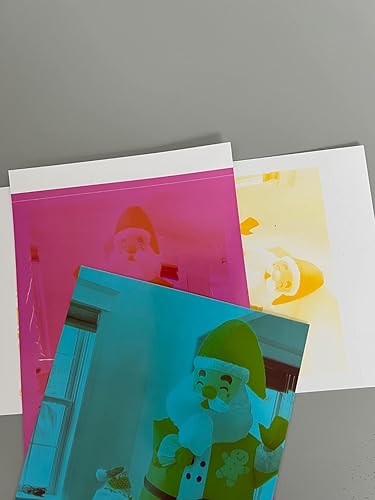
I bought this as a gift for my sister who has a beautiful newborn this year. There were literally problems even before startup - as part of the setup, you are to download the sprocket app for instructions but I encountered numerous server errors upon opening. Okay, I'll let this one slide because this was on Christmas so maybe others had received this "gift" and overloaded the server. The app finally worked a few hours later and the setup was straightforward. I printed the first one and it came out fine (slightly grainy). It immediately went downhill from there. The subsequent pictures came out the way you see in the picture I uploaded. Initially, it mostly came out in the blue hue, then it printed the other colors you see in the picture. One other picture came out fine - I did not tamper with anything (application or hardware) in between the prints. So what did I do. All the troubleshooting method suggested by hp - firmware is the most up to date, the paper did not have any defects, etc. I checked to see if the size/megapixels of the images mattered. Nope. To add insult to injury, I even bought an additional paper/cartridge pack which I installed and still encountered the same issues. During the final prints, I noticed the film from the cartridge wasn't sticking and came out loose from the printer. The final straw was the paper jam at the end (pictures uploaded). Lastly, when I tried to search online about the blue hue issue (apparently prevalent), I found a variety of posts where hp reps responded with the standard troubleshoot blurb (with links that no longer exist). However, despite the OPs responding that the same issue persists, there is still no solution. ... show more
Reviewed in the United States on December 27, 2022 Reviewed in the United States on December 27, 2022 by Eric

  • Nice
Love it
Reviewed in the United States on February 13, 2026 by Patsy

Can't find a product?

Find it on Amazon first, then paste the link below.
Checking for best price...