⚡️Cyber Monday deals are live! View Deals
Search  for anything...
HP

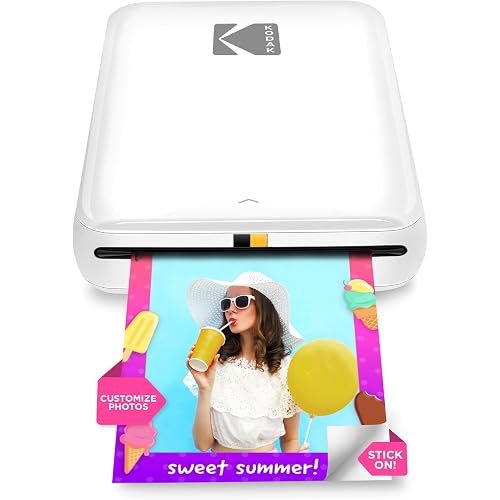
HP Sprocket Portable 2x3 Instant Photo Printer (Blush Pink) Starter Bundle

  • Based on 28,013 reviews
Condition: New
Checking for the best price...
$118.99 Why this price?
Cyber Monday Deal · 15% off was $139.99

Buy Now, Pay Later


As low as $19.83 / mo
  • – 6-month term
  • – No impact on credit
  • – Instant approval decision
  • – Secure and straightforward checkout

Ready to go? Add this product to your cart and select a plan during checkout.

Payment plans are offered through our trusted finance partners Klarna, Affirm, Afterpay, Apple Pay, and PayTomorrow. No-credit-needed leasing options through Acima may also be available at checkout.

Learn more about financing & leasing here.

Selected Option

Free shipping on this product
This item's return window has been extended for the holiday season: FREE refund/replacement until Jan 31, 2026

To qualify for a full refund, items must be returned in their original, unused condition. If an item is returned in a used, damaged, or materially different state, you may be granted a partial refund.

To initiate a return, please visit our Returns Center.

View our full returns policy here.


Availability: Only 2 left in stock, order soon!
Fulfilled by Amazon

Arrives Dec 15 – Dec 30
Order within 46 minutes
Available payment plans shown during checkout

Protection Plan Protect Your Purchase
Checking for protection plans...

Style: Starter Bundle


Color: Blush Pink


Features

  • PRINT PHOTOS ON DEMAND! - HP Sprocket 2nd Edition Printer Prints 2x3 Photographs from Your Smartphone or Social Media. For iOS 10+ & Android 5+ Bluetooth 5.1
  • ZINK ZERO INK TECHNOLOGY - No Expensive Toner or Ribbon Replacements! Glossy Sticky-Back Photo Paper Has Colors Embedded Inside for Amazing Resistance to Water, Smudges & Tears
  • UNIQUE FILTERS, FRAMES & FLAIR - Customize Your Snaps with Cool Editing Tools on the HP App. Apply Stickers, Borders & Emojis. Hashtag a photo in social media and use the HP app to print right away.
  • Bundle Includes Sprocket Printer w/ Paper Pack (20 sheets), Deluxe Case, Twin Tip Markers, Album, 9 Fun Sticker Sets, Sticker Frames, Square Hanging Frames, Decorative Stickers.

Description

Let the good times print with the HP Sprocket Portable Photo Printer. With exclusive editing features, seamless social media integration, and easy party printing mode, creating gorgeous full-color photographs is as simple as showing up! Send images straight from your smartphone to the HP app to customize, print, share with friends, and stick to your scrapbook, journal, collage, photo wall, and other creative projects. Zink Zero Ink premium paper resists smudging, tearing, and fading, while upgraded Bluetooth 5.0 allows everyone to join in the action. In addition to customizing and printing photos straight from your smartphone or social media account via the HP Sprocket app, friends can also connect. Specs & Details - Compatibility: iOS & Android - Wireless: Bluetooth 5.0 - Print Type: ZINK Zero Ink - Warranty: 1-year limited

Brand: HP


Connectivity Technology: Bluetooth


Printing Technology: Zink Technology


Special Feature: Network-Ready, Portable


Color: Blush Pink


Model Name: AMZHPISPK2BP


Printer Output: Color


Maximum Print Speed (Color): 1 ppm


Max Printspeed Monochrome: 1 ppm


Item Weight: 1 Pounds


Product Dimensions: 4.63"D x 3.15"W x 0.98"H


Controller Type: iOS App


Maximum Media Size: 2x3


Included Components: Printer and accessories


Print media: Glossy photo paper


Scanner Type: Photo, Portable


Max Input Sheet Capacity: 1


Max Copy Speed (Black & White): 1 ppm


Compatible Devices: Smartphones


Maximum Color Print Resolution: 300 dpi


Sheet Size: 2x3 inches


Maximum Black and White Print Resolution: 300 dots_per_inch


Warranty Type: Limited Warranty


Dual-sided printing: No


Max copy resolution color: 300 dpi


Max copy resolution black-white: 300 dpi


Duplex: Simplex


Hardware Interface: Bluetooth


Additional Printer functions: Print Only


Control Method: App


Output sheet capacity: 20


Processor Count: 1


Model Series: Sprocket


Specific Uses For Product: Photo Printer


UPC: 843812150293


Printer Ink Type: No Ink


Memory Storage Capacity: 64 MB


Item Weight: 1 pounds


Item model number: AMZHPISPK2BP


Batteries: 1 Lithium Ion batteries required. (included)


Is Discontinued By Manufacturer: No


Date First Available: October 22, 2020


Manufacturer: hp


Language: English


Frequently asked questions

If you place your order now, the estimated arrival date for this product is: Dec 15 – Dec 30

Yes, absolutely! You may return this product for a full refund within 30 days of receiving it.

To initiate a return, please visit our Returns Center.

View our full returns policy here.

  • Klarna Financing
  • Affirm Pay in 4
  • Affirm Financing
  • Afterpay Financing
  • PayTomorrow Financing
  • Financing through Apple Pay
Leasing options through Acima may also be available during checkout.

Learn more about financing & leasing here.

Top Amazon Reviews


  • Compact, easy, vivid photo colors, functional - Would buy as a gift for others.
Style: Printer Color: Luna Pearl
I purchased this printer to quickly connect to my phone and have the ability to print small pictures that can also be stickers. The photo paper for the HP sprocket uses 2 * 3 photos using thermal sticker paper. The application is easy to download to you phone and gives detailed instructions on how to use the app. I am an avid book reader and the app allows me to print a collage of book covers to insert into my book journal. The colors from the print are true to life and have a terrific quality. The printer is small and can be slipped into a pocket for easy transport and durability. Functionally simple to use for a quick photo print that can be shared with others. ... show more
Reviewed in the United States on May 21, 2025 by Jennifer L

  • I would like to thank TikTok for introducing me to this!
Style: Printer Color: Lilac
The app and the printer are epic in so many ways. It’s kind of like trying to set up your WiFi in your home, but as long as you don’t give up you know what to do. The pics came out good as long as it’s cleared, printer charged, and you have enough refill paper to last you months. The print speed is amazing as long as it’s connected, and it’s great for me to use in my journals, notes, etc. The zink feature is epic in so many ways. I can easily store this in my Fjallraven kanken. ... show more
Reviewed in the United States on August 9, 2025 by Kelly

  • Very impressive for a portable ink-less printer!
Style: Printer Color: Black Noir
I am SO impressed with this little dude! It was so easy to set up and is so quick to print. I am very happy and have already printed around 100 photos for a project I’m doing and couldn’t be happier :) This little guy definitely deserves a 5 star review in my book.. but for those needing more info on how it actually operates here are the issues I have (to be expected from a $100 portable/ink-less printer) - the color prints a little funky. It’s not the best quality but if you do a little pre editing you might be able to counteract the pink hue it prints in - it’s battery life is pretty short so be ready to be by an outlet or make sure it’s charged all the way before taking it out with you - it often has printer feed issues which can be slightly irritating.. but they are easy to fix, you just have to feed the blue barcode through again so it understands what’s going on Those are just the minor honest issues I have with it to give everyone a better understanding of it outside of me saying how much I love it. But I truly am very pleased and would definitely buy again just for the ease and sticky paper backed photos! Super fun too :)) Hope this helps! ... show more
Reviewed in the United States on February 26, 2024 by Sequoia F. Sequoia F.

  • Great little printer but put in a bit of effort for best results
Style: Printer Color: Eclipse
This is a great little printer *for what it is*. It’s incredibly small and lightweight, and the app is well-designed and easy to use. The print size is a smidge larger than other printers, which I like, and the sticky-back Zink paper is perfect for journaling. But (and DO NOT come at me over this) you should not expect to get the best results without a little effort. There’s a reason that photographers use apps like Photoshop and Lightroom and it’s because NO printer will reproduce exactly what you see on a screen. Some of that is due to the printer calibration and some of that is your screen/device/camera calibration. If you demand high quality image reproduction, you don’t want a pocket printer — they all return worse quality in color, sharpness, etc., than a half-decent desktop inkjet printer. You are buying *convenience* with pocket printers. THAT SAID, a fair number of people are reporting a pink (magenta) or blue (cyan) cast to their prints that other manufacturers’ models do not seem to have, which is decidedly disappointing. Mine has a pink cast, hence my -1 star. There are instructions from the manufacturer for resetting the unit to address this problem, and you should use the calibration card in each Zink packet as recommended (and keep it for recalibration). If those things do not work, there are some simple edits you can make to your photo (before you open it in the HP app) to correct for the color cast if you otherwise like the Sprocket Select and are willing to sacrifice a few prints in the process. The suggestions below will not be news to most photography enthusiasts (let alone professionals) — I’ve included them here because even though I think that HP has considerable room to improve the thermal control of this printer (which is how the colorization occurs with Zink paper), I still think this little printer has a lot going for it and casual photographers can get much improved prints from it. 1) The simplest method: You can counteract color casts by finding the “tint” setting in your photo editor (ALWAYS be sure to make and work on a copy of your original image if you’re not sure you can revert the image to its original state by undoing the edits). If your prints have a blue/cyan cast, use the tint adjustment to push the image towards red/magenta; if your prints are pink, move the tint towards green. For relatively simple editors (e.g., iOS Photos), you might start by making a 100% adjustment and then backing off from there in 10-20% increments for subsequent prints (of the same image) if you’ve gone too far. The image may look horrible on screen, but that’s not the point. Whatever setting you decide gives the best result, apply it to future images (or their copies) before you open them in the HP Sprocket app; this won’t work 100% of the time, but should help in many cases. Also be aware that various editing apps for different devices will apply differing amounts of adjustment at comparable settings (e.g., “50%” in one app on one phone may be “75%” on another phone or in a different editing app), so you may want to follow some of the additional steps below to dial in the best possible correction, albeit at the price of a few more test prints. 2) If you’re willing to put in a bit more effort: pick a photo that is representative of your most common subject (e.g., landscape, portrait, nighttime) and choose one with a good range of values (light to dark) and that is not under- or overexposed. Convert this to black and white (monochrome) in your phone/tablet/computer photo editor (no fancy enhancing filters, just a basic conversion) and print the image. This will allow you to see which values in the image have the greatest color cast (highlights, mid-tones, or shadows), which can be hard to see in a color image. 3) Go back to the original color image (or your copy!) and target your tint correction by looking at the values (areas) of the image with the worst color cast in the black and white version. This is inherently subjective, and remember it’s not meant to look good onscreen. Make a print and assess whether you need more or less tint correction. Rinse and repeat until you’re satisfied enough, recalling that you’re not aiming for perfection from this convenience printer. 4) For the folks with more sophisticated photo editing apps that allow targeted editing of color balance in terms of value ranges — highlights, mid-tones, or shadows (e.g., Lightroom or Pixelmator Photo on iOS): Start with Step 2 to figure out where the color cast is the worst but instead of changing the image tint in the original color image (which affects the whole image), tweak the cyan/red or magenta/green balance for just the values in the image that need the most correction (e.g., mid-tones). If you’re not sure whether the cast is in, for example, the mid-tones or highlights, just pick one (mid-tones) and make a 100% change in the color balance relevant to the color cast your prints have — if the area you’re concerned with (from step 2) changes the most onscreen, you’ve got it. If not, undo and try the other value range. If you like the result and your photo editor allows it, save this setting as a preset and apply to future images before printing. (And you can edit two or all three of the value ranges with differing amounts of color correction!) 5) For the truly adventurous: follow step 4 with additional enhancements, such as slight bumps to settings like “vibrance”, “clarity”, overall brightness (if images print a bit dark) and contrast (if images look a bit flat). Your photo editor probably allows changes to brightness in the value ranges of the color balance section, too, if you want a targeted effect. Save as a preset and apply to future images before opening them in the HP Sprocket app for printing. Using these techniques, I was able to get a *much* better, more true-to-life color print after five prints (original; B&W; 100% green tint; less tint correction and more brightness; and finally, targeted value range corrections to color and brightness with bumps to overall vibrance and contrast based on earlier prints). You may not want to have to do anything to your images before printing - in that case, move along or take your chances and be prepared to return you unit if you dislike the prints. But if you don’t mind a little twiddling, I actually recommend this little printer. ... show more
Reviewed in the United States on August 2, 2022 by sandrift

  • Cute little printer that’s perfect for trips
Style: Printer Color: Blush Pink
This has been really fun to bring on family vacations. We take a bunch of pictures and then print them out right away to stick in a scrapbook. The print quality is pretty good for something this small, and the sticky backs make it super easy to use. It’s tiny and fits in a purse or backpack without taking up any space. The blush pink color is adorable too. Overall, just a fun little gadget that makes memories feel a bit more special. ... show more
Reviewed in the United States on November 26, 2025 by Jessie Canon

  • The hue is off but its still good quality
Style: Printer Color: Black Noir
The media could not be loaded. Impressed with this printer. I just got it but yhe quality is great even if the hue on the pictures is different and it cuts a little bit of the corners of the pic
Reviewed in the United States on November 21, 2025 by Michael M. Michael M.

  • Best printer for journaling!
Style: Printer Color: Luna Pearl
The media could not be loaded. This printer works so good for Journaling! Theres zero dry time and the pictures look great for how small they are. They pictures have lasted years in my journal stored in my super hot camper. You load the paper with the test page and it prints out the test page automatically making it super easy to use. I've had this printer /paper combo for years and Im opting to keep using it for my next journal project because the pictures have lasted! Super durable for a pocket printer / paper combo. Its never jammed and recharges easily with USB C. Doesnt use ink so no mess or running! ... show more
Reviewed in the United States on August 30, 2025 by Amanda

Can't find a product?

Find it on Amazon first, then paste the link below.
Checking for best price...