


Search  for anything...

GL.iNet Comet (GL-RM1) Remote KVM Over Internet, 4K@30Hz Tailscale Support,Remote Keyboard, Video, Mouse, Install OS Via BIOS Control, Adapted KVM Switches for Home Offices,Data Center

  • Based on 300 reviews
Condition: New
Checking for the best price...
$89.99 Why this price?
Save $15.90 was $105.89

Buy Now, Pay Later


As low as $15.00 / mo
  • – 6-month term
  • – No impact on credit
  • – Instant approval decision
  • – Secure and straightforward checkout

Ready to go? Add this product to your cart and select a plan during checkout.

Payment plans are offered through our trusted finance partners Klarna, Affirm, Afterpay, Apple Pay, and PayTomorrow. No-credit-needed leasing options through Acima may also be available at checkout.

Learn more about financing & leasing here.

Free shipping on this product

FREE 30-day refund/replacement

To qualify for a full refund, items must be returned in their original, unused condition. If an item is returned in a used, damaged, or materially different state, you may be granted a partial refund.

To initiate a return, please visit our Returns Center.

View our full returns policy here.


Availability: In Stock.
Fulfilled by Amazon

Arrives Saturday, Feb 21
Order within 18 hours and 31 minutes
Available payment plans shown during checkout

Protection Plan Protect Your Purchase
Checking for protection plans...

Features

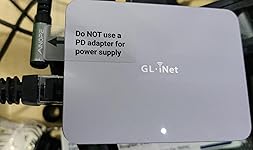
  • Effortless Remote Device Control Remotely reboot, install operating systems via BIOS interface, and power on computers all without ever setting foot in the data center. Ideal for IT professionals and smart home users alike. (Note: PD adapters cannot be used.)
  • Universal Compatibility & Easy Setup Seamlessly connect to laptops, desktops, servers, and more. Simple one-click connection via app the computer being controlled requires no additional software.
  • Crystal-Clear Remote Experience Enjoy desktop-quality visuals (3840x2160@30Hz resolution, low latency) Remote audio output for immersive and complete remote control.
  • Instant File Transfer Transfer files between computers effortlessly. No more tedious synchronization issues when working remotely.
  • Access Anytime Anywhere Maintain constant remote access to your computers, boosting productivity whether you're at home or on the go. Perfect for remote work and managing multiple computers.
  • Versatile Hardware Solution With H.264 Hardware Encoding, this hardware-based KVM solution is ideal for remote work, offline device management, technical support, and server maintenance.

Brand: GL.iNet


CPU Socket: LGA 1200


Compatible Devices: Computers (PCs, laptops, servers), keyboards, mice, displays


RAM Memory Technology: DDR3


Platform: Not Machine Specific


Model Name: GL-RM1


CPU Model: Cortex A7


Memory Storage Capacity: 8 GB


RAM Memory Maximum Size: 8 GB


Main Power Connector Type: RM


Product Dimensions: 3.15 x 2.36 x 0.69 inches


Item Weight: 3 ounces


Manufacturer: GL.iNet


Language: English


Item model number: GL-RM1


Date First Available: March 20, 2025


Frequently asked questions

If you place your order now, the estimated arrival date for this product is: Saturday, Feb 21

Yes, absolutely! You may return this product for a full refund within 30 days of receiving it.

To initiate a return, please visit our Returns Center.

View our full returns policy here.

  • Klarna Financing
  • Affirm Pay in 4
  • Affirm Financing
  • Afterpay Financing
  • PayTomorrow Financing
  • Financing through Apple Pay
Leasing options through Acima may also be available during checkout.

Learn more about financing & leasing here.

Top Amazon Reviews

  • A cheap, flexible and reliable hardware solution to allow remote KVM access.
There were two primary functions I wanted to test this KVM for: 1. Using WOL to wake up a headless host and then be able to remotely connect to it both via LAN and WAN. Previously I had to use one utility to do the WOL and have a client loaded onto the host which meant that you couldn't remote to it until the OS had booted. The KVM allows me to use a single interface to WOL and then connect to the device. Having no client means you can also connect during POST if needed. 2. Connect to a Chromebook remotely Previously to connect to a Chromebook remotely you needed to have Chrome Remote Desktop installed and you had to enter a code to allow remote access at the host meaning someone had to be at the host Chromebook. The KVM allows full access to the Chromebook now but with the caveat that the Chromebook is turned on as Chromebooks don't support WOL. (You could do with a remote power switch if you need to as most Chromebook will boot on power up). The unit is well made with an aluminum body which does get a bit warm even when in standby. You can connect via the app but that's only available for Windows and Mac at the moment and as primarily a Chromebook user, I use a Wireguard VPN into my home Flint 2 and then just use the web interface direct to the KVM. I can't seem to see any major differences in performance using the different connection methods ( Windows app vs Chromebook VPN). For remote access this unit works wonders. There's no software client or subscription fees which is a huge bonus and initial capital cost is low. The ability to do whatever I need to on the remote host is great and I can even stream videos with audio. There's a heap of settings to play with to get the most optimal solution for your requirements so it's pretty flexible. At the moment I don't have any use for the more advance functions like ATX or Fingerbot control but nice to know they're there if I ever need it. Well worth the money if you need simple, clientless and easy remote access. ... show more
Reviewed in the United States on June 6, 2025 by zoonie

  • Similar to PIKVM but cheaper
Great for headless devices. Connected and was up and running quickly. The virtual storage is too small to really use for setting up devices. There might be a way to contact external usb storage for ISO storage but I haven’t bothered to set it up yet. The video and inputs are snappy but there is the usual latency of IPKVM. About the same as the PIKVM I have setup. You can adjust the screen to 1080p, 1440p, or 4k but there is no screen passthrough. UI is very snappy with decent controls even on a tablet, customizable shortcut keys, on screen keyboard, scrolling adjustments, VPN, wake on LAN, and paste to remote machine. ... show more
Reviewed in the United States on July 28, 2025 by daringblaze

  • Impressive Performance and Easy to Use!
The GL.iNet Comet (GL-RM1) Remote KVM Control truly delivers on its promises. Setup is quick and straightforward, performance is consistently strong, and regular updates continue to bring valuable new features. I went in with modest expectations, but this device genuinely impressed me. While there are a few minor improvements I’d like to see, the combination of its current features and reliability makes it a solid tool. The only thing left is for it to support remote video stream (using WebRTC), which could make this an even more powerful remote management device. Pair it with Tailscale, and you’ll be securely accessing and controlling systems from anywhere in no time. This is a must-have for anyone who needs reliable, remote KVM control with minimal hassle. ... show more
Reviewed in the United States on August 14, 2025 by JAMusic JAMusic

  • Pretty good. IP KVM
So after tinkering around a little bit I finally did get this thing working. I'm not a huge fan of the wall gardening, the app to Windows and Mac only. The main reason I got this product was to have a decent 60 FPS stream to control some of my servers over my land. And what's awesome is you can do exactly that you don't have to specifically be controlling just Mac and windows. All of my servers are running. Popos and with these plugged in, I can easily sit at my laptop and connect to the IP address locally without ever having to install or touch their application for that use. It's great! It works a lot better than open RDP or just RDP with Windows. My only downside to it is I do wish that had power over ethernet which the newer model looks like it will be just cuz it's kind of a mess for cable management ... show more
Reviewed in the United States on June 19, 2025 by Austin staton

Can't find a product?

Find it on Amazon first, then paste the link below.
Checking for best price...