Search  for anything...

eXtremeRate Face Clicky Kit for Steam Deck OLED Handheld Console, Custom Dpad View A B X Y Menu Keys Face Buttons Mouse Clicky Kit for Steam Deck OLED Console - WITHOUT Console


  • Based on 184 reviews
Condition: New
Checking for the best price...
$19.98 Why this price?
Save $18.99 was $38.97

Buy Now, Pay Later


As low as $4 / mo
  • – 4-month term
  • – No impact on credit to apply
  • – Instant approval decision
  • – Secure and straightforward checkout

Ready to go? Add this product to your cart and select a plan during checkout.

Payment plans are offered through our trusted finance partners Klarna, Affirm, Afterpay, Zip, Apple Pay, and Google Pay. No-credit-needed leasing options through Acima may also be available at checkout.

Learn more about financing & leasing here.

Selected Option

Free shipping on this product

FREE 30-day refund/replacement

To qualify for a full refund, items must be returned in their original, unused condition. If an item is returned in a used, damaged, or materially different state, you may be granted a partial refund.

To initiate a return, please visit our Returns Center.

View our full returns policy here.


Availability: 20 left in stock
Fulfilled by Amazon

Arrives Sunday, Oct 18
Order within 21 hours and 24 minutes
Available payment plans shown during checkout

Protection Plan Protect Your Purchase
Checking for protection plans...

Size: Strong Version


Features

  • The Face Clicky kit is exclusively designed ONLY for the Steam Deck OLED handheld gaming console, NOT fit for Steam Deck LCD (2022) handheld console
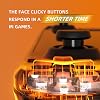
  • This custom tact switches Face Clicky Kit is specially designed for the Steam Deck OLED console. It significantly enhances the responsiveness of Dpad, ABXY, View, and Menu buttons by reducing their distance, resulting in react faster during gameplay
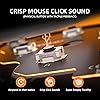
  • The Face Clicky Kit featuring tact switches, provides an instant response with a crisp mouse-like clicky sound and requires only 1.57N of force, eliminating the mushy feeling previously experienced with button presses
  • Easy to install, requires disassemble the console with no soldering required. Get the installation video guide on YouTube by searching "eXtremeRate Face Clicky Kit for Steam Deck OLED" or "xGPG9t-g_sk"
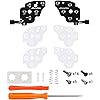
  • The package includes 1* customized FPC board for the D-pad and view buttons, 1* customized FPC board for the ABXY and menu buttons, 4* conductive pads, screwdrivers, and spare screws springs. (Please note: WITHOUT the console, buttons, and other parts.)

Description

Face Clicky Kit Replacement Thumbsticks Bottom Shell Shell for Steam Deck OLED Shell for Steam Deck OLED Full Set Buttons Full Set Buttons Personalize your handheld console for Steam Deck OLED with eXtremeRate replacement shell and Buttons

Compatible Devices: For Steam Deck OLED


Controller Type: Gamepad


Hardware Platform: Steam Deck


Compatible Video Game Console Models: Valve Steam Deck


Item Weight: 10 g


Package Quantity: 1


Item Dimensions: 1.18 x 0.79 x 0.39 inches


Brand Name: eXtremeRate


Manufacturer: Extremerate


Model Number: FUJSL001


Manufacturer Part Number: FUJSL001


Frequently asked questions

If you place your order now, the estimated arrival date for this product is: Sunday, Oct 18

Yes, absolutely! You may return this product for a full refund within 30 days of receiving it.

To initiate a return, please visit our Returns Center.

View our full returns policy here.

  • Klarna Financing
  • Affirm Pay in 4
  • Affirm Financing
  • Afterpay Financing
  • Zip Pay in 4
  • Financing through Apple Pay
  • Financing through Google Pay
Leasing options through Acima may also be available during checkout.

Learn more about financing & leasing here.

Top Amazon Reviews


  • A must have mod, very well thought out and bonuses included
Size: Strong Version
First, I only installed the dpad tactile button mod, which is the critical one. Not that much of a fan of ABXY button mods as no controllers afaik have clicky (tactile) buttons, but it's there if I need it. The dpad mod makes the dpad feel much better, mushiness is gone and the diagonals respond perfectly. The dpad does require more pressure to activate than before and this will take some getting used to. What is really special about this kit is what they give you. They give you a huge assortment of replacement torx screws, and a few extra springs (I believe bumper and trigger) which is a very nice touch, since it is very easy to lose a spring since if a spring hits a hard floor, it can bounce deceptively anywhere. And they even give you *two* membrane pads for each side (dpad and buttons), so you have one pad and a spare replacement. I never knew those would ever wear out but it's really nice to have an extra. You also get an extra dpad protective layer as well. Really pleased and happy with the attention to detail here, and most kits you buy only give you what you purchased and absolutely nothing else. As for longevity, we'll see. The one thing about the 'stock' capacitive layer is that those things basically last forever (until the contacts wear out, if they ever do). Note that you do have to peel off the stock capacitive layer from the original button board(s), and it's not clear whether (even if you protect the adhesive) the original can be re-used after being bent (you can see bends in the pads after removal), so it's recommended that you buy a spare button and dpad board from ifixit just in case you need something to go back to. *Edit* After seeing some of the posts here and in the extremerate subreddit, I decided to take apart my dpad section (3 months later) and checked the membrane, and the membrane looked flawless. There was no damage that I could see. Maybe the cover for the dpad has something to do with that, but I went ahead and put on another membrane that I had already applied tiny cutout squares of kapton tape to, inside of the dimples, just for good measure. I have not done the button mod at all, as I find clicky buttons a bit strange (only the menu button, which is part of the dpad set itself, is a clicker), but I can see the ABXY long button travel combining with the small hard clicky microswitches causing issues for anyone there. I am rather sure that applying kapton tape inside the button membrane dimples would help preserve the membranes-kapton tape is very resilient (it's used for high temp solder applications). But the dpad part of this kit is flawless and is a must do for anyone who hates the stock dpad. But the button section needs extra attention. Extremerate mentioned on their reddit that they were looking into a fix for this, so you can ask there for any redesigned membranes for the button section. ... show more
Reviewed in the United States on October 29, 2024 by Ike Miller

  • Massive improvement in feel for not a lot of money
Size: Strong Version
I recently picked up a Steam Deck OLED, and while I love the device, the buttons and dpad leave a lot to be desired. I've always been a fan of clicky switches on controllers, so I ordered this kit and installed it in my deck. Here are my thoughts. Install - You have to take out a few different parts in order to access the front buttons, but that's not really eXtremeRate's fault, so I won't ding them for that - The parts went into place without issue. Alignment seems perfect. - The ribbon cable that goes from button board to the main board is a bit short, IMO. I'd like a little bit more to make install easier. - eXtremeRate includes extra screws, springs, and membranes in the kit just in case you need them. I didn't need them, but it's a really nice touch. D-Pad - The biggest improvement is the d-pad. The cost of the entire package is worth it for this part alone. Playing indie games or retro titles that favor the d-pad is infinitely more enjoyable with the clicky buttons in place. - In terms of feel, the buttons are probably more difficult to press than something like the Xbox Series controller d-pad, but I didn't find it too stiff at all. - Installing the kit seems to somewhat help with the deck's lack of a center pivot on the d-pad. It's more difficult to press the entire pad down and activate multiple buttons Face Buttons - Not as big of an improvement as the d-pad, but still appreciated - Buttons feel really tight, like the tolerances are somehow tighter now. Makes it feel more expensive, if you know what I mean Tips/Tricks - I did the playing card trick on the face buttons. Basically, you use a hole punch on a playing card and slip the circular piece of cardboard in between the buttons and included membrane. This supposedly reduces the wear on the membrane. - Make sure to extensively check the feel of the buttons and bumpers before putting everything back together. I had to tweak the screws a bit on both sides to get the ideal feel. - After reassembly, one of my triggers had a bit more play in it than before. I assume this is simply down to the plastic wearing a bit during install. I added some tape on the pivot to try and eat some of the gap between it and the trigger. This fixed the issue. Overall, I'm loving the change and recommend it to anyone who likes clicky buttons on their controllers. ... show more
Reviewed in the United States on January 27, 2026 by E. Hamalainen

  • Great at first... Quickly disappointed (Update 1.23.25)
Size: Strong Version
Update 1.23.25 - After giving this a 1 star and writing the review below the seller was nice and reached out to understand my issue better. They provided me with a handful of replacement membranes and were very professional about it. Updating my rating to a 4/5, I think the membrane issue is still a very large issue (3 out of 5 stars) but I gave a 4th star because I think it says a lot about a company based on how they respond to feedback like this. Similar to another review on here, at first after I installed the new buttons I was very pleased. They felt great, responded great, everything that I was looking for. However, within a few days I noticed the A button feeling very squishy and requiring quite a bit of force to click. Once I took it apart again I noticed the membrane/rubber button for the A button had actually torn. Initially I chalked this up to just an unfortunate happenstance and went ahead and replaced it with the extra one that came in the box. The A button was back to working like the rest of them. However, again just a few days later it happened again and this time I didn't have a replacement membrane and the factory ones that come with the SD are not compatible with the clicky kit. I looked online for replacement membranes to no success. At this point I'm pretty disappointed and stuck with a squishy A button. ... show more
Reviewed in the United States on December 26, 2024 by michael behrendsen

  • Great product with satisfying feel.
Size: Strong Version
Let's start off with WHY I got this kit: my Steam Deck OLED had a D-Pad that would not register down-left diagonals consistently and the face buttons felt squishy when pressing (the button would not bounce back as well as I liked). Enter this kit. Doing the modification requires some teardown of the Steam Deck. I would strongly suggest to watch the guide that Extremerate has before attempting to see if this is in your skill set. It does not involve any soldering, but does involve some small ribbon cables and undoing the triggers. This mod took me about an hour with testing and some tinkering to make work well. Be warned that this will not make the older PCB for your buttons usable any more, but you can order new kits on iFixit's website. When I initially installed the kit, the down direction on the D-Pad would only go down and to the right. I panicked initially, but this was fixed by loosening one screw by the shoulder button assembly (which does not affect the button but rather how tight the PCB is to the D-Pad). It now works like a champ. The buttons and D-Pad now feel great. I wish the membranes were just a tad softer and the kit came with face buttons that were now just a tad shorter, but that's nitpicking at this point. My buttons don't stick and feel great, and the D-Pad is reliable and feels great. Overall, if you like to do some tinkering and you don't like the stock Steam Deck experience, I'd say go for this. It really is transformative! ... show more
Reviewed in the United States on September 30, 2024 by Brandy Sampson

  • *4 Month Update* - Big Design Flaw
Size: Strong Version
I purchased this kit originally back in August ('24) and the installation was pretty easy, no problems there. The buttons felt amazing, and I was really pleased with the product overall. Unfortunately, in December ('24) I noticed the A button was quite "squishy" and there was a lot of play before it would click/press. I assumed the new PCB/tactile switch was somehow failing, pushed in or something. I'm not rough with my Steam Deck, so I was really annoyed at how fragile it seemed. Regardless, I took my Steam Deck apart to assess damage and it turns out what actually happened because the A button itself has a hollow circle in the center (Picture 3) and the tactile switch is a nub, so basically after so many pushes, the membrane had a hole "punched out" like a cookie cutter. (Picture 1) So, the good news was that the switch itself was fine, but the bad news is that the membrane is thin and weak. The kit comes with spares, so that made replacement easy enough, but it wouldn't have solved the problem at hand, so I actually placed plastic (from the Amazon shipping envelope) into the membrane (Picture 4) and my hope is that it provides enough resistance to keep the button from pressing through again. I'm not sure what the solution will be should this option fails. The stock membrane actually has little "pads" inside (to touch the contact points on the stock button PCB) which would provide ample protection but unfortunately get in the way of the tactile switches, so that also is not an option. (Picture 2) Overall, the kit is good. It's great, really. But unfortunately, with the way it is right now I wouldn't necessarily suggest it to anyone because I am not sure if my "fix" will be a long-term solution or not. eXtremeRate needs to address this, at the very least. ... show more
Reviewed in the United States on December 7, 2024 by Brian

  • Do not install on the xyab buttons. The membranes are prone to damage from pressing A so much
Size: Strong Version
Every about 4 months I have to replace the membrane or else the A button feels awful. I have been through 4 membranes. Whenever I get a chance, I'm removing this mod from the console completely. It's depressing because the clicky mod on my LCD steam deck that I sold to a friend of mine is still working. I saw a review from a guy named Brian. That's exactly what all of my broken membranes look like. Until this is fixed. I recommend people avoid this. I just attached a photo of three of the four membranes and if you look where the a button would be, you can see that the top of the micro switch for the button has cut into the membrane. I reached out to them in the past and showed them this. They never replied. Again, unless you want to take apart your steam deck every few months to replace the membranes, I recommend you avoid the clicky button mod ... show more
Reviewed in the United States on March 24, 2025 by Greg Hooper

  • Satisfying Button Upgrade for the Steam Deck OLED
Size: Strong Version
This clicky kit gives the Steam Deck OLED face buttons a more tactile and responsive feel. It’s a useful modification for users who prefer a distinct click instead of the original softer button response. Installation requires careful disassembly, proper tools, and attention to the included instructions, so it may not suit beginners. Confirm compatibility with the OLED model before ordering. Overall, it’s a worthwhile customization for experienced modders. ... show more
Reviewed in the United States on August 26, 2026 by Dirigotech

  • Awesome
Size: Strong Version
Sounds awesome, somewhat easy to install, raises the sensitivity slightly, over all a great experience
Reviewed in the United States on August 10, 2026 by Brent Vaughn

Can't find a product?

Find it on Amazon first, then paste the link below.
Checking for best price...