Search  for anything...

Dragon Touch 21.5" Digital Calendar Chore Chart – 1080P Full HD Interactive Touchscreen, Smart Family Planner, Hearth Display Digital Calendar Wall & Desk Mountable for Seamless Scheduling

  • Based on 114 reviews
Condition: New
Checking for the best price...
$399.99 Why this price?

Buy Now, Pay Later


As low as / mo
  • – Up to 36-month term if approved
  • – No impact on credit
  • – Instant approval decision
  • – Secure and straightforward checkout

Ready to go? Add this product to your cart and select a plan during checkout.

Payment plans are offered through our trusted finance partners Klarna, Affirm, Afterpay, Apple Pay, and PayTomorrow. No-credit-needed leasing options through Acima may also be available at checkout.

Learn more about financing & leasing here.

Selected Option

Free shipping on this product
This item's return window has been extended for the holiday season: FREE refund/replacement until Jan 31, 2026

To qualify for a full refund, items must be returned in their original, unused condition. If an item is returned in a used, damaged, or materially different state, you may be granted a partial refund.

To initiate a return, please visit our Returns Center.

View our full returns policy here.


Availability: In Stock.
Fulfilled by Amazon

Arrives Tuesday, Dec 16
Order within 16 hours and 24 minutes
Available payment plans shown during checkout

Protection Plan Protect Your Purchase
Checking for protection plans...

Size: 21.5"W x 13"H


Features

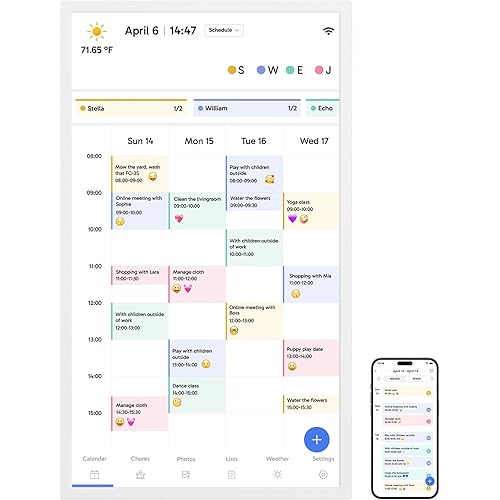
  • All-In-One Smart Family Calendar: Dragon Touch digital frame effortlessly organizes and tracks every family schedule with the crystal-clear 21.5" FHD touchscreen. Assign different colors and tasks to each family member, making family scheduling simpler and more intuitive.
  • Easy Setup and Auto-Sync: Enjoy a user-friendly design that our smart picture frame allows for quick setupjust plug in, connect to Wi-Fi, and link your calendar to the Mobile App. Once synced, it seamlessly integrates multiple personal calendars (iOS, Google, etc.) into one unified interface. Authorize additional devices for even greater convenience.
  • Interactive Chores Chart & Dinner Planner: Our digital calendar keeps housework organized and motivates family members, especially children, to develop healthy habits with an interactive chore chart. Display your family dinner plans to keep everyone informed and eliminate the daily "What's for dinner?" question.
  • Manage from Anywhere: Stay connected with the powerful eCalendar App. Access and manage your calendar on the go, with free features like a photo frame, chore chart, dinner plan, grocery list, and more. Paid functions like Magic Import offer advanced tools tailored for users with special needs.
  • Charming Digital Picture Frame: When not in use, your smart calendar transforms into a beautiful digital picture frame. Showcase treasured family photos on the crystal-clear 21.5" large touchscreen, adding a touch of elegance to any room as modern home decor.

Description

Dragon Touch 21.5" Digital Calendar Chore Chart – 1080P Full HD Interactive Touchscreen, Smart Family Planner, Hearth Display Digital Calendar Wall & Desk Mountable for Seamless Scheduling

Size: 21.5"W x 13"H


Year: 2023


Format: Wall Calendar


Brand: Dragon Touch


Theme: digital calendar


Material: Plastic


Sheet Size: 21.5


Product Dimensions: 21.5"W x 13"H


Mounting Type: Wall Mount


Manufacturer: Dragon Touch


Manufacturer: ‎Dragon Touch


Brand: ‎Dragon Touch


Item Weight: ‎10.17 pounds


Product Dimensions: ‎22.05 x 15.75 x 0.99 inches


Item model number: ‎XKRL0003-WT-EU


Color: ‎White


Cover Material: ‎Vinyl


Shape: ‎Square


Material Type: ‎Plastic


Number of Items: ‎1


Size: ‎21.5"W x 13"H


Sheet Size: ‎21.5


Manufacturer Part Number: ‎XKRL0003-WT-EU


Date First Available: December 12, 2024


Frequently asked questions

If you place your order now, the estimated arrival date for this product is: Tuesday, Dec 16

Yes, absolutely! You may return this product for a full refund within 30 days of receiving it.

To initiate a return, please visit our Returns Center.

View our full returns policy here.

  • Klarna Financing
  • Affirm Pay in 4
  • Affirm Financing
  • Afterpay Financing
  • PayTomorrow Financing
  • Financing through Apple Pay
Leasing options through Acima may also be available during checkout.

Learn more about financing & leasing here.

Top Amazon Reviews


  • You need this!!
This is an excellent product! It’s user friendly. My kids love marking off their chores and earning stars. I love the calendar meal planning feature. We’ve also loaded hundreds of pictures on it which cycle through while it’s in idol. I also appreciate that you don’t have to pay for the app.
Reviewed in the United States on November 21, 2025 by Heidi Conner-Smith Heidi Conner-Smith

  • Great Potential, Disappointing Failure
The media could not be loaded. Initially, we loved this calendar. It features a larger screen than many of its competitors at a more affordable price—and best of all, there’s no annual subscription required. Syncing with our Google Calendar was quick and easy. We also appreciated the ability to load chores (Tasks) for our kids and reward them with stars that could be redeemed for custom Rewards. We added family photos, used the meal tracking feature, and found it to be a promising all-in-one family organizer. While the app interface isn’t particularly sleek or modern, the product itself felt well-made and the customer service was responsive. Unfortunately, the excitement was short-lived. After just four days, the device froze on the startup logo screen and wouldn’t reboot—even after unplugging it and attempting a reset. The reset button doesn’t seem to have any actual mechanism inside; pressing it yielded no result. We’re truly bummed. This could have been a fantastic addition to our family routine, but the malfunction cut that experience far too short. ... show more
Reviewed in the United States on May 14, 2025 by Joseph H.

  • Good Value Calendar
Was looking at the Skylight, but couldn’t justify the price or added monthly subscription. This was our solution! Works amazing, syncs to our phone calendars, and has all the same extra features with no extra monthly subscription! Very happy with our purchase. There have been a few hiccups (like the AWS outage) and we’ve always been notified timely and been able to work through it. ... show more
Reviewed in the United States on October 27, 2025 by Michelle S

  • Had Issues....Now Thrilled!!
Item itself finally arrived. It was easy to use and figure out. My issue now is that it is stuck on the logo screen after updating. Called customer service and now I'm waiting on a replacement device because the update damaged my Calendar. This is so much more complicated than it's worth. Update: once I recieved the new one and set it up I had to redo all the information. But it does work exactly as its supposed to. It has different profiles. It is such a great product now that it is updated and working properly. ... show more
Reviewed in the United States on May 14, 2025 by Pamela Caulkins

  • Underwhelming, overpriced.
The unit functioned more or less as intended, however the interface software and firmware leave something to be desired in terms of completeness; absence of basic quality of life features and functioning correctly, consistently. 1. It disconnects from wifi when entering auto-sleep mode (Or using the power button) and doesn't consistently reconnect after turning back on. Defeats the purpose of being accessible anywhere, any time. 2. Has a hard time acquiring Internet Access after connecting to wifi, oftentimes requiring one to 'Forget' the selected wifi source and redoing the connection process all over again. (Tested with multiple wifi sources. This applies to powering on from sleep mode as well). 3. Turning the keypad sounds 'Off' in options doesn't disable the respective noises from all interface sections. Creating a new event, for example, still played keypad chimes. 4. You can't delete any of the Event Categories you create. Ever. There's no option in the device, nor through the App. Resetting the unit only removes them from the device itself, however if you re-connect it to your App Account, they come right back. This means having to make an entirely new App Account to get rid of Event Categories you don't want anymore. 5. Only one person can be logged into the App Account at any given time. Logging in while someone else is connected immediately dumps the other person... And the App login doesn't even have a 'Remember Me' option, so your login info must be entered manually, in full, every time. Altogether, I expected less issues and more/better basic functionality for how much this thing costs. The entire point of such a product is to make schedule keeping easier and more accessible. In my opinion, it failed to meet either of those criteria. Item was returned shortly after purchase. ... show more
Reviewed in the United States on March 26, 2025 by Eric B.

  • Don't be fooled, it WILL NOT look like your Google calendar - many issues!!!!
This calendar does not do what it shows in the advertisement photos! There is no way to make a multi-day event into one long bar over several days. After going through many different emails with several departments of tech support, there is NO way currently to make it look like the pictures! It turns every multi-day event into single day events, which in my opinion does truly sync with Google calendars since it changes the events. Also, not sure that this matters for others but my calendars are currently color coded per family member in my family calendar in Google, it does not transfer those color codes, every event that comes through one calendar is one color no matter what color it shows in Google. In order for me to color code this calendar I would have to enter every event and assign it to the particular family member that it applies to, seems like more work than just writing on a paper wall calendar! This is just not advanced enough to be useful for my family currently with its limitations! Maybe some day it will truly transfer all data, color codes, and information accurately but it seems that it is not in the near future! ... show more
Reviewed in the United States on May 28, 2025 by emeryiii

  • Easy-to-use digital calendar with a big, bright screen
This is a great digital calendar and super easy to set up. You can position it horizontally or vertically, depending on your preference. The screen is huge, but I did go with the larger version. It’s very responsive with no lag, and I like that I can customize the settings right on the device. Setup was quick and syncing my calendar took less than 10 minutes. I do wish you could adjust some settings through the app, but that’s a minor detail. I also love that it can display photos or videos, so I use it to check my schedule and then enjoy a nice slideshow. It’s great to have my calendar on a big screen instead of always looking at my phone! ... show more
Reviewed in the United States on March 13, 2025 by Khoa

Can't find a product?

Find it on Amazon first, then paste the link below.
Checking for best price...