




8.8 Inch Small Touchscreen Monitor, PC Temperature Display 1920x480, 60Hz HDMI PC Sensor Panel Display, IPS Mini Screen for Raspberry Pi, AIDA64 CPU RAM Data Temperature Monitor for ARGB Computer Case




Buy Now, Pay Later
- – 6-month term
- – No impact on credit to apply
- – Instant approval decision
- – Secure and straightforward checkout
Ready to go? Add this product to your cart and select a plan during checkout.
Payment plans are offered through our trusted finance partners Klarna, Affirm, Afterpay, Zip, Apple Pay, and Google Pay. No-credit-needed leasing options through Acima may also be available at checkout.
Learn more about financing & leasing here.
Selected Option
FREE 30-day refund/replacement
To qualify for a full refund, items must be returned in their original, unused condition. If an item is returned in a used, damaged, or materially different state, you may be granted a partial refund.
To initiate a return, please visit our Returns Center.
View our full returns policy here.
Recently Viewed


Size: 8.8
Features
- 1. 8.8 INCH STRETCHED LCD SCREEN 1920480 IPS full-view display, Refresh frequency: 60Hz; size: 233 66 mm, perfect as a secondary monitor for PC case, real-time CPU/GPU/RAM/temp monitoring. Package includes: 1 * 8.8-inch display, 1 * hdmi cable, 1 * power cable, 1 * user manual.
- 2. PLUG & PLAY TEMPERATURE MONITOR Works with AIDA64, displays hardware data, clock, network, volume, and customizable themes without complicated setup. (AIDA64 does not require additional purchase. We specially prepare free exclusive AIDA64 installation resources for every customer, which can be obtained through official after-sales service after ordering).
- 3. FLEXIBLE INSTALLATION Can be mounted inside/outside the case, supports 50mm/75mm VESA and adhesive pads, fits most gaming PC chassis effortlessly.
- 4. HIGH BRIGHTNESS 300600 cd/m2 adjustable brightness, landscape/portrait rotation, (Brightness adjustment method: Simply poke the small hole on the back of the monitor with the included SIM card ejector).
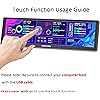
- 5. Compatible Devices: The touch function of this device only supports Windows systems, and does not work with macOS or other operating systems. To activate the touch feature, you must connect the device to your computer host using the included Type-C cable; the touch function will fail without this dedicated cable connection. Kindly note: The devices Type-C port solely supplies power and cannot transmit video signals. This monitor is compatible with Raspberry Pi 3B/3B+/4B and all Windows versions (WIN XP/WIN7/WIN8/WIN10).
- 6. If the touch function fails to operate, the defective cable is the common cause. Please get in touch with our customer support for replenishment shipment. Regarding product dimensions: The iPhone 17 Pro Max screen is 6.9 inches diagonally, while our screen is 8.8 inches. This Monitor is 1.9 inches larger diagonally than the iPhone 17 Pro Max.
Description
Each AlSHICHEN monitor is manufacturedbefore leaving the factory. All will undergo professional coloradjustment, which also makes the displaycolor of the screen infinitely close to theactual color, presenting a more realisticvisual effect at a high level, meeting yourprofessional vision. We stands behind all AlSHICHEN products. If any questions about any product, pleasefeel free to come to us. We pursue a portable technological lifestyle, hoping to make work and entertainment more effective and free. We are always exploring the path of innovation and improving user experience. We have a dedicated technical research team and our own factory, as well as a professional after-sales team, ready to provide you with professional technical assistance at any time. Yes, each monitor has undergone rigorous appearance, functionality, and practical testing, making our customers more at ease. Provide you more screen space, reduce frequent page switching and tackle tasks more eficiently. As a main screen for Mac mini, mini Pc, quickly build asmall portable workstation. The 8.8-inch long strip is the best size choice for electronic smart calendars. By connecting HDMI cables and USB to Type-C cables to your host, touch the electronic calendar to make your computer desktop cool. Resolution: 1920 × 480, It is the best choice for computer subscreen and industrial computer. Response time: 30s (Tr+Td); Refresh frequency: 60Hz; IPS full view,can be used as on-board display, chassis display, etc. Contrast: 1300:1 (Typ). Put a 8.8" TOUCHSCREEN in your bag when traveling or gathering. you can play games anytime and work remotely from anywhere and enjoy travelwhile keeping work flowing smoothly. What is the difference between this model and the upgraded 8.8-inch touch display model? The shell of this monitor is made of iron, which will have a good texture. But this monitor does not have a built-in stand. The 8.8-inch upgraded touch monitor has a plastic casing, but comes with an adjustable bracket built-in. The system has HDMI signal input, but the screen is always black. How to solve it? Some master controllers need to connect HDMI cable before powering on.If you see that the HDMI signal exists in the system display setting, and it is the correct 480x1920 resolution, try to connect HDMI cable first, and then connect power supply. How can I obtain free AIDA64 templates and software? Take a screenshot of your email and send it to the seller (sending text directly may not be visible to the seller) Why is the screen flashing? It is possible that the voltage power supply is insufficient. 1: Please try replacing the power supply with a higher voltage. 2: Please try unplugging the cable again. Why can't I use touch functionality on Windows? Please ensure that you have connected your computer host using the USB cable that comes with us. Please also set the 8.8-inch monitor as the main screen.
Brand: AISHICHEN
Screen Size: 8.8 inches
Resolution: 1920 x 480
Aspect Ratio: 169
Screen Surface Description: Matte
Aspect Ratio: 169
Screen Finish: Matte
Contrast Ratio: 8001
Refresh Rate: 60
Display Type: LCD
Display Technology: LCD
Viewing Angle: 170 degrees
Brightness: 600 candela_per_square_meter
Pixel Pitch: 0.23
Picture Quality Enhancement Technology: FHD
Screen Size: 8.8 inches
Item Dimensions D x W x H: 10"D x 2"W x 3"H
Resolution: 1920 x 480
Display Resolution Maximum: 1920 x 480
Native Resolution: 1920 x 480
Response Time: 3 milliseconds
Connectivity Technology: USB
Hardware Connectivity: HDMI
Additional Features: Touchscreen
Specific Uses For Product: Gaming
Color: Touch
Mounting Type: Wall Mount
Compatible Devices: Desktop
Warranty Type: Manufacturer Warranty - Other
Shape: Rectangular
Number of Height Positions: 10
Brand: AISHICHEN
Model Number: P-81124
Model Name: Small HDMI Computer
Warranty Description: other
Manufacturer: AISHICHEN
Unit Count: 1 Count
Total Number of HDMI Ports: 1
Total Usb Ports: 1
Number of Component Outputs: 1
Total USB 2.0 Ports: 1
Frequently asked questions
To initiate a return, please visit our Returns Center.
View our full returns policy here.
- Klarna Financing
- Affirm Pay in 4
- Affirm Financing
- Afterpay Financing
- Zip Pay in 4
- Financing through Apple Pay
- Financing through Google Pay
Learn more about financing & leasing here.
Similar Products


Top Amazon Reviews


