Search  for anything...

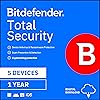
Bitdefender Total Security - 5 Devices | 1 year Subscription | PC/Mac | Activation Code by email

  • Based on 2,166 reviews
Condition: New
Checking for the best price...
$44.99 Why this price?
Save $45.00 was $89.99

Buy Now, Pay Later


As low as $11 / mo
  • – 4-month term
  • – No impact on credit to apply
  • – Instant approval decision
  • – Secure and straightforward checkout

Ready to go? Add this product to your cart and select a plan during checkout.

Payment plans are offered through our trusted finance partners Klarna, Affirm, Afterpay, Apple Pay, and PayTomorrow. No-credit-needed leasing options through Acima may also be available at checkout.

Learn more about financing & leasing here.

Selected Option

Free shipping on this product

This item is eligible for return within 30 days of receipt

To qualify for a full refund, items must be returned in their original, unused condition. If an item is returned in a used, damaged, or materially different state, you may be granted a partial refund.

To initiate a return, please visit our Returns Center.

View our full returns policy here.


Availability: Only 2 left in stock, order soon!
Fulfilled by Amazon

Arrives within 30 days
Order within 1 hour and 36 minutes
Available payment plans shown during checkout

Protection Plan Protect Your Purchase
Checking for protection plans...

Platform: Instant Digital Download


Edition: 5 Devices


Subscription Term Name: 1 Year


Features

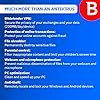
  • SPEED-OPTIMIZED, CROSS-PLATFORM PROTECTION: World-class antivirus security and cyber protection for Windows, Mac OS, iOS, and Android. Organize and keep your digital life safe from hackers.
  • ADVANCED THREAT DEFENSE: Your software is always up-to-date to defend against the latest attacks, and includes: complete real-time data protection, multi-layer malware, ransomware, cryptomining, phishing, fraud, and spam protection, and more.
  • SUPERIOR PRIVACY PROTECTION: including a dedicated safe online banking browser, microphone monitor, webcam protection, anti-tracker, file shredder, parental controls, privacy firewall, anti-theft protection, social network protection, and more.
  • TOP-TIER PERFORMANCE: Bitdefender technology provides near-zero impact on your computers hardware, including: Autopilot security advisor, auto-adaptive performance technology, game/movie/work modes, OneClick Optimizer, battery mode, and more

Description

Bitdefender Total Security – Complete Multi-Device Protection for Windows, macOS, iOS & AndroidBitdefender Total Security delivers comprehensive, real- time protection for all your devices—Windows, macOS, iOS, and Android. Powered by advanced cybersecurity technologies, it proactively detects and neutralizes the latest threats, including malware, ransomware, phishing, and network-based attacks.With automatic up-to-date updates and upgrades to the latest version, you’re always equipped with the latest innovations in digital security. Bitdefender’s multi-layered defense system prevents exploitation of system vulnerabilities, blocks brute-force attacks, and safeguards your personal data from botnets and other cyber threats.Key Features:Cross-Platform Protection: One solution for all your devices—PC, Mac, smartphone, and tablet.Advanced Threat Defense: Predicts, prevents, and neutralizes emerging threats in real time.Network Security: Blocks unauthorized access, brute-force attempts, and botnet attacks.Parental Controls (Windows): Manage screen time, filter content, and track your child’s location for peace of mind.Automatic Updates: Stay protected with the latest features and security enhancements.Whether you're working, banking, shopping, or streaming, Bitdefender Total Security ensures your digital life remains private, safe, and uninterrupted.System Requirements: OS Compatibility: Windows 7 SP1 / 8 / 8.1 / 10 / 11 · macOS 10.10+ · Android 6+ · iOS 13+ Hardware (Windows): Dual Core 1.6 GHz · 2 GB RAM · 2.5 GB free disk space Hardware (macOS): 1 GB free disk space Browser Support: IE 11+ (Windows), Safari, Chrome, Firefox Internet: Required for all devices to activate, and for software to stay up-to-date

Item Weight ‏ : ‎ 0.01 ounces


Date First Available ‏ : ‎ May 8, 2018


Manufacturer ‏ : ‎ Bitdefender


Best Sellers Rank: #12 in Software (See Top 100 in Software) #6 in Antivirus #6 in Internet Security Suites


#6 in Antivirus:


#6 in Internet Security Suites:


Customer Reviews: 4.3 4.3 out of 5 stars (2,682)


Frequently asked questions

If you place your order now, the estimated arrival date for this product is: within 30 days

Yes, absolutely! You may return this product for a full refund within 30 days of receiving it.

To initiate a return, please visit our Returns Center.

View our full returns policy here.

  • Klarna Financing
  • Affirm Pay in 4
  • Affirm Financing
  • Afterpay Financing
  • PayTomorrow Financing
  • Financing through Apple Pay
Leasing options through Acima may also be available during checkout.

Learn more about financing & leasing here.

Top Amazon Reviews


  • Best antivirus in 2022
Platform: Instant Digital Download Edition: 5 Devices Subscription Term Name: 1 Year
I been using this for 2 years and it has stopped over 21,000 incomming threats i have a business at home and this has protected me And my family and i havent had one issue with any device apple Or android and its absolute incredible it gives android phone security like apple meaning locking and wiping your phone from a distance remotely to even tracking which it which is amazing and u can ping your phone if it was stolen and the user who stole It would have no idea your tracking it which is amazing on top of that or can be used for a parent tracking a child or a woman tracking a jelous husband overall out standing product. The software overall is better then norton and other top leading virus protection services and yes it is based in russia but its paritally american owned and only operate in russia for user rights which are challenged in the united states The software dose give android and pc users more features but manily in the security area because that what they truly lack and because there also not apple which is monitored 24/7 Overall the geolocation tracking for any device u install it is worth it in my opinion!!! it even takes photo and record audio with out the user knowing soo u can catch the person who stole it and absolute take them Down which is amazing so they cant say im holding it for a friend or i found it Another great feature with this software they have hands down the best encryptions software i installed it on my girl friend mac pro and she had a issue and had to send it to apple support they called us asking us for the password to unlock the device because they had absolute no access to the device it self and couldnt even force it open which was impressive in my opinion so u know for a fact if u loose your device or exspensive computer u can turn it into a paper weight there absolute no way in hell anyone can download anything from those devices if its locked with this software Another thing i love about this software is that when its running on the background it dosnt change my computer performance what so ever and not even on my iphone or android it dosnt DRAIN BATTERY not like other security apps i used Hands down best software for 2022 And recommend by most ethical hackers and security engineers this the only way to stay protected online ... show more
Reviewed in the United States on March 9, 2022 by Christian m

  • BitDefender is top rated and minimally uses systems resources compared with others.
Platform: Instant Digital Download Edition: 5 Devices Subscription Term Name: 1 Year
Been using this paid version of bitdefender for several months now on android, apple, and windows computers. It works fine even on some older Win 10 computers to prevent malware and viruses. Easy to install but it will disable the free versions of these if you have those on a phone or computer. You will get frequent notifications to install downloaded components if you don't install all the products such as spam calling. ... show more
Reviewed in the United States on November 29, 2025 by DubG

  • BITDEFENDER 2022 - KEEPING BITDEFENDER (DROPPING KASPERSKY)
Platform: Instant Digital Download Edition: 5 Devices Subscription Term Name: 1 Year
I'VE DECIDED TO RETURN TO BITDEFENDER and DROP KASPERSKY (soon after the Russian Invasion of Ukraine). ** ROMANIA (BITDEFENDER) is our NATO ALLY ** Kaspersky is a threat and NOT allowed on government computers in the US, Europe, NATO etc -- All things being equal, it's not worth the risk of having a back door put in place by Russian Kaspersky (FYI the wife who co-ran the company is a big supporter of Putin and the invasion, let alone adding Mr Kaspersky to the list of heads of Russian companies falling off of balconies or being otherwise murdered for not cooperating with Russia). 2026 January - AMAZON has NOT sent me the "ACTIVATION CODE" (that Bitdefender requires) so, I'm getting a Refund and Buying my Bitdefender Total Security from an online Computer Hardware Software company instead. 2021 COMPARISON - MY INITIAL REVIEW (below) Before this check of current users, I had a basically favorable view of Bitdefender, since I had Bitdefender before Kaspersky. Unlike half of the Amazon users, I HAD NO PROBLEMS DOWNLOADING, INSTALLING OR TRANSFERRING TO MULTIPLE COMPUTERS. (I'm assuming those people made a mistake that they missed) BITDEFENDER FEATURES compared to my KASPERSKY, considering most technical reviewers have the two packages in a close tie for First place. I'm comparing this Bitdefender 2021 TOTAL SECURITY to my (Home User) Kaspersky 2021 This BITDEFENDER TOTAL SECURITY is installed on my both of my computers, my Primary Desktop (self build windows - with several years of additional software installed) and my backup computer which is six months old and relatively clean of software: Lenovo Think Station SFF Half Tower Desktop (with 2 drives). Both companies have three packages: AntiVirus, Internet or Total (with the most features) Multiple Device Licenses cover Computer, Tablet, Phone, for both Windows and Apple. Both Bitdefender and Kaspersky have an online Dashboard at their website that lists your Devices by their Computer Name. BD (BITDEFENDER) also has a PDF User Guide that you can download. Kaspersky has an online User Guide. COMPARING THE PACKAGES PRO and CON * PRO * BITDEFENDER HAS ADDITIONAL FEATURES that Kaspersky does not have (NA for Kaspersky). * PRO BITDEFENDER ONLY * COMPUTER VULNERABILITY SCAN = (Kaspersky NA) BD has POTENTIAL VULNERABILITY SCAN AND FIX of your computer will fix any or all issues that you choose. Fixes include Security Network settings and Operating System Updates. Several suggested security settings were made for my newer computer and I went ahead and had BD make the changes for me. It also downloaded and (approve) installed two critical windows updates. * PRO BITDEFENDER ONLY * RESCUE ENVIRONMENT = (Kaspersky NA) BD When we detect sophisticated threats, like rootkits, we reboot the computer in Rescue Mode for clean-up and restoration to keep your system safe. * PRO BITDEFENDER ONLY * PROFILES to make system adjustments (Work,Movie,Game,Public Wi-Fi,Battery Mode) = (Kaspersky NA) * PRO * WI-FI SECURITY ADVISOR (Bitdefender is more User Friendly) * PRO * PUBLIC WI-FI PROFILE for additional security (Kaspersky also) * PRO * SAFE PAY BROWSER (Kaspersky also) This protected browser screen can be used for Banking, Credit Card, Financial, Taxes and Medical / Govt ID transactions. Most Antivirus or Firewall software also include their own Internet Browser. Personally, I NEVER use my PHONE for Bank, Cards or Financial. I already have a SEPARATE PASSWORD MANAGER and VPN PROVIDER for all of my computers and phone. Check the latest internet reviews of the computer technical websites for the last two years for this alternate software. * ALTERNATE * BETTER PASSWORD Manager (examples) Bitwarden, Keeper, LastPass, Roboform, Dashlane -- Check the internet reviews for the BEST Password Managers. For me. it's better to buy a better and separate Password Manager, so you're not locked into an AntiVirus Internet package for life just for your old password list. THIS IS WHY I USE A SEPARATE PASSWORD MANAGER that is NOT part of my Antivirus Security package. PASSWORD MANAGER (Kaspersky also) Included, free Password Manager is limited to a small number of passwords SEPARATE PURCHASE (BD and Kaspersky) If you're sure you're staying with Bitdefender for life, then go ahead and use their Password Manager, especially if you're creating new, complex, strong (generated) passwords. The Import and export Bitdefender Wallet uses only the Bitdefender database format. Later on, you probably will NOT be able to transfer your Bitdefender Passwords to other Password Managers. * ALTERNATE * BETTER VPN (examples) Nord VPN, Express VPN VPN LIMITED DAILY MAXIMUM (Kaspersky also) SEPARATE PURCHASE OF REGULAR UNLIMITED VPN (BD and Kaspersky) Kaspersky Free Limited Daily VPN MAX OF 300 MB total (100 more than BD) BD's Free Limited Daily VPN MAX OF 200 MB total runs out too fast. SEPARATE VPN PROVIDER with unlimited use is better for me, as I save download online pages as PDF as CYA proof of all transactions. Any Daily Limit VPN like this would be used up immediately. For PUBLIC WI-FI, I turn on my VPN for my phone or computer and VERIFY that the VPN IP address is now being used (like a Chicago or some other close location). Look for VPN website page "What is my IP Address?" * PRO * RANSOMWARE PROTECTION (Kaspersky also) is a recent addition the last few years. * PRO * RANSOMWARE PROTECTION (for both BUSINESS NETWORKS and HOME users) SEE TECHRADAR 2019 TEST ARTICLE = Bitdefender Ransomware Protection review * ALTERNATE * SETUP YOUR OWN COMPUTER BACKUP SYSTEM = DRIVE IMAGE BACKUP RESTORE (for HOME or BUSINESS users) -- For my home Windows computer, I'm using PARAGON HARD DISK MANAGER ADVANCED (for HOME users) -- From PARAGON-SOFTWARE_c_o_m (Paragon Technologie GmbH from Germany). It will make a disk image of your entire drive that is hardware independent and can be restored to any other hardware computer, as long as the receiving hard drive is large enough. This complete restore includes your operating system, data and all other software installed. You just need an extra internal hard drive that is large enough. PARAGON SOFTWARE is for both home and business users. * PRO * PARENTAL CONTROL (Kaspersky also) * PRO * PHONE APP (Kaspersky also) Bitdefender has some BAD reviews for their PHONE APP at Google Play Store for Android. Until now, I've been using Avast Free Antivirus just for my phone. Since my BD license for Total Security is 5 devices, I'm installing it on my phone. * CON * REMOTE LOCATE - ONLY WORKS IF THE LAPTOP OR COMPUTER IS WI-FI CONNECTED TO THE INTERNET. If your computer is hard-wired to the internet or is using a VPN, the IP Address is WORTHLESS in locating your computer. Your computer's IP address from your internet service provider is a temporary IP each time you logon. Your IP address is supplied from a pool of internet addresses for general public customers. The only permanent, fixed IP addresses are special paid for businesses. When I tested BD's REMOTE LOCATE for my IP, it showed my hard-wired computer as FIVE MILES AWAY from my location ... and when I turned on my computer's VPN (to use the VPN's IP instead) then BD said my computer was located 400 MILES AWAY in ANOTHER STATE. ** FOR AMAZON PURCHASE TURN OFF Bitdefender AUTO-RENEWAL BEFORE you enter YOUR NEW PURCHASED AMAZON activation code Bitdefender AUTO RENEWAL is at Bitdefender's Price with your payment going to some Bitdefender Third Party website) Bitdefender SUPPORT HELP (search) Bitdefender SUBSCRIPTION AUTO-RENEWAL TURN ON OFF TURN OFF AUTO-RENEWAL (steps below) Go to BITDEFENDER CENTRAL WEBSITE Go to MY SUBSCRIPTIONS on the sidebar menu MY PAYMENTS / VIEW DETAILS button next to the subscription Click on MANAGE your subscription renewal options To stop the automatic renewal Choose CANCEL SUBSCRIPTION ** RENEW BITDEFENDER at AMAZON'S PRICE (1) BUY BITDEFENDER SUBSCRIPTION on AMAZON = BITDEFENDER ACTIVATION CODE BY EMAIL (2) Go to AMAZON'S ORDER EMAIL = Your Amazon.com order of Bitdefender ORDER DETAILS = Activation Code: XXX Activation Code: XXX is what you would KEYIN UPDATE on BITDEFENDER CENTRAL website HOW TO REDEEM THIS ITEM = This has all of the steps to follow at Bitdefender Central website (3) Go to BITDEFENDER CENTRAL WEBSITE MY SUBSCRIPTIONS / upper right part of the window = CLICK ACTIVATE WITH CODE IF THIS IS BEFORE the EXPIRATION of your current Bitdefender = Select EXTEND CURRENT SUBSCRIPTION _ ** FYI AFTER INSTALL ** RIGHT CLICK on any file(s) or folder(s) shows Bitdefender actions for Scan (or) File Shredder DASHBOARD (TOP ROW) = AUTO PILOT Suggestions (Click to check further) _ ** CHANGES TO MAKE AFTER INSTALL ** PROTECTION / RANSOMWARE REMEDIATION = TURN ON VPN = Don't Turn On or Install if you ALREADY HAVE A SEPARATE ONE on your computer = PRIVACY / VPN PASSWORD MANAGER = Don't Turn On or Install if you ALREADY HAVE A SEPARATE ONE on your computer = PRIVACY / PASSWORD MANAGER PASSWORD WALLET (for Password Manager) = Don't install as Browser extension --- if you are NOT using BD's Password Manager and are already using another separate Password Manager OPTIONAL = COMPLAINTS BY USERS for ANTI-TRACKER = Don't install as Browser extension = PRIVACY / ANTI-TRACKER Turn Off OPTIONAL = SCHEDULE SCANS = PROTECTION / AntiVirus / Scans / Manage Scans = schedule WEEKLY Full Scan, etc UTILITIES = PROFILES DEFAULT = LEAVE TURNED OFF OPTIONAL = SETTINGS / GENERAL = SECURITY WIDGET = DEFAULT TURNED OFF OPTIONAL = SETTINGS / GENERAL = SPECIAL OFFER notifications MAY BE TURNED OFF or LEFT ON OPTIONAL = SETTINGS / GENERAL = RECOMMENDATION notifications = DEFAULT TURNED ON _ ** PERSONALLY FOR MYSELF ** SKIP UTILITIES = ONE CLICK OPTIMIZER (SKIP IGNORE) = PERSONALLY, I WOULD NOT USE THE COMPUTER OPTIMIZER SKIP UTILITIES = PROFILES (TEST these out or LEAVE TURNED OFF) If you decide to not use Profiles, a default profile called Standard is enabled and it brings no optimization to your system. PROFILES for Bitdefender: Work, Movie, Game, Public Wi-Fi, Battery Mode _ * FYI * SCAN DEFAULT ACTION = PROTECTION / AntiVirus / Advanced / Threat Actions = TAKE PROPER ACTION WHERE Infected Files are Disinfected / then Quarantined WHERE Suspicious files are Quarantined WHERE Malicious files are Deleted ** OR INSTEAD of Take Proper Action, you can select either Move to Quarantine (or) Deny Access _ * FYI * PROTECTION / VULNERABILITY scan of your computer Scanning your system for vulnerabilities requires an active internet connection. Operating System Security Critical Windows updates Weak Windows accounts Browser Security Application updates Network and Credentials Wi-Fi networks and routers _ ... show more
Reviewed in the United States on June 27, 2021 by DAVID STRONG

  • Good Virus Software.
Platform: Instant Digital Download Edition: 5 Devices Subscription Term Name: 1 Year
I have used Bitdefender for years. Best prices usually on Amazon vs buying from Bitdefender. Plus, this subscription covers up to 5 computers.
Reviewed in the United States on March 8, 2026 by Stanley Richardson

Can't find a product?

Find it on Amazon first, then paste the link below.
Checking for best price...