Search  for anything...

Silhouette Cameo 5 12 inch Vinyl Cutting Machine with Studio Software, Electric Tool and ES Mat Compatible, SNA and IPT, 50 db, Marble Edition

  • Based on 748 reviews
Condition: Used - Like New
Checking for inventory...

Notify me when this product is back in stock

$247.49 Why this price?
Save $52.50 was $299.99

Buy Now, Pay Later


As low as $41.25 / mo
  • – 6-month term
  • – No impact on credit to apply
  • – Instant approval decision
  • – Secure and straightforward checkout

Payment plans are offered through our trusted finance partners Klarna, Affirm, Afterpay, Zip, Apple Pay, and Google Pay. No-credit-needed leasing options through Acima may also be available at checkout.

Learn more about financing & leasing here.

Selected Option

Free shipping on this product

This item is eligible for return within 30 days of receipt

To qualify for a full refund, items must be returned in their original, unused condition. If an item is returned in a used, damaged, or materially different state, you may be granted a partial refund.

To initiate a return, please visit our Returns Center.

View our full returns policy here.


Availability: Unavailable
Fulfilled by Amazon
Available payment plans shown during checkout

Color: Bianco Carrara


Features

  • The new Silhouette Cameo 5 12 inch vinyl cutting machine/plotter is a full redesign of the CAMEO 12 inch wide cutter. Now quieter and more precise than ever before.
  • IPT Technology:optimizes cut orders, providing a tension-free cutting experience for all materials. Multi-layered cuts and sharp angles are achieved without tearing or rounding corners, elevating your designs to a professional level.
  • New Tool Options: New electric tool options expand the creative possibilites in addition to cutting and sketching
  • SNA: Silhouette New Architecture means precision, more precise cuts on a new belt driven chassis.
  • 12 inch cutting machine, 1 year limited warranty

Description

Cameo 5

Brand: Silhouette America


Material: crystal & limpid tempered glass


Color: Bianco Carrara


Product Dimensions: 25"D x 11"W x 9"H


Active Surface Area: 288 square inches


Brand Name: Silhouette America


Manufacturer: Silhouette America


UPC: 819177026788


Part Number: SILH-CAMEO-5-BC-4T


Model: SILH-CAMEO-5-BC-4T


Included Components: machine


Operation Mode: Automatic


Print media: Unknown


Item Dimensions D x W x H: 25"D x 11"W x 9"H


Active Surface Area: 288 square inches


Item Weight: 7.59 Kilograms


Material Type: crystal & limpid tempered glass


Color: Bianco Carrara


Frequently asked questions

This product is currently out of stock. Please check back later for shipping info.

Yes, absolutely! You may return this product for a full refund within 30 days of receiving it.

To initiate a return, please visit our Returns Center.

View our full returns policy here.

  • Klarna Financing
  • Affirm Pay in 4
  • Affirm Financing
  • Afterpay Financing
  • Zip Pay in 4
  • Financing through Apple Pay
  • Financing through Google Pay
Leasing options through Acima may also be available during checkout.

Learn more about financing & leasing here.

Top Amazon Reviews


  • Fantastic Cutting Machine Fantastic Cutting Machine
This is my first cutting machine and I absolutely love it. After doing a lot of research, I decided to go with the Cameo 5 over the Cricut Maker 3 for various reasons. The machine performs and cuts well, is very sturdy, and sleek looking. I love the new power tool feature and the tools they’re making for them. The software is awesome and I can do almost anything I want with it. It also isn’t very loud; my husband is a light sleeper and I have used it at my desk while he was sleeping and it didn’t wake him up. It sounds like it’s computing rather than cutting lol. My only con is the auto blade. I love the auto blade holder but hate how fast the blade dulls and how I have to throw it out once it’s dull and buy a whole new blade and holder (It’s expensive considering it dulls pretty fast after a handful of uses.) I really wish Silhouette would make an auto blade holder you could change the blade out on like you can with Cricut. Yes, I know of the CB09 and other Roland blade like alternatives, and I have bought both but it takes forever messing around with the blade depth and different settings and a ton of test material before you find the right setting and as soon as you change the blade or material I have to mess with it all over again because it doesn’t sit in there the same way it did before I changed it. Plus the adapters for the blades are a thin plastic that’s already wearing out from opening it up and closing it so many times. All in all I give this machine an 8 out of 10. It really is my dream machine but the blade situation really ticks me off. ... show more
Reviewed in the United States on January 23, 2024 Reviewed in the United States on January 23, 2024 by Victoria Salcido

  • My ears have been spared! An Improvement to the Cameo4 but some quirks
I bought a Cameo 4 not too long ago for sale and it has been a reliable machine, but I had 1 main issue with it. It. was. loud. I was not aware of the Cameo 5 until recently. When I was told the Cameo 5 was going to be quieter, I rushed to buy this. What a godsend to finally hear my thoughts, as the machine no longer screams with the voices of the tortured souls of the dammed. When I say it is quieter, it is not silent. However, it is a MASSIVE improvement from the past machine. The overall setup was a little bit more complex than the cameo 4, I had to watch a few tutorials to get situated. The best resource I could find was "How to Setup Silhouette CAMEO 5: Start to Finish (And Ready for First Cut) by Silohuette School" on youtube. She rambles a bit, but ultimately does a comprehensive breakdown of your machine setup. It is a little more barebones in terms of items being provided with the machine. It does not come with a USB cable and you will need to supply your own. It will rely on Bluetooth but if you want to use a more reliable connection be sure to buy a USB 2.0 USB A Male to USB 2.0 Male cable. I am still exploring some of the features, but so far it is proving to be a great machine. There is still a learning curve to use this machine. You will need to learn via online resources (which there are plenty of) how to use it for your projects, so I would not say this is super beginner-friendly, but in my eyes, it is a reliable machine you will not regret learning how to use. ... show more
Reviewed in the United States on February 8, 2024 by Eevee

  • Best Machine for Stickers
Color: White
I needed a machine that would allow me to do kiss cut stickers and just more over all control in the hands of the user, the Silhouette Cameo 5 delivers that. In started with a Cricut Maker 3 it doesn't even offer kiss cut settings and the software gives only limited cut control to the user. I tried numerous hacks but I was never able to get kiss cut out of it. For stickers the Cameo five default settings are for kiss cut and I was able to easily adjust the settings for die cut and the need to cut through a second layer of clear laminate. I also like the software, which has the same basic told as the illustration software I use. I was able to draw a free form cut path and a rectangle with rounded corners cut path. My one issue with the software is using the print to cut set up, it shows me to use more of the sticker sheet then Cricut but not so if it. I'm experimenting with creating print layouts that use the entire sheet and creating the cut paths myself. The machine is quieter than the Cricut Maker 3. I'm not impressed with the cut mat. It got very dirty, very quickly. I went to shabby l clean it the same way I cleaned my cricut mats, a little soap and water and the adhesive came right off. I will soon be investing in the electro static cut mat. It will be with it to have a consistently clean cut surface that doesn't damage it bend my materials. Bottom line, the Cameo 5 is more complicated but the better choice for the artist and creator that is doing their own thing. ... show more
Reviewed in the United States on December 29, 2023 by Kelly Hulse

  • Happy with my Cameo 5 Happy with my Cameo 5
I've had my cameo 5 for a little over 6 months, so wanted to write a review after having time to use it. As background, I was a longtime Cricut user before moving to Silhouette. I started with a Portrait 3 and loved it (you can read my Amazon review), but wanted a larger size, so got the cameo 5. I was hesitant given the negative reviews, but I knew I could return it if it was defective. To my pleasant surprise, it has worked very well. I had to calibrate it to get print and cut to be more accurate, but as you can see from my picture, print and cut looks amazing (the stickers were cut a different times). Even the preset autoblade functions have been relatively accurate for me, with some minor adjustments depending on the material. The one negative thing I have to say is I was unable to do matless cutting like I did on my Portrait 3 (my favorite function!). I would usually dock a star, but I ended up getting the electrostatic mat, which is such a game changer and even better than matless cutting because I don't have the roller lines anymore since I move them to the furthest edges. I've always hated sticky mats, which is why I left cricut in the first place, so am happy to be free of them thanks to Silhouette. I want to add I'm in no way affiliated with silhouette, I just genuinely love their products that I've bought. I know the company receives negative reviews due to lack of customer service, dissatisfaction with the machines during the initial roll out, and changes to the design store (I tried today and my synching issues finally seem to be resolved, yay!), but I hope others will still consider silhouette because their products are innovative, reasonably priced compared to other cutting machines on the market, and really seem to try to address the needs and wants of their customers. My review may change if my machine rollers breaks, but for now I'm a happy and loyal customer ;) (knock on wood). Lastly, to Silhouette America, please work on the issues customers complain about instead of ignoring them or you will one day find people unwilling to give your products a chance. ... show more
Reviewed in the United States on June 14, 2025 Reviewed in the United States on June 14, 2025 by Mama Choi

  • No worky No worky
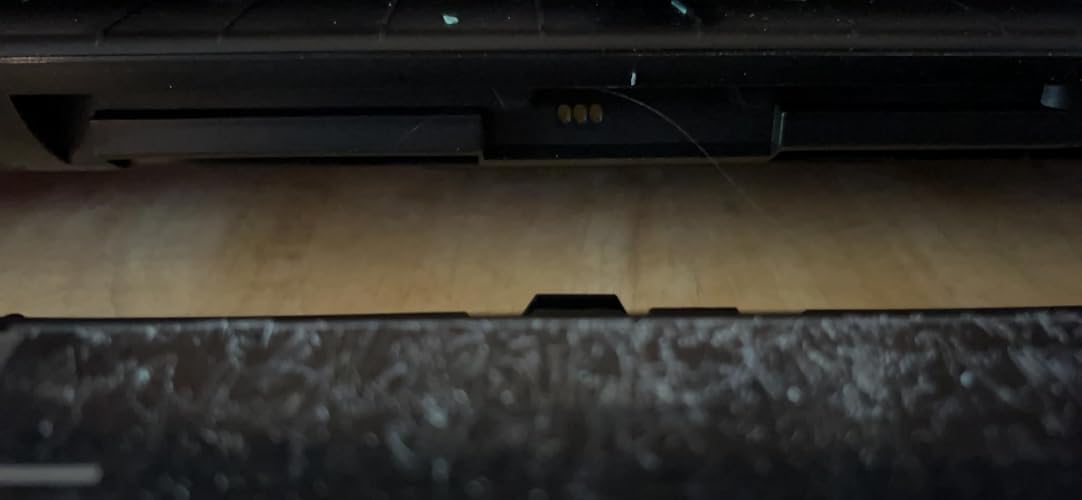
I hope silhouette improves their design release process, because this has a lot of potential. The ES mat was the feature that convinced me to spend nearly double to buy a silhouette 5, rather than a used 4. Let me tell you, I had so many issues with it, by the time I gave up, I'd solved many... so here are some tricks I learned: (because customer service was garbage, and it included no instructions.) 1. If your silhouette is failing to hold a connection to bluetooth- it links but then drops... manually connect it to your computer and download the latest firmware. 2. There is a secret panel on the front, bottom of the cameo. You need to remove it to connect the mat. (Picture included.) 3. If the cameo will not pull the mat in, you need the rollers lined up on the tape on the sides. The rollers will have 12" between them, so- the vinyl cover and 12 x 12 paper will fit perfectly. YOU MUST NEUROTICALLY ADJUST IT TO BE SURE IT ISN'T SLIGHTLY ASKEW. If it is twisted, it will fail to feed during the print and cause the WHOLE WORLD to crumble. 4. The vinyl mat is only 12 x 12. Be sure that you PERFECTLY put your paper on it, and you decide what part of the ES mat you want to protect. If you do not get the file to start exactly at the corner of the mat, be sure you will cut the ES surface. Further, if the blade squirms slightly off the paper, it may snag the edge and bring the paper askew. If you did not choose to protect that part of the mat, and the rollers are failing because the paper is askew, see#3. Also, see the picture of the damage. 5. There is a white line on the ES mat. It seems like a good place to start, but realize, you'll have to leave the top part unprotected because the vinyl is only so big. There's nothing said about this white line, so do what you want with it. (See picture of instance where the blade got stuck behind the paper and cut a detailed design onto the es mat.) 6. After you have resolved all of this, you can make a cut like the one above! ... show more
Reviewed in the United States on April 15, 2024 Reviewed in the United States on April 15, 2024 by Runs; with Scissors

  • Great item with a bit of a learning curve
Color: White
Not exactly a cutter for beginners, but after you go through a few instruction videos you get a very solid cutter with lots of possible features and add-ons. I mostly just use it to cut out little stickers but it has the possibility to do so much more. The actual cutter is easy to set up. Software is slightly buggy but that could also be my messed up computer so im not docking points for that. All in all. This is an item id research first to make sure it fits what youre wanting to do. But if it is? Deffinately go with the Cameo 5!!! ... show more
Reviewed in the United States on October 17, 2025 by Alex Foxe

  • Just buy it!! 😍✨ Just buy it!! 😍✨
Color: Bianco Carrara
This is my second cutting plotter machine, And I definitely prefer Cameo over Cricut. Functionality 10/10, excellent quality, clean and precise cuts with the proper settings, Worth the price. Its software isn't as intuitive as Cricut's, but it allows you to do more things.
Reviewed in the United States on January 27, 2026 Reviewed in the United States on January 27, 2026 by Eunice Pedroza

  • Great cutting machine
The Cameo 5 works great. It cuts very clean and is easy to use. Perfect for vinyl and craft projects. Very happy with this purchase
Reviewed in the United States on March 14, 2026 by Stefany

Can't find a product?

Find it on Amazon first, then paste the link below.
Checking for inventory...