Search  for anything...
PLT

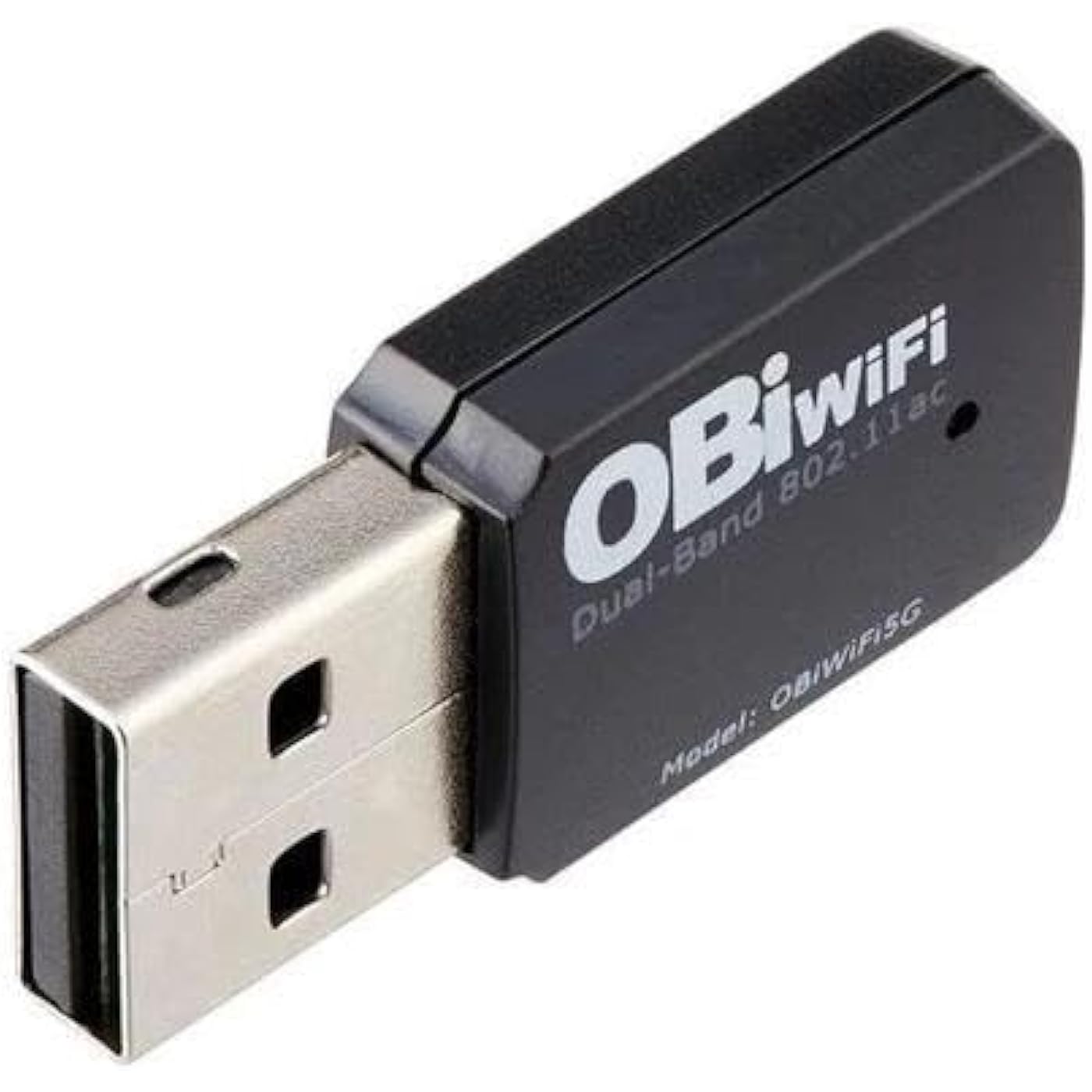
POLY Plantronics and Polycom OBiWiFi5G USB Wi-Fi Accessory for VoIP Adapters, Model 1517-49585-001
  • Based on 638 reviews
Condition: New
Checking for the best price...
$58.99 Why this price?
Save $1.00 was $59.99

Buy Now, Pay Later


As low as $9.83 / mo
  • – 6-month term
  • – No impact on credit to apply
  • – Instant approval decision
  • – Secure and straightforward checkout

Ready to go? Add this product to your cart and select a plan during checkout.

Payment plans are offered through our trusted finance partners Klarna, Affirm, Afterpay, Zip, Apple Pay, and Google Pay. No-credit-needed leasing options through Acima may also be available at checkout.

Learn more about financing & leasing here.

Free shipping on this product

30-day refund/replacement

To qualify for a full refund, items must be returned in their original, unused condition. If an item is returned in a used, damaged, or materially different state, you may be granted a partial refund.

To initiate a return, please visit our Returns Center.

View our full returns policy here.


Availability: Only 3 left in stock, order soon!
Fulfilled by DirectSupplyClub

Arrives Sunday, Sep 13
Order within 10 hours and 47 minutes
Available payment plans shown during checkout

Protection Plan Protect Your Purchase
Checking for protection plans...

Features

  • USB WI-FI ACCESSORY FOR VOIP ADAPTERS
  • Simply transform your VoIP adapter or phone to connect to the internet
  • Workplace freedom by enabling Wi-Fi you can place your device anywhere within the range of your Wi-Fi network
  • Wireless data encryption provides a high level of security

Description

Wireless adapter allows a USB-equipped VoIP adapter or VVX phone to connect to the Internet over a Wi-Fi network. With Wi-Fi adapter, you have the freedom to place your VVX phones or VoIP adapters anywhere within range of your Wi-Fi network.

Brand: PLT


Hardware Interface: USB


Color: black


Compatible Devices: Desktop, Laptop


Data Link Protocol: USB


Item Weight: 1.12 ounces


Unit Count: 1 Count


UPC:


Compatible Operating System Family: Windows


Global Trade Identification Number: 88


Brand: PLT


Unit Count: 1 Count


UPC: 196188225608 610807882688


Global Trade Identification Number: 88


Number of Items: 1


Manufacturer: Poly


Built-In Media: Wireless-AC USB Adapter


Model Number: 1517-49585-001


Mfr Part Number: 1517-49585-001


Warranty Description: 1 Year


Hardware Interface: USB


Compatible Devices: Desktop, Laptop


Data Link Protocol: USB


Compatible Operating System Family: Windows


Item Weight: 1.12 ounces


Color: black


Frequently asked questions

If you place your order now, the estimated arrival date for this product is: Sunday, Sep 13

Yes, absolutely! You may return this product for a full refund within 30 days of receiving it.

To initiate a return, please visit our Returns Center.

View our full returns policy here.

  • Klarna Financing
  • Affirm Pay in 4
  • Affirm Financing
  • Afterpay Financing
  • Zip Pay in 4
  • Financing through Apple Pay
  • Financing through Google Pay
Leasing options through Acima may also be available during checkout.

Learn more about financing & leasing here.

Top Amazon Reviews


  • I Wish I Had Found this Device Years Ago!
I discovered this OBiWiFi5G USB dongle while looking for wireless connectivity options for my OBi200 analog telephone adapter (ATA). I've been using Google Voice for about 15 years and began using the OBi200 with Google Voice in 2018. The OBi200 needed to be tethered to my router with an Ethernet cable and, unfortunately, this also meant that my analog cordless telephone base station needed to be close to the OBi200 because of the analog telephone cord connection. The OBiWiFi5G enabled me to relocate the OBi200 to a more convenient location with my analog cordless telephone base station. Installation and setup of the OBiWiFi5G USB dongle was a snap. The ability to configure the OBiWiFi5G USB dongle on the 5GHz radio band was particularly useful as I strive to phase out devices on my home WiFi network using the 2.4GHz band. The OBiWiFi5G USB dongle plugs directly into the USB port on the back of the OBi200. The OBi200 recognizes the dongle immediately. Because my OBi200 was already connected to my home network via Ethernet cable, I was able to log into the OBi200 via a web browser and bring up the Polycom-branded configuration screen. The OBiWiFi configuration option is the second choice down the left side of the web page. After entering my WiFi configuration options and rebooting my OBi200, I was able to unplug the Ethernet cable and voila, the OBi200 was now connected via WiFi. One thing of note though... The middle green LED (there are three) on the OBi200 will no longer illuminate when connected via WiFi. This is because the middle LED shows Ethernet connectivity only. Once the Ethernet cable is unplugged, only the left and right green LEDs will illuminate when the OBi200 is functioning properly. The OBiWiFi5G USB dongle has a tiny blue LED on it that flickers to show network activity. The blue circle in the uploaded picture shows the OBiWiFi5G USB dongle in action on my OBi200 next to the analog cordless telephone base station. This is definitely a legacy implementation as Google Voice can no longer be configured with OBi analog telephone adapters. Google has not committed to this arrangement for any length of time, but I continue to enjoy free home VoIP telephone service for the cost of my Internet connection until Google drops this arrangement. Thank you for reading my remarks! ... show more
Reviewed in the United States on August 7, 2025 by Lisa A. Compton

  • Easy to install. Works great!
Works like a charm. It's very easy to install. Once it's plugged into the USB slot of your phone, the phone will reboot. You choose your Wi-Fi network from the phone screen, enter your password and submit. The phone will reboot again. Once it's back online, the Wi-Fi symbol will show on the phone screen. And that's all there is to it. ... show more
Reviewed in the United States on January 22, 2026 by Dutchie

  • Read carefully, it works, if not it's your setup, don't expect blue light
Read carefully, It works. You may have to update phones firmware. I was using polycom vvx501. You can do firmware updates by 1 connecting to phone's ip address from your computer browser. Or 2. Setting up in the phone to reach out to polycom. 1st way is much better. NOTE: Pluging this into a USB port of a computer will not help. It's not a USB dive or a part that can be updated. It may not even blink blue . That does not mean it's bad blur light turns on when properly connected to a phone USB port and wife ID setup . This device is made to be attached to a phone , phone will detect it. I will scan the wifi networks and just give the wifi password. Very simple setup. You will have problems if you don't know how to deal with the phone menus. Hope this helps. ... show more
Reviewed in the United States on March 21, 2021 by Hassan

  • WiFi Dongle/Adaptor for Poly Phone -- Works Great!
Used as a WiFi adapter on a Poly 350 phone (which unfortunately didn't have built in WiFi) and it worked flawlessly. Set up is not overly intuitive, but I found a great YouTube video(s) that walked through 1) initial set up after plugging in USB, and then 2) how to actually attached to your WiFi network (selecting a capital letter is tricky!). Good price point for this device... ... show more
Reviewed in the United States on September 17, 2025 by IndyCM

  • Nope
Waste of time. Did not work at all.
Reviewed in the United States on March 29, 2026 by Yari Griffiths

  • Good option when wired is not an option...
We just switched over to a new phone system using Polycom desk phones and having this wireless option is going to work well for us. Currently, we're only testing with this module and it's been mostly reliable. Voice quality has been good. Easy to install... We have had to restart the phone a few times when it lost connection to Wi-Fi, but that's infrequent enough to not be an issue so far. We will be using these a couple months from now with employees working out of home offices where wired network isn't an option. ... show more
Reviewed in the United States on March 31, 2021 by Jack

  • Calls are clear on both end and use less cords to the OBI box.
I wish I got this adapter when I purchase my OBI202. I've followed the instructions given by the OBI website and other customer reviews here, but nothing work. So I go a different way. 1: Make sure your OBI box is connected to the internet with an ethernet cord to your network. 2: Use the phone you have connected to the OBI box and dial ***1 to listen to the IP address given to you. 3: On a computer or device connected to your network, go to the IP address you got from step 2 and login to your OBI webpage. The default username and password to login is admin. If you changed your login password then you should go to obitalk.com and login to your account to retrieve the password you set up for the device you are trying to connect to. If you cannot get into the webpage then dial***0 and enter option 30 followed by the pound sign. Press 1 to change the value and press 1 followed by the pound sign to enable. Press 1 again to confirm and save. 4: Select OBIWiFi and choose the scan WiFi option. The box will then scan for available WiFi connections. You will then have to follow the instructions given to you after selecting your Wi-Fi. If you follow the above steps correctly then I believe you will be able to get it connected right away. There is no need to contact support if you do follow the steps above. This adapter help me remove an extra cord out of the way. ... show more
Reviewed in the United States on June 10, 2022 by Cheng Xiong

  • Obi WiFi
With the Obi 1022 works very well.
Reviewed in the United States on March 15, 2026 by Jorge J. Serralles

Can't find a product?

Find it on Amazon first, then paste the link below.
Checking for best price...