Search  for anything...
msi

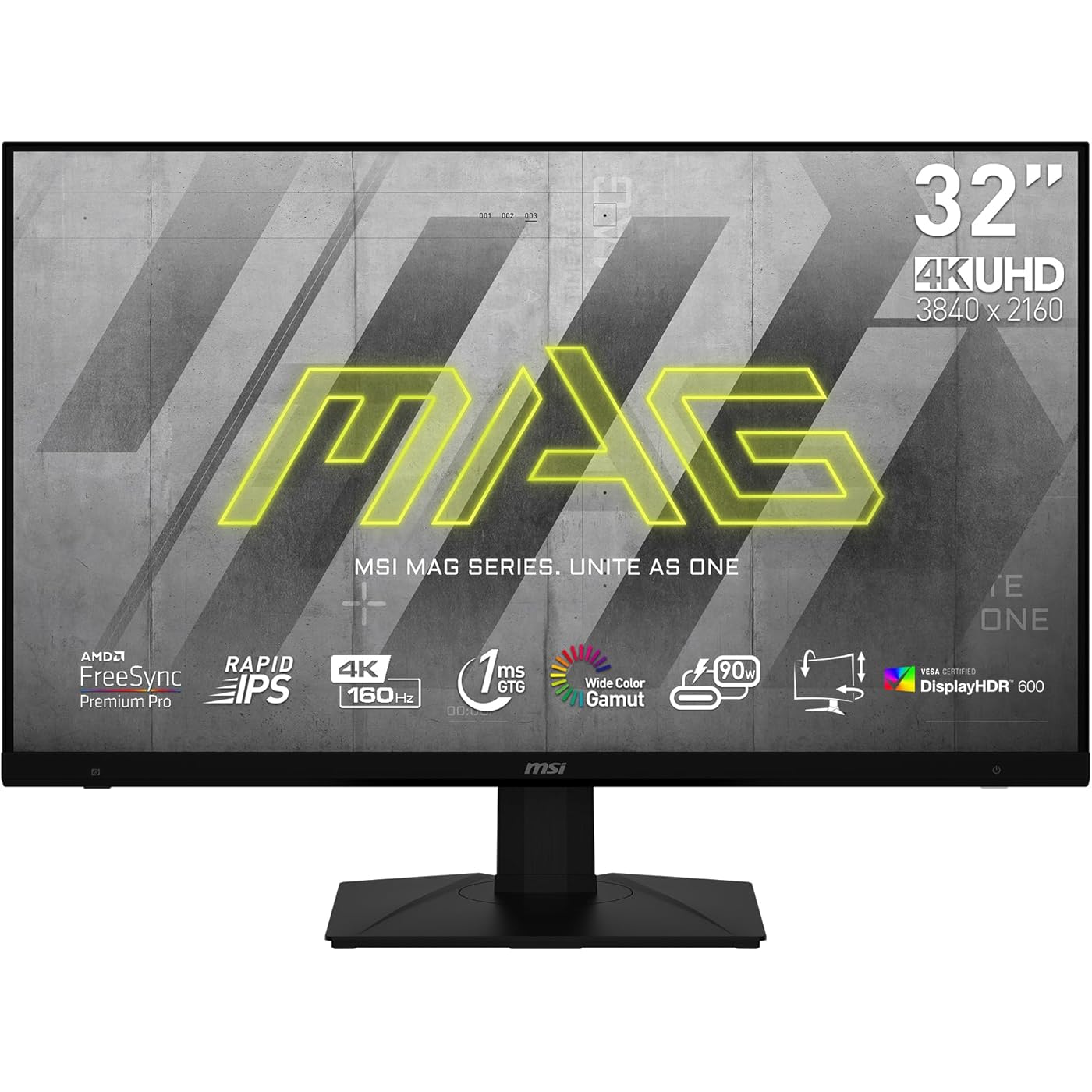
MSI MAG323UPF, 32" 3840 x 2160 (UHD), 4K Rapid IPS Gaming Monitor, 1 ms, 160Hz, FreeSync Premium, HDR600, FreeSync Premium Pro, HDMI, DisplayPort, Tilt, Swivel, Pivot and Height Adjustable.
  • Based on 416 reviews
Condition: Used - Like New
Checking for inventory...

Notify me when this product is back in stock

$554.92 Why this price?

Buy Now, Pay Later


As low as / mo
  • – Up to 36-month term if approved
  • – No impact on credit to apply
  • – Instant approval decision
  • – Secure and straightforward checkout

Payment plans are offered through our trusted finance partners Klarna, Affirm, Afterpay, Apple Pay, and PayTomorrow. No-credit-needed leasing options through Acima may also be available at checkout.

Learn more about financing & leasing here.

Selected Option

Free shipping on this product

This item is eligible for return within 30 days of receipt

To qualify for a full refund, items must be returned in their original, unused condition. If an item is returned in a used, damaged, or materially different state, you may be granted a partial refund.

To initiate a return, please visit our Returns Center.

View our full returns policy here.


Availability: Unavailable
Fulfilled by Amazon
Available payment plans shown during checkout

Style: MAG 323UPF (New Model)


Features

  • 32" Rapid IPS 3840 x 2160 (UHD)
  • 160Hz refresh rate - Display without after image.
  • 1ms response time helps eliminate screen tearing and choppy frame rates
  • Wide view angle - 178 visible.
  • Adaptive sync - keep screen tearing away from your monitor.

Description

MSI’s MAG323UPF gaming monitor delivers you an elevated gaming experience. The monitor comes equipped with a 31.5" Rapid IPS display that supports up to 3840 x 2160 (UHD) resolution. The MAG323UPF can operate at up to a 160Hz refresh rate and 1ms (GTG) response time. The MAG323UPF is FreeSync Premium Pro compatible and allows for a more seamless experience when operating at high performance modes or when you’re multitasking. With 1x DP and 2x HDMI ports, you can connect any way you want to play.

Brand: msi


Screen Size: 31.5 Inches


Resolution: 4K UHD 2160p


Aspect Ratio: 169


Screen Surface Description: Glossy


Standing screen display size: ‎31.5 Inches


Screen Resolution: ‎3840x2160


Max Screen Resolution: ‎3840 x 2160


Brand: ‎msi


Series: ‎MAG323UPF


Item model number: ‎MAG323UPF


Item Weight: ‎15 pounds


Product Dimensions: ‎9.8 x 28 x 20 inches


Item Dimensions LxWxH: ‎9.8 x 28 x 20 inches


Color: ‎Black


Voltage: ‎15


Manufacturer: ‎MSI


Date First Available: ‎October 4, 2023


Frequently asked questions

This product is currently out of stock. Please check back later for shipping info.

Yes, absolutely! You may return this product for a full refund within 30 days of receiving it.

To initiate a return, please visit our Returns Center.

View our full returns policy here.

  • Klarna Financing
  • Affirm Pay in 4
  • Affirm Financing
  • Afterpay Financing
  • PayTomorrow Financing
  • Financing through Apple Pay
Leasing options through Acima may also be available during checkout.

Learn more about financing & leasing here.

Top Amazon Reviews


  • Very Good Monitor for the Price!
Style: MAG 323UPF (New Model)
I like the MAG323UPF monitor, very nice refresh rate and resolution, the colors and image are great, my previous monitor was the benq pd3200u ("with good color accuracy") , the monitor menu is very good (I prefer not to use the software), HDR works nice although I don't use it much. Only have a few negatives, it takes 6-7 seconds for the screen to turn on from sleep, accumulates dust fast, I don't like the tiny edge(looks weak), in my case got 2 stuck pixels on the sides, I'm showing all this with images. All in all is a great option for the price, compared to a 27 inches I prefer a larger screen 30"-32" ideal for work and games and also the highest resolution possible. ... show more
Reviewed in the United States on January 10, 2025 by Mario Mario

  • Spectacular monitor, but a caveat for Mac users
Style: MAG 323UPF (New Model)
I've been using the MSI MAG323UPF for a couple of weeks and so far it works wonderfully with my MacBook Air M2 - a single cable to charge my laptop and connect to the display. I use the monitor mostly for business, followed by streaming videos/shows/movies at my desk, and the very occasional game (mostly Resident Evil: Village) - it's amazing for all uses. Love the high refresh rate, resolution, screen size, clarity, the included stand which has tilt, swivel, and height adjustments without a large footprint, as well as the display's colors (a bit saturated but can be adjusted - I like it though), brightness, and lack of glare due to it being matte. The one annoyance as a Mac user is that every time you plug in, a disk image called NO NAME mounts in the Finder. If you eject this disk image in the Finder, it re-mounts within a second. When you unplug from the monitor, you get a "Disk Not Ejected Properly" error - multiples, in fact, if you've been plugged in for awhile and logged back in after the computer went to sleep. I contacted MSI support and there's no fix or an ETA for one. It's an issue that occurs with Apple Silicon-based Macs (M-series), and according to them, stems from macOS seeing the display's addressable ROM as removable storage. This doesn't happen on Windows and you can't fix it for a Mac on Windows. Maybe Apple would be able to solve this issue in future OS versions, but I'm not holding my breath. Not taking away any stars for this from my review and for me the benefits of this monitor far outweigh this minor issue. Especially at the $437 + tax I paid for it during Prime Day October 2024, it's a monitor I can easily recommend to other Mac users looking for a monitor with its features. Update 11/16/24: A month in and still loving this monitor. I found a post on Reddit that explains how to get rid of all "disk not ejected properly" notifications - globally, not just for this monitor. It requires the use of Terminal and there is no warranty about this advice, but I personally used it and it worked for me, though I'm cautious not to disconnect a disk while a file transfer/backup/etc. is going on so I'm okay with not seeing those notifications which really only involve this monitor in my case. Here you go - proceed cautiously: sudo defaults write /Library/Preferences/SystemConfiguration/com.apple.DiskArbitration.diskarbitrationd.plist DADisableEjectNotification -bool YES && sudo pkill diskarbitrationd Hope that helps anyone technically inclined and/or comfortable using Terminal, but don't ask me for help if something bad happens because I cannot provide it. This may help the probably small share of this monitor's users who use a Mac and are bothered enough by the notifications. ... show more
Reviewed in the United States on November 1, 2024 by Ron Ron

  • Monitor randomly stopped working almost 3 months after purchase
Style: MAG 274UPF (New Model)
The monitor MAG274UPF had good brightness and picture quality but a few weeks after getting it, it had a glitch that was a very thin vertical line of pixels that would look redish-pink when I connected the monitor to my MacBook Pro. The line would go away when the macbook would go to sleep and then wake up again so I didn't mind it, especially since that line didn't show up when I used the monitor with my Xbox Series X. I bought the monitor at the beginning of February and on april 22 it randomly stopped working. It was on and working just fine while connected to my Macbook, I stepped away for dinner and when i came back the monitor wouldn't turn on even though my Macbook was on and plugged in just fine. There is a light that shines Orange when the monitor is OFF and white when the monitor is ON and that light was completely off, no orange light or white light. I tried multiple outlets in my house hoping that would solve the issue and there was no luck. So I contacted MSI support to learn that the monitor is still under manufacturers warranty and I had to apply for a RMA number by filling out a form on their website. This was for me to ship the monitor back to them for a repair. The caveat is that I have to pay for one way shipping to the MSI service center in California. I threw away the packaging a few days after getting the monitor because everything was working just fine. So, now I have to ship the monitor without the original packaging. I bought large Bubble wrap and a large box from Walmart and packed it to make sure the monitor was protected and wouldn't take any damage during shipping. MSI recommends shipping the product with UPS or FedEx. I went to UPS to ship it today and they told me I had purchased the wrong box. It was a moving box and they said the moving boxes often rip so they recommended I repackage it myself in a shipping box or pay them to do it correctly. That was my mistake, so I decided I'll just have them do it since they have a shipping guarantee that it wont get damaged if they package the monitor themselves. They tell me the price for a box and them repackaging the monitor is ~$38, and that the cheapest ground shipping is ~$130, so it comes out to a total of more than $170 for the shipping. I decided it isn't worth it to spend almost half of the price of the monitor just to ship it to the service center. I don't think its fair that MSI can sell a product that breaks while its still under warranty, and then the consumer has to eat the large cost of shipping for MSI's mistakes and bad quality product. If you decide to buy this product make sure you consider that if this happens to you, youll have to pay to ship it to their service center. I'm in New Mexico, relatively close to california and the ground shipping was still $130. If you're further away it'll likely be more than that. ... show more
Reviewed in the United States on April 24, 2024 by Juan B

Can't find a product?

Find it on Amazon first, then paste the link below.
Checking for inventory...