Search  for anything...

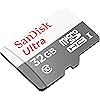
Made for Amazon SanDisk 32GB microSD Memory Card for Fire Tablets and Fire -TV

  • Based on 93,710 reviews
Condition: New
Checking for the best price...
$7.38 Why this price?
New Year Deal · 63% off was $19.98

Buy Now, Pay Later


As low as $1 / mo
  • – 4-month term
  • – No impact on credit
  • – Instant approval decision
  • – Secure and straightforward checkout

Ready to go? Add this product to your cart and select a plan during checkout.

Payment plans are offered through our trusted finance partners Klarna, Affirm, Afterpay, Apple Pay, and PayTomorrow. No-credit-needed leasing options through Acima may also be available at checkout.

Learn more about financing & leasing here.

Selected Option

Free shipping on this product

FREE 30-day refund/replacement

To qualify for a full refund, items must be returned in their original, unused condition. If an item is returned in a used, damaged, or materially different state, you may be granted a partial refund.

To initiate a return, please visit our Returns Center.

View our full returns policy here.


Availability: In Stock.
Fulfilled by Amazon

Arrives Tuesday, Jan 20
Order within 3 hours and 29 seconds
Available payment plans shown during checkout

Protection Plan Protect Your Purchase
Checking for protection plans...

Capacity: 32GB


Features

  • Load your Fire Tablet with more fun - by adding space for additional photos, music and movies
  • Download your apps and games directly to the SD card
  • Class 10 performance for Full HD (1080p) video recording and playback
  • Designed to perform multiple simultaneous activities with no lag or delay

Description

Made for Amazon SanDisk 32GB microSD Memory Card for Fire Tablets and Fire -TV

RAM: ‎32 GB


Brand: ‎SanDisk


Item model number: ‎SDSQUNB-032G-AZFMN


Item Weight: ‎0.071 ounces


Product Dimensions: ‎0.08 x 0.94 x 1.26 inches


Item Dimensions LxWxH: ‎0.08 x 0.94 x 1.26 inches


Color: ‎White/Gray


Manufacturer: ‎SanDisk


Is Discontinued By Manufacturer: ‎No


Date First Available: ‎September 16, 2015


Frequently asked questions

If you place your order now, the estimated arrival date for this product is: Tuesday, Jan 20

Yes, absolutely! You may return this product for a full refund within 30 days of receiving it.

To initiate a return, please visit our Returns Center.

View our full returns policy here.

  • Klarna Financing
  • Affirm Pay in 4
  • Affirm Financing
  • Afterpay Financing
  • PayTomorrow Financing
  • Financing through Apple Pay
Leasing options through Acima may also be available during checkout.

Learn more about financing & leasing here.

Top Amazon Reviews


  • Worked perfectly in my new Kindle Fire 2017 tablet but there are some set up issues that you should check!
Capacity: 128GB
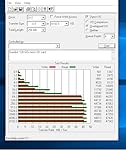
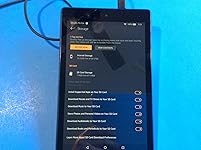
I got this 128 GIG card to use with my new 2017 Kindle Fire 8 inch Tablet. So far it has worked perfectly with my tablet and it has automatically installed all of my Kindle books, all of my Audible books and many of my apps onto the SD card. Please make sure that your Kindle tablet is properly setup to use the SD card for storage. Those settings are seen by swiping down on the Kindle screen, touching storage and looking at the slide switch settings on the lower part of the screen. Turn all of the slide switches to the ON position which is to the right. I show that setup page in an attached photo. I do want to point out that while this SD card has worked perfectly, not all of your apps will transfer to the SD card. I had about 17 that would not go onto the SD card and they consumed an amazing 12 GB of my device’s internal memory. I simply wound up deleting those apps once I played the game. This is not the fault of the Kindle tablet or the SD card but a problem with the way the application is written. Several of the apps were over 1 GIG in size. This card has worked well and I simply plugged it into my tablet. I told the tablet to erase the SD card to make sure that it was empty and I simply downloaded my items from Amazon. They were automatically installed onto the SD card. I used 50 GIG of SD card memory for 1180 books, 106 large apps and 42 Audible books. I own about 100 SD cards and I always do a speed test to verify the reading and writing speeds before I install the memory. I particularly did this on this card as the web page and the packaging do not list the speeds which is very unusual. The card checked out OK but it is not the fastest SanDisk class 10 card I have ever tested. The fastest write speed on this card was 45.886 MB/Sec and the fastest reading speed was 47.426 MB/Sec. I have attached the graphical test data for your information. I used a USB 3.0 port with a USB 3.0 card reader for the test. I have tested SanDisk Ultra cards that were twice as fast as this one. Overall, this card worked well and I rated it five stars. If I have any future issues I will update my review. ... show more
Reviewed in the United States on June 11, 2017 by JJCEO

  • UPDATE: Make sure you insert your card correctly!! Directions could be WRONG!!
Capacity: 32GB
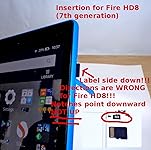
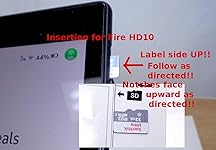
UPDATED!!!! I have to update my review after buying another Fire tablet. The first tablet I bought was the Fire HD10 and I followed the directions according to the graphics given. The card EASILY slid into the slot with no problem. After all, the directions told me to do it this way, with the notches on the card pointing downward. Then I bought the Fire HD 8 (7th Generation). I inserted the card the same way as I did with my Fire HD10, the way the directions told me to. It DID NOT WORK!!!! I could not for the life of me get the card to spring into the slot. I tried about 3 x's when I thought, turn the card upside-down. Even though the directions tell me the notches should be facing down and the label should be facing towards me, I decided to turn it. VOILA!!! The card sprung into the slot!! The directions are NOT CORRECT for the HD8!!! You need to havethe notches facing up. For both tablets, there is a slight spring-like action when inserting the card. For removal, you should push in the card slightly with your fingernail and it should spring out enough for you to pull it out. This card works very well with the fire tablet. At first, I thought any micro SD card would work but the others seem to lag when retrieving from the card. I have no problems with lagging on this one. It works just like the internal memory. I have my music stored on this card and the songs play smoothly. If you have a Fire tablet, get this one which is made for it! Just remember, insertion of the card depends on your Fire tablet!!! I bought this for the Fire HD10. I had my music from my CDs stored on my computer and transferred them onto this with a memory card reader. I suggest you get at least an adapter to change it into an SD card to use with your computer OR a memory card reader which takes many forms of cards, those are the best. It makes it easier and faster to transfer files, erase files, or to format. I have had no problems with it so far with the Fire tablet or my computer. ... show more
Reviewed in the United States on October 30, 2017 by Miss Matched

  • NEED TO FORMAT SD CARD but no worries! I've included instructions :)
Capacity: 512GB
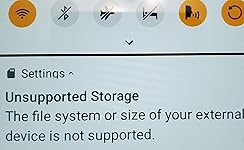
I saw reviews of people saying their memory cards are not working or its a fake. Try these steps on your Amazon Fire HD 10 first: -Make sure your Amazon Fire HD tablet is completely turned off. 1.) Insert memory card on the designated slot on the right side. (SD card label facing up) 2.) Turn on Amazon Fire Tablet (may take a few seconds longer loading) 3.) If you see a notification : "Unsupported Storage" The file system or size of your external device is not supported." -Go to "Settings" -Go to "Storage" -Under "SD Card" -Tap on Format Media Card for Storage -The tablet will show in big letters that it is formatting. May seem like it is stuck at 20% but give it a minute. -If it has been 5 minutes and it is still at 20%, Restart tablet, and repeat these instructions from step 2. It should work now! Hope this helps someone who needs a little tech assistance! Cheers! ... show more
Reviewed in the United States on November 29, 2020 by JayYen

  • Anyone who gets the $49 Fire Tablet needs extra memory - this micro SD is perfect
Capacity: 32GB
Works perfectly in my Dad's new Fire tablet. Now he has enough memory to store his media. Anyone who buys the $49 Fire tablet will need extra memory, and this SD card is a perfect match. All you need to do is insert the SD card into the slot on the tablet instantly recognizes it, there is no formatting needed. ... show more
Reviewed in the United States on October 22, 2015 by The Technologist

Can't find a product?

Find it on Amazon first, then paste the link below.
Checking for best price...