




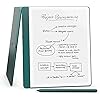
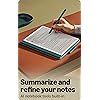
Like-New Amazon Kindle Scribe (64GB) - Your notes, documents and books, all in one place. With built-in AI notebook summarization. Includes Premium Pen - Metallic Jade
Condition: New







$319.99
Holiday Deal
· 21% off
was $404.99
Buy Now, Pay Later
As low as
/ mo
Learn more
- – Up to 36-month term if approved
- – No impact on credit to apply
- – Instant approval decision
- – Secure and straightforward checkout
Ready to go? Add this product to your cart and select a plan during checkout.
Payment plans are offered through our trusted finance partners Klarna, Affirm, Afterpay, Zip, Apple Pay, and Google Pay. No-credit-needed leasing options through Acima may also be available at checkout.
Learn more about financing & leasing here.
Selected Option
Free shipping on this product
Extended holiday returns
FREE refund/replacement until Jan 31, 2027 Learn more
FREE refund/replacement until Jan 31, 2027 Learn more
This item's return window has been extended for the holiday season: FREE refund/replacement until Jan 31, 2027
To qualify for a full refund, items must be returned in their original, unused condition. If an item is returned in a used, damaged, or materially different state, you may be granted a partial refund.
To initiate a return, please visit our Returns Center.
View our full returns policy here.
Availability:
In Stock.
Arrives
Sunday, Nov 22
Recently Viewed



At a glance
- Condition
- New
- Storage
- 64.0 GB
- Color
- Metallic Jade
- Offer Type
- Without Kindle Unlimited
- Model
- 53-036582
Features 7
- A digital notebook for all your writing needs - Replace your stack of notebooks with a single device purpose-built for writing, reading, and thinking. No notifications or social media.
- With AI tools to transform your notes - Convert messy handwriting into readable font, summarize your notes, and change their length and tone with built-in AI notebook tools.
- Feels like pen on paper - See, feel and hear your thoughts meet the page with every stroke of the Premium Pen. No need to set up or charge, just start writing.
- Easily import and mark up documents - Import documents and PDFs using Send to Kindle, and mark them up directly on the page.
- Capture insights as you read Just start writing on a book's page and Active Canvas will create space for your notes. Expand the margins to add more notes, or collapse them to see the original page.
- Read comfortably in any light - The 10.2" glare-free, 300 ppi front-lit display is designed for reading and writing anytime, indoors and out.
- Power that keeps up with your ideas - Read for months, write for weeks, all on a single charge.
Frequently asked questions
If you place your order now, the estimated arrival date for this product is:
Sunday, Nov 22
Yes, absolutely! This item's return window has been extended for the holiday season: FREE refund/replacement until Jan 31, 2027.
To initiate a return, please visit our Returns Center.
View our full returns policy here.
To initiate a return, please visit our Returns Center.
View our full returns policy here.
- Klarna Financing
- Affirm Pay in 4
- Affirm Financing
- Afterpay Financing
- Zip Pay in 4
- Financing through Apple Pay
- Financing through Google Pay
Learn more about financing & leasing here.



Top Amazon Reviews
Note Taking
Digital Storage Capacity: 16.0 GB
Color: Tungsten
Offer Type: Without Kindle Unlimited
Refurbished Kindle Scribe. It works great. I’ve had a refurbished Kindle in the past. I never had any problems with it. I bought this mainly for school to take notes on. But I also have my whole book library and can read on it as well. It is very useful for taking notes and having a weekly planner. I have everything I need in one space, as opposed to an actual notebook and planner. There are many different templates to choose from. I like how it feels writing on it compared to using an iPad for note taking. I didn’t want to pay full price just yet for a Kindle Scribe. I am very happy with my purchase. I do not have any complaints. It functions very well. You are also able to do word searches and some other things that you can’t on a regular Kindle. I would definitely recommend this if you are looking for something like it.
...
show more
Reviewed in the United States on September 27, 2026 by Emily Madden
Beats a stack of spiral bound notebook
Digital Storage Capacity: 64.0 GB
Color: Tungsten
Offer Type: Without Kindle Unlimited
A coworker introduced the concept of an electronic notebook and the idea did not settle in until changing rolls. With all the meetings in different genres it is convenient having all the notes in one convenient location. It is easy to create and organize multiple projects in one device. The ability to take notes, create sketches, erase, redo is better than paper. Notebooks are shared with other registered devices. Email a page or an entire notebook is a matter of a few taps on the screen. The stylist on the screen provides the feeling of writing on paper. Kindle Scribe will easily go a week between charges. There a apps for tablets that mimic note taking but lack the feel, convenience, and functionality of the Kindle Scribe. If available, take advantage of the cost savings of a "Like-New" version.
...
show more
Reviewed in the United States on September 27, 2026 by Odd Duck
Wonderful writing experience with unfortunate placement of button and port
Digital Storage Capacity: 64.0 GB
Color: Metallic Jade
Offer Type: Without Kindle Unlimited
Pro: Excellent writing experience. Feels just like writing on paper. Large tablet Con: Slow Button and Port placement Large tablet If you're looking for a writing tablet, look no further (unless you mind being locked into Kindle ecosystem.) Writing on it feels just like writing on paper. Notebooks can be synced to your Amazon account and are accessible on all Kindle app. The tablet is light but very large. The is either good or bad depending on what you're looking for. You can read pdf files that you upload via USB-C port without conversion. No annotation though. To do that the pdf needs to be uploaded via Amazon's Kindle upload service. Screen refresh is on the slow side if you're coming from regular tablet. But it's fast enough that what you write shows up instantaneously on the screen. The metal case feels premium. The premium pen feels nice and balance in the hand. What's really annoying is the placement of the button and port. Both the power button and USB port are located on one side of the tablet while the other side has the pen magnetically attached. It's awkward turning the tablet on or plugging it in to the computer while holding on to the other side that has the pen attached. It'll be much better if the power button is on the top and the USB port on the bottom.
...
show more
Reviewed in the United States on October 16, 2025 by CT
Love my Kindle Scribe
Digital Storage Capacity: 32.0 GB
Color: Tungsten
Offer Type: Without Kindle Unlimited
I'm a fan of Amazon products and have purchased several of their tablets and devices. I took a chance on this refurbished Kindle Scribe to get it at a lower price. I wasn't sure how much I would use it but once I got it I found myself looking for reasons to pick it up and use it. I even bought some Sudoku books to use on it. The pencil that came with it is a very nice accessory. It can write and erase with ease and to me feels very natural to use. The size and weight of the device is nice and I can use it for long periods without feeling fatigued at all. It's very easy to read books on and as with any Kindle, you can easily increase the size of the font if need be. The Kindle Scribe offers great versatility. It can be used for reading books, writing, journaling and as a daily planner. Out of all the Kindle devices I've owned over the years this is my favorite so far. As a reference I've owned a few basic Kindle Touches and also a Kindle Oasis. If you're like me and would like to own a Kindle Scribe but don't want to pay full price then this is a great option for you. I've owned this now for over 6 months and have used it almost daily, based on that I'm looking forward to enjoying my Kindle Scribe for years to come. I also won't hesitate to buy other Like-New Amazon products in the future.
...
show more
Reviewed in the United States on May 25, 2026 by S. Oliver
5 Stars is a lot of stars, But it fit my needs perfectly.
Digital Storage Capacity: 64.0 GB
Color: Tungsten
Offer Type: Without Kindle Unlimited
First and foremost I took the risk and purchased this refurbished item to get the 64 gig memory at a considerably lesser price. So far it works like new...Thank goodness! I have it about one month. It is warranted like a newly purchased item. Please note I am not an expert user on every feature of this device but I use this every day. My objectives for this device: Good notetaking features for personal needs and consulting work. So far Terrific. I wanted options for Day-Week-Month Planning. It has it. Use it every day almost like a bit of diary. I needed "To do" lists for both work and personal. It does that! I wanted options to separately track daily activities like going to the fitness center-grocery store etc. It does that for the month on one page. Be concise in your entries and it meets that need very well. It has folders so you can organize what will eventualy become many note pages. So important for finding items/notes later on. It also has a "search Kindle" feature to search for notes etc. There are many options when you select a new notebook..margins/no margins/wide or narrow lines/blank/graph/dotted/music/storyboard page setup. Just started using it as a reader. Works like my 7 inch Kindle. The larger screen is a luxury for sure. And I can do two things that I was hoping for. Underline-highlight text in the book while reading. Write thoughts/notes in margins. Easily Retreivalbe. I also open a separate notetaking page to write down notable items about the book. You have to go out of the reader and into the notebook section and then back but I like that I can memorialize what I think are remarkable items for future reference. Long Battery life (week+ before recharge). The styils tips are long lasting. Still on my first tip but it is getting low. I don't draw well so no comment about its capabilites for drawing. I tried to import some PDFs to the device without success. It says it is capable so likely user error. It however takes some doing. I will keep at it becasue it will be a great help for being able to import and mark up work related items If it could only intergrate my outlook calendar..now that would be something! I wrote this moderately long review because these were all the questions I had about this device and really could not easily find the answers. It took me months to finally pull the trigger on it but I am a slow roller! Hope this is helpful So far I love it.
...
show more
Reviewed in the United States on October 26, 2025 by Tom Bell
Best thing that happened to writing since parchment.
Digital Storage Capacity: 64.0 GB
Color: Tungsten
Offer Type: Without Kindle Unlimited
This is the best thing that has happened to my writing. Literally. If you write and keep notebooks…. It will change your life. It became an instant fave and goes pretty much everywhere with me. I had a training class at work and was scrawling notes my coworkers didn’t all have notebooks some couldn’t keep up with notes…. I said no worries I’ll convert to text and print them for you! They were like you wait WHAT??!
...
show more
Reviewed in the United States on October 19, 2026 by Caedan
Poor function for notes
Digital Storage Capacity: 64.0 GB
Color: Tungsten
Offer Type: Without Kindle Unlimited
This thing sucks. The main reason I bought it was so I could write notes in notebook and then use search to find notes, but there is no easy way to do this without multiple steps that send the notes to email. Useless function in my opinion. The pages also turn way too slow compared to iPad kindle. If they at least scrolled similar to iPad, I could swipe through to find handwritten notes quickly.
...
show more
Reviewed in the United States on October 18, 2026 by vincent
Good for some -- mediocre for others
Digital Storage Capacity: 64.0 GB
Color: Tungsten
Offer Type: Without Kindle Unlimited
I want to love the Scribe. I truly do. But, while flirting with them, I can't even like them much, less so love them. Background: This review is for both the 2022 and 2025 Scribe. Minor differences. My house is filled with Amazon products - TVs, Fire tablets, Alexas, smart plugs... (also, with Apple and PC products). I have two iPad Pros, 2 minis, a mini Mac, an iMac, a Mac Pro laptop. But, I have a Surface, a Lenovo Yogi, a mini PC also. In spite of all these toys, I wanted an eink or similar tablet to write on. Do lots of research, read a lot of docs and PDFs and ePubs and Kindles, and take lots of notes. I refuse to join the Remarkable or Boot crowd. Yes, they're probably good but insanely priced (sounds kinda' stupid given all my toys). In the $300s or so is fine, but not $700+. So, I look in that range for something that lets me take notes in all three kinds of documents. I got a Penstar (Android based so lots of apps) but having to use the pen for everything is irritating (though I did rearrange the buttons to go forward and back while reading). Good product. Reads everything and I mean everything. Good product. I also have received a XP Pen tablet (also Android based) for comparison to the Penstar and these two products. Who wins? Nobody. Who loses? Nobody. Each product is good for some and not for others. The Penster is good if you don't mind using the pen as primary selection tool. Good readability and reads every format with no problem. No backlighting though. If you read in the bed at night with the lights off -- well, that's not going to happen with a neck or head lamp. Good at taking notes. True eink. The XP Pen is pretty cool. Three screen methods but not actually eink. Not bad, though. Good for writing on. Far better than the iPad, which actually suck at taking written notes even with one of those 'feel like paper' screen protectors. I hate the Apple pens. They don't feel right. The pen here and in the Punster write well but they feel like cheap pens you'd steal from a bank or motel. Why can't I use my Lamy or Bamboo on these surfaces (yes, I understand the additional layer required and increased expense and weight). Android products have serious advantages over a locked-in Kindle environment (side load?) Now, for the Scribe(s). I'm into the Amazon/Kindle world with hundreds of books. I want to write directly on them. I don't want a box or column opening up for me to jot down a comment or note. I want the same privilege on ePubs and PDFs (which I can do on the Penstar and XP Pen but not Kindles (mobi format). For reading Kindle books, they're not even quite as good as the Kindle app on other tablets. They omit pictures from the text that the app does not. What the hell is with that? Smooth writing is a trait I'll give to them. Their pen is a little thicker and feels better than other pens (but not he Lamy). Backlighting is just right. Since all four tablets are about the same size, no advantage to any one. Alright, a slight, very slight, edge to the XP Pen because of the pen slot but that advantage goes away with the cover which has a lump to cover the pen. Can't use it to brace the tablet up though. another dumb move. But the cover comes with the tablet as does one with the Punstar. Amazon, however, includes nothing but a pen and wants another $90 or so for a cover, Are you serious? You don't get enough money from devotees like me? Couldn't you, at least, give me free Kindle Unlimited account rather than charging me another $13/month (which I pay). So, what's the net analysis. If you want to primarily read the Kindle format and an occasional PDF, go for the Scribe. If you don't want to convert every ePub to Kindle and you rarely read that format (iPad users note), go for the Scribe. If you want better note-taking ability, buy a Boox or Remarkable (and pay for their cloud service?). I must note that it's unfair to compare a $300-400 tablet to ones that cost $650-1100. Yet, reviewers, like myself, do it all the time. That's as stupid as giving a product a bad score because the box arrived dented. So, this review is about the $300 or so category and only against each other, What will I do? Return the Scribes. I already have the PenStar. I'll probably keep the XP Pen. Probably. we'll see. Excuse typos and misspellings.
...
show more
Reviewed in the United States on October 26, 2025 by Jim Helton