Search  for anything...
KTC

KTC 27" 4K UHD 144Hz Gaming Monitor - Fast IPS Panel 160Hz 1ms GTG, HDR400 132% sRGB, HDMI2.1/DP1.4, VESA Mount, Height/Tilt/Pivot/Swivel Stand, Vertical Monitor Ideal for Gamers, Designers

  • Based on 3,112 reviews
Condition: New
Checking for the best price...
$299.99 Why this price?
Save $100.00 was $399.99

Buy Now, Pay Later


As low as $50.00 / mo
  • – 6-month term
  • – No impact on credit to apply
  • – Instant approval decision
  • – Secure and straightforward checkout

Ready to go? Add this product to your cart and select a plan during checkout.

Payment plans are offered through our trusted finance partners Klarna, Affirm, Afterpay, Zip, Apple Pay, and Google Pay. No-credit-needed leasing options through Acima may also be available at checkout.

Learn more about financing & leasing here.

Selected Option

Free shipping on this product

FREE 30-day refund/replacement

To qualify for a full refund, items must be returned in their original, unused condition. If an item is returned in a used, damaged, or materially different state, you may be granted a partial refund.

To initiate a return, please visit our Returns Center.

View our full returns policy here.


Availability: In Stock.
Fulfilled by Amazon

Arrives Saturday, Aug 22
Order within 22 hours and 21 minutes
Available payment plans shown during checkout

Protection Plan Protect Your Purchase
Checking for protection plans...

Size: 27 in


Style: Fast IPS UHD 160Hz 1ms GTG


Color: Black


Features

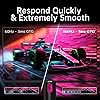
  • Immersive Gaming Experience, 27-inch monitor with 4K UHD resolution and 160Hz refresh rate for ultra-smooth gameplay.
  • Fast IPS Panel, Enjoy vivid colors, sharp contrast, and detail with 1ms GTG response time.
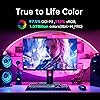
  • HDR400, Enjoy dynamic contrast and high-fidelity color expression with HDR400 and DCI-P3 97.5% (typical).
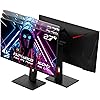
  • Height Adjustable Stand, Ergonomic design with height adjustment, tilt, pivot, and swivel for the perfect viewing angle.
  • Multiple Ports, With HDMI 2.1, DP 1.4, USB 2.0 and earphone jack, this monitor is versatile for a range of devices.
  • G-Sync Compatible, Smooth, tear-free visuals thanks to the officially validated G-Sync compatibility.
  • FreeSync Premium, Experience fluid, virtually tear-free gameplay with low latency and at least 120Hz refresh rate.
  • Low Blue Light and Flicker-free, Keep your eyes comfortable during long hours of gaming with these features.
  • Anti-glare and Quick Release Stand, Reduce eye strain and save space with quick and easy stand installation.
  • For Gamers, Designers, and Business: Suitable for various settings, from gaming to creative work and business applications.

Brand: KTC


Screen Size: 27 Inches


Resolution: 4K UHD 2160p


Response Time: 1 Milliseconds


Refresh Rate: 160 Hz


Refresh Rate: 160 Hz


Display Type: IPS


Display Technology: IPS LCD


Brightness: 400 candela_per_square_meter


Has Color Screen: Yes


Picture Quality Enhancement Technology: HDR400, FreeSync, G-Sync, Low Blue Light, Flicker-Free


Screen Size: 27 Inches


Item Dimensions D x W x H: 30"D x 20"W x 10"H


Resolution: 4K UHD 2160p


Display Resolution Maximum: 3840 x 2160


Native Resolution: 3840x2160


Total Number of HDMI Ports: 2


Total Usb Ports: 1


Number of Component Outputs: 4


Color: Black


Brand: KTC


Model Number: H27T22


Model Name: H27P22S


Manufacturer: KTC


Response Time: 1 Milliseconds


Connectivity Technology: HDMI, DisplayPort


Hardware Connectivity: DisplayPort, HDMI


Adaptive Sync: FreeSync Premium, G-Sync Compatible


Frequently asked questions

If you place your order now, the estimated arrival date for this product is: Saturday, Aug 22

Yes, absolutely! You may return this product for a full refund within 30 days of receiving it.

To initiate a return, please visit our Returns Center.

View our full returns policy here.

  • Klarna Financing
  • Affirm Pay in 4
  • Affirm Financing
  • Afterpay Financing
  • Zip Pay in 4
  • Financing through Apple Pay
  • Financing through Google Pay
Leasing options through Acima may also be available during checkout.

Learn more about financing & leasing here.

Top Amazon Reviews


  • Excellent monitor choice.
Size: 27 inch Style: QHD 100Hz. Color: Black
I've been very happy with this monitor. It has been working great now for six months with heavy usage. Colors and brightness are great. No bad pixels, very tiny dot pitch so no dots visible in images even at close viewing. It was a great price too for a QHD monitor with sync capability. l highly recommend. ... show more
Reviewed in the United States on June 15, 2026 by Rick

  • Good monitor, good value
Great picture, easy to setup, very durable and works with everything, I liked this monitor so much I bought a second one a few months later. Great for office work and gaming.
Reviewed in the United States on April 29, 2026 by John Lamb

  • Great overall
Size: 27 inch Style: 27'' 180Hz FHD Color: Black
Used for almost a year now. Still doing great. Love the frame rate. Good value especially if caught on sale. I haven’t found any issues with brightness. It does come with a headphone port too, good for a speaker setup bc it doesn’t have a built in speaker. You just need an extra speaker and an additional cord. Hooked it up to my JBL flip and it sounds great. Has great color too. ... show more
Reviewed in the United States on April 4, 2026 by Jake

  • Price to performance, it's a winner
Size: 27 inch Style: QHD 1500R VA 180Hz Color: black
When I balance price to performance, this is a great monitor I would purchase again. Cons: back bleed is quite noticeable when viewed at angles but when looking straight on during normal use I can't see it. Might be a bother to you if you often have someone using the monitor with you. Pros: The colors are rich. Deep and vibrant to the point I can't ask for more. the blacks are black, and at 180hz it's so smooth. It auto switches to HDR for games that use it, and it looks wonderful. Setup was easy, particularly with the monitors joystick button on the back. There's no way I'll ever buy a monitor that doesn't have one now. The menu is easy to read and organized which is a big plus in my book. Note: The bezels on the side and top are thin at 1/10th inch (3mm), but including bezel there's about 4/10's inch, (9mm) before the screen really starts. That should help you make a decision if you're planning to add monitors next to this. Note: HDR doesn't look good in Windows as it makes everything look washed out, only content that makes use of HDR looks good. Maybe other monitors do better at handling HDR but I think you should know this so you check your expectations. ... show more
Reviewed in the United States on April 25, 2025 by Tophin84

  • Good Quality Monitor
Size: 27 inch Style: QHD 100Hz. Color: Black
The Quality of this monitor is worth the price. Easy to setup and many different port types to connect devices. The picture quality is High Def and has HDR support . Overall a great value for your money. My monitor broke down and I was able to reach out to support for a quick and easy Warranty exchange. Customer Support was very helpful. ... show more
Reviewed in the United States on April 19, 2026 by Nobeel K

  • Quit staring at your screen, and stare at THIS one!
Size: 32 inch Style: Curved 1000R QHD 240hz Color: Black
Quality, Easy setup, great looks, pairs well side by side with the matching one i bought. great refresh rate at 1440p, and easily transition into 4k gaming with a still great refresh rate. Worth more than it costs!
Reviewed in the United States on May 12, 2026 by Jason G.

  • Excellent monitor
Size: 27 inch Style: 27'' 180Hz FHD Color: Black
The monitor has beautiful color, sharp picture and a seemingly larger screen because of its housing. I have two of these that I bought recently and am very happy with its performance --- excellent.
Reviewed in the United States on June 3, 2026 by Roger

  • Great panel on a budget, frustrating KVM and input switching
Lets start with the good, if all you want is a nice panel that won't break the bank. This works great. Looks awesome in games, very little input latency, HDR content. etc etc, its an OLED, just get it if its in your budget. Most people will likely not have any issues with this thing. The primary functionality of displaying stuff is good. Okay now the bad, its long because it needs to be. This won't apply to everyone, but if you want to use the KVM / USB dock, or simply want to switch inputs between two or more plugged in devices, keep reading... Starting with the KVM / USB Dock issues. This could potentially burn in your monitor over time if you aren't careful. I won't gripe about it too much since this can be fixed with an external KVM / Dock Keep in mind, this issue depends on your devices or input configuration but, I've got a run of the mill Windows laptop plugged in over USB C, and a PC plugged in over Displayport. This issue all starts when the laptop goes to sleep, the monitor switches to the PC that is also plugged in. Well, that disconnects the dock from the laptop, which in turn wakes it up causing it to reconnect to the monitor and switch between inputs in a slow but infinite loop! If you don't catch this behavior, your monitor could very well be burning in from this over time without you even noticing why. Okay for basic input switching functionality, I'm not going easy on them for on this. Even $5 monitors from 25 years ago found at goodwill on their last leg do a better job than this thing. How is it this bad? Like almost any monitor, you can manually select inputs in the OSD, there is an automatic input feature and each discrete input can also be selected. The auto feature is fine if you want that. If you want to manually select an input with more than one thing plugged in, good luck and keep reading... Okay first, not as bad, but not great. If you manually switch inputs, and the display 'sees' a black screen, ie. from a second display on a windows login. Its technically an active input, just the entire screen is black. The monitor will automatically switch inputs to the previous one after only 1-2 seconds afterwards, even if you specifically told it what input you want to use in the OSD. This improves a little if active content is on the input you are switching to, but still this thing struggles daily for me. It will inconsistently switch the input back to the previous one, even if content is on the input you are switching to. I constantly have to unplug the DP cable on the back to get around this. On top of all this, about once a week, the monitor needs a full power cycle to successfully switch inputs at all, even after you physically unplug all but the one input you want, simply just a terrible experience. Here is the thing, if a monitor or any screen really has an option to manually set the input, it should stay on that input regardless if there is any input at all, at least for an extended period of time. Realistically, it should always be on the input you selected. They absolutely dropped the ball on this simple feature, in my circumstances its infuriating. ... show more
Reviewed in the United States on December 19, 2024 by Max

Can't find a product?

Find it on Amazon first, then paste the link below.
Checking for best price...