Search  for anything...

iPhone 16 for Seniors and Beginners Guide: Simplified, Illustrated, and Packed with Tips to Connect, Customize, and Feel Confident Every Day. Zero Tech Overload

  • Based on 295 reviews
Condition: New
Checking for the best price...
$18.98 Why this price?
Save $10.99 was $29.97

Buy Now, Pay Later


As low as $4 / mo
  • – 4-month term
  • – No impact on credit to apply
  • – Instant approval decision
  • – Secure and straightforward checkout

Ready to go? Add this product to your cart and select a plan during checkout.

Payment plans are offered through our trusted finance partners Klarna, Affirm, Afterpay, Apple Pay, and PayTomorrow. No-credit-needed leasing options through Acima may also be available at checkout.

Learn more about financing & leasing here.

Free shipping on this product

FREE 30-day refund/replacement

To qualify for a full refund, items must be returned in their original, unused condition. If an item is returned in a used, damaged, or materially different state, you may be granted a partial refund.

To initiate a return, please visit our Returns Center.

View our full returns policy here.


Availability: In Stock.
Fulfilled by Amazon

Arrives Friday, Jun 5
Order within 3 hours and 43 minutes
Available payment plans shown during checkout

Protection Plan Protect Your Purchase
Checking for protection plans...

Description

Are you ready to finally master your iPhone 16 without feeling overwhelmed by confusing tech talk?If you've struggled with your new device, wishing you could easily FaceTime your grandkids, confidently navigate your phone, or secure your personal information without asking for help, then keep reading.In a world where technology evolves faster than ever, it’s easy to feel left behind, especially when even sending a simple photo or understanding constant software updates can seem impossible.Frustrated by complex menus and worried about pressing the wrong button?You're not alone. Imagine the stress of getting lost in endless settings or accidentally deleting something important. But what if it didn’t have to be that way?This book is designed specifically for seniors and beginners who want to feel empowered, secure, and self- sufficient while using their iPhone 16. With step-by-step guidance and large, detailed illustrations, you’ll finally enjoy your device and all it has to offer.You will learn:• How to set up your iPhone 16 from scratch, including a simple way to personalize your settings for comfort and usability.• The secrets to mastering FaceTime and Messages so you can connect with loved ones effortlessly.• How to customize your device with larger text, custom ringtones, and even hearing aid compatibility for an experience tailored to you.• Methods to navigate the App Store safely and discover apps that make life more enjoyable, from health trackers to fun hobbies.• How to use the iPhone's built-in emergency features for ultimate peace of mind in any situation.• Practical tips for taking and sharing photos that will impress your family, plus editing tricks that make your memories look their best.… and much more!You’ll get exclusive access to:iPhone 16 & iPhone 16 Pro Videos Tutorial: Visual learners rejoice! Watch and learn with easy-to-follow video guides that walk you through every feature of your iPhone 16 & iPhone 16 Pro, from basic setup to pro-level tricks.Quick Voice Command Cheat Sheet for Siri: Say goodbye to fumbling through endless menus. This handy cheat sheet gives you instant, go-to commands to make your iPhone work for you with just your voice.Digital Photo Book Creation Guide: Turn your memories into stunning digital photo books to share with loved ones. Step-by-step instructions will have you creating professional-looking albums in minutes.Troubleshooting Basics Guide: Get quick fixes for common problems so you never feel stuck or helpless. No tech support needed — handle issues like a pro and keep your iPhone running smoothly.Don’t let technology intimidate you any longer.Scroll to the top of the page and select the Buy Now button to transform your iPhone 16 into a helpful, enjoyable tool that connects you to what matters most! Read more

Publisher ‏ : ‎ Independently published


Publication date ‏ : ‎ November 22, 2024


Language ‏ : ‎ English


Print length ‏ : ‎ 192 pages


ISBN-13 ‏ : ‎ 45


Item Weight ‏ : ‎ 1.3 pounds


Dimensions ‏ : ‎ 8.5 x 0.44 x 11 inches


Best Sellers Rank: #454,373 in Books (See Top 100 in Books) #69 in Computer Tablet Books #162 in Handheld & Mobile Devices #648 in Computer Hardware & DIY


#69 in Computer Tablet Books:


Frequently asked questions

If you place your order now, the estimated arrival date for this product is: Friday, Jun 5

Yes, absolutely! You may return this product for a full refund within 30 days of receiving it.

To initiate a return, please visit our Returns Center.

View our full returns policy here.

  • Klarna Financing
  • Affirm Pay in 4
  • Affirm Financing
  • Afterpay Financing
  • PayTomorrow Financing
  • Financing through Apple Pay
Leasing options through Acima may also be available during checkout.

Learn more about financing & leasing here.

Top Amazon Reviews


  • Become an iphone pro Become an iphone pro
Format: Paperback
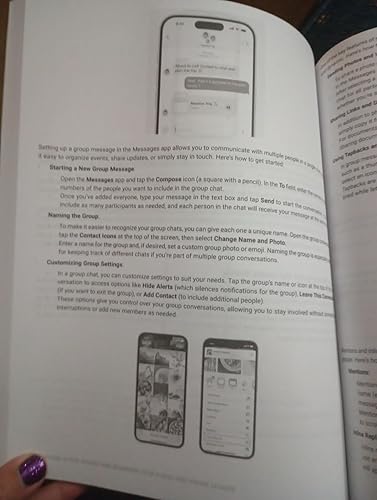
My parents are new to iPhones, so I got this book to help them use them properly. The book was just what I wanted. The author provides good information with ample photos and screen grabs. The author covers the basics, like navigating the home screen. But, as the book progresses the author moves on to advanced concepts, like Facetime and setting up medical emergency stuff. There are also some chapters that focus on troubleshooting issues that may arise. I found this book knowledgeable and helpful. ... show more
Reviewed in the United States on January 20, 2025 Reviewed in the United States on January 20, 2025 by J. Mielke

  • One of the best Simple Guides for the iPhone 16
Format: Kindle
I recently started exploring my iPhone 16, and this guide has been a huge help. Having never used an iPhone before, I felt a little overwhelmed at first, but the structure of the guide, with clear instructions and lots of pictures, made everything much easier. I loved that it covers everything from the basics, like setting up the phone, to customizing it to my preferences. ... show more
Reviewed in the United States on June 13, 2025 by Andrey Steven Plazas

  • iPhone 16 set up
Format: Kindle
This book is easy to follow with step by step instructions written in simple terms. Great if you’re new to this technology. The illustrations are simple and straightforward. The explanations of terms is helpful too. I really appreciated that there was advice on switching from android to iOS.
Reviewed in the United States on June 3, 2025 by Gayla

  • I found this book to be positively useless and I don't recommend it!
Format: Paperback
My husband had an older iPhone and when he updated to an iPhone 16. I got my first iPhone (16) as well. I am better using written guides than he is and I am more curious about the capabilities of my new toy. I wanted a guide to help me out as I explored more than just the basics of my iPhone and based on the reviews, I thought this book would fit the bill. Instead, I found it to be meandering, boring and poorly laid out. It was nothing like the descriptions in the reviews, in my opinion. I discovered today that I could get credit for the book and buy a new book. I'm hoping that the book I've chosen will be of more help to me than this one, which I just realized didn't even answer a very basic question I had. Obviously, I firmly do not recommend this book! ... show more
Reviewed in the United States on January 27, 2025 by Kathleen

  • Need to know about ‘cloud’ ahead of time.
Format: Paperback
My relative of 71 could not use this book. He got hung up in the first chapter because it was all about “the cloud” and he did not know what that was. He was a previous Android user and we had to go back to that. I’m an iPhone user and cannot do anything on the Android, so I understand. Maybe the first chapter should be turning on the phone and making a call… ... show more
Reviewed in the United States on September 24, 2025 by Texas Mom

  • My 83-yr-old mom loves it!
Format: Paperback
I bought this for my 83-yr-old mother when I bought her her first iphone. she says that it has been incredibly helpful because she is not a person who uses internet to look for instructions. She likes to have instructions written on paper, so she can makes notes for her self and know where to go to find out how the iphone functions work. ... show more
Reviewed in the United States on August 2, 2025 by BabeOBooks

  • Doesn't live up to being for Seniors or beginners
Format: Paperback
The author does not seem to understand seniors or beginners. They will shut down if you flood them with a bunch of information and pep talk in the introduction. The introduction is way too long. So don't lose them before they even get started. You have to assume they don't know anything. There is a reason they are just now are getting a smart phone. The illustrations in chapter 1 are poorly illustrated, confusing or don't match text. For instance, there is a photo of the buttons on side of the phone. A good illustration that seniors and beginners that would need/require would be arrows pointing to each button with text identifying each button. Also, the text says the Sim card tray is on the right side. Clearly it is on the left. If the senior/beginner hasn't completely given up by the time they reach the initial setup on page 18, they see a list of steps to do so. The first step says "When you turn on your iPhone" etc. Don't assume they will remember or know that on the previous page that "wake up the screen" means turn on your iPhone. You don't assume the senior/beginner knows how to operate touch screen. If they don't, none of the steps can be performed. Game over. Basic touch screen procedures needed to complete the basic steps of the initial setup must be explained in the step text. Later in chapter 2, touch screen gestures are explained. For seniors/beginners they must be the first thing explained after initial setup. Don't assume a senior/beginner knows what a swipe means. Text alone can't describe clearly what a swipe is. An illustration of finger doing so would be helpful. Turning on the iPhone is not just pressing the power button. It is pressing the power button, unlocking the screen, then entering your pass code. No where in the manual is this explained. Just as important is how to turn off the phone. The procedures are kind of there but are buried in previous flood of information. They are so important to seniors/beginners that each step in the process should be fully explained and illustrated if necessary. Having them practice turning on and off might be helpful. Icons and Widgets could be better explained with illustration with arrow pointing them with text labels. Seniors/beginners need help in identifying them understanding them. These are tech terms but they have to explained. Seniors/beginners would be better served if the user guide would start with a very brief introduction, fully illustration(s) showing iPhone identified buttons, touch screen procedures, illustrated initial setup, and fully explained on/off procedures. After that iPhone features could listed. Finally, the rest of the procedures. My rating is based on that it fails to be senior/beginner friendly. ... show more
Reviewed in the United States on January 16, 2025 by Kindle Customer

  • Am I phone 16 manual that is great for seniors
Format: Paperback
A simplified owners manual for the I phone 16. Large print makes it ideal for seniors and those with visual impairment. An improvement would be actual photos instead of line diagrams.
Reviewed in the United States on August 30, 2025 by Bob Battaglia

Can't find a product?

Find it on Amazon first, then paste the link below.
Checking for best price...