Buy Now, Pay Later
- – 4-month term
- – No impact on credit to apply
- – Instant approval decision
- – Secure and straightforward checkout
Ready to go? Add this product to your cart and select a plan during checkout.
Payment plans are offered through our trusted finance partners Klarna, Affirm, Afterpay, Zip, Apple Pay, and Google Pay. No-credit-needed leasing options through Acima may also be available at checkout.
Learn more about financing & leasing here.
FREE refund/replacement until Jan 31, 2027 Learn more
To qualify for a full refund, items must be returned in their original, unused condition. If an item is returned in a used, damaged, or materially different state, you may be granted a partial refund.
To initiate a return, please visit our Returns Center.
View our full returns policy here.
Recently Viewed


At a glance
- Condition
- New
- Model
- For Samsung Note 20 Ultra 5G
- Dimensions
- 1 x 1 x 1 in
- Weight
- 7.2 oz
- Color
- Black
- Other display features
- Wireless
Features 3
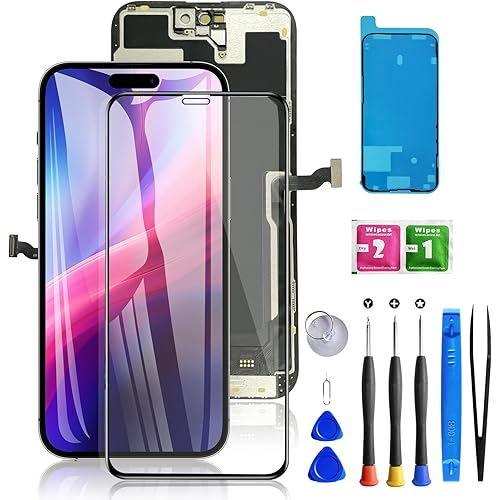
- This replacement screen comes With Front Frame. Matched with screen protector and a complete repair tool kit. everyone can complete easily.
- Replacing old, cracks, dead spots, damage, touch not working properly or touch response problems on the screen.
- Its highly recommended to install the screen with the guidance of the tutorial videos on YouTube. You can search " Note 20 Ultra Screen Replacement" on YouTube for a tutorial videos of how to do the replacement.
Description
Before Installation Notes 1: Test before installation When testing, do not remove any protective film or tags. Please pay attention to the problem of static electricity. Before attempting any repair, be sure to ground yourself is an ESD (electro static discharge) strap. This will prevent static electricity from damaging the electronic components within the phone. Ensure you wear eye protection and use caution not to cut your finger with the glass splinters. 2: Simulates testing Screen replacement is very fragile product. We strongly suggest test before installation. Please simulates testing, which means mobile phone apart, (motherboard + LCD or screen) connected audio cable and new replacement, power on, test finished. If test OK, please install it. If it can not show, please contact us at the very first time. And please do not force it to be installed in mobile phone. We will not be responsible once the screen is installed. 3: Do not over-bend cable Please make sure LCD cable Do not over-bend. Over 90 degrees bent will cause black display.
Specs 5
| Product Dimensions | 1 x 1 x 1 inches |
|---|---|
| Item Weight | 7.2 ounces |
| Item model number | For Samsung Note 20 Ultra 5G |
| Other display features | Wireless |
| Color | Black |
No specs match.
Frequently asked questions
To initiate a return, please visit our Returns Center.
View our full returns policy here.
- Klarna Financing
- Affirm Pay in 4
- Affirm Financing
- Afterpay Financing
- Zip Pay in 4
- Financing through Apple Pay
- Financing through Google Pay
Learn more about financing & leasing here.