Search  for anything...

ELECROW 10.1 Inch Portable Monitor - IPS Capacitive Monitor with HD VGA Port,1920x1080P LCD Display Built-in Dual Speakers VESA Mount for Raspberry Pi 5/4/3, PS Xbox, Windows 11/10/8/7

  • Based on 1,027 reviews
Condition: New
Checking for the best price...
$119.99 Why this price?
New Year Deal · 25% off was $159.99

Buy Now, Pay Later


As low as $20.00 / mo
  • – 6-month term
  • – No impact on credit
  • – Instant approval decision
  • – Secure and straightforward checkout

Ready to go? Add this product to your cart and select a plan during checkout.

Payment plans are offered through our trusted finance partners Klarna, Affirm, Afterpay, Apple Pay, and PayTomorrow. No-credit-needed leasing options through Acima may also be available at checkout.

Learn more about financing & leasing here.

Selected Option

Free shipping on this product

FREE refund/replacement until Jan 31, 2026

To qualify for a full refund, items must be returned in their original, unused condition. If an item is returned in a used, damaged, or materially different state, you may be granted a partial refund.

To initiate a return, please visit our Returns Center.

View our full returns policy here.


Availability: In Stock.
Fulfilled by Amazon

Arrives Wednesday, Jan 7
Order within 2 hours and 24 minutes
Available payment plans shown during checkout

Protection Plan Protect Your Purchase
Checking for protection plans...

Size: 10.1" Non-touch Display


Features

  • Display Quality: The 10.1-inch IPS LCD screen monitor offers 19201080 FHD resolution, delivering sharp, vivid visuals with accurate color reproduction and wide viewing angles
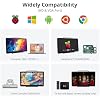
  • Wide Application: The portable monitor works perfectly for PS3 PS4 WiiU XBOX360 Raspberry Pi 5,4, 3, 2 1 Model B B+, industrial equipment, car audio and video, car headrest, and medical equipment display
  • Audio Experience: Equipped with high-quality dual speakers and a 3.5mm headphone jack, it delivers immersive audio clarity for music, movies, or gaming. You can easily adjust the volume with the switch
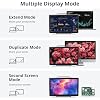
  • Plug and Play: Connect your devices to the capacitive monitor effortlessly using the HD or VGA ports; It can be used not only as a game console monitor, but also as a computer split-screen monitor
  • Flexible Installation: This portable monitor offers different installation options; choose to mount it on the wall using the standard VESA 75 mount (mount not included, M3*4mm screws needed), or place it on your desktop using the adjustable mount stand provided

Brand: ELECROW


Screen Size: 10.1 Inches


Resolution: FHD 1080p


Aspect Ratio: 169


Screen Surface Description: Glossy


Product Dimensions: 1.2 x 10.4 x 6.6 inches


Item Weight: 2.2 pounds


Manufacturer: ELECROW


Item model number: Portable Monitor


Is Discontinued By Manufacturer: No


Date First Available: October 16, 2017


Standing screen display size: 10.1 Inches


Aspect Ratio: 169


Voltage: 12 Volts


Resolution: 1920 x 1080


Image brightness: 350 lm


Frequently asked questions

If you place your order now, the estimated arrival date for this product is: Wednesday, Jan 7

Yes, absolutely! You may return this product for a full refund within 30 days of receiving it.

To initiate a return, please visit our Returns Center.

View our full returns policy here.

  • Klarna Financing
  • Affirm Pay in 4
  • Affirm Financing
  • Afterpay Financing
  • PayTomorrow Financing
  • Financing through Apple Pay
Leasing options through Acima may also be available during checkout.

Learn more about financing & leasing here.

Top Amazon Reviews


  • Great for Raspberry PI, but read this to get best results.
Size: 10.1" Non-touch Display
This is a nifty monitor for a Raspberry Pi Zero project that I am working on. Hauling around a monstrous monitor does not make sense for a computer scarcely bigger than my thumb. I have tried some of the small, cheap screens that you can get that just plug into a Raspberry Pi, and they have their place. Sure, they have touch input, but the resolution is quite low. As I have to sometimes do some development work on the PI, this smaller screen is often insufficient for my needs. So I was looking for a bigger screen with better resolution. I found this one, with 1920x1200 resolution (for real resolution, many screen sellers will lie and say that it is an HD screen when it is really a 320x240 resolution screen that is capable of displaying downsampled 1920x1200 images - an outright lie in my books). I got this and experienced two hiccups. The first is that the menu is by default in Mandarin. Since I don't read Mandarin, and in the infinite wisdom of the designers of this, they chose all of the menu entries that you need to change the language be in Mandarin by default. I have seen this before, it it seems to be a really odd design decision - if you can read Mandarin, you don't need to change the menu, if if you can't then you cannot tell how to change it. Fortunately, there are a few reviews here that tell you how to change it to English. In the end, I really didn't need the menu, but I wanted to see what the options were. Onto the second hiccup. I hooked this up, and the image was nice indeed. I was excited. Then something happened. The screen blanked, made a bit of a soft "bzzzzt" sound stayed off for a second or so, and came back on. Then it happened again in a few minutes. I checked the HDMI connector and the power connector, and all seemed good. So I worked on it for a while, and this continued. Very aggravating. So I tried it on a PC, and it was fine. I wanted to hold off on my review until I got to the bottom of this. So I did some searching. Then I found the following suggestion: Open up a terminal window and run "sudo leafpad /boot/config.txt" (without quotes of course). Search for the following entries, remove the '#' character at the beginning of its line (if present), and change to the following values: hdmi_force_hotplug=1 hdmi_drive=1 hdmi_mode=16 disable_overscan=1 Save the file and reboot. It worked wonders. There had been a black border around the screen (that I didn't really notice at the time) that disappeared as well. So the problem was with the configuration on the Pi, not the monitor. Very happy now and I will probably be buying at least one more. ... show more
Reviewed in the United States on March 13, 2018 by brunt

  • This one set up fine, however the colors were washed out to an ...
Size: 10.1" Non-touch Display
Bought 2 of these as a 4th and 5th monitor for use as smaller displays for lesser stuff of importance while leaving me a lot of retail space on my desk. Originally I would have given this a 5stars as I purchased one as a test. It worked perfectly out the box, vibrant colors, no problems setting anything up, heck, it started in English rather than mandarin. I've lowered this to 3stars however as what I suspect isn't too rare of a problem with monitors crept up with the second one purchased the same day. This one set up fine, however the colors were washed out to an excessive extent. I fiddled around with all the, admittedly, limited options on the device aswell as my own computer settings. However nothing could bring this second monitor even close to the value I was getting from the first and there was no one I could keep this when I had 4 monitors with perfect colors and one without. As such I docked 2 stars as I return the second one but will raise it back to four stars should the third one work perfectly. Aside from color issues and vibrancy problems, these monitors are great. Their low profile works perfectly for someone who wants something smaller yet without a sacrifice in quality. The display is comparable to my 3 main monitors aside from the obvious size difference(3x 23in vs a 10.1). Honestly, atleast from the side I know of, if space is an issue and you just want another monitor for use as a small client for perhaps web browsing, holding programs such as irc out of the way to leave you your main display(s) free, etc, then I can recommend this provided you get one with proper coloring. Edit: July 23, 2018 Updated to 5 stars cause honestly, I couldn't find anything wrong. I returned the one with the color problem, got a new one. Tested them both for a few days and they're perfect for their job. I don't think it's worth it to dock a star for one faulty item. So review will stand but with this update that I'm pleased as punch with my purchase. I doubt I'll ever need more than 2 but for the two I have, their price and quality is well worth what I used them for. ... show more
Reviewed in the United States on July 17, 2018 by UnspunReality

  • Lightweight Good Quality Travel Display
Size: 10.1" Non-touch Display
This is an affordable non-touch display when working with devices for configuration or for playing videos without getting out a heavy bulky laptop. I primarily use this with an ASUS Tinkerboard running Android for playing videos, browsing websites, or general mobile app usage. Aside from that, this is great for Raspberry Pi initial setup or device recovery where a display is needed. The material quality is good, the sound is satisfactory given the speaker size and picture quality is very good. The included stand is not the best fit for the product, however, a simple fix I used for this was taping a few magnets to the display where the stand would be resting. This keeps the display firmly attached to the stand when inflexible HDMI cables can cause the display to be easily pulled off the stand. ... show more
Reviewed in the United States on March 20, 2019 by Kevin

Can't find a product?

Find it on Amazon first, then paste the link below.
Checking for best price...