Search  for anything...

EHOMEWEI X2 Pro Foldable Dual Touchscreen Portable Monitor 16"×2 2.5K QLED Laptop Screen Extender with 4096 Stylus for MacBook Windows
  • Based on 21 reviews
Condition: New
Checking for the best price...
$699.99 Why this price?

Buy Now, Pay Later


As low as / mo
  • – Up to 36-month term if approved
  • – No impact on credit to apply
  • – Instant approval decision
  • – Secure and straightforward checkout

Ready to go? Add this product to your cart and select a plan during checkout.

Payment plans are offered through our trusted finance partners Klarna, Affirm, Afterpay, Zip, Apple Pay, and Google Pay. No-credit-needed leasing options through Acima may also be available at checkout.

Learn more about financing & leasing here.

Selected Option

Free shipping on this product

FREE 30-day refund/replacement

To qualify for a full refund, items must be returned in their original, unused condition. If an item is returned in a used, damaged, or materially different state, you may be granted a partial refund.

To initiate a return, please visit our Returns Center.

View our full returns policy here.


Availability: Only 1 left in stock, order soon!
Fulfilled by Amazon

Arrives Tuesday, Sep 8
Order within 16 minutes
Available payment plans shown during checkout

Protection Plan Protect Your Purchase
Checking for protection plans...

Size: 16"


Style: Dual 16" Touch+Stylus Support | 2560 x 1600


Features

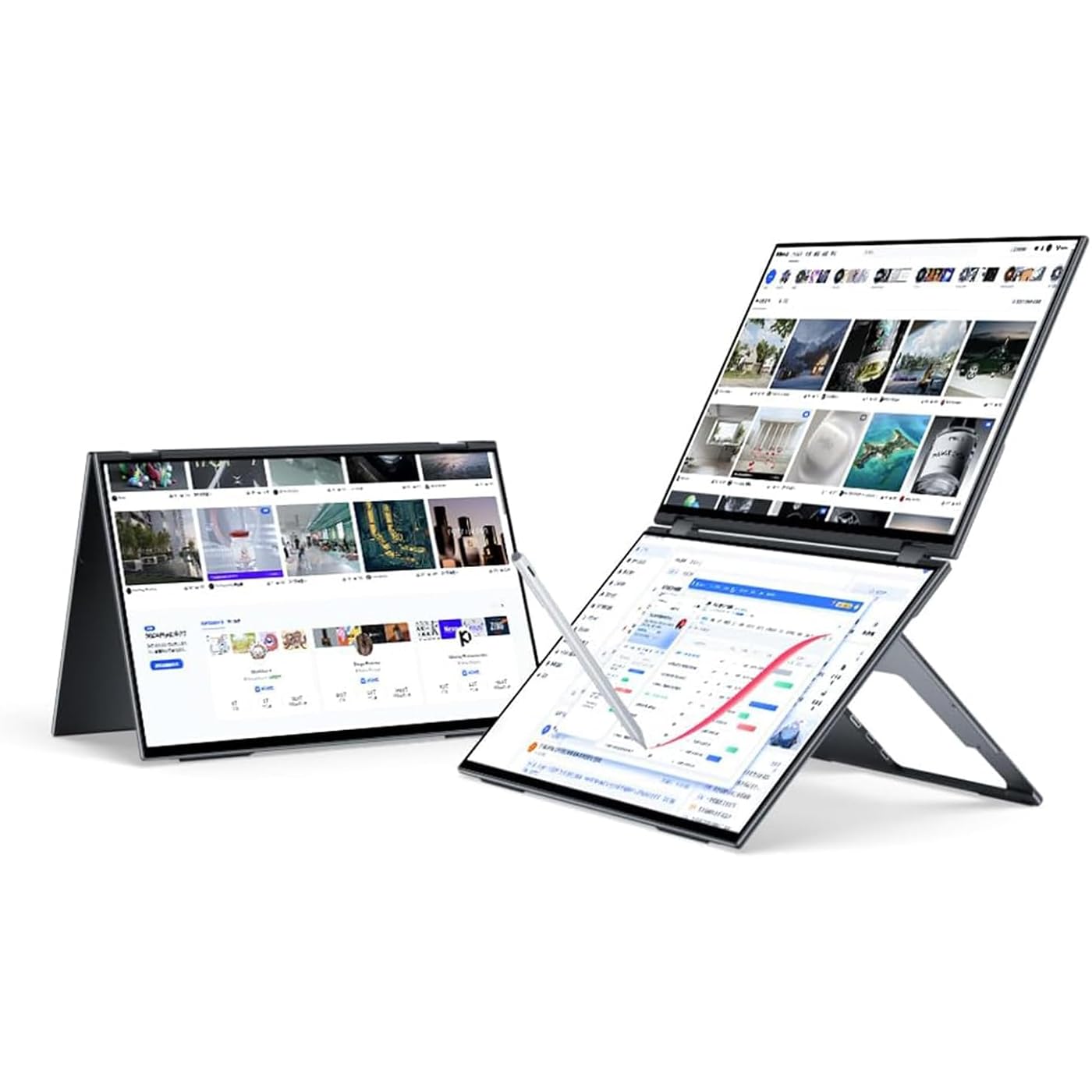
  • Professional Grade Visuals: EHOMEWEI X2 Pro dual 16-inch 2.5K QLED touchscreen features 100% DCI-P3 wide color gamut and 500nit high brightness, built for creators, designers and professional users.
  • Precise 10-Point Touch & Stylus: Comes with 4096-level pressure pen and virtual keyboard, supports iPhone 15 touch control, greatly improving working efficiency and creative experience.
  • One-Cable Convenience: Single USB-C cable connects both screens with no driver needed. Supports extended, mirrored, waterfall and independent display modes for maximum flexibility.
  • Premium Rotatable Design: CNC aluminum unibody, 360 rotating top screen and 90 foldable stand deliver ultra-portability for business and creation.
  • Rich Interface & Full Accessories: 2USB-C, 2HDMI, built-in speakers, carry case and full accessories, perfect for professionals, creators and gamers.

Description

Premium Portable Gaming Monitor Display Brand X2 Air X1 X2 X1 Pro Where can I download the self-developed Application? On our Ehomewei Official website. I can't apply the protective film well. Please paste it slowly while checking the position after pasting. If dust gets in during the process, go back to where the dust was, peel it off, and roll up the cellophane tape to remove the dust. I have just opened the package, but I can see air bubbles on the product. Our products are covered with a factory protective film to protect the screen. You can use it as it is, but if you are concerned about air bubbles, please remove it and attach the attached protective film. What are the differences between the L, R, and X series? The L series is stable upside down, perfect for handwriting. The R series supports cable management, magnetic stylus, and is more stable in portrait mode. The X series is a dual-screen version of the R series. What’s the difference between EHOMEWEI’s touch functionality and stylus? EHOMEWEI exclusively supports touch functionality on macOS, including multi-finger gestures like a trackpad. The stylus also supports macOS and, with additional software, enables pressure-sensitive handwriting on Mac.

Brand: EHOMEWEI


Screen Size: 16 inches


Resolution: 2.5K QHD Wide


Aspect Ratio: 1.601


Screen Surface Description: Matte


Aspect Ratio: 1.601


Screen Finish: Matte


Contrast Ratio: 12001


Refresh Rate: 60


Display Type: QLED


Display Technology: IPS


Brightness: 400 candela_per_square_meter


Pixel Pitch: 0.18


Color Gamut: 1.15


Picture Quality Enhancement Technology: HDR10+, AI-PQ Engine, Ultra Luminance, 4K Upscaler


Screen Size: 16 inches


Item Dimensions D x W x H: 4"D x 13.97"W x 20.08"H


Item Weight: 2072 g


Resolution: 2.5K QHD Wide


Display Resolution Maximum: 2560×1600 pixels


Native Resolution: 2560x1600


Connectivity Technology: HDMI, USB Type C


Hardware Connectivity: HDMI


Adaptive Sync: FreeSync


Color: X2 Pro|16" 2.5K Touch


Mounting Type: Panel Mount


Compatible Devices: Desktop, Gaming Console, Laptop, Mac, Smartphone


Warranty Type: 3 Years Manufacturer Warranty


Shape: Flat


Brand: EHOMEWEI


Model Number: X2 Pro


Model Name: X2 Pro


Warranty Description: 3 Year, Due to technical issues, we offer a 3-year free warranty


Manufacturer: Ehomewei


Unit Count: 1 Count


Included Components: 30W PD Adapter, 4K Mini HDMI Cable, Full Function Type-C Cable, Protective Bag


Response Time: 1 milliseconds


Total Number of HDMI Ports: 1


Total Usb Ports: 1


Number of Component Outputs: 1


Frequently asked questions

If you place your order now, the estimated arrival date for this product is: Tuesday, Sep 8

Yes, absolutely! You may return this product for a full refund within 30 days of receiving it.

To initiate a return, please visit our Returns Center.

View our full returns policy here.

  • Klarna Financing
  • Affirm Pay in 4
  • Affirm Financing
  • Afterpay Financing
  • Zip Pay in 4
  • Financing through Apple Pay
  • Financing through Google Pay
Leasing options through Acima may also be available during checkout.

Learn more about financing & leasing here.

Top Amazon Reviews


  • Fantastic Dual-Screen Touch Monitor for Studying, Note-Taking, and Multitasking
After three weeks of using the EHOMEWEI X2 Pro, I can confidently say it has become one of the most useful additions to my desktop setup. Unboxing experience: Opening the package feels like unboxing a premium electronic device. Everything is presented neatly, the instructions are straightforward, and connecting the included cables to the monitor and desktop is simple. 1. Study workflow: This monitor has been fantastic for taking notes during school. I write notes on one screen while the other displays my lecture videos. My main monitor can then remain open for the textbook, PowerPoint slides, or other course materials. Having all three displays available greatly reduces how often I need to switch between windows and makes note-taking much easier. 2. Touch and pen support: Both screens support touch and pen input. The pen experience is comparable to writing with an Apple Pencil on an iPad or using the pen with my Surface Book 2. Writing feels responsive and accurate enough for detailed class notes. 3. Screen protectors: It includes two screen protectors. The paper-like protector provides a writing texture similar to what I have experienced on an iPad and Surface Book 2. The other protector is still acceptable for writing, but it is especially good for maintaining a clear and vibrant image. 4. Gaming setup: The 60 Hz refresh rate is nothing extraordinary for serious gaming, but that is not the main reason I purchased it. While gaming on my main monitor, I keep Discord open on one EHOMEWEI screen and Spotify on the other. Touch input works very well for quickly changing songs, checking messages, or controlling secondary applications without interrupting the game. 5. Picture quality: The display quality is very good. Text is clear, colors look good, and videos and other content are pleasant to view. The screens are well suited for lectures, productivity applications, Discord, Spotify, and general secondary-display use. 6. Windows setup: Setting it up with a Windows desktop was much easier than I expected. Windows made it simple to arrange the screens, identify which display was which, and configure which screen responds to touch or pen input. The instructions are not confusing and the physical connections are straightforward. 7. Build and presentation: The device feels premium and sturdy. It looks much better on my desk than I expected and does not feel like a cheap portable monitor accessory. Cons: 1. Palm rejection: Palm rejection occasionally fails while I am writing, which can cause the page or image to move. This has not been a major problem for me because I am already accustomed to placing a small microfiber glasses cloth under my palm when writing on a screen. Still, improved palm rejection would make the writing experience better. 2. Cable length: The included cables are all approximately three feet long. That may be enough for a laptop or compact setup, but it was too short for my desktop arrangement. Depending on your computer outputs, expect to spend approximately $30 to $40 on longer five-foot USB4, HDMI to USB-C, HDMI to Mini HDMI, or DisplayPort to Mini HDMI cables. 3. Control buttons: The buttons used to open and navigate the monitor settings are difficult for me to reach comfortably. When I want to adjust the brightness, I usually need to lift the bottom screen so I can reach them properly. Bottom line: I highly recommend the EHOMEWEI X2 Pro to anyone with a desktop workstation who wants to add touch and pen capabilities to their workflow. It has made studying, note-taking, multitasking, and managing applications while gaming significantly easier. The few drawbacks are minor compared with how much functionality it adds to my setup. I genuinely love using it. ... show more
Reviewed in the United States on August 2, 2026 by Parsa

  • Almost …
UPDATE: eHomeWei now on most places correctly lists the max brightness at 400 nits NOT 500. It is a big difference if you have ever worked with a 500+ nit screen (like the MacBook Pro). I have purchased so many of these dual monitor solutions hoping for the best! First let’s start with the good points: 1) Packaging is very good and they give you every cable you will need. 2) They include a nice padded case. 3) Build quality is exceptional. Now the bad: 1) One of the monitors (top or bottom monitor) kept disconnecting from my MacBook Pro 16 M3 Max. 2) The screens are supposed to be 500 nits max brightness with external power source. My LG Portable 16 monitors that are rated at 350 nits are brighter and produce better color. I really, really wanted to use these as a replacement for my current setup but just can’t justify the problems for $700. ... show more
Reviewed in the United States on November 12, 2024 by Aggie85

  • I feel this brand really pays attention to detail.
"I was really amazed when the screen lit up! The clarity is much better than the 1080p dual screen I tried before. It's dense, crystal clear, and has a wide range of colors. It fits my laptop perfectly! 1. The all-metal body is protective, so it's durable and you don't have to worry about scratches when carrying it around. Moreover, its smooth and rounded design feels great in your hand. 2. The brand understands the needs of desk setup enthusiasts with a cable management stand so you don't have to worry about tangled cables. 3. The menu is controlled by touch so you don't have to press any buttons like you would with other monitors. Setting it up is very convenient. There are also different modes suitable for different needs, such as reading mode and gaming mode. 4. It comes with a lot of accessories such as a carrying case and a screen protector, so everything is well thought out. Very well thought out and not complicated. 5. The touch and pen input support on the screen is amazing. It is especially optimized for macOS and iOS, making tasks like annotating, taking notes, and reading more efficient. It almost feels like it can be used as an iPad lol! 6. Suggestion: It would be great if there was a smaller model that was easier to carry around. Overall I am very satisfied. Now I can work on three screens, so I don't have to switch between windows as often. I can open windows in Chat, documentation, and reference pages in place, with one cable providing both power and signal transmission. This has definitely improved my productivity. Highly recommended!" ... show more
Reviewed in the United States on November 27, 2024 by vincent

  • Very nice dual monitor
I was very impressed by the monitor. I worked fairly easily for me on both Linux and Windows. One thing to remember: you probably want to switch from Mirror mode (the default) to expanded. Macs will need to sequence mode (but I didn't test this). Unexpected nice things: the USB connection supports Power Delivery, so you can charge your laptop through the monitor connection if you have a robust enough USB-C power supply. The box also had a fairly complete set of cables. Unexpectedly it shipped with a case and screen protectors which was a nice bonus. It also had some adhesive feet that should attach somewhere, but I don't see what their intended use is supposed to be. ... show more
Reviewed in the United States on December 10, 2025 by Neil Katin

  • Worried if this monitor will have issues in a year.
Updated to one star: Touch functionality is unavailable occasionally when my device powers on with the same machine and same cables connected. The monitor also disconnects and reconnects continuously on occasion. In both cases I have to remove all the cables, and reinsert them each one at a time to fix this. I also have not heard back from support about my broken pen. For a $700 device this is not very reliable, would recommend buying second hand used for much less if you can deal with the quirks. Old Review: Worried about the quality of my new X2 Pro. The box was damaged and I think the pen might have come chipped. Would love to get in contact with Ehomewei to resolve this, because the monitor seems great for now, I am just worried about it failing out of nowhere in a year. ... show more
Reviewed in the United States on May 30, 2025 by Guillermo

  • Not a one cable solution - and OS X support is very limited
Had to return it. No multitouch for OS X - too complicated and definitely not a one cable solution.
Reviewed in the United States on April 6, 2025 by Malthe

  • Does the job right
It is as what I expected, after watching all fhe available video reviews, good resolution, responsive touchscreen with pencil styles or fingers, snappy. Well lit brightness. Working well with just a single usb-c cable. Wishing the gap and bezels between both display could be smaller. It's little be expensive comparable to a full laptop, even without the touch support, but full accessories are included even a carry bag wich is fantastic. It does the job excellent, which it matters most. ... show more
Reviewed in the United States on July 8, 2026 by Metodi

  • Dual touchscreen monitor doubles my efficiency
EHOMEWEI X2 Pro portable touchscreen dual monitor has completely changed my workflow. 1, The ultimate convenience of dual screen collaboration, the magnetic folding bracket design allows seamless switching between the main and secondary screens, the vertical mode perfectly adapts to code writing and document editing, and multitasking no longer requires frequent window switching. 2, Professional level display effect, dual screen accurately restores colors, HDR support ensures consistent colors for video editing and design work, bidding farewell to the color difference problem of external displays. 3, Ultra portable integrated design, is lightweight and durable, with a thickness of only 1.5 inches when folded, making it easy to fit into a backpack and deploy workstations at coffee shops & anywhere at any time. ... show more
Reviewed in the United States on December 13, 2025 by Amazon Customer

Can't find a product?

Find it on Amazon first, then paste the link below.
Checking for best price...